As an Amazon Associate we earn from qualifying purchases. Learn more.
How to Reduce Webcam Glare and Improve Lighting for Classes (2026 Problem-Solving Guide)
Glare, blown-out highlights and harsh shadows make you look tired and distract classmates during online lessons. This guide shows practical fixes — where to place lights, what gear works for different rooms, and three tested products that remove glare while producing natural, even light. I selected lights and webcams that users praise for quality, ease of use and versatility, and I focused on features that actually solve glare and shadow problems: adjustable color temperature, high CRI, diffusion, and mounting options.
Quick Answer
To reduce webcam glare and improve lighting for classes, use a dedicated adjustable LED panel like the SmallRig RM120 to add balanced, high-CRI fill light and diffuse it to remove hotspots. For a budget all-in-one option use the Hrayzan 2K webcam (built-in fill ring light); for a simple studio-style soft key light the Elitehood 12 ring light is a value pick.
Our Top Picks
Quick Comparison
Select 2-3 products to compare side-by-side
| Compare | Product | GearLark Score | Price Tier | Key Feature | Best For | Action |
|---|---|---|---|---|---|---|
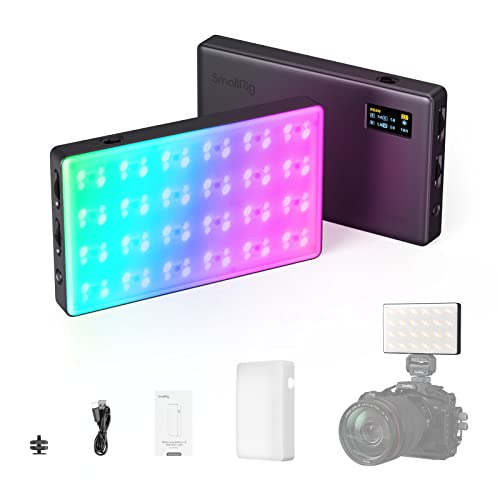 SmallRig RM120 RGB Light
|
Premium | 2500–8500K & CRI/TLCI 98+ | Users needing portable, high-quality fill light | Check Price | ||
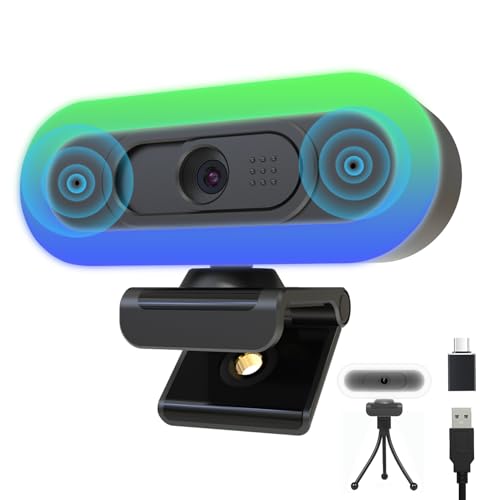 Hrayzan 2K Webcam
|
Budget | Built-in adjustable fill ring light | Students needing plug-and-play webcam + light | Check Price | ||
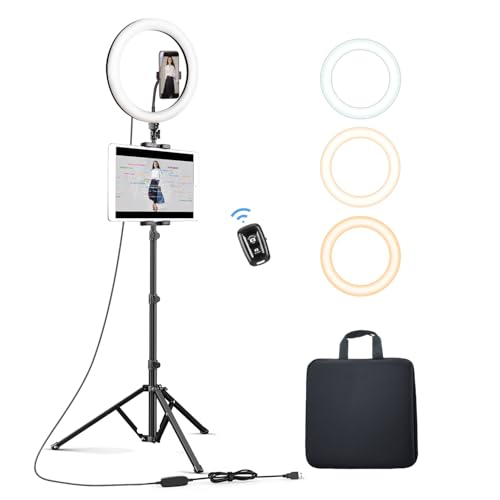 Elitehood 12 Ring Light
|
Mid-Range | 12in ring with 3 color modes | Sitting or standing webcam lessons & makeup | Check Price |
1. SmallRig RM120 RGB Video Light, 5000mAh 180 Minutes Portable Camera Light 7W Output Power, LED Video Light Panel, 2500-8500K CRI TLCI 98+ for TikTok, Content Creator, Photographer
The SmallRig RM120 is a compact, high-CRI RGB panel that solves webcam glare by giving you full control over color temperature, hue and intensity plus a diffuser for soft output. Its strong battery life and metal build make it a durable, portable way to add a polished key or fill light when natural light causes hotspots or harsh shadows.
Key Specs
- Built-in 5000mAh battery — up to 180 minutes
- 7W max output, 1580 lux
- Color temp 2500–8500K; CRI 98+ / TLCI 98+
- 360° hue & 100-level saturation control
- All-metal frame; 1/4-inch-20 threaded mount
Pros
- Very high color accuracy reduces color casts
- Long battery life for portable setups
- Fine-grain controls and OLED display for precise adjustments
Cons
- Premium price tier vs simpler lamps
- Small panel may need diffusion or multiple units for large backgrounds
Best For: Users needing portable, high-quality fill light
Check Latest Price on Amazon2. 2K Webcam for PC, Plug and Play USB C Webcam with Dual Microphones,Ring Light,Fill RGB Light & Cover, Autofocus Web-Cam for Laptop,65FOV, Streaming PC Web Camera for Desktop Computer Mac Zoom
This Hrayzan 2K webcam combines a sharp sensor with an integrated fill/ring light that cuts glare by adding even front lighting and auto light balance. It's an affordable, simple way to reduce shadows on your face during classes without buying separate lights, though color tuning and mic performance are mixed in user reports.
Key Specs
- 2K QHD sensor with up to 50/60fps modes
- 65° field of view with autofocus
- Built-in RGB/fill light with 3 white brightness levels
- Dual noise-cancelling mics; USB-C plug-and-play
Pros
- Excellent image quality and easy setup
- Integrated light removes need for separate lamp
- Good value for an all-in-one webcam
Cons
- Microphone performance is inconsistent for some users
- Some users report color/skin-tone tinting under certain light modes
Best For: Students needing plug-and-play webcam + light
Check Latest Price on Amazon3. Elitehood 12 Ring Light with Tripod Stand (72 Tall) & iPad/Phone Holder, Dimmable Selfie Circle LED Lights Ringlight for Video Recording, Conference, Makeup, Laptop, Computer, Webcam, YouTube
The Elitehood 12 ring light gives a soft, shadow-free wash over your face, perfect for eliminating single-source glare and evening out skin tones in a classroom feed. Its tall tripod and multiple color modes make it flexible, but some buyers note mixed durability and occasional stability issues with extended use.
Key Specs
- 12-inch ring with 168 SMD LEDs, up to 15W
- Three color modes and 10 brightness levels
- Tripod extends up to 72 inches with phone/tablet holder
- USB-powered with inline controls and Bluetooth remote
Pros
- Produces even, shadow-free light ideal for webcams
- Good value and easy to assemble
- Tall tripod works for sitting or standing setups
Cons
- Durability and long-term sturdiness can be a concern
- Brightness is mixed — may be weak for some rooms without a second light
Best For: Sitting or standing webcam lessons & makeup
Check Latest Price on AmazonWhich One Should You Choose?
If budget is tight → Hrayzan 2K Webcam (B0DSWMPMVW) is the easiest way to cut glare with a built-in fill light and plug-and-play setup. If you need portable, accurate color and battery operation → SmallRig RM120 (B0B63CRMKC) gives the most control and high-CRI output for removing color casts and hotspots. If you want a simple, studio-style soft wash for sitting or standing classes at a good price → Elitehood 12 Ring Light (B0881F5TNN) provides even, shadow-free illumination and an adjustable tripod.
Best for Specific Scenarios
- Dorm-room classes or poor overhead lighting: Hrayzan 2K Webcam because its built-in ring/fill light improves face exposure without extra gear.
- Mobile tutoring or teaching from multiple rooms: SmallRig RM120 because its battery power and compact metal build let you place a controllable, high-CRI panel anywhere.
- Sit/stand streaming and makeup demos: Elitehood 12 Ring Light because it delivers broad soft light and height flexibility to remove shadows and glare from glasses.
Frequently Asked Questions
Why do I see glare on my glasses or forehead and how do I fix it?
Glare happens when a bright light source reflects directly into the camera. Move your main light slightly higher and off to the side (10–30° from your face) and add a diffuser or softbox to broaden the light. Lower the light intensity or add a fill light on the opposite side to reduce contrast.
Should I use a ring light or a small LED panel to reduce shadows?
Ring lights provide even front illumination that minimizes shadows for close-up shots; LED panels (especially high-CRI models) offer more flexible color temperature and directional control. Choose a ring light for simple, shadow-free looks and a high-CRI panel if you need precise color and adjustable placement.
How important is color temperature and CRI for online classes?
Very important — color temperature affects how skin tones look and how your camera auto-exposes. Aim for adjustable color temp (around 3000–5600K for mixed indoor/natural light) and CRI/TLCI 90+ so colors and skin tones appear natural and avoid color casts that can make glare more noticeable.
How We Selected These Products
Our recommendations are based on data-driven analysis: we evaluated 155229+ products across 23916+ brands using a composite scoring system that weighs rating (40%), review volume (30%), price value (20%), and demand signals (10%). Every product is ranked by data, not opinions.
Last updated: August 04, 2026
As an Amazon Associate we earn from qualifying purchases at no extra cost to you. Full disclosure.
GearLark Score is our editorial ranking based on a composite analysis of product quality, value, and verified customer sentiment. Click through to Amazon for current pricing, availability, and live customer reviews.