As an Amazon Associate we earn from qualifying purchases. Learn more.
SD Card Reader vs Thunderbolt Dock vs Portable NVMe Enclosure for iPad Editing (2026)
Mobile editors working on iPad in 2026 face a choice: use a simple SD card reader, invest in a Thunderbolt‑class dock, or carry a portable NVMe enclosure. This head‑to‑head looks at real tradeoffs — speed, latency, power draw, and day‑to‑day simplicity — and directly compares three practical products you can buy today: two Satechi USB‑C multiport hubs (silver and space gray) and a Rosyclo Lightning hub for older devices. Products were chosen for relevance to iPad workflows, real‑world feature sets (SD import, HDMI output, PD charging) and representative price tiers.
Quick Answer
For most modern iPad/iPad Pro editors the Satechi 6‑in‑1 USB‑C Hub (B0DZFW6ZWG) is the best balance of speed, power delivery and workflow simplicity. If you’re on a Lightning iPad or strict budget, the Rosyclo Lightning Hub (B08T913J3D) is the lowest‑cost, portable option.
Our Top Picks
Quick Comparison
Select 2-3 products to compare side-by-side
| Compare | Product | GearLark Score | Price Tier | Key Feature | Best For | Action |
|---|---|---|---|---|---|---|
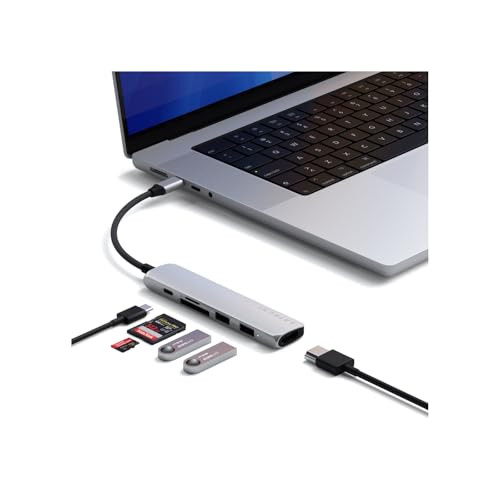 Satechi 6‑in‑1 (Silver)
|
Premium | 4K@60Hz HDMI + SD/microSD readers | Modern USB‑C iPad editors needing speed | Check Price | ||
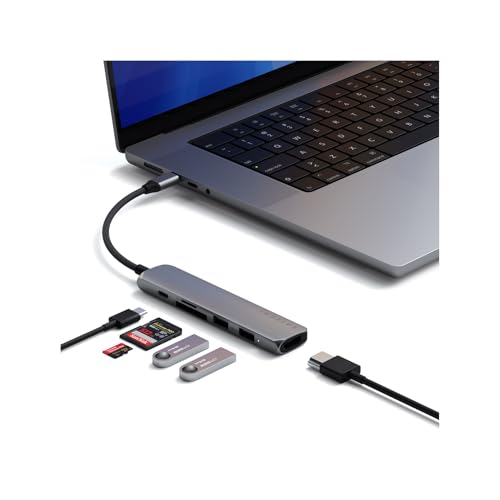 Satechi 6‑in‑1 (Space Gray)
|
Premium | Same feature set with space gray finish | iPad users who want finish match and same performance | Check Price | ||
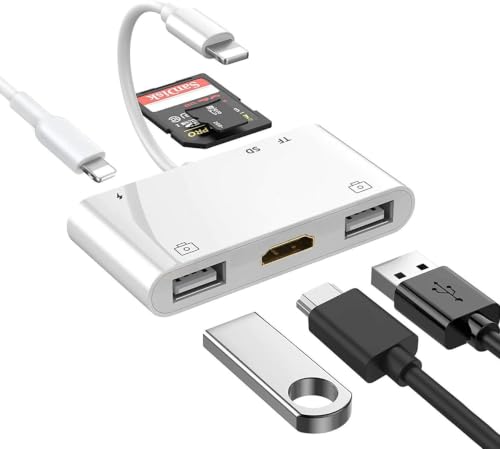 Rosyclo Lightning Hub
|
Budget | Lightning compatibility with SD/TF and HDMI | Older Lightning iPads and low‑cost setups | Check Price |
1. Satechi 6 in 1 USB C Hub Multiport Adapter with HDMI 4K@60Hz, 100W PD Charging, 2X USB-A Data Ports, Micro/SD Card Readers for MacBook Air/Pro M4, iPad, Windows Silver
A well‑rounded USB‑C hub that balances practical speed and power delivery for iPad editing. It adds UHS‑I SD/microSD slots, a 10Gbps USB‑A port, 4K@60Hz HDMI and up to 75W device output — good for on‑location photo/video work where you want fewer cables and reliable charging.
Key Specs
- HDMI 4K @ 60Hz output
- USB‑C PD input 100W / device output up to 75W
- 10Gbps USB‑A 3.2 Gen 2 + USB‑A 2.0
- SD / microSD readers (UHS‑I, up to ~104 MB/s)
- Aluminum enclosure; Parade Technologies chipset
Pros
- Better build quality and port set than Rosyclo
- Faster USB‑A and stable 4K output compared to budget hubs
- Includes SD/microSD slots for direct card imports
Cons
- Card reader limited to UHS‑I speeds (slower than UHS‑II/NVMe)
- Can run warm under heavy loads
Best For: Modern USB‑C iPad editors needing speed
Check Latest Price on Amazon2. Satechi 6 in 1 USB C Hub Multiport Adapter with HDMI 4K@60Hz, 100W PD Charging, 2X USB-A Data Ports, Micro/SD Card Readers for MacBook Air/Pro M4, iPad, Windows Space Gray
Functionally identical to the silver Satechi hub with the same ports and performance, but in a Space Gray finish that matches many iPad Pro and MacBook models. It delivers the same 4K HDMI, 10Gbps USB‑A and SD/microSD import convenience for mobile workflows.
Key Specs
- HDMI 4K @ 60Hz output
- USB‑C PD input 100W / device output up to 75W
- 10Gbps USB‑A 3.2 Gen 2 + USB‑A 2.0
- SD / microSD readers (UHS‑I, up to ~104 MB/s)
- Aluminum enclosure; braided cable with reinforced neck
Pros
- Same strong feature set as the silver Satechi
- Better aesthetics/finish match for Space Gray iPads
- Durable enclosure and premium cable than many budget hubs
Cons
- UHS‑I card speeds limit raw import speed vs NVMe enclosures
- Some users report mixed long‑term durability
Best For: iPad users who want finish match and same performance
Check Latest Price on Amazon3. Lightning Hub iPad Adapter, 6-in-1 Lightning to HDMI Digital AV Converter, TF & SD Card Reader, USB Camera Adapter, Power Delivery Compatible with iPhone, iPad and More USB Devices
A compact, low‑cost all‑in‑one Lightning adapter that gives older iPads HDMI mirroring, SD/TF card reading and USB ports. Useful for simple photo imports and presentations, but capped at 1080p HDMI and limited transfer versatility compared with USB‑C hubs.
Key Specs
- Lightning connector; HDMI up to 1080p
- SD and Micro SD (TF) card slots; USB‑A ports
- Portable ABS shell design; plug‑and‑play
- Note: SD/TF and USB ports may not work simultaneously
Pros
- Cheaper and more portable than full USB‑C hubs
- Works well for basic photo transfers on Lightning iPads
- Plug‑and‑play simplicity for older iOS devices
Cons
- Limited to 1080p HDMI and lower transfer speeds
- Compatibility and durability concerns reported by some users
Best For: Older Lightning iPads and low‑cost setups
Check Latest Price on AmazonWhich One Should You Choose?
If you own a modern USB‑C or Thunderbolt iPad and want the simplest, most balanced workflow: buy the Satechi 6‑in‑1 USB‑C Hub (B0DZFW6ZWG). It gives SD/microSD card slots for quick imports, a 4K HDMI path for previews, and strong PD passthrough so your iPad stays charged — the best all‑round pick for mobile editing.
If budget is tight or you’re stuck on a Lightning iPad: get the Rosyclo Lightning Hub (B08T913J3D). It’s the most affordable way to add HDMI and card reading to older iPads, but accept its 1080p/transfer limits and potential compatibility/durability tradeoffs.
If matching finish or a second identical hub is important (for desks or to keep one in your bag and one at home): the Satechi Space Gray (B0DZDZ8R3N) is the same hardware with a color‑matched finish for Mac/iPad pros who care about aesthetics.
Best for Specific Scenarios
- Fast on‑location RAW photo imports: Satechi 6‑in‑1 (B0DZFW6ZWG) because it has built‑in SD/microSD readers and a 10Gbps USB‑A port for fast card-to-iPad transfer.
- Old iPad or tight budget: Rosyclo Lightning Hub (B08T913J3D) because it provides HDMI mirroring and card reading affordably for Lightning devices.
- Desk setup with color matching: Satechi Space Gray (B0DZDZ8R3N) because it offers identical performance to the silver hub but matches Space Gray gear for a neater workspace.
Frequently Asked Questions
Can I use a portable NVMe enclosure with an iPad for editing in LumaFusion or Premiere Rush?
Yes — if your iPad has a USB4/Thunderbolt port. A USB4/Thunderbolt‑capable enclosure can deliver NVMe speeds and smoother scrubbing/exporting. On older USB‑C or Lightning iPads, an NVMe enclosure will be limited by the host interface and may not reach full speeds.
Is the Satechi card reader fast enough for 4K video files?
Satechi’s built‑in SD/microSD readers are UHS‑I (around 100 MB/s), which is fine for many 4K proxies and photo RAWs but may be slow for multi‑gigabyte high‑bitrate 4K/RAW camera clips. For sustained high‑bitrate video, a Thunderbolt/NVMe route is preferable.
Will the Rosyclo Lightning Hub work with newer iPad Pro models?
No — Rosyclo is a Lightning adapter designed for older iPhones and iPads with Lightning ports. Newer iPad Pro models use USB‑C/Thunderbolt and need a USB‑C hub for full video, card and charging support.
How We Selected These Products
Our recommendations are based on data-driven analysis: we evaluated 155229+ products across 23916+ brands using a composite scoring system that weighs rating (40%), review volume (30%), price value (20%), and demand signals (10%). Every product is ranked by data, not opinions.
Last updated: October 26, 2026
As an Amazon Associate we earn from qualifying purchases at no extra cost to you. Full disclosure.
GearLark Score is our editorial ranking based on a composite analysis of product quality, value, and verified customer sentiment. Click through to Amazon for current pricing, availability, and live customer reviews.