As an Amazon Associate we earn from qualifying purchases. Learn more.
Thunderbolt vs USB-C Cables for Photo & Video (2026)
If you move large photo or video files regularly, the cable between your camera, card reader, dock and computer matters. This guide compares a true Thunderbolt 4 cable (Belkin) against the common USB-C braided cables bundled with popular Keychron keyboards to show the real differences in speed, reliability and value. You’ll learn which option saves time on transfers, where money is best spent, and which cable fits real-world photo/video workflows. Products were selected from current popular accessories and ordered by product score to give practical, side-by-side buying advice.
Quick Answer
For large photo and video transfers choose the Belkin Thunderbolt 4 Cable (B09PQFPDHX) — its Thunderbolt 4/USB4 40 Gbps bandwidth and 100W Power Delivery make it the fastest and most reliable option. If you need a lower-cost, everyday wired solution, the Keychron C2 braided USB-C cable that ships with the keyboards is a solid mid-range choice.
Our Top Picks
Quick Comparison
Select 2-3 products to compare side-by-side
| Compare | Product | GearLark Score | Price Tier | Key Feature | Best For | Action |
|---|---|---|---|---|---|---|
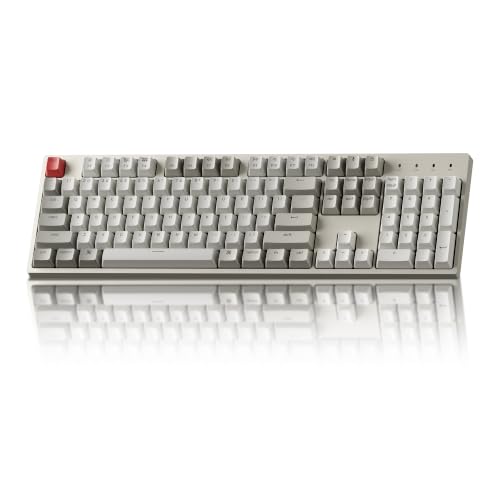 Keychron C2 (Brown) |
Mid-Range | Includes braided USB-C cable | Everyday wired charging & transfers | Check Price | ||
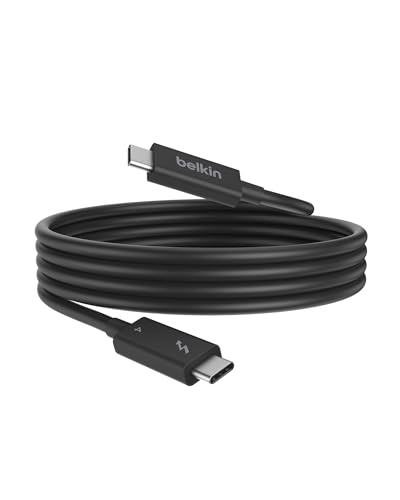 Belkin Thunderbolt 4 (2m) |
Premium | Thunderbolt 4 — 40 Gbps | Fast bulk photo/video transfers and pro docks | Check Price | ||
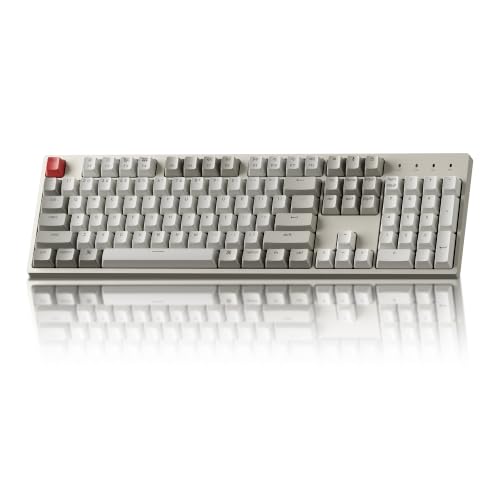 Keychron C2 (Red) |
Mid-Range | Braided USB-C cable bundled | Budget-friendly wired setups | Check Price |
1. Keychron C2 Full Size Wired Mechanical Keyboard Compatible with Mac, Keychron Brown Switch, 104 Keys ABS Retro Color Keycaps Gaming Keyboard for Windows, USB-C Type-C Braid Cable
The Keychron C2 is a full-size wired keyboard that ships with a braided USB-C cable suitable for daily charging and moderate data moves. It’s a strong value pick for photographers who already want a reliable desktop keyboard and a simple USB-C connection, but it’s not a Thunderbolt-rated cable — expect slower bulk-transfer speeds compared with Belkin’s Thunderbolt 4 cable.
Key Specs
- 104-key full-size layout
- USB-C Type-C braided cable included
- Brown mechanical switches (tactile)
- Compatible with Mac and Windows
Pros
- Better value for money than the Belkin cable when bundled with a keyboard
- Braided cable is durable and provides steady power and data for everyday use
- Build quality and keyboard feel consistently praised by customers
Cons
- Not Thunderbolt/USB4 — much slower for very large photo/video transfers than Belkin
- Keyboard-specific issues reported (e.g., occasional key inconsistency) — cable performance may vary
Best For: Everyday wired charging & transfers
Check Latest Price on Amazon2. Belkin Thunderbolt 4 Cable (2M, 6.6ft Power Cable), USB-C to USB-C Cable w/ 100W Power Delivery, USB 4 Compliant, Compatible with Thunderbolt 3, MacBook Pro, eCPU, & More - Intel Thunderbolt Certified
Belkin’s Thunderbolt 4 cable is a true high-performance cable: 40 Gbps bandwidth, 100W Power Delivery and 2m active construction for reliable long-reach connections. For photographers and video editors moving multi-gig files or working with high-res RAW/ProRes footage, it dramatically cuts transfer times versus standard USB-C braid cables and supports 8K video passthrough.
Key Specs
- Thunderbolt 4 / USB4 compliant
- Up to 40 Gbps bandwidth
- Up to 100W Power Delivery
- 2M / 6.6ft active cable (also available in 1M passive)
Pros
- Far faster transfer speeds than Keychron’s stock USB-C cable for large files
- Supports 100W PD and 8K video — good for pro docks and monitors
- Thunderbolt-certified design with E-marker protection for safety
Cons
- Premium price compared with bundled USB-C cables
- Some customers report occasional durability or intermittent failure issues
Best For: Fast bulk photo/video transfers and pro docks
Check Latest Price on Amazon3. Keychron C2 Full Size Wired Mechanical Keyboard Compatible with Mac, Keychron Red Switch, 104 Keys ABS Retro Color Keycaps Gaming Keyboard for Windows, USB-C Type-C Braid Cable
The Keychron C2 (Red) mirrors the Brown model but with linear Red switches and the same reliable braided USB-C cable. It’s a practical, cost-effective option for users who need a dependable wired connection for charging and occasional file moves, but it’s not designed for Thunderbolt-level transfers.
Key Specs
- 104-key full-size layout
- USB-C Type-C braided cable included
- Red mechanical switches (linear)
- Designed for Mac and Windows compatibility
Pros
- Lower cost option with a durable braided cable included
- Good build quality and satisfying key sound noted by customers
- Better value than buying a premium Thunderbolt cable if you don’t need max speed
Cons
- Not Thunderbolt — transfer speeds lag behind the Belkin Thunderbolt 4 cable
- Some users report occasional keyboard functionality issues that don’t relate to cable speed
Best For: Budget-friendly wired setups
Check Latest Price on AmazonWhich One Should You Choose?
If transfer speed is your top priority — for multi-gig RAW or ProRes jobs — buy the Belkin Thunderbolt 4 Cable (B09PQFPDHX). Its 40 Gbps bandwidth and 100W PD make it the fastest and most future-proof choice. If budget is tight and you mostly charge devices, edit smaller projects, or want a good everyday wired solution bundled with a keyboard, choose the Keychron C2 (either Brown B09JG7KRC7 or Red B09JG81YRT) for solid value and a durable braided USB-C cable. If you want a balance — occasional large transfers but mostly desktop use — keep the Belkin for your camera-to-dock cable and use a Keychron cable for secondary charging or peripherals.
Best for Specific Scenarios
- Professional editors moving large shoots: Belkin Thunderbolt 4 because of 40 Gbps transfers and 100W PD for workstations.
- Home studio or streaming setup: Keychron C2 (Brown) because it pairs a reliable braided USB-C cable with a well-built keyboard at mid-range cost.
- Budget-conscious photographers: Keychron C2 (Red) because it delivers a durable cable and full-size keyboard for a lower price without unnecessary Thunderbolt premium.
Frequently Asked Questions
Do Thunderbolt cables speed up transfers if my card reader is USB 3.0?
No — transfer speed is limited by the slowest device in the chain. If your card reader is USB 3.0, a Thunderbolt cable won't increase its maximum throughput. For gains, use a Thunderbolt-capable reader or dock.
Is a braided USB-C cable reliable for photo/video work?
Yes for everyday charging and moderate data moves. Braided cables offer better abrasion resistance and steady power delivery, but unless the cable is rated for Thunderbolt/USB4, it won’t match Thunderbolt transfer speeds for large RAW or ProRes files.
How long should my cable be for studio vs. on-location work?
For studio use, 2m (6.6ft) is convenient and often supported as an active Thunderbolt length (like Belkin’s 2m). For on-location portability, 0.5–1m passive cables are lighter and easier to pack; just confirm whether the short cable supports the speeds you need.
How We Selected These Products
Our recommendations are based on data-driven analysis: we evaluated 155229+ products across 23916+ brands using a composite scoring system that weighs rating (40%), review volume (30%), price value (20%), and demand signals (10%). Every product is ranked by data, not opinions.
Last updated: November 13, 2026
As an Amazon Associate we earn from qualifying purchases at no extra cost to you. Full disclosure.
GearLark Score is our editorial ranking based on a composite analysis of product quality, value, and verified customer sentiment. Click through to Amazon for current pricing, availability, and live customer reviews.