As an Amazon Associate we earn from qualifying purchases. Learn more.
Best Compact USB-C Hubs for Photo Editing on the Go (2026 Guide)
If you edit photos away from the studio — on trains, in cafes, or at location shoots — you need a compact USB-C hub that puts an SD reader and fast ports close at hand. This guide tests and compares compact multiport hubs and docking stations that prioritize SD/microSD access, high-speed data lanes, reliable Power Delivery and clean monitor output. You’ll learn which hubs fit small travel rigs, which ones power laptops while you edit, and which models avoid common pitfalls like flaky HDMI or slow card readers. Products were selected for portability, SD reader support, modern port speeds, and real-user feedback on durability and value.
Quick Answer
For on-the-go photo editors who need a compact all-in-one hub, the Belkin USB C Hub (ASIN B08PXVLQPM) is the best overall — it pairs an SD card slot, Gigabit Ethernet and 100W PD in a slim travel-ready body while offering reliable 5 Gbps transfers.
Our Top Picks
Quick Comparison
Select 2-3 products to compare side-by-side
| Compare | Product | GearLark Score | Price Tier | Key Feature | Best For | Action |
|---|---|---|---|---|---|---|
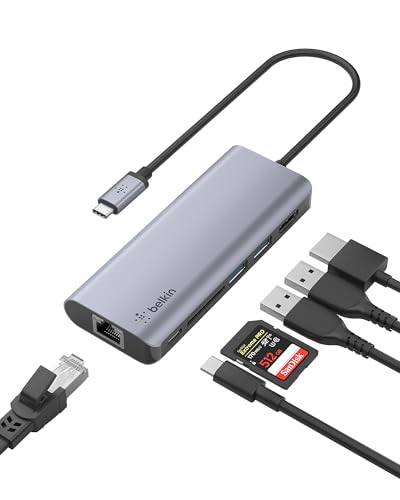 Belkin 6-in-1 Hub
|
Premium | 100W PD + SD slot | Traveling photo editors needing a slim hub | Check Price | ||
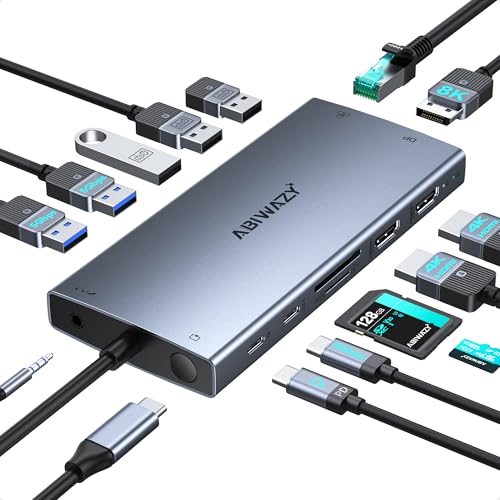 ABIWAZY 15-in-1 Dock
|
Budget | Dual 4K@60Hz + 8K DP | Editors needing multi-monitor support on the road | Check Price | ||
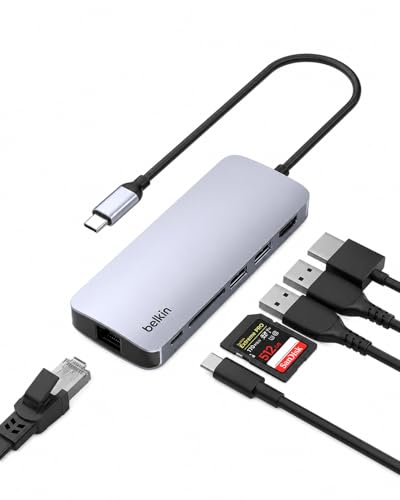 Belkin 6-in-1 (4K@60)
|
Premium | 4K@60Hz HDMI | Editors who want 60Hz external displays | Check Price | ||
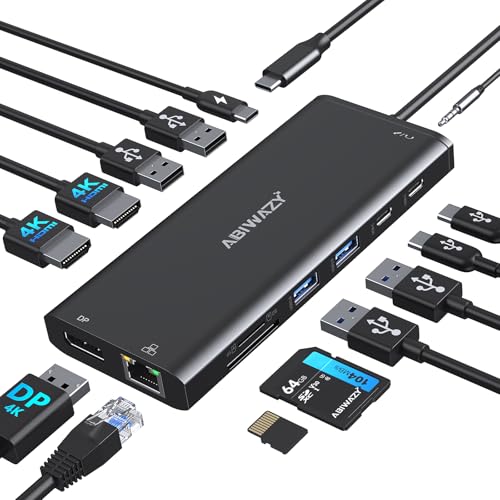 ABIWAZY 3-Monitor Hub
|
Mid-Range | Triple display + SD/TF dual readers | Mobile creators needing many ports at budget price | Check Price | ||
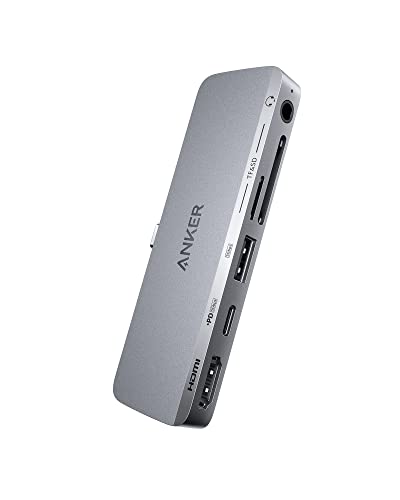 Anker 541 for iPad
|
Budget | iPad-tailored fit + SD slots | Photographers who edit on iPad | Check Price | ||
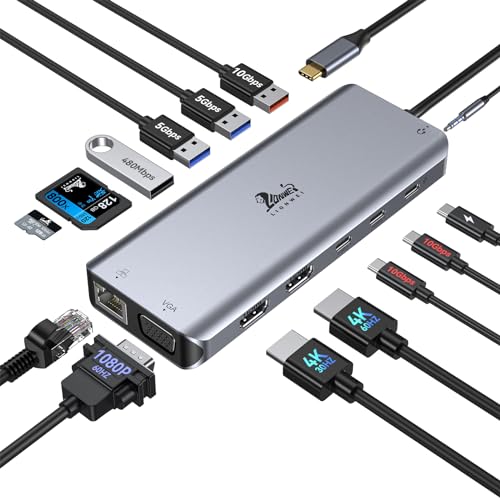 LIONWEI 14-in-1 Dock
|
Budget | 10Gbps USB + 100W PD | Users needing fast data lanes and many display options | Check Price |
1. Belkin USB C Hub, 6-in-1 MultiPort Adapter Dock with 4K HDMI, USB-C 100W PD Pass-Through Charging, 2 x USB A, Gigabit Ethernet Ports and SD Slot for MacBook Pro, Air, iPad Pro, XPS and More
A compact, travel-ready 6-in-1 that puts an SD reader, Gigabit Ethernet and 100W pass-through power into a slim package. It’s ideal for photographers who want a reliable connector for cards and fast wired uploads without adding bulk to a mobile rig.
Key Specs
- Ports: HDMI (4K@30Hz), USB-C PD 100W, 2x USB-A 3.0, Gigabit Ethernet, SD card reader (SD 2.0)
- USB transfer up to 5 Gbps
- 5-inch cable that lays flat
- 2-year limited warranty
Pros
- Compact, durable aluminum-like housing for travel
- 100W pass-through charging keeps laptops topped up
- Built-in SD slot and Gigabit Ethernet for fast uploads
Cons
- HDMI limited to 4K@30Hz (not ideal for 60Hz external editing displays)
- SD reader is older SD 2.0 spec (slower than UHS-II readers)
Best For: Traveling photo editors needing a slim hub
Check Latest Price on Amazon2. USB C Docking Station Dual Monitor for Dell XPS/HP/Lenovo/Surface, 15 in 1 USB-C Hub 3 Monitor Adapter, Dock with 8K DisplayPort, 2 HDMI 4K@60Hz, 6 USB A/C, 100W PD, Ethernet, SD/MicroSD
A port-packed budget dock offering 15 ports including dual 4K@60Hz HDMI and an 8K-capable DisplayPort — excellent for mobile setups that expand into two or three displays. Great value for creators who juggle monitor-heavy workflows, but some users report mixed long-term durability and charging consistency.
Key Specs
- Ports: 2x HDMI (4K@60Hz), DisplayPort (8K@30Hz/4K@144Hz), USB-C/USB-A ports, SD/MicroSD, Gigabit Ethernet
- Supports up to 100W PD
- Screen switch button and smart status lights
- Plug-and-play design
Pros
- Huge port count for a small dock — ideal for many peripherals
- High-resolution monitor outputs (dual 4K@60Hz + DP)
- Excellent value for the feature set
Cons
- Some reports of HDMI ports failing over time (durability concern)
- Power delivery reliability varies with certain laptops
Best For: Editors needing multi-monitor support on the road
Check Latest Price on Amazon3. Belkin USB-C Hub - 6-in-1 Multi-Port Adapter Dock with 4K HDMI, USB-C 100W PD Pass-Through Charging, 2X USB-A Ports, Gigabit Ethernet Ports, and SD Slot for MacBook Pro, Air, iPad, Pro, XPS and More
A close sibling to the top pick but tuned for smoother monitor output, this Belkin variant supports 4K@60Hz HDMI while maintaining the essential SD reader, Ethernet and 100W PD. It’s a premium, polished choice for editors who prefer a higher-refresh external monitor while traveling.
Key Specs
- Ports: HDMI 4K@60Hz, USB-C PD 100W, SD 2.0 card reader, 2x USB-A 3.0, Gigabit Ethernet
- Data transfer up to 5 Gbps
- Slim 5-inch cable design
- 2-year limited warranty
Pros
- True 4K@60Hz HDMI for smoother external previews
- Strong pass-through charging up to 100W
- Well-engineered, travel-friendly build quality
Cons
- Still only an SD 2.0 reader (slower than UHS-II)
- Limited port count compared with larger docks
Best For: Editors who want 60Hz external displays
Check Latest Price on Amazon4. USB C Docking Station 3 Monitors USBC Hub Laptop Dual Monitor Multiport Adapter Dock Dongle,USBC to 2 HDMI,4K DisplayPort,PD Charging,Ethernet,7 USB-C/A Ports,SD/TF,Audio for Dell/HP/Lenovo(Black)
Balances port density and compact size: the 14-in-1 ABIWAZY hub supports multiple displays, SD/TF reading and PD charging up to ~87W. It’s a pragmatic choice for photographers who want lots of connections without a bulky dock, but some buyers note power connection inconsistencies and long-term HDMI wear.
Key Specs
- Ports: 2x HDMI (one up to 4K@60Hz), DisplayPort, Gigabit Ethernet, SD/Micro SD, PD up to 87W, multiple USB-A/C ports
- Supports triple-display on Windows (macOS mirroring only)
- Plug-and-play, 12-month support
Pros
- Impressive port array for the price
- Compact footprint suitable for travel setups
- Good value and easy setup
Cons
- Mixed feedback on power/charging with some laptop models
- Some users report HDMI ports degrading after extended use
Best For: Mobile creators needing many ports at budget price
Check Latest Price on Amazon5. Anker USB C Hub for USB-C iPad, 541 USBC Hub (6-in-1) with 4K HDMI Port, Multi-Function USB Port, SD and microSD Card Slots, for iPad Pro 5th Gen/iPad Air 5th Gen/iPad mini 6th and Later (Gray)
Designed to match USB-C iPads, the Anker 541 brings an SD/microSD reader, 4K@60 HDMI and a multifunction USB-C port in a slim package. It’s an excellent budget pick for iPad-based editing rigs, though fit issues with some cases and PD limits mean you should check your charger and cover first.
Key Specs
- Ports: HDMI 4K@60Hz, multi-function USB-C (charging/file transfer), USB-A, SD and microSD slots, 3.5mm audio jack
- Data transfer up to 5 Gbps; pass-through charge with 30W+ chargers recommended
- Designed to match iPad dimensions; 18-month warranty
Pros
- Made-for-iPad sizing makes it tidy for tablet rigs
- Solid build quality and easy plug-and-play use
- Includes both SD and microSD slots for quick transfers
Cons
- Some users must remove iPad cases for a proper fit
- Pass-through charging requires a reasonably strong charger (30W+)
Best For: Photographers who edit on iPad
Check Latest Price on Amazon6. USB C Docking Station Dual Monitor for Laptop, LIONWEI 14-in-1 USB-C Hub with Triple Display, 2 HDMI + VGA, Ethernet, 6 USB A/C 3.0/2.0, PD, SD/TF, Audio, USBC Dock for Surface/HP/Dell/Lenovo/MacBook
A budget-friendly 14-in-1 dock offering 10Gbps USB ports, dual 4K HDMI and VGA support, plus high-capacity PD input. It’s a practical pick for editors who move between older and newer displays and need fast external SSD transfers, though macOS display mode limits and occasional connectivity issues are worth noting.
Key Specs
- Ports: 2x 4K HDMI, VGA (1080p), 2x USB-C 3.1 (10Gbps), USB-A ports, SD/TF, Gigabit Ethernet, 100W PD input (87W out)
- 10Gbps USB 3.1 data lanes for fast SSD transfers
- 18-month warranty
Pros
- Very fast 10Gbps USB-C ports for external SSD editing
- Wide display compatibility including VGA for legacy gear
- Good material and build quality for a budget dock
Cons
- MacOS limits multi-monitor extensions (mirroring only in many cases)
- Some reports of inconsistent connections with certain laptops
Best For: Users needing fast data lanes and many display options
Check Latest Price on AmazonWhich One Should You Choose?
If budget is tight → choose the Anker 541 (ASIN B09XDZKH5P) for a tidy, iPad-friendly hub that covers SD, HDMI and basic PD. If you need the most portable, reliable all-rounder → choose the Belkin 6-in-1 (ASIN B08PXVLQPM) for compact design, Ethernet and 100W PD. If you need the best port density and multi-monitor capability without breaking the bank → choose the ABIWAZY 15-in-1 dock (ASIN B0DSDRJ8GV). For the best mix of features and value (multiple displays + SD slots) → the ABIWAZY 3-Monitor hub (ASIN B0DG588B1S) is a strong practical choice.
Best for Specific Scenarios
- Airport or café culling session: Belkin B08PXVLQPM because it’s compact, offers SD + Ethernet and keeps your laptop charged so you can upload large batches quickly.
- Hotel room multi-monitor edit: ABIWAZY 15-in-1 (B0DSDRJ8GV) because it supports dual 4K monitors/DisplayPort and lots of USB ports for external drives and peripherals.
- iPad-based travel edit: Anker 541 (B09XDZKH5P) because it’s sized to match USB-C iPads and gives SD/microSD access plus 4K HDMI for client previews.
Frequently Asked Questions
Do these hubs support fast SD card speeds (UHS-II)?
Some hubs include high-speed SD readers but many compact models ship with SD 2.0 readers (slower). If you shoot a high-volume RAW workflow, look for hubs that explicitly list UHS-II or advertise 10+ MB/s sustained speeds; if that detail isn’t listed, expect slower transfers and consider using a dedicated card reader.
Will the hub charge my laptop while I edit?
Most reviewed hubs offer Power Delivery pass-through. Check the PD wattage: laptops that need 60–100W should use a hub that supports at least that output. Some docks accept 100W input but limit laptop output to ~85–87W — this usually still keeps editing laptops charged, but double-check compatibility with your model.
Can I run multiple external monitors from these hubs on my MacBook?
Windows machines usually handle extended displays from multi-port docks better. On macOS, many USB-C hubs support mirroring or are limited to a single external extended display unless you use a Thunderbolt/USB4 dock with explicit multi-display support. If multiple external monitors are critical, choose a dock that specifies multi-monitor macOS support or use a Thunderbolt-capable solution.
How We Selected These Products
Our recommendations are based on data-driven analysis: we evaluated 155229+ products across 23916+ brands using a composite scoring system that weighs rating (40%), review volume (30%), price value (20%), and demand signals (10%). Every product is ranked by data, not opinions.
Last updated: July 05, 2026
As an Amazon Associate we earn from qualifying purchases at no extra cost to you. Full disclosure.
GearLark Score is our editorial ranking based on a composite analysis of product quality, value, and verified customer sentiment. Click through to Amazon for current pricing, availability, and live customer reviews.