As an Amazon Associate we earn from qualifying purchases. Learn more.
USB-C Hub vs Portable Dock vs Travel Dock: Best Choice for Hotel Photo Editing (2026)
Traveling photographers who edit in hotel rooms need a compact dock that handles tethering, fast card imports, external displays, and stable network connections. This head-to-head comparison looks at three compact docking options — EZQuest USB C Hub, OWC USB-C Travel Dock E, and the HalaGong 67W Travel TV Dock — selected from real-customer feedback, feature sets, and compatibility for tethered workflows. You'll get a clear side-by-side of ports, power delivery, display support, and real-world durability so you can pick the best travel dock for editing photos on the go.
Quick Answer
For hotel-room tethered photo editing the EZQuest USB C Hub is the best overall pick — it balances lots of ports (HDMI, gigabit Ethernet, SD/microSD, 3x USB‑A) with 85W pass-through power. If you want the smallest, bus-powered option choose the OWC USB-C Travel Dock; if budget is the main constraint the HalaGong offers basic 4K/PD functionality at a low cost.
Our Top Picks
Quick Comparison
Select 2-3 products to compare side-by-side
| Compare | Product | GearLark Score | Price Tier | Key Feature | Best For | Action |
|---|---|---|---|---|---|---|
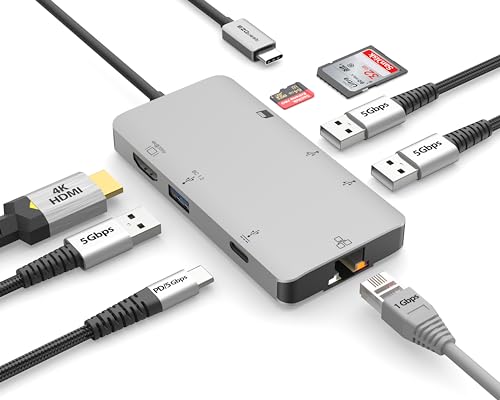 EZQuest 8-in-1 USB-C Hub
|
Mid-Range | Extensive port array + 85W PD | Photographers needing many ports | Check Price | ||
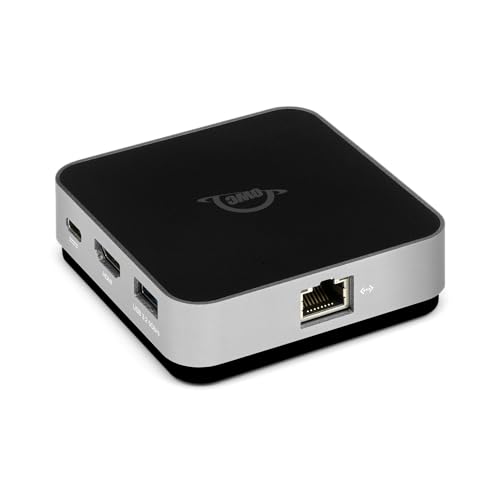 OWC USB-C Travel Dock E
|
Premium | Bus-powered with 4K@60Hz HDMI | Travelers who want compact, single-cable docks | Check Price | ||
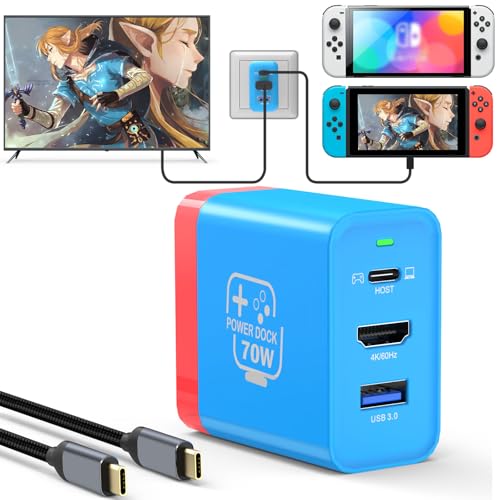 HalaGong 67W Travel Dock
|
Budget | Low-cost 4K@60Hz + PD | Budget travelers or Switch users | Check Price |
1. EZQuest USB C Hub Docking Station 8 in 1 with 4K HDMI, 1 Gbit Ethernet, 3 USB A 3.0 Ports, 1 USB-C PD/Data, SD/Micro SD for Work and Travel, Compatible with MacBook/Dell/HP/Lenovo/Laptops
The EZQuest is the most versatile choice for hotel photo editing: lots of USB-A ports, SD and microSD slots, gigabit Ethernet, and a pass-through USB-C PD port up to ~85W. It trades slightly higher heat and mixed long-term reliability reports for broad functionality and strong connectivity — ideal for tethered shoots and multicable setups.
Key Specs
- 4K HDMI output (up to 30Hz)
- Gigabit Ethernet (RJ-45)
- 3 × USB-A 3.0 (5Gbps)
- USB-C PD pass-through up to 85W
- SD + microSD card reader
Pros
- More ports than the HalaGong and OWC — better for multi-accessory tethering
- SD + microSD slots and gigabit Ethernet make imports and transfers faster than simple travel docks
- Stronger value-for-money vs pricier premium docks for the same port mix
Cons
- HDMI limited to 4K@30Hz vs OWC's 4K@60Hz — less ideal for high-refresh external monitors
- Some users report heat and mixed long-term durability compared with metal-bodied premium docks
Best For: Photographers needing many ports
Check Latest Price on Amazon2. OWC USB-C Travel Dock E, 6 Port, Bus-Powered, USB Type-C 100W Pass Through, one 4K Display, (2) USB 3.2 Type-A, HDMI, SD Card, Gigabit Ethernet, Compatible with Thunderbolt Devices
OWC's Travel Dock E is the most compact, bus-powered option here and supports 4K@60Hz HDMI along with pass-through charging. It excels for photographers who want a tiny, well-built travel companion that doesn’t require an external brick, though some customers report mixed durability and concerns about cable length and occasional networking glitches.
Key Specs
- HDMI 2.0: up to 4K@60Hz
- USB-C power pass-through (up to 92W reported capability)
- 2 × USB 3.2 Gen 1 Type-A ports (600MB/s-ish)
- Gigabit Ethernet (RJ-45)
- SD card reader
Pros
- Better 4K@60Hz HDMI support than the EZQuest — smoother external monitor output for editing
- Smaller and more truly portable than the EZQuest — excellent fit for tight hotel setups
- Bus-powered design avoids needing an external power brick, unlike some mid-range docks
Cons
- Fewer ports than the EZQuest — less convenient when you need multiple USB-A accessories
- Some users report durability and networking issues over time compared with sturdier mid-range hubs
Best For: Travelers who want compact, single-cable docks
Check Latest Price on Amazon3. 67W USB C Charger Dock for Nintendo Switch/OLED, Portable Travel TV Docking Station with 4K HDMI/USB2.0/PD Charging Port, Fast Charging Adapter with USB-C Cable for Laptop, Mobile Phone, Steam Deck
The HalaGong dock is the lowest-cost option that still gives 4K HDMI and PD charging. It's marketed to Switch users but works with many USB-C devices. Expect compromises: a single USB 2.0 port (slower device speeds), more plastic construction, and mixed quality reports, but it’s a reasonable temporary solution for light travel edits.
Key Specs
- 4K@60Hz HDMI output
- USB-C PD fast charging (up to ~62–67W supported)
- 1 × USB 2.0 port (5W)
- Includes 1m USB 3.1 full-function cable
- Aluminum-alloy shell for heat dissipation
Pros
- Cheaper than the EZQuest and OWC — good if budget is your top constraint
- Compact and includes a foldable plug and full‑function cable unlike some bare hubs
- Aluminum shell may dissipate heat better than cheaper plastic docks
Cons
- USB 2.0 port limits tethering and external drive performance compared with EZQuest's USB‑A 3.0 ports
- Build quality and long-term durability are inconsistent compared with the OWC and mid-range hubs
Best For: Budget travelers or Switch users
Check Latest Price on AmazonWhich One Should You Choose?
If you want the best balance of ports, card readers, Ethernet and reliable pass-through power for tethered photo editing, buy the EZQuest USB C Hub — it’s the most practical all-rounder for hotel workflows. If your priority is the smallest, plug-and-go, bus-powered dock with true 4K@60Hz output and a compact footprint, go with the OWC USB-C Travel Dock E. If your budget is tight and you only need basic HDMI output + PD charging for light editing or gaming console use, the HalaGong 67W Travel Dock will do the job but expect slower USB transfer speeds and mixed long-term durability.
Best for Specific Scenarios
- Tethered shoots with multiple accessories: EZQuest because its 3x USB-A, SD/microSD and gigabit Ethernet let you connect camera, mouse, external drive and network simultaneously.
- Ultra-compact hotel editing station: OWC because its bus-powered, tiny design and 4K@60Hz HDMI give clean monitor output without carrying a brick.
- Budget trips or occasional edits: HalaGong because it provides 4K HDMI and PD charging at the lowest cost when you need basic functionality.
Frequently Asked Questions
Will these docks run a 4K external monitor at 60Hz?
OWC supports 4K@60Hz via HDMI. EZQuest supports 4K but is limited to 30Hz on its HDMI output — fine for stills but less smooth for high-refresh needs. HalaGong advertises 4K@60Hz but verify compatibility with your host device and cable.
Can I tether my camera and charge my laptop at the same time?
Yes — but choose a hub with strong PD passthrough and multiple data-capable USB ports. EZQuest and OWC both offer PD pass-through; EZQuest has more USB-A 3.0 ports for camera tethering, while OWC is bus-powered and more compact. HalaGong has limited USB speeds which may slow tethered workflows.
Do I need an externally powered dock for hotel editing?
Not always. Bus-powered docks (like the OWC) work well for light setups and save you carrying a brick. If you run multiple drives, high-power accessories, or a power-hungry laptop under load, an externally powered hub or one with higher guaranteed PD passthrough (or using your laptop’s charger) is safer for consistent performance.
How We Selected These Products
Our recommendations are based on data-driven analysis: we evaluated 155229+ products across 23916+ brands using a composite scoring system that weighs rating (40%), review volume (30%), price value (20%), and demand signals (10%). Every product is ranked by data, not opinions.
Last updated: July 19, 2026
As an Amazon Associate we earn from qualifying purchases at no extra cost to you. Full disclosure.
GearLark Score is our editorial ranking based on a composite analysis of product quality, value, and verified customer sentiment. Click through to Amazon for current pricing, availability, and live customer reviews.