As an Amazon Associate we earn from qualifying purchases. Learn more.
USB-C Hub vs Portable Monitor vs Dock: What to Pack for Vacation Rentals (2026)
Packing for a week of remote work at a vacation rental means choosing between extra ports (a USB-C hub), a second screen (portable monitor), or a fuller dock that replaces your desk I/O. This article compares three real products shoppers consider when traveling light: the LIONWEI 11-in-1 docking station, Hiearcool’s 11-in-1 docking hub, and the Sabrent 4-bay drive dock. You’ll learn which option fits different workflows (multi-monitor meetings, fast peripheral access, or local backups), what tradeoffs to expect, and which to pack depending on your laptop, travel style, and priorities. Products were selected by port mix, display support, real-world features from manufacturer specs, and common customer feedback about build, ease of use, and durability.
Quick Answer
For most temporary remote-work setups the LIONWEI Laptop Docking Station (B08BYFQHC4) is the best overall pick — it balances multi-monitor support, 10Gbps USB ports and 87W PD for laptops. Choose the Hiearcool (B09J2C9DSK) if you need triple-display and higher 100W PD, or the Sabrent drive dock (B0711L68MS) if your priority is quick local backups and swapping multiple drives.
Our Top Picks
Quick Comparison
Select 2-3 products to compare side-by-side
| Compare | Product | GearLark Score | Price Tier | Key Feature | Best For | Action |
|---|---|---|---|---|---|---|
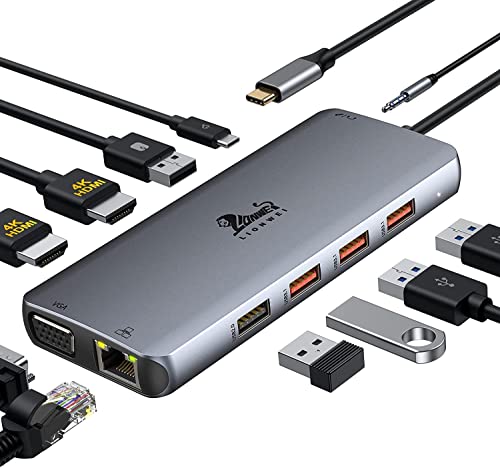 LIONWEI 11-in-1 Dock
|
Mid-Range | 10Gbps USB 3.1 ports + dual 4K HDMI | Remote workers needing fast I/O and dual monitors | Check Price | ||
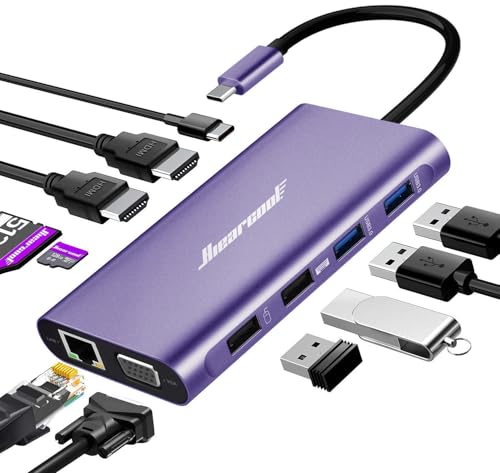 Hiearcool 11-in-1 Hub
|
Premium | Triple-display capable + 100W PD | Users wanting triple displays and stronger PD | Check Price | ||
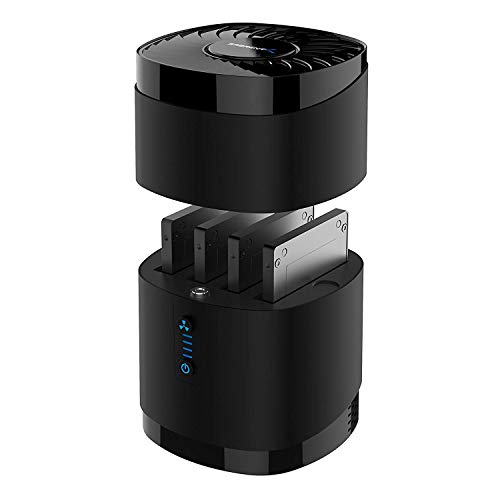 SABRENT 4-Bay Dock
|
Mid-Range | Tool-free 4-bay SATA swap with cooling fan | Content creators and backup-focused travelers | Check Price |
1. LIONWEI Laptop Docking Station Dual Monitor, 11-in-1 to 4K HDMI,VGA,Gigabit Ethernet,3 USB 3.1 10G,2 USB 2.0,87W PD,Audio for Dell/Surface/HP/Lenovo Laptops
A feature-rich mid-range dock that balances connectivity and speed. LIONWEI offers multiple high-speed USB ports, dual 4K HDMI outputs, 87W PD charging and gigabit Ethernet — a solid all-rounder for temporary setups at rentals.
Key Specs
- 11-in-1 connectivity: 2×4K HDMI, VGA, RJ45, audio
- 3×USB 3.1 ports (up to 10Gbps) + 2×USB 2.0
- USB-C Power Delivery up to 87W
- Triple-display support via SST/MST on Windows
Pros
- Faster USB throughput (10Gbps) than Hiearcool for large file transfers
- Strong multi-monitor support and broad port mix for peripherals
- Consistently praised for ease of use and perceived build quality
Cons
- 87W PD is slightly lower than Hiearcool's 100W
- Some users report intermittent HDMI or compatibility quirks on certain laptops
Best For: Remote workers needing fast I/O and dual monitors
Check Latest Price on Amazon2. Hiearcool Docking Station,11IN1 USB C Docking Station,Dual Monitor Laptop Docking Station USB C Dock for Dell HP Lenovo Universal Docking Station for Office and Work from Home
Hiearcool leans into display flexibility and power. It supports up to three displays (two 4K HDMI + VGA) in different modes and offers up to 100W Power Delivery — handy when you need multiple monitors at a rental and faster laptop charging.
Key Specs
- 11-in-1: 2×4K HDMI, VGA, SD/TF card slots, RJ45
- Triple-display support (mirror/extend/video wall modes)
- PD charging up to 100W (PD 3.0)
- USB 3.0 ports up to 5Gbps
Pros
- Better Power Delivery (up to 100W) than LIONWEI for faster charging
- More flexible triple-display modes useful for multi-window workflows
- Portable design with broad port selection for photographers and presenters
Cons
- USB 3.0 (5Gbps) is slower than LIONWEI’s 10Gbps ports for big transfers
- Some customers mention occasional durability or connection issues over time
Best For: Users wanting triple displays and stronger PD
Check Latest Price on Amazon3. SABRENT USB 3.0 4-Bay 2.5 SATA SSD and HDD Docking Station with Cooling Fan, Tool-Free, Supports Up to 4X 16TB, 5Gbps Transfer, for SATA 2.5 SSD/HDD (Up to 12.5mm), USB 3.0 Compatible - (DS-4SSD)
Not a general-purpose USB-C hub — the Sabrent is a four-bay SATA dock built for hot-swapping drives and local backups. It’s ideal if you travel with multiple SSDs/HDDs and need fast access, but it won’t replace a display-capable docking station.
Key Specs
- Supports up to 4×16TB 2.5" SATA drives (12.5mm max thickness)
- USB 3.0 interface up to 5Gbps
- Tool-free drive access and magnetic cover
- Built-in cooling fan (on/off)
Pros
- Easier local backups and fast media access than either docking station
- Tool-free design and wide OS compatibility praised for ease of use
- Good perceived value for multi-drive workflows
Cons
- Cooling fan can be noticeably loud compared with passive hubs/docks
- Not a replacement for multi-monitor or peripheral docking — limited to storage
Best For: Content creators and backup-focused travelers
Check Latest Price on AmazonWhich One Should You Choose?
If you need the best all-around dock for temporary remote work — connecting dual monitors, fast external drives and many peripherals — pick the LIONWEI 11-in-1 (B08BYFQHC4). It delivers 10Gbps USB ports, strong multi-monitor support on Windows and an 87W PD balance that fits most laptops.
If your priority is running three displays and faster laptop charging at the rental, choose the Hiearcool 11-in-1 (B09J2C9DSK) — it supports triple-display modes and up to 100W PD, though USB throughput is lower than LIONWEI’s.
If your trip centers on photo/video backup or you need to swap multiple SSDs/HDDs, take the Sabrent 4-bay drive dock (B0711L68MS). It’s purpose-built for multi-drive access and local backups, but it won’t replace a display-capable dock.
Best for Specific Scenarios
- Frequent video calls & multitasking: LIONWEI (B08BYFQHC4) because its dual HDMI and fast USB ports keep camera, headset, keyboard and mouse connected smoothly.
- Presenter or multi-window power user: Hiearcool (B09J2C9DSK) because triple-display modes and up to 100W PD let you run several full-size apps and charge robustly.
- On-the-go editors and backup-focused travelers: Sabrent (B0711L68MS) because tool-free drive swapping and a built-in fan make quick backups and media ingest convenient.
Frequently Asked Questions
Will these docks work with my MacBook or Windows laptop?
Most modern docks and hubs support both macOS and Windows for basic USB, Ethernet and display connections. Display behavior can differ: macOS often mirrors multiple external displays unless the host supports MST or DisplayLink. Check the product’s triple-display notes and your laptop’s video output (Thunderbolt vs USB-C) for full compatibility.
Can I charge a power-hungry laptop from these docks?
Yes — Hiearcool advertises up to 100W Power Delivery, and LIONWEI provides up to 87W PD. That typically covers ultrabooks and many larger laptops, but very high-wattage gaming laptops may require their dedicated power bricks for full performance.
Is the Sabrent 4-bay dock safe for hot-swapping drives?
The Sabrent dock is designed for tool-free swapping and broad OS compatibility, but always follow safe-eject procedures in your operating system before removing drives. The built-in cooling fan helps drive longevity, though some users report the fan can be loud in quiet environments.
How We Selected These Products
Our recommendations are based on data-driven analysis: we evaluated 155229+ products across 23916+ brands using a composite scoring system that weighs rating (40%), review volume (30%), price value (20%), and demand signals (10%). Every product is ranked by data, not opinions.
Last updated: July 08, 2026
As an Amazon Associate we earn from qualifying purchases at no extra cost to you. Full disclosure.
GearLark Score is our editorial ranking based on a composite analysis of product quality, value, and verified customer sentiment. Click through to Amazon for current pricing, availability, and live customer reviews.