As an Amazon Associate we earn from qualifying purchases. Learn more.
USB-C Hub vs Portable Monitor vs Dock — What's Best for Travel Workflows? (2026)
Travel-focused workflows force trade-offs: do you carry a slim USB-C dock, a screen that doubles as a travel monitor, or a compact hub that tidies your desk? This head-to-head comparison looks at three real options — two portable monitors and a compact USB hub stand — and evaluates portability, port options, and multi-monitor usability for trips. Products were chosen from high-scoring, customer-backed models with clear portability and connectivity claims; we prioritized weight, connector types, and real-world customer feedback on build and value.
Quick Answer
For most travelers who need a secondary screen, the ARZOPA Portable Monitor (B0CH9XW8RK) is the best balance of portability, ports and value. If you only need extra USB ports and desk organization on a budget, the Tilted Nation USB hub stand (B07YNN9DSV) is the compact choice. For the highest-spec portable display with dual USB-C inputs, choose the MNN Premium Portable Monitor (B0BT9Q1NG8).
Our Top Picks
Quick Comparison
Select 2-3 products to compare side-by-side
| Compare | Product | GearLark Score | Price Tier | Key Feature | Best For | Action |
|---|---|---|---|---|---|---|
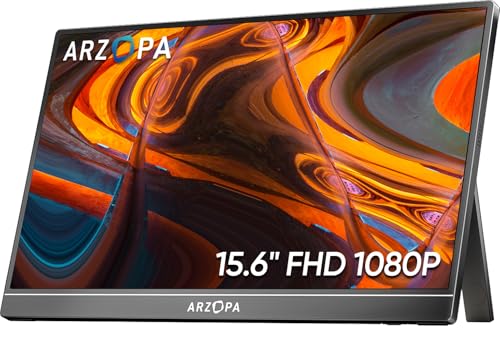 ARZOPA 15.6" FHD Monitor
|
Mid-Range | Lightweight 15.6" FHD IPS screen | Traveling professionals who need a second screen | Check Price | ||
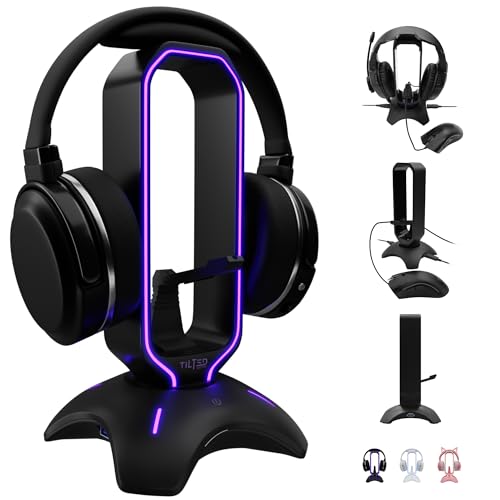 Tilted Nation Hub Stand
|
Budget | Built-in 2-port USB 3.0 hub | Budget travelers who need extra USB ports and desk organization | Check Price | ||
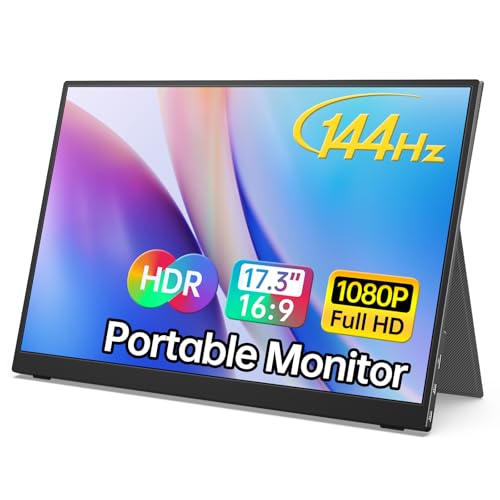 MNN 17.3" 144Hz Monitor
|
Premium | 144Hz FHD panel with dual full-feature Type-C | Users who want premium refresh rate and dual Type-C inputs | Check Price |
1. ARZOPA Portable Monitor 15.6'' FHD 1080P - Ultra-Slim Portable Laptop Monitor with Kickstand - IPS Display for PC, MAC, Phone, Xbox, PS5 - USB C & HDMI Connectivity - A1
A slim, travel-ready 15.6" Full HD IPS monitor that balances low weight, metal construction and simple plug-and-play connectivity (USB-C and HDMI). Customers praise image clarity, portability and ease of setup, making it a reliable travel companion for road warriors wanting a quick dual-screen boost.
Key Specs
- 15.6" Full HD 1920×1080 IPS display
- USB-C and HDMI connectivity (plug-and-play)
- Built-in kickstand, ultra-slim 0.35" profile
- Weight ~1.6 lb; metal construction
Pros
- More portable than the bulkier premium monitor (lighter and thinner)
- Better value-for-money for travel setups than the premium MNN model
- Stronger metal build and dependable plug-and-play compatibility vs simple hubs
Cons
- Fewer advanced features than the premium MNN (no 144Hz/dual Type-C power)
- Not a replacement for a full dock — limited port expansion
Best For: Traveling professionals who need a second screen
Check Latest Price on Amazon2. Tilted Nation Gaming Headset Stand | RGB Headphone Stand for Desk with Mouse Bungee and USB Hub (Cool and Clean Setup) Gaming Headset Holder - Perfect Gamer Gift Accessory
A multifunctional desk accessory that combines a stable headset stand, RGB lighting, mouse bungee and a 2-port USB 3.0 hub. It’s a budget-friendly way to add a couple of fast ports and reduce cable clutter, but it’s not a full USB-C dock or a travel monitor.
Key Specs
- 2 × USB 3.0 ports (fast data transfer)
- Weighted, non-slip base with RGB lighting
- Integrated mouse bungee and headset holder
- Plug-and-play setup
Pros
- More USB port utility than the monitors for accessory connections
- Sturdier, heavier base than slim travel monitors (less prone to tipping)
- Better desk organization and cable management than two loose devices
Cons
- Not designed as a travel monitor or docking station — bulky for packing
- Only two USB ports and no USB-C PD or video output like a true dock
Best For: Budget travelers who need extra USB ports and desk organization
Check Latest Price on Amazon3. MNN 17.3" Portable Monitor 1080P FHD 144Hz Narrow Edge Laptop Monitor USB C HDMI Gaming Computer IPS HDR Screen for PC Mac Phone Xbox PS5 Switch Laptop w/Smart Cover & Speakers
A premium portable monitor with a high refresh rate and two full-feature USB-C ports so a single cable can handle power and display on supported devices. It includes a PU leather smart cover and aims at users who want a higher-spec travel display for gaming and creative tasks.
Key Specs
- Full HD 1920×1080 IPS display with up to 144Hz refresh
- 2 × full-feature USB-C (supports power+display if host supports DP ALT Mode)
- Smart PU leather cover doubles as stand; built-in speakers
- Lightweight travel design (~1.74 lb) and portrait/landscape modes
Pros
- More capable connectivity (dual Type-C) than ARZOPA for power+video workflows
- Higher refresh rate and HDR modes for smoother visuals and gaming
- Smart cover and PU leather protection offer better carry protection than bare monitors
Cons
- Slightly less portable and heavier than the ARZOPA option
- Requires device support for DP ALT Mode/Thunderbolt — not plug-and-play on all laptops
Best For: Users who want premium refresh rate and dual Type-C inputs
Check Latest Price on AmazonWhich One Should You Choose?
If budget is tight → Tilted Nation (B07YNN9DSV). Buy this if you mainly need extra USB ports and cleaner desk setup rather than extra screen space; it’s the most cost-effective way to add USB 3.0 connectivity on the road.
If you need the best balance of portability, screen size and compatibility → ARZOPA (B0CH9XW8RK). It’s the most travel-friendly portable monitor here: lighter, thin, durable metal build and both USB-C and HDMI inputs make it the simplest plug-and-play choice for most laptop travelers.
If premium image quality, higher refresh and dual Type-C convenience matter → MNN (B0BT9Q1NG8). Choose this if you want gaming-capable refresh rates or a monitor that can accept power+display over Type-C on compatible machines and you’re willing to trade a bit of portability for features.
Best for Specific Scenarios
- Frequent airplane/coffee shop worker: ARZOPA — light, slim and quick to set up with both USB-C and HDMI.
- Traveler who needs extra ports & tidy desk: Tilted Nation — budget USB hub plus headset stand and cable management in one accessory.
- Creator or gamer on the road who wants higher refresh: MNN — 144Hz and dual Type-C for smoother visuals and fewer cables if your laptop supports it.
Frequently Asked Questions
Will these portable monitors work with a MacBook?
Most modern MacBooks support USB-C video output, so both ARZOPA and MNN should work via USB-C if your Mac supports DisplayPort Alt Mode or Thunderbolt. If not, the ARZOPA’s HDMI input can be used with an HDMI adapter. The Tilted Nation hub is a USB-A hub and won’t provide video output.
Can I run two external monitors from these devices on a trip?
Neither of the reviewed portable monitors is a full multi-monitor dock, but the MNN’s dual full-feature USB-C ports can simplify multi-cable setups on Thunderbolt-capable laptops. For a true dual-monitor travel setup you’ll usually need a dedicated USB-C dock with multiple video outputs or a laptop with native multi-display support.
Do these hubs and monitors provide laptop charging (power delivery)?
The Tilted Nation hub includes USB 3.0 ports but does not function as a high-wattage USB-C PD dock. The MNN advertises full-feature Type-C ports that can carry power+video on compatible hosts; the ARZOPA may require a separate power source for some connections. Always check your laptop’s PD requirements and the product’s PD rating before relying on a monitor for charging.
How We Selected These Products
Our recommendations are based on data-driven analysis: we evaluated 155229+ products across 23916+ brands using a composite scoring system that weighs rating (40%), review volume (30%), price value (20%), and demand signals (10%). Every product is ranked by data, not opinions.
Last updated: June 18, 2026
As an Amazon Associate we earn from qualifying purchases at no extra cost to you. Full disclosure.
GearLark Score is our editorial ranking based on a composite analysis of product quality, value, and verified customer sentiment. Click through to Amazon for current pricing, availability, and live customer reviews.