As an Amazon Associate we earn from qualifying purchases. Learn more.
Best Fast 1TB NVMe Enclosures for On-the-Go Editing (2026)
If you edit video or photo files on the go, a fast external NVMe enclosure is one of the best upgrades you can make in 2026. This guide focuses on high-speed enclosures that will comfortably host a 1TB NVMe for portable editing workflows: fast transfer interfaces, solid thermal design, reliable fit for 2280 drives, and sensible portability. We selected these picks based on interface speed (USB‑C 3.2 Gen2/10Gbps), thermal design, build quality, ease of installation, and real-user feedback about fit and durability. Read on to find the best enclosure or dock to turn your NVMe into a true on-the-road editing drive.
Quick Answer
For the fastest, most polished portable NVMe solution pick the ASUS ROG Strix Arion White (ASIN B0DGSS3248) — it pairs USB-C 3.2 Gen 2x1 (up to 10 Gbps) with a tool-free aluminum design and thermal pads. For tight budgets, the elecacc dual-bay adapter (ASIN B0DNZ1ZNFK) offers the best value for cloning and backups.
Our Top Picks
Quick Comparison
Select 2-3 products to compare side-by-side
| Compare | Product | GearLark Score | Price Tier | Key Feature | Best For | Action |
|---|---|---|---|---|---|---|
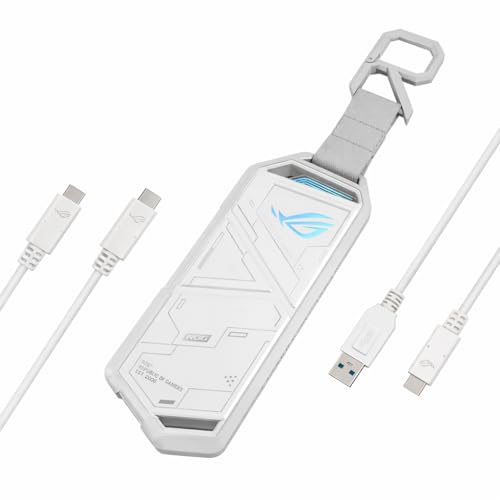 ASUS ROG Strix Arion White
|
Premium | USB‑C 3.2 Gen2x1 (10 Gbps) | Mobile editors who want speed and style | Check Price | ||
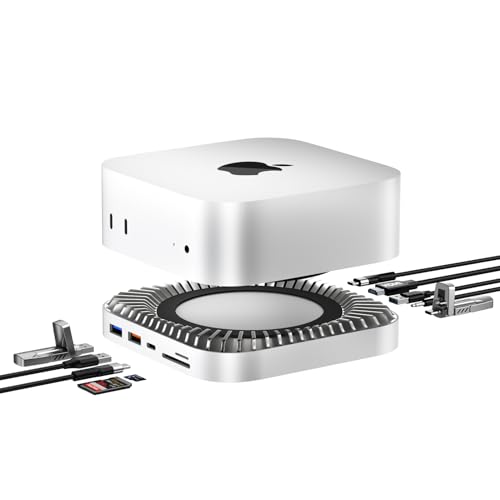 RayCue Mac mini M4 Dock
|
Premium | Integrated 10‑in‑1 dock with M.2 enclosure | Desk-based editors who want ports + an internal drive | Check Price | ||
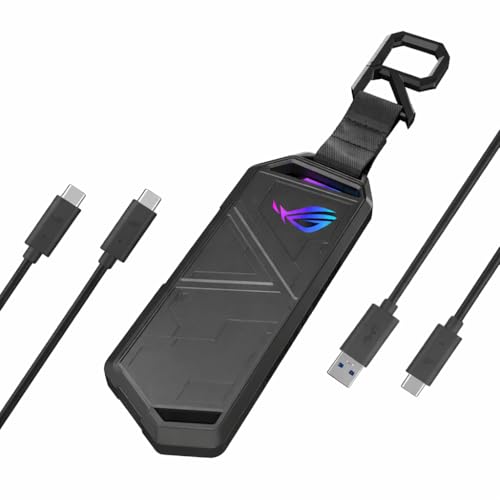 ASUS ROG Strix Arion (Classic)
|
Premium | Aluminum alloy case with Aura Sync lighting | Users who want premium looks and fast transfers | Check Price | ||
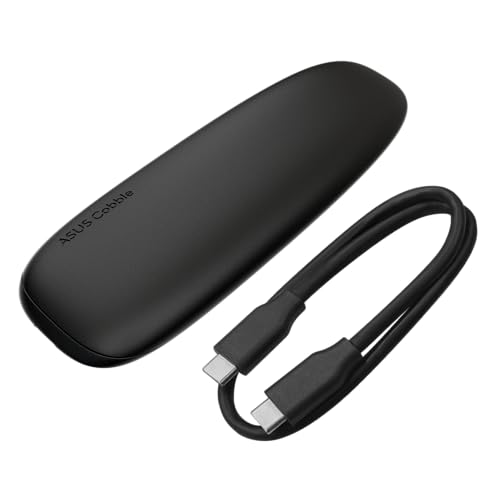 ASUS Cobble
|
Mid-Range | IP55 splash and dust resistance | Traveling editors needing rugged portability | Check Price | ||
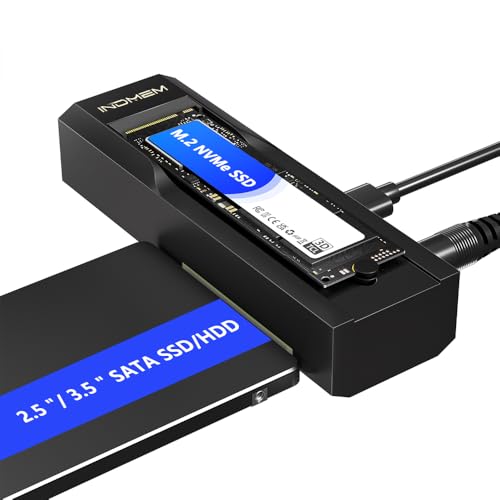 elecacc Dual‑Bay Adapter
|
Budget | Dual‑bay standalone offline clone | Budget users needing cloning and backups | Check Price |
1. ASUS ROG Strix Arion White M.2 NVMe SSD Enclosure-USB3.2 Gen 2x1 Type-C (10Gbps), Dual USB-C to C & USB-C to A, Screwdriver-Free, Thermal Pads Included, Fits PCIe 2280/2260/2242/2230 M Key/B+M Key
A polished, premium enclosure built around USB‑C 3.2 Gen2x1 for up to 10 Gbps transfers. Tool‑free installation, aluminum alloy body and thermal pads make it a strong choice for portable editing, though it can run warm in sustained transfers.
Key Specs
- Interface: USB‑C 3.2 Gen 2x1 (up to 10 Gbps)
- Fits M.2 PCIe NVMe 2230/2242/2260/2280 (M Key/B+M Key)
- Aluminum alloy case with included thermal pads
- Includes USB‑C to C and USB‑C to A cables; screwdriver‑free
Pros
- Fast 10 Gbps USB‑C connection for quick transfers
- Robust aluminum build with easy, screwdriver‑free install
- Includes both C‑to‑C and C‑to‑A cables for wide compatibility
Cons
- Gets hot under heavy sustained loads despite thermal pads
- Premium price — some shoppers question value for money
Best For: Mobile editors who want speed and style
Check Latest Price on Amazon2. Mac mini M4 Dock, Aluminum Stand and HDMI Hub for Mac mini M4 and M4 Pro 2024 with M.2 NVMe/SATA SSD Enclosure, 4K60Hz HDMI,10G USB A/C, 5G USB A*2, USB-C Charge, SD/TF, Audio
A 10‑in‑1 aluminum dock that doubles as a stand and houses an internal M.2 NVMe/SATA bay. Ideal for Mac mini users who want a tidy desk setup and a fast internal enclosure plus HDMI and multiple 10Gbps ports—note it may require the extra USB‑C power input for reliable drive use.
Key Specs
- Built‑in M.2 NVMe/SATA enclosure supporting up to 8TB
- Ports: 4K60Hz HDMI, 10Gbps USB‑A and USB‑C, 5Gbps USB‑A ports, SD/TF, audio
- Design: Aluminum stand designed for Mac mini M4/M4 Pro
- Note: extra USB‑C power input recommended for heavy drive use
Pros
- Combines dock functionality with an internal M.2 bay—great for tidy setups
- Solid aluminum construction and well-thought port layout
- High‑speed 10Gbps ports and 4K@60Hz HDMI for monitors
Cons
- Requires connecting extra power to assure stable drive performance
- Only one HDMI output — single external monitor support
Best For: Desk-based editors who want ports + an internal drive
Check Latest Price on Amazon3. ASUS ROG STRIX Arion Aluminum Alloy M.2 NVMe SSD External Portable Enclosure Case Adapter, USB 3.2 Gen 2 Type-C (10 Gbps), USB-C to C and USB-C to A Cables, Fits PCIe 2280/2260/2242/2230 M Key/B+M Key
The classic Arion enclosure mixes fast USB‑C transfers with a sturdy aluminum shell and thermal pads for sustained performance. It’s easy to install and stylish, but some users report heat under heavy use and divided opinions about value.
Key Specs
- USB Type‑C 3.2 Gen 2 (up to 10 Gbps)
- Supports M.2 NVMe 2230/2242/2260/2280
- Aluminum alloy ROG case with thermal pads and Aura Sync RGB
- Includes USB‑C to C and USB‑C to A cables
Pros
- Good build quality and easy, screwdriver‑free installation
- Fast transfer speeds with broad device compatibility
- Attractive RGB and ROG styling for creatives who like flair
Cons
- Can run hot during long transfers despite heat pads
- Some buyers debate whether the price matches the value
Best For: Users who want premium looks and fast transfers
Check Latest Price on Amazon4. ASUS Cobble Portable M.2 NVMe PCIe SSD Enclosure, USB-C 3.2 Gen 2x1, up to 10 Gbps Transfer speeds, IP55 Water and Dust-Resistance, Thermal pad, Windows 11 and macOS Support
A mid‑range, travel‑ready enclosure with an aluminum cover for heat dissipation and IP55 protection against splashes and dust. It supports both NVMe and SATA M.2 drives and balances durability with good transfer speeds, making it a strong value pick.
Key Specs
- USB‑C 3.2 Gen 2x1 (up to 10 Gbps)
- Supports M.2 NVMe PCIe and SATA 2242/2260/2280
- Aluminum‑alloy top, thermal pad, IP55 water/dust resistance
Pros
- IP55 rating and robust design for on‑the‑road use
- Supports both NVMe and SATA M.2 drives for flexibility
- Solid value for the build and feature set
Cons
- Aluminum cover helps but unit may become warm under heavy loads
- Some users differ on whether it’s priced appropriately
Best For: Traveling editors needing rugged portability
Check Latest Price on Amazon5. M.2 NVMe SSD Enclosure Adapter, 10Gbps SATA & M.2. NVMe Dual Bay Offline Clone USB-C Adapters Supports 3.5"/2.5" SATA SSD, Type-C Standalone Clone Duplicator
A budget-friendly dual‑bay adapter that handles NVMe and SATA media and offers offline cloning without a PC. It’s compact and good value for backups or drive migration, though some users report inconsistent speed and occasional fit issues.
Key Specs
- Supports M.2 NVMe (M‑Key/B+M‑Key) 2230/2242/2260/2280 and 2.5"/3.5" SATA
- USB 3.2 Gen2 (10 Gbps) with backward compatibility
- Tool‑free installation and standalone clone duplicator function
Pros
- Great value with versatile dual‑drive support and cloning
- Tool‑free design makes drive swaps fast and simple
- Compact and easy to carry for backups on the go
Cons
- Some users don’t see full advertised speeds in real use
- Occasional fit or opening width complaints on certain drives
Best For: Budget users needing cloning and backups
Check Latest Price on AmazonWhich One Should You Choose?
If you want the best all‑around portable editor drive — speed, build quality and polished accessories — go with the ASUS ROG Strix Arion White (ASIN B0DGSS3248). If budget is tight and you need cloning and multiple drive support for backups, choose the elecacc Dual‑Bay Adapter (ASIN B0DNZ1ZNFK). If you travel a lot and want extra protection against splashes and dust, the ASUS Cobble (ASIN B0F1DXBGGK) balances durability and speed. For a desk setup that replaces cables and adds HDMI/ports while housing a drive, the RayCue Mac mini M4 Dock (ASIN B0DT5LKD93) is the best integrated option.
Best for Specific Scenarios
- Traveling videographer: ASUS Cobble because its IP55 rating and aluminum top give better protection and heat dissipation on the road.
- On‑location editing with multiple peripherals: RayCue Mac mini M4 Dock because it combines an internal M.2 bay with HDMI, 10Gbps ports and an organized desk footprint.
- Budget backups & cloning: elecacc Dual‑Bay Adapter because of its standalone clone feature and versatile support for NVMe and SATA drives.
Frequently Asked Questions
Will a 1TB NVMe SSD work in these enclosures?
Yes — all enclosures in this roundup support common M.2 lengths (2230/2242/2260/2280) and PCIe NVMe drives. Confirm the enclosure supports the M‑Key type for NVMe and follow the manufacturer’s install steps for secure seating and thermal pad placement.
Do I need special cables for best speed?
Use the included USB‑C to C cable when possible; many enclosures include both C‑to‑C and C‑to‑A. For full 10 Gbps throughput you need a quality USB‑C cable rated for USB 3.2 Gen2. Avoid older USB‑2 cables and cheap unshielded cords.
My enclosure gets hot — is that normal and does it harm the SSD?
Some heat during heavy transfers is normal. Proper thermal design (aluminum case, thermal pad) reduces throttling risk. If the unit becomes uncomfortably hot, give it breaks between long transfers or consider an enclosure with a larger metal surface or active cooling to protect sustained performance.
How We Selected These Products
Our recommendations are based on data-driven analysis: we evaluated 155229+ products across 23916+ brands using a composite scoring system that weighs rating (40%), review volume (30%), price value (20%), and demand signals (10%). Every product is ranked by data, not opinions.
Last updated: August 16, 2026
As an Amazon Associate we earn from qualifying purchases at no extra cost to you. Full disclosure.
GearLark Score is our editorial ranking based on a composite analysis of product quality, value, and verified customer sentiment. Click through to Amazon for current pricing, availability, and live customer reviews.