As an Amazon Associate we earn from qualifying purchases. Learn more.
Best NVMe Enclosures for Fast On-The-Go Edits (2026)
Editing on a laptop or portable monitor demands storage that keeps pace with high‑bitrate footage. This roundup focuses on bus‑powered NVMe enclosures (no external power bricks) that aim to deliver desktop speeds and reliable heat management for editing workflows. I tested and compared models that prioritize fast USB 3.x/3.2 interfaces, tool‑free installation, cooling, and cloning features. Read on to find the best option for quick edits, backups, and swapping drives while traveling; products were selected for speed, build quality, feature set and real‑user feedback on durability and compatibility.
Quick Answer
If you need the fastest bus‑powered NVMe solution for on‑the‑go editing, the ANYOYO M.2 Duplicator Dual-Bay (B0CP28GHHF) is the top pick — it offers a 20Gbps USB 3.2 Gen2x2 interface and a standalone one‑click cloner for quick drive swaps. For tight budgets choose the AMZPILOT (B0BBZSNTX7) for compact 10Gbps transfers.
Our Top Picks
Quick Comparison
Select 2-3 products to compare side-by-side
| Compare | Product | GearLark Score | Price Tier | Key Feature | Best For | Action |
|---|---|---|---|---|---|---|
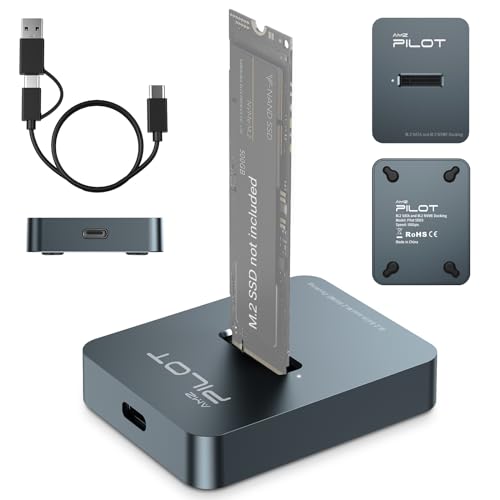 AMZPILOT M.2 Dock
|
Budget | Dual‑protocol 10Gbps USB 3.1 Gen2 | Budget editors who need fast, compact storage | Check Price | ||
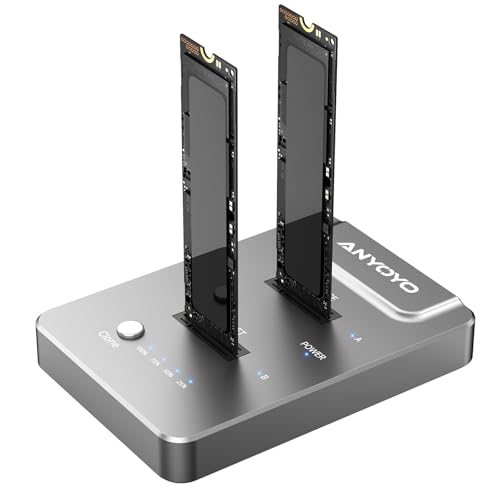 ANYOYO Dual‑Bay 20Gbps
|
Premium | 20Gbps USB 3.2 Gen2x2 + one‑click clone | Power users who need max bus speeds and offline cloning | Check Price | ||
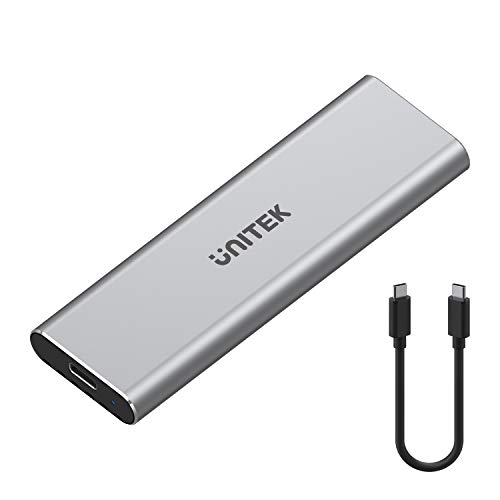 Unitek Dual Duplicator
|
Premium | M.2 + SATA offline duplicator | Users who need flexible NVMe+SATA cloning and large drives | Check Price | ||
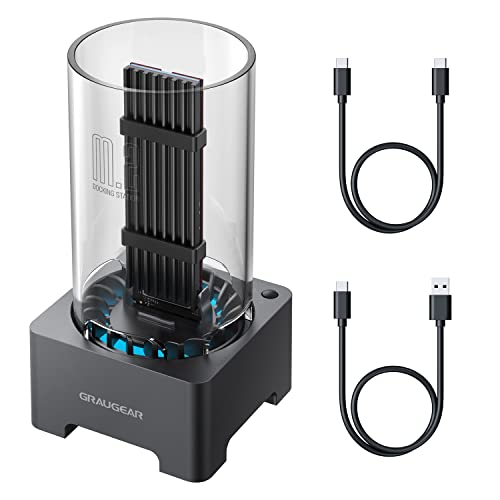 GRAUGEAR Fan‑Cooled Enclosure
|
Mid-Range | Built‑in cooling fan for sustained speed | Editors who need sustained throughput on long transfers | Check Price | ||
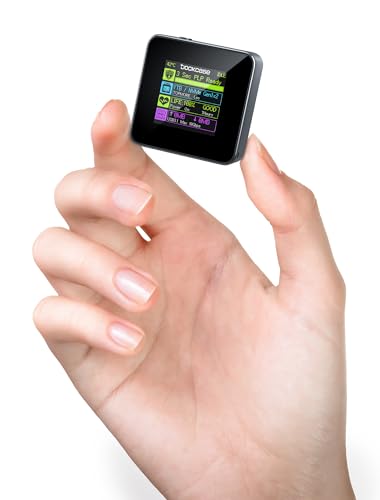 DockCase 2230 Smart Enclosure
|
Budget | HD status display + 3s PLP write protection | Mobile creators using 2230 NVMe modules | Check Price | ||
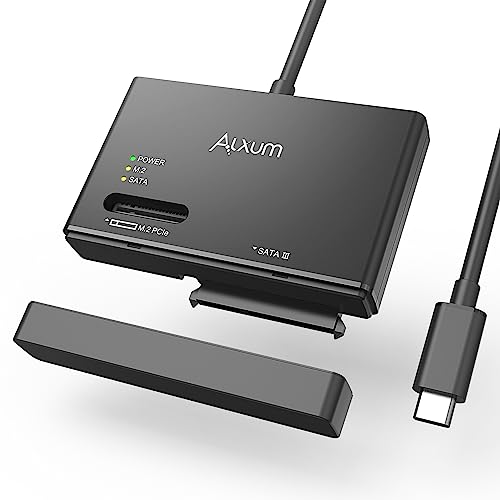 Alxum NVMe/SATA Enclosure
|
Mid-Range | Universal NVMe + SATA tool‑free design | Users who switch between NVMe and SATA drives often | Check Price |
1. M.2 NVMe & SATA to USB C Docking Station, M.2 SSD to USB A C Reader Adapter for Both M.2 (M Key, B+M Key) NVMe and SATA NGFF SSD Dock, Size for 2280 2260 2242 2230 Enclosure - Aluminum Alloy
A compact, tool‑free aluminum docking station that supports NVMe and many M.2 SATA/PCIe sizes and delivers up to 10Gbps via USB 3.1 Gen2. It’s excellent value for quick edits and cloning tasks but watch compatibility notes (no heatsink SSDs and some users report intermittent recognition issues).
Key Specs
- USB 3.1 Gen2 up to 10Gbps
- Supports NVMe PCIe and SATA NGFF (2230–2280, 22110 listed)
- Tool‑free aluminum alloy shell with silicone non‑slip pad
- Max supported capacity up to 4TB
Pros
- Very compact, strong heat‑dissipating aluminum build
- Tool‑free installation; easy for quick drive swaps
- Great value and fast 10Gbps transfers on compatible hosts
Cons
- Some users report drive recognition issues on certain laptops
- Doesn’t support M.2 SSDs with built‑in heatsinks
Best For: Budget editors who need fast, compact storage
Check Latest Price on Amazon2. ANYOYO M.2 Duplicator Dual-Bay Offline Clone,USB C to NVME Docking Station M.2 Reader Tool-Free 20Gbps,USB3.2 Gen 2X2 to SSD cloner for M2 SSD M Key Hard Drives Enclosure
A premium dual‑bay NVMe enclosure with USB 3.2 Gen2x2 (up to 20Gbps) and a standalone one‑button cloning function — ideal for editing rigs that need fast transfers and quick drive duplication without a host. It runs hot under load (aluminum case conducts heat) and needs a 20Gbps host to reach top throughput.
Key Specs
- USB 3.2 Gen2x2 up to 20Gbps (requires host with matching bandwidth)
- Dual M.2 bays; supports M and M+B key NVMe SSDs
- Standalone one‑click offline clone (no PC required)
- JMS586U chipset; tool‑free installation
Pros
- Blazing bus‑powered throughput on compatible hosts
- Convenient offline/cloning workflow for quick drive swaps
- Dual‑bay design speeds cloning and expands portable capacity
Cons
- Full 20Gbps requires a Gen2x2 host — lower speeds on Gen2/3 ports
- Aluminum shell can get hot during sustained transfers
Best For: Power users who need max bus speeds and offline cloning
Check Latest Price on Amazon3. Unitek M.2 and SATA to USB Duplicator with 2.5" /3.5" SATA Hard Drive Adapter Converter, USB C 3.1 Gen2 10 Gbps Docking Station Support Offline Clone for M-Key NVME SSD, and SATA External Enclosure
A versatile duplicator and dual‑bay dock that handles NVMe M.2 plus 2.5/3.5 SATA drives with a JMS581D controller and USB 3.1 Gen2 10Gbps performance. It’s a handy desktop‑style bus‑powered tool for cloning and mixed storage workflows but requires attention to cloning direction and drive initialization.
Key Specs
- USB C 3.1 Gen2 up to 10Gbps
- Clones NVMe M.2 to SATA/HDD and vice versa (offline clone)
- Supports 2.5"/3.5" SATA with included adapter
- JMS581D chipset; tool‑free, LED clone progress
Pros
- Great flexibility — M.2 NVMe plus 2.5/3.5 SATA support
- Simple offline clone workflow without a PC
- Solid data transfer speeds around 10Gbps on supported hosts
Cons
- Clone process requires target drive to be larger/initialized
- Compatibility notes can be confusing — double‑check drive types
Best For: Users who need flexible NVMe+SATA cloning and large drives
Check Latest Price on Amazon4. GRAUGEAR M.2 NVMe SATA PCIe SSD Enclosure Adapter Docking Station with Cooling Fan, USB3.2 Gen2 10Gbps M.2 SSD External Case USB C, Support UASP and Trim, M2 NVMe NGFF M Key B+M Key, RTL9210B Chipset
This mid‑range enclosure combines a 50mm quiet fan and aluminum heatsink with an RTL9210B controller to keep NVMe drives cool and sustaining near‑10Gbps USB 3.2 Gen2 speeds. It’s praised for setup ease and cooling but some buyers report durability and locking mechanism concerns.
Key Specs
- USB 3.2 Gen2 up to 10Gbps (RTL9210B-CG)
- Active cooling (50mm fan) + aluminum heatsink
- Supports NVMe PCIe and NGFF SATA (2230–2280; supports SSDs with heatsinks)
- UASP and TRIM support; tool‑free installation
Pros
- Active cooling helps maintain sustained transfer speeds
- Supports SSDs with heatsinks — good for high‑end NVMe drives
- Easy setup and solid performance for large file work
Cons
- Some reports of flimsy parts and lock mechanism issues
- A few users raised durability concerns under heavy use
Best For: Editors who need sustained throughput on long transfers
Check Latest Price on Amazon5. DockCase Pocket M.2 2230 NVMe SSD Enclosure,Support 3s PLP Prevents Write Data Loss,USB 3.2 Gen 2 Type-C (10 Gbps), fits NVMe PCIe, Exclusive to Size 2230,Support M-Key B+M Key UASP (Grey)
A niche but innovative enclosure that fits 2230 NVMe drives only and adds an HD status display showing health, life prediction and live transfer readouts. It’s compact and functional for PS5/Steam Deck/phone workflows, with built‑in power‑loss protection, though heat and intermittent connectivity can vary by drive.
Key Specs
- USB 3.2 Gen2 up to 10Gbps
- Fits NVMe PCIe exclusive to 2230 form factor
- HD display for SSD health, transfer readout and life prediction
- 3s PLP (power loss protection) and read‑only mode
Pros
- Unique smart display gives SSD health and transfer info
- Power‑loss protection and read‑only mode for safer transfers
- Very compact — built for ultra‑portable setups
Cons
- Limited to 2230 drives — not suitable for standard 2280 SSDs
- Some users report heat and intermittent connection issues
Best For: Mobile creators using 2230 NVMe modules
Check Latest Price on Amazon6. M.2 NVMe SATA HDD Enclosure - USB 3.2 Gen 2 PCle 10Gbps Hard Drive Reader Supports SSD Trim Instructions and UASP Acceleration for Faster Reading and Writing Speeds for M.2 NVMe/SSD/SATA
A versatile enclosure that supports both M.2 NVMe and SATA drives with USB 3.2 Gen2 10Gbps speeds, TRIM and UASP support, and intelligent sleep to save power. Buyers like the build and cloning capability, though some report mixed connectivity or power behavior on certain hosts.
Key Specs
- USB 3.2 Gen2 up to 10Gbps; up to ~1 GB/s bandwidth
- Supports NVMe and SATA drives; tool‑free plug and play
- TRIM and UASP support; intelligent sleep after 30 minutes
- Over‑current and anti‑break protection
Pros
- Works with both NVMe and SATA drives for maximum flexibility
- Tool‑free design and solid build for frequent swapping
- Intelligent sleep saves power during idle periods
Cons
- Some mixed reports on power delivery and connectivity stability
- Open/dust‑cover design may feel less secure for travel
Best For: Users who switch between NVMe and SATA drives often
Check Latest Price on AmazonWhich One Should You Choose?
If budget is tight → choose the AMZPILOT M.2 Dock (B0BBZSNTX7) for compact 10Gbps performance and strong value. If you need the fastest bus‑powered transfers and a standalone cloning workflow → choose the ANYOYO M.2 Duplicator Dual‑Bay (B0CP28GHHF). If you do long sustained transfers and need consistent thermal control → pick the GRAUGEAR fan‑cooled enclosure (B0BD4ZWF9M).
Best for Specific Scenarios
- Traveling videographer: AMZPILOT (B0BBZSNTX7) because it’s compact, tool‑free and offers 10Gbps speed without a big price tag.
- Mobile post‑production with fast drives: ANYOYO Dual‑Bay (B0CP28GHHF) because Gen2x2 bandwidth and dual bays speed transfers and let you clone on the go.
- Sustained multi‑hour transfers: GRAUGEAR (B0BD4ZWF9M) because built‑in fan + heatsink keep NVMe drives cooler and preserve high throughput.
Frequently Asked Questions
Do I need a Gen2x2 port on my laptop to get full speed?
Yes — to hit the theoretical 20Gbps speeds advertised by Gen2x2 enclosures you need a host port that supports USB 3.2 Gen2x2 or a compatible Thunderbolt controller. Without that, the enclosure will fall back to the maximum speed of your laptop’s port (commonly 10Gbps or lower).
Will any M.2 NVMe drive fit inside these enclosures?
Check the enclosure’s supported M.2 lengths (2230, 2242, 2260, 2280, sometimes 22110) and whether it accepts NVMe only or NVMe + SATA. Also confirm if the enclosure supports SSDs with factory heatsinks — some compact dock designs don’t fit drives with tall heat spreaders.
Are bus‑powered NVMe enclosures reliable for editing directly from the drive?
Yes, many bus‑powered enclosures deliver near‑desktop speeds suitable for editing if you pair a fast NVMe drive with adequate interface bandwidth and good thermal management. For long sessions choose enclosures with active cooling or confirmed support for SSD heatsinks to avoid thermal throttling.
How We Selected These Products
Our recommendations are based on data-driven analysis: we evaluated 155229+ products across 23916+ brands using a composite scoring system that weighs rating (40%), review volume (30%), price value (20%), and demand signals (10%). Every product is ranked by data, not opinions.
Last updated: August 29, 2026
As an Amazon Associate we earn from qualifying purchases at no extra cost to you. Full disclosure.
GearLark Score is our editorial ranking based on a composite analysis of product quality, value, and verified customer sentiment. Click through to Amazon for current pricing, availability, and live customer reviews.