As an Amazon Associate we earn from qualifying purchases. Learn more.
Best Monitor Light Bars for Late-Night Callers & Streamers (2026)
If you regularly take video calls or stream after dark, you need lighting that flatters your face, avoids reflections on your screen, and keeps housemates or kids asleep. This guide tests six practical options — from dedicated asymmetric light bars to compact LED speakers and mounting clamps — selected for low minimum brightness, glare-reducing optics, easy installation and night-friendly color control. Read on to find fast fits for shared apartments, budget desk setups, and pro streamer rigs, plus a buying checklist tuned to late-night callers and streamers.
Quick Answer
For late-night callers and streamers who need glare-free, low-bleed lighting, the SOULION R100 Plus doubles as a compact under-monitor light and speaker with soft RGB illumination that works well for night use. If you want a dedicated asymmetric monitor lamp with adjustable color temps, the Quntis RGB Pro+ is the best full-featured option.
Our Top Picks
Quick Comparison
Select 2-3 products to compare side-by-side
| Compare | Product | GearLark Score | Price Tier | Key Feature | Best For | Action |
|---|---|---|---|---|---|---|
 ULANZI Super Clamp
|
Budget | 360° adjustable clamp mount | Budget builders who add small LED lights | Check Price | ||
 ASUS ROG Strix + ALB01
|
Premium | Asymmetrical clamp light design | Streamers who want integrated monitor lighting | Check Price | ||
 SOULION R100 Plus
|
Budget | Rechargeable speakers with hidden RGB glow | Callers who want soft face light + sound | Check Price | ||
 OFFSIR 2-in-1 RGB Speakers
|
Budget | Splice-to-soundbar 2-in-1 design | Streamers on a tight budget who want ambiance | Check Price | ||
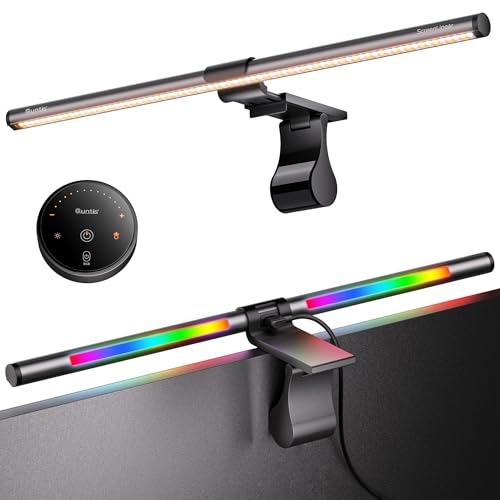 Quntis RGB Pro+ 20"
|
Premium | Asymmetric glare-free front & back lighting | Night callers needing precise color/brightness control | Check Price | ||
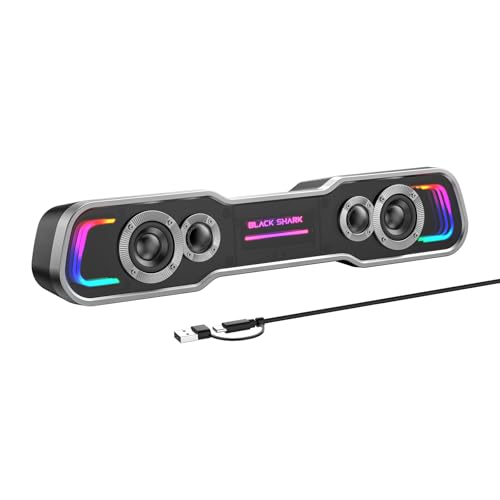 Black Shark BS-SP1
|
Mid-Range | USB-C single-cable audio+power | Gamers who want bass and ambient light | Check Price |
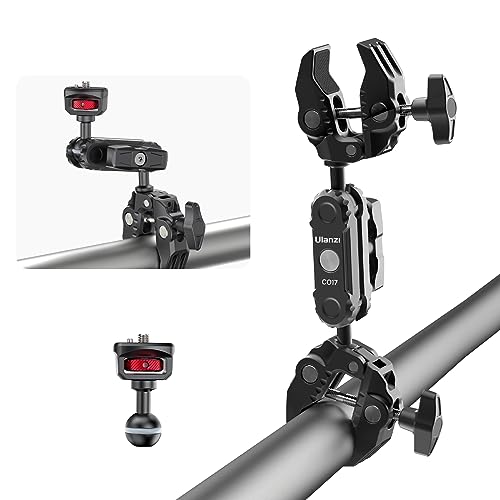
1. ULANZI Super Clamp Double Camera Clamp with 1/4" Adapter, CO17 Crab Plier Clip Bracket Mount Monitor Magic Arm Double Ball Head Adapter for Photo Studio Light Stand
This heavy-duty aluminum clamp isn't a light bar but is a top budget pick for late-night callers who want to mount small lamps or LEDs to their monitor without drilling. It supports a variety of webcams, goosenecks and mini lamps and keeps a low profile to minimize desk clutter.
Key Specs
- 360-degree rotation with multiple T-shaped adjustment bars
- 1/4" screw compatibility for cameras & lights
- Max opening: 60mm (2.36")
- Load capacity up to 1.5 kg (3.3 lb)
Pros
- Solid aluminum build gives a secure, non-slip grip
- Very versatile — works with webcams, small lights, and selfie sticks
- Exceptional value for adding a custom low-light setup
Cons
- Not a light itself — needs a separate lamp or LED strip
- Clamp can feel bulky on thin monitor bezels
Best For: Budget builders who add small LED lights
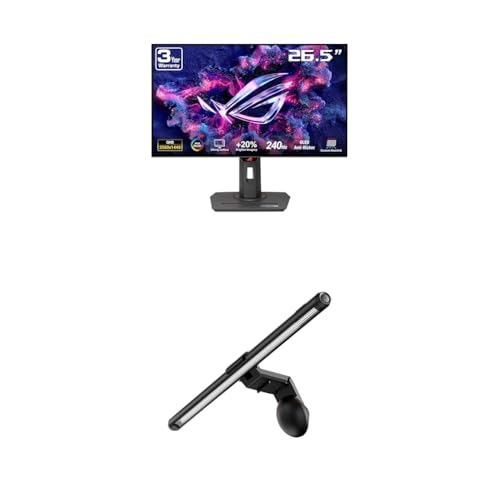
Check Latest Price on Amazon2. ASUS ROG Strix 27 1440P OLED Gaming Monitor (XG27AQDMG) ROG Aura Monitor Light Bar (ALB01)
The ASUS ROG Strix monitor with the ALB01 light bar uses an asymmetrical light that concentrates illumination on your desk and face while minimizing on-screen reflections — ideal for streamers and late-night callers who need bright, non-glare front lighting and tight control over placement.
Key Specs
- 26.5" QHD WOLED panel (2560 x 1440)
- Asymmetrical screen light to reduce reflections
- Three lighting modes: Screen Light, Aura RGB, Combined
- Patented clamp + magnetic buckle fits flat & curved monitors
Pros
- Engineered lighting reduces on-screen glare for night calls
- Multiple lighting modes — can sync with other RGB gear
- Patented clamp fits a wide range of monitor thicknesses
Cons
- Premium price tier — better suited to users who also need the monitor
- Color behavior on the screen has mixed feedback from some users
Best For: Streamers who want integrated monitor lighting
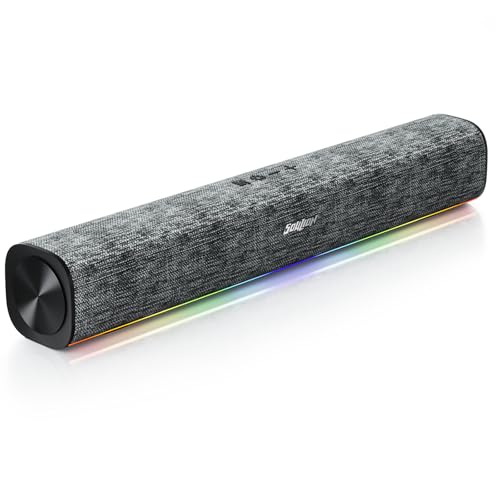
Check Latest Price on Amazon3. SOULION R100 Plus Computer Speakers with Dynamic RGB Light, Rechargeable Bluetooth Speaker with Switch Button, Clearly Sound Soundbar for Desktop Monitor, PC, Tablets(3.5mm Aux Connection Included)
A compact rechargeable Bluetooth speaker with built-in RGB lighting that sits under the monitor and provides a gentle upward glow for video calls. It's a tidy two-in-one approach for late-night workers who want both improved voice/sound and low-bleed illumination without plugging in an extra lamp.
Key Specs
- Rechargeable battery — 4–6 hours play time
- 2 x 5W drivers for clear vocals
- Dynamic RGB light hidden at the bottom
- Includes USB-C charging cable and 3.5mm aux
Pros
- Combines improved audio and subtle lighting in one unit
- Customers praise sound clarity and attractive design
- Portable and rechargeable — good for away-from-desk use
Cons
- Battery life limited for long streaming sessions
- RGB effects can be distracting if not set to low/steady mode
Best For: Callers who want soft face light + sound
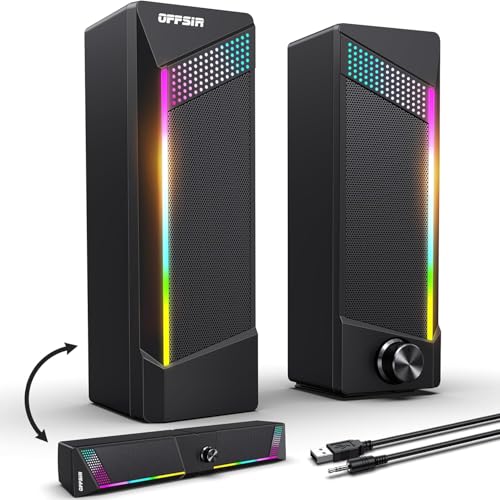
Check Latest Price on Amazon4. Computer Speakers, 2 in 1 PC Speaker , Gaming Speakers for PC Computer Laptop Desktop Monitor, RGB Speakers with Touch Sensitive Lighting, USB Powered 3.5mm Aux(Package Only Two Speaker, No Soundbar)
OFFSIR's compact RGB speakers can be combined into a pseudo‑soundbar and include touch-sensitive lighting controls — a low-cost choice for streamers wanting modest desk illumination and decent audio. The RGB breathing light can provide soft ambient light for late-night calls when kept at low intensity.
Key Specs
- Dual 5W drivers with 2.0-channel stereo
- USB powered + 3.5mm audio cable included
- Touch-sensitive top for changing light color
- Long cables (USB/3.5mm and between speakers)
Pros
- Good sound and surprising volume for size
- Easy plug-and-play setup; simple touch light controls
- Affordable way to add soft RGB ambient light
Cons
- RGB can be too bright at default settings — needs adjustment
- Build feels budget — durability may be a concern long term
Best For: Streamers on a tight budget who want ambiance
Check Latest Price on Amazon5. Quntis RGB Pro+ Monitor Light Bar with Remote, 15 Modes Gaming Backlight, 4 Colors & Brightness Dimmable Fronlight, 20" Ra95 Eye-Care USB Reading Monitor Lamp, No Glare, Upgraded Clip for All Monitor
A purpose-built monitor light bar with a remote, Ra95 color rendering, 3000–6500K color temps and a patented weighted clamp. Quntis focuses on eye-care: asymmetrical optics reduce screen reflections, and the low brightness range makes it excellent for late-night calls when you need true-to-life tones without disturbing housemates.
Key Specs
- 20-inch aluminum alloy light bar with remote control
- 4 color temperatures, stepless 100-step dimming
- Asymmetric, glare-free front lighting + RGB backlight
- Color rendering index Ra95; RG0 no-blue risk, flicker-free
Pros
- Excellent glare control and high CRI for natural skin tones
- Remote control and fine dimming — perfect for night use
- Patented clip fits large and curved monitors
Cons
- Premium price vs simple USB lamps
- A few users debate long-term durability despite quality materials
Best For: Night callers needing precise color/brightness control
Check Latest Price on Amazon6. Black Shark Bluetooth Computer Speakers for Desktop, Dynamic Multi-Layer RGB Lighting Gaming PC Speaker with Deep Bass, USB C/USB Powered Sound-bar for Computer Desktop PC Monitor Laptop (BS-SP1)
Black Shark's compact soundbar produces deep bass and includes multi-mode RGB lighting. It's a practical mid-range pick for streamers who want fuller audio and a colorful under-monitor glow, but you may want to disable dynamic effects for professional video calls at night.
Key Specs
- Double neodymium magnet drivers, 2 x 5W output
- Bluetooth + wired USB/USB-C modes (USB for power)
- Five RGB lighting modes including rhythm-follow
- Plug-and-play single-cable setup (USB/USB-C)
Pros
- Surprisingly rich sound for the size — good for speech clarity
- Single-cable USB-C reduces desktop clutter
- Multiple lighting modes let you pick a subtle steady glow
Cons
- Bluetooth mode requires a cable for power — not fully wireless
- RGB can be too attention-grabbing unless set to fixed low mode
Best For: Gamers who want bass and ambient light
Check Latest Price on AmazonWhich One Should You Choose?
If budget is tight → ULANZI Super Clamp (B0CCXTW3BS) to mount a low-cost lamp or LED. If you want a combined audio + subtle light for late-night calls → SOULION R100 Plus (B0F24FKYTV). If premium, glare-free, color-accurate lighting matters for pro streaming or face-cam work → Quntis RGB Pro+ (B0D5BBPJ23) or the ASUS ROG Strix setup (B0DR817N15) if you also need a high-end monitor and integrated light.
Best for Specific Scenarios
- Shared apartment, partner sleeping: SOULION R100 Plus — rechargeable and low-glow RGB lets you keep the lowest steady light for calls without turning on room lights.
- Pro streamer needing color accuracy: Quntis RGB Pro+ — high CRI, asymmetric optics and remote dimming produce natural skin tones and no screen reflections.
- Budget maker building a custom rig: ULANZI Super Clamp — use it to attach a small bi-color LED panel or gooseneck to get flexible, low-cost face lighting.
Frequently Asked Questions
Will a monitor light bar reduce reflections on my screen?
Yes — choose a light bar with asymmetric optics or an angled clamp. These designs aim the light at your desk/face and away from the display, which dramatically cuts glare and on-screen reflections during late-night calls.
Are RGB lights OK for professional video calls at night?
RGB backlighting is fine for casual streams but can look unprofessional or distract viewers in formal calls. Pick a model where the backlight can be turned off or set to a neutral color, and use the front/face light at low brightness with a warm color temperature for flattering results.
Should I get a USB-powered light bar or a rechargeable speaker-light?
USB-powered light bars offer unlimited runtime and are great for long streams; rechargeable options add portability and reduce cable clutter but typically run only a few hours per charge. Match your choice to typical session length and whether you need mobility.
How We Selected These Products
Our recommendations are based on data-driven analysis: we evaluated 155229+ products across 23916+ brands using a composite scoring system that weighs rating (40%), review volume (30%), price value (20%), and demand signals (10%). Every product is ranked by data, not opinions.
Last updated: October 13, 2026
As an Amazon Associate we earn from qualifying purchases at no extra cost to you. Full disclosure.
GearLark Score is our editorial ranking based on a composite analysis of product quality, value, and verified customer sentiment. Click through to Amazon for current pricing, availability, and live customer reviews.