As an Amazon Associate we earn from qualifying purchases. Learn more.
Best Monitor Light Bars for Late-Night Work (2026 Guide)
If you work late into the evening, a dedicated monitor light bar can cut screen-to-room contrast, reduce eye strain and give your webcam more flattering, even light. In this 2026 guide you'll find carefully chosen monitor light bars that emphasize eye comfort and better video-call lighting for cozy night sessions. We tested options with asymmetrical optics, adjustable color temperature, remote or touch controls, and compatibility notes for curved and ultra-wide screens. Products were selected based on build quality, eye-care features, ease of installation and customer feedback about function and value.
Quick Answer
The BenQ ScreenBar Pro is the best overall monitor light bar for late-night work: it delivers ultrawide, glare-free illumination with an automatic motion sensor and USB-C power. For budget-conscious night owls choose the Diirglus for solid eye-care lighting and a wireless remote; for large or multi-monitor setups the Quntis RGB Pro+ offers high CRI, remote control and RGB backlighting.
Our Top Picks
Quick Comparison
Select 2-3 products to compare side-by-side
| Compare | Product | GearLark Score | Price Tier | Key Feature | Best For | Action |
|---|---|---|---|---|---|---|
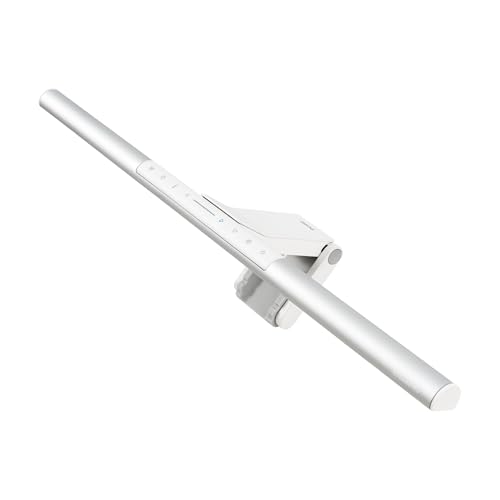 BenQ ScreenBar Pro
|
Premium | Ultrawide 1000+ lx, motion sensor | Late-night workers wanting premium eye care | Check Price | ||
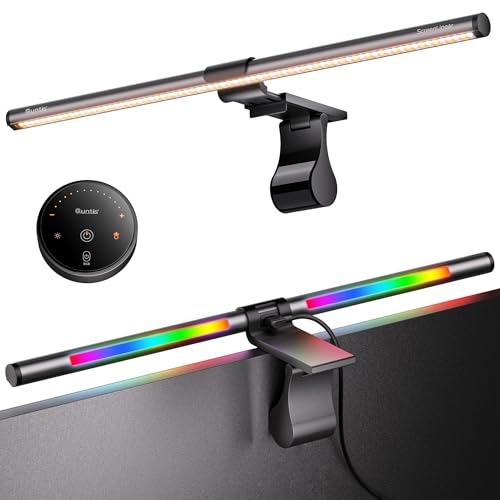 Quntis RGB Pro+
|
Premium | High CRI (Ra95) + RGB backlight | Large or ultrawide monitors and creative work | Check Price | ||
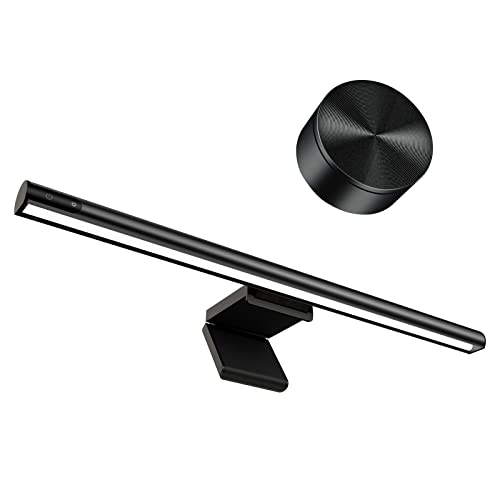 Diirglus Monitor Light Bar
|
Mid-Range | Wireless dual control & compact clamp | Budget-minded night workers and dual-screen setups | Check Price |
1. BenQ ScreenBar Pro LED Monitor Light Bar - Ultrawide Lighting, Motion Sensor, Adjustable Brightness/Color Temperature, Eye-Care USB-C Monitor Lamp, No Glare, Space-Saving, Curved Monitors, Silver
The BenQ ScreenBar Pro prioritizes eye comfort with asymmetrical optics that eliminate screen glare while lighting the desk evenly. It combines high central brightness, an ultrasonic motion sensor for automatic on/off, and a patented clamp to fit a wide range of monitors and curved screens.
Key Specs
- Central brightness over 1000 lx, 500 lx uniform range within 33"x20"
- Fits monitors 0.17"–2.56" thick and 1000–1800R curvature
- Ultrasonic motion sensor auto on/off
- Powered via USB-C (adapter included)
Pros
- Bright, glare-free illumination that reduces screen-to-room contrast
- Convenient motion sensor and easy on-device controls
- Secure patented clamp works with curved and irregular monitor bezels
Cons
- Premium price—some buyers debate value for money
- Requires USB power (no internal battery for wireless use)
Best For: Late-night workers wanting premium eye care
Check Latest Price on Amazon2. Quntis RGB Pro+ Monitor Light Bar with Remote, 15 Modes Gaming Backlight, 4 Colors & Brightness Dimmable Fronlight, 20" Ra95 Eye-Care USB Reading Monitor Lamp, No Glare, Upgraded Clip for All Monitor
Quntis RGB Pro+ is built for larger displays and creative users who want precise color and ambiance control. It offers Ra95 color rendering, a remote for fine adjustments, front and RGB backlighting modes, and a sturdy sliding counterweight clamp for wide monitors and curved panels.
Key Specs
- 20" aluminum alloy light bar, fits large/curved monitors
- Color temperature 3000–6500K, Ra95 color rendering
- Remote control with 100-step dimming and 15 RGB modes
- Patented retractable counterweight clamp, 1.8m USB cable
Pros
- Excellent color fidelity and flicker-free design for accurate tones
- Remote and RGB backlight let you tune ambiance for calls and streams
- Designed to mount cleanly on large and curved displays
Cons
- Premium cost compared with basic monitor lamps
- Heavier design may not suit very thin or lightweight monitors
Best For: Large or ultrawide monitors and creative work
Check Latest Price on Amazon3. Computer Monitor Light Bar,Wireless Remote Control Multiple Screen lamp Dimmer Switch,USB Powered, E-Reading LED Hanging Light,for Office/Home, Brightness/Color Temperature Adjustment
Diirglus delivers core eye-care features—an asymmetric light source, 2900K–6000K color range, touch controls and a wireless mini remote—at an approachable price. It’s easy to set up, works on most bezels, and focuses light on the desk to cut screen glare.
Key Specs
- Color temperature 2900K–6000K with 60 LEDs, flicker-free
- Wireless 2.4GHz remote plus touch controls; remote can pair with two lights
- Asymmetric light design prevents screen reflection
- Type-C power; clamp fits bezels 1–28mm
Pros
- Great value with wireless remote and flexible controls
- Effective asymmetric lighting reduces reflections on the screen
- Simple clamp design and easy setup on most monitors
Cons
- Build feels lighter than premium models—durability varies
- Lower maximum brightness and fewer advanced features than top-tier bars
Best For: Budget-minded night workers and dual-screen setups
Check Latest Price on AmazonWhich One Should You Choose?
If budget is tight → Diirglus (B09TGT4G5G) gives reliable asymmetric, glare-free light and a wireless remote for the lowest fuss. If you need portable or flexible mounting for large curved screens → Quntis RGB Pro+ (B0D5BBPJ23) supports wide/curved monitors, offers Ra95 color fidelity and a remote with RGB backlight for video calls and streams. If premium quality, motion-sensing convenience and the best overall eye-care performance matter → BenQ ScreenBar Pro (B0CZ94MB2R) is the top pick for late-night work.
Best for Specific Scenarios
- Late-night coding and reading: BenQ ScreenBar Pro — its ultrawide, glare-free beam and motion sensor keep your workspace evenly lit without screen reflection.
- Video calls and streaming: Quntis RGB Pro+ — high CRI front light plus customizable RGB backlighting helps you look natural on camera while setting a pleasing background tone.
- Dual monitors or tight budgets: Diirglus Monitor Light Bar — easy clamp and wireless remote make synchronized lighting across two screens simple and affordable.
Frequently Asked Questions
Will a monitor light bar really reduce eye strain at night?
Yes. A light bar that uses asymmetric optics to illuminate the desk instead of the screen reduces the stark contrast between a bright monitor and a dark room, which is a common cause of eye fatigue. Choose adjustable color temperature and flicker-free LED technology for the best results.
Do monitor light bars block my webcam or affect video calls?
Most monitor light bars are designed to sit above the bezel without blocking webcams; look for models that state 'no glare' and 'no blocking to camera lens' or those with an off-center mounting system. Front-facing adjustable color temperature helps produce more flattering video-call lighting than relying on room lights alone.
How do I choose brightness and color temperature for late-night work?
For late-night work pick warmer color temps (3000K or lower) and lower brightness to avoid blue-light stimulation that can interfere with sleep. Brightness should be enough to illuminate your keyboard and notes without causing screen glare—many users prefer the lowest comfortable setting on a dimmable bar.
How We Selected These Products
Our recommendations are based on data-driven analysis: we evaluated 155229+ products across 23916+ brands using a composite scoring system that weighs rating (40%), review volume (30%), price value (20%), and demand signals (10%). Every product is ranked by data, not opinions.
Last updated: October 07, 2026
As an Amazon Associate we earn from qualifying purchases at no extra cost to you. Full disclosure.
GearLark Score is our editorial ranking based on a composite analysis of product quality, value, and verified customer sentiment. Click through to Amazon for current pricing, availability, and live customer reviews.