As an Amazon Associate we earn from qualifying purchases. Learn more.
Best Monitor Light Bars for Late-Night Holiday Calls (2026)
Late-night family calls and remote work sessions demand two things: soft, flattering light for your webcam and a setup that doesn’t add to eye strain. This guide evaluates monitor light bars and related desktop accessories focused on eye comfort, webcam lighting, fit and ease of installation. I selected products based on design (asymmetrical optics, clamp fit), functionality (auto-dimming, color temperature), build quality and real customer feedback about durability and value. You’ll find full reviews, quick winners, and a buying guide to match the right tool to your holiday-call setup.
Quick Answer
The BenQ ScreenBar Pro is the best pick for late-night holiday calls thanks to its glare-free asymmetrical optics, motion sensor and wide brightness range that prioritize eye comfort. For budget-conscious setups, the ULANZI Super Clamp is a useful, low-cost mounting solution and the iQuincy USB monitor light bar gives adjustable color temperature and auto-dimming at a wallet-friendly price.
Our Top Picks
Quick Comparison
Select 2-3 products to compare side-by-side
| Compare | Product | GearLark Score | Price Tier | Key Feature | Best For | Action |
|---|---|---|---|---|---|---|
 ULANZI Super Clamp |
Budget | 360° adjustable double-headed clamp | Mounting lights/webcams on odd-shaped monitors | Check Price | ||
 iQuincy USB Light Bar |
Budget | Stepless dimming & 3000–6000K | Budget webcam lighting with auto-dimming | Check Price | ||
 ASUS ROG Strix + ALB01 |
Premium | Integrated Aura RGB & screen light modes | Gamers who want integrated lighting and performance | Check Price | ||
 SOULION R100 Plus |
Mid-Range | Rechargeable Bluetooth speaker with RGB | Improving audio for family calls and adding ambient light | Check Price | ||
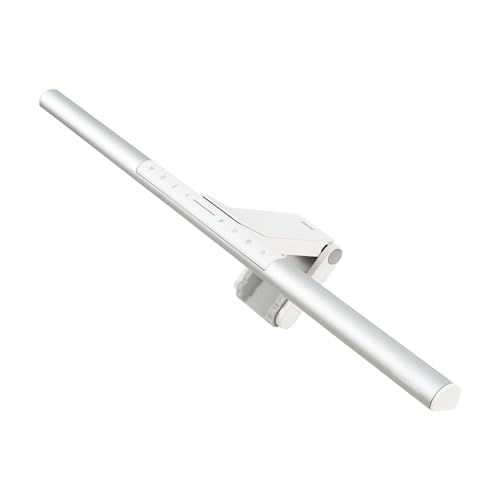 BenQ ScreenBar Pro |
Premium | Asymmetrical optics + motion sensor | Eye-care focused lighting for long calls | Check Price | ||
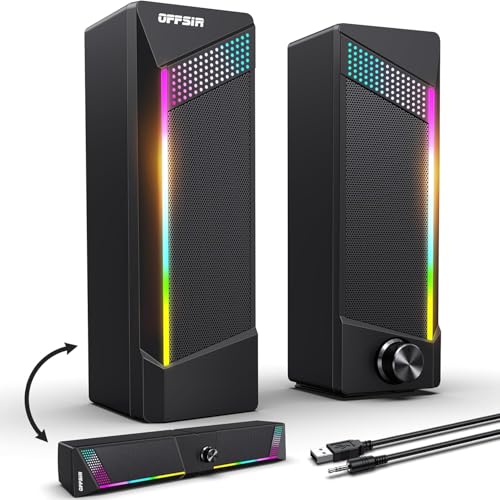 OFFSIR 2-in-1 Speakers |
Mid-Range | 2-in-1 splicing speakers / soundbar | Compact desktop audio with RGB accent light | Check Price |
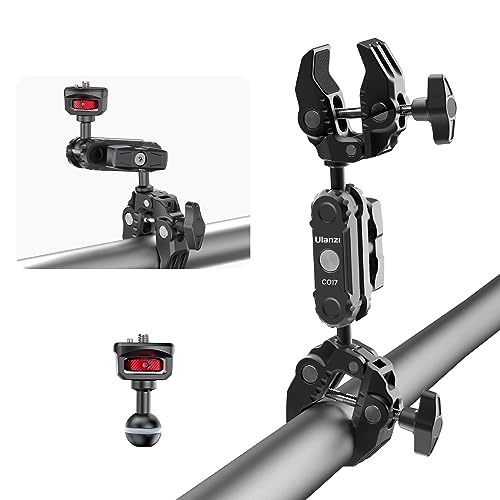
1. ULANZI Super Clamp Double Camera Clamp with 1/4" Adapter, CO17 Crab Plier Clip Bracket Mount Monitor Magic Arm Double Ball Head Adapter for Photo Studio Light Stand, Photo Boom Stand, Cross Bars
Not a light bar but a versatile, well-made clamp that solves mounting headaches when your monitor has a thin bezel or unusual shape. Customers praise its solid aluminum construction, secure grip and value — ideal for attaching a monitor light bar, webcam or small LED fixture for holiday calls.
Key Specs
- 360-degree rotation with adjustable T-shape bars
- 1/4" screw adapter compatible with cameras and lights
- Maximum load capacity: 1.5 kg (3.3 lb)
- Maximum clip opening: 60 mm (2.36")
- Aluminum alloy construction, CNC-processed
Pros
- High build quality and secure grip
- Versatile mounting options for lights and cameras
- Lightweight yet sturdy aluminum design
Cons
- Not a lighting device—requires separate light bar or lamp
- May need careful tightening on very thin or very thick bezels
Best For: Mounting lights/webcams on odd-shaped monitors
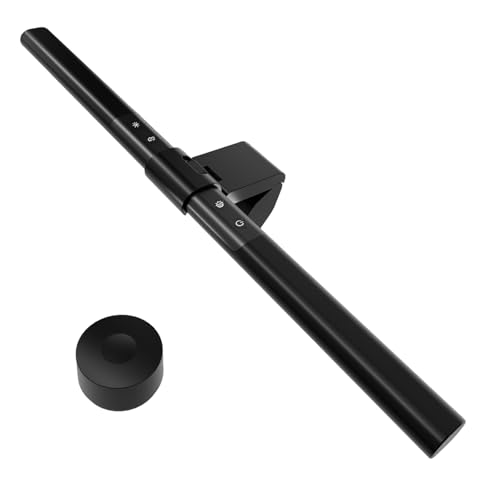
Check Latest Price on Amazon2. Computer Monitor Light Bar with Remote, Adjustable Auto-Dimming Monitor Lamp for Eye Care, LED Screen Light Bar with USB Powered for Office/Gaming, Stepless Dimming Brightness and Color Temperature
A compact, USB-powered monitor light that aims to reduce screen glare by focusing illumination on the desk and keyboard area. It offers stepless brightness control, multiple color temperatures and an ambient light sensor for automatic fill light—good value for late-night calls and basic eye-care needs.
Key Specs
- 108 LED beads with anti-glare optical design
- Stepless dimming and 3000–6000K color temperature range
- Built-in ambient light sensor for auto fill light
- USB-powered (compatible with power banks and adapters)
- Approximately 17-inch length to fit most monitors
Pros
- Adjustable brightness and color temperature tailored to eye comfort
- Easy installation and USB power convenience
- Good value for the functionality offered
Cons
- Clamp/design may not fit very thick or unusual monitor tops
- Remote and sensor range can be limited in some setups
Best For: Budget webcam lighting with auto-dimming
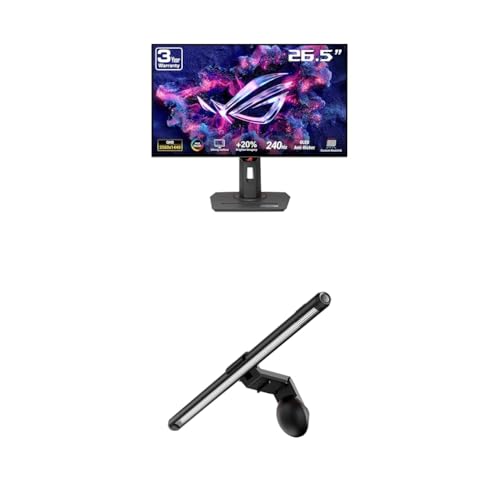
Check Latest Price on Amazon3. ASUS ROG Strix 27 1440P OLED Gaming Monitor (XG27AQDMG) ROG Aura Monitor Light Bar (ALB01)
A high-performance gaming monitor that includes a dedicated ROG Aura monitor light bar with multiple lighting modes. The asymmetrical lighting design focuses desk illumination while minimizing reflections, and the magnetic clamp lets you adjust the light easily. It’s a premium, all-in-one option if you want both display performance and integrated lighting for calls or streaming.
Key Specs
- 26.5-inch QHD WOLED panel (240 Hz listed for gaming)
- Three light modes: Screen Light, Aura RGB, Combined
- Asymmetrical design to reduce on-screen reflections
- Patented clamp and magnetic buckle for flat and curved monitors
Pros
- Integrated light bar that syncs with ecosystem RGB
- Asymmetrical optics reduce screen glare for webcam lighting
- Well-engineered clamp for easy mounting
Cons
- Premium product—overkill if you only need simple lighting
- Some users report mixed color uniformity on the monitor
Best For: Gamers who want integrated lighting and performance
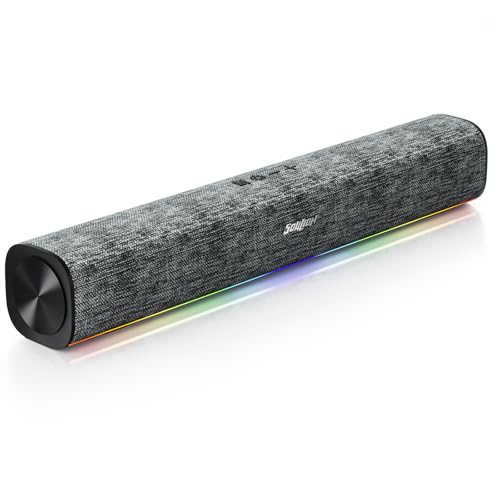
Check Latest Price on Amazon4. SOULION R100 Plus Computer Speakers with Dynamic RGB Light, Rechargeable Bluetooth Speaker with Switch Button, Clearly Sound Soundbar for Desktop Monitor, PC, Tablets(3.5mm Aux Connection Included)
A rechargeable Bluetooth speaker with built-in RGB lighting that adds atmosphere to late-night calls while boosting audio clarity. It’s portable, offers clear vocals for conversations, and the RGB bottom lights provide subtle ambient illumination—useful when you want a combined audio and lighting upgrade without clutter.
Key Specs
- 2 x 5W output (clear stereo sound)
- Rechargeable (USB-C) with ~4–6 hours play time
- Bluetooth plus 3.5mm aux input
- Dynamic RGB lighting with multiple modes
Pros
- Good sound quality and clear voice reproduction
- Attractive RGB lighting adds ambient mood
- Portable with USB-C charging
Cons
- Battery life is limited for extended sessions
- Not a dedicated monitor light—limited effect on face lighting
Best For: Improving audio for family calls and adding ambient light
Check Latest Price on Amazon5. BenQ ScreenBar Pro LED Monitor Light Bar - Ultrawide Lighting, Motion Sensor, Adjustable Brightness/Color Temperature, Eye-Care USB-C Monitor Lamp, No Glare, Space-Saving, Curved Monitors, Silver
Designed specifically to reduce eye strain, the ScreenBar Pro offers ultrawide, glare-free illumination with asymmetrical optics that light the desk but not the screen. It includes a motion sensor for auto on/off, broad brightness range and USB-C power; customers consistently praise its light quality and ergonomic benefits for evening calls and late-night work.
Key Specs
- Over 1000 lx central brightness and wide illumination area
- Fits monitors 0.17"–2.56" thick and curvature 1000–1800R
- Ultrasonic motion sensor for auto on/off
- Asymmetrical optics to prevent screen reflection
- USB-C powered (adapter included)
Pros
- Glare-free, wide illumination tuned for eye comfort
- Motion sensor and easy brightness/color controls
- Patented clamp fits a wide range of monitor shapes
Cons
- Premium price—some users debate value for money
- Heavier and more feature-dense than simple clip-on bars
Best For: Eye-care focused lighting for long calls
Check Latest Price on Amazon6. Computer Speakers, 2 in 1 PC Speaker , Gaming Speakers for PC Computer Laptop Desktop Monitor, RGB Speakers with Touch Sensitive Lighting, USB Powered 3.5mm Aux(Package Only Two Speaker, No Soundbar)
A versatile pair of USB-powered speakers that can combine into a small soundbar and feature touch-sensitive RGB lighting. They offer solid sound for calls and media, plug-and-play setup, and a compact footprint for clutter-free holiday call setups.
Key Specs
- Dual 5W drivers (hi-fi stereo sound)
- USB and 3.5mm audio connections (plug & play)
- Touch sensitive RGB lighting with multiple colors
- Long cables for flexible placement
Pros
- Good sound quality and surprisingly loud for size
- Flexible setup—can be used separately or combined
- Easy plug-and-play operation
Cons
- Marketing images can be confusing about included parts
- Limited low-end bass compared with larger speakers
Best For: Compact desktop audio with RGB accent light
Check Latest Price on AmazonWhich One Should You Choose?
If budget is tight → choose the iQuincy USB Light Bar (B0DLGLQRDN) for adjustable color temperature and auto-dimming without breaking the bank. If you need a flexible mounting tool for odd monitors or to hang a separate LED for webcam lighting → choose the ULANZI Super Clamp (B0CCXTW3BS). If premium eye-care and the most refined glare-free desk lighting matter most → choose the BenQ ScreenBar Pro (B0CZ94MB2R). If you want better audio and a touch of ambient lighting as well → consider the SOULION R100 Plus speakers (B0F24FKYTV).
Best for Specific Scenarios
- Late-night family video calls: BenQ ScreenBar Pro because its asymmetrical optics and adjustable color temp produce flattering, glare-free face lighting.
- Unusual monitor shapes or thin bezels: ULANZI Super Clamp because it securely mounts lights or webcams where standard clamps won’t fit.
- Combined audio and atmosphere: SOULION R100 Plus because it adds clear voice playback plus RGB ambient lighting for a cozier video-call background.
Frequently Asked Questions
Do monitor light bars reduce eye strain?
Yes—when they use asymmetrical optics and adjustable brightness/color temperature to light your desk and face without reflecting on the screen. That reduces contrast stress and flicker-related fatigue compared with harsh overhead lights.
Will a light bar block my webcam?
Most monitor light bars are designed to sit above the screen and use angled optics to avoid blocking the camera. Check the product’s clamp and design notes—some include patents or magnetic buckles that prevent obstruction on curved or thick monitors.
Can I power a light bar from a USB power bank?
Many USB-powered bars will run from a power bank, but performance can vary. Use a bank capable of steady 5V output and consider USB-C if the bar requests higher power for advanced features.
How We Selected These Products
Our recommendations are based on data-driven analysis: we evaluated 155229+ products across 23916+ brands using a composite scoring system that weighs rating (40%), review volume (30%), price value (20%), and demand signals (10%). Every product is ranked by data, not opinions.
Last updated: November 08, 2026
As an Amazon Associate we earn from qualifying purchases at no extra cost to you. Full disclosure.
GearLark Score is our editorial ranking based on a composite analysis of product quality, value, and verified customer sentiment. Click through to Amazon for current pricing, availability, and live customer reviews.