As an Amazon Associate we earn from qualifying purchases. Learn more.
Best Multi-Port USB-C Chargers for Dorms and Small Apartments (2026)
Living in a dorm or small apartment means every inch of desk and counter matters — including where you plug in phones, laptops and speakers. This guide tests and compares compact multi-port USB-C chargers (power strips and towers) that prioritize space-saving designs, safety features and shared-use practicality. I evaluated each product for port count, PD USB-C output, cord/plug design, safety certifications and real-world ease of use. Read on to find the best overall pick, budget option and compact towers that keep cords tidy and devices accessible in shared living spaces.
Quick Answer
For most dorms and small apartments the vipwell 16-in-1 Surge Protector (ASIN B0FM73Y6X7) is the best pick — it combines many AC outlets, two USB-C PD ports, a built-in device stand and safety certifications in a compact package. If vertical footprint matters, consider the UWIWUTEI power towers for dense outlet counts on a small desk.
Our Top Picks
Quick Comparison
Select 2-3 products to compare side-by-side
| Compare | Product | GearLark Score | Price Tier | Key Feature | Best For | Action |
|---|---|---|---|---|---|---|
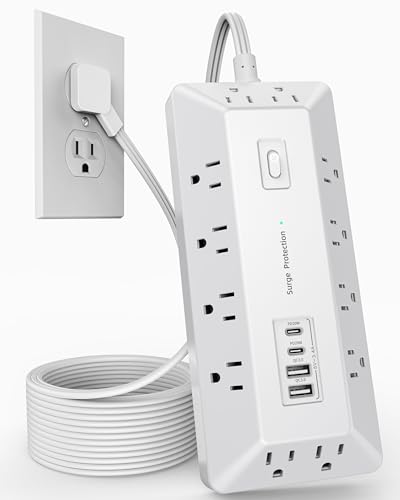 vipwell 16-in-1 Surge Strip
|
Mid-Range | Built-in multi-device stand | Shared desks and device charging hubs | Check Price | ||
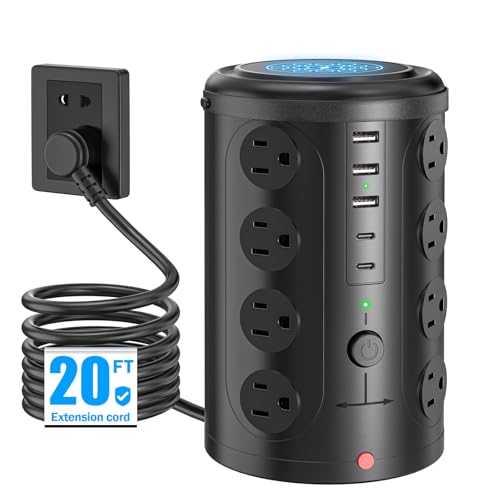 UWIWUTEI 21-in-1 Tower (20FT)
|
Mid-Range | Vertical tower saves desk footprint | Tight desks and communal stations | Check Price | ||
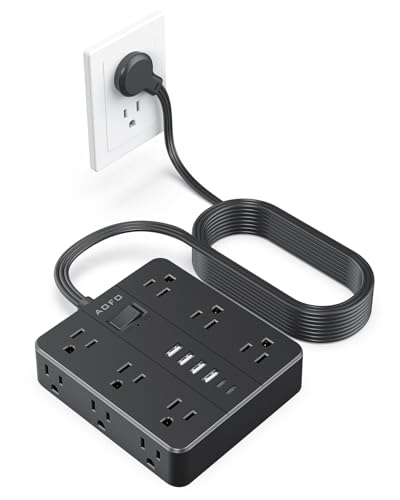 AOFO 18-in-1 (Black)
|
Premium | Mountable, long 15 ft flat cord | Wall- or under-desk installations | Check Price | ||
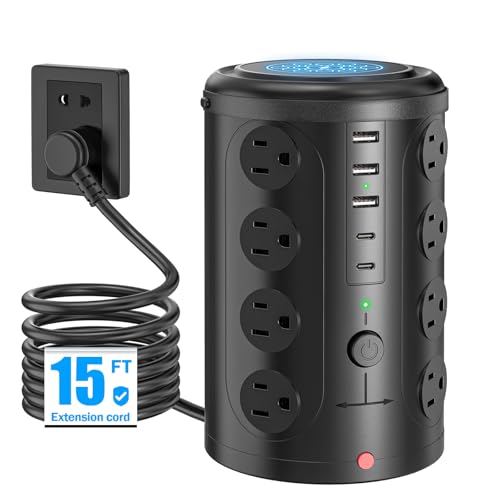 UWIWUTEI 21-in-1 Tower (15FT)
|
Budget | Budget-friendly vertical design | Cost-conscious roommates and students | Check Price | ||
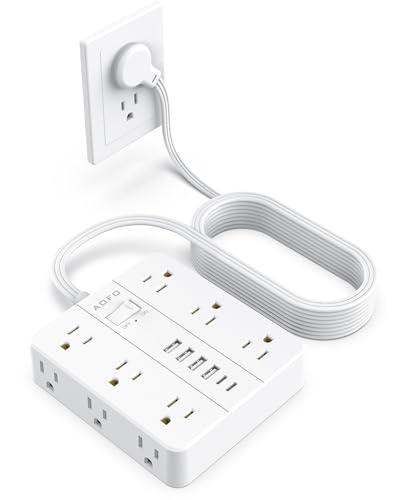 AOFO 18-in-1 (White)
|
Premium | Mountable white finish for neat installs | Visible charging hubs and home offices | Check Price | ||
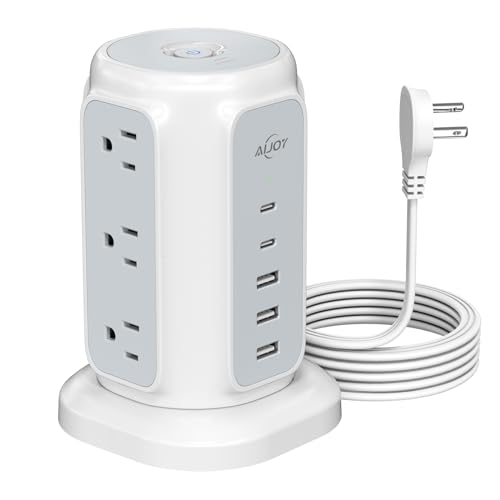 AiJoy 14-in-1 Tower
|
Budget | Compact tower with individual switches | Small desks and nightstands | Check Price |
1. 16-in-1 Surge Protector Power Strip with Multi-Function Stand, 6 Outlets with 2 USB-C (20W PD) and 2 USB-A (18W) and 6FT Extension Cord (White)
The vipwell 16-in-1 mixes lots of AC outlets with USB-C PD ports and a hidden multi-function stand to hold phones or tablets. It emphasizes safety (FCC/UL mentioned) and a flat 6ft cord that fits tight spaces — a strong all-around choice for dorm rooms that need organization.
Key Specs
- 12 AC outlets + 4 USB ports (2 USB-C PD, 2 USB-A)
- USB-C PD rated ~20W per port
- 6 ft flat, 45° angled plug cord
- Built-in stand holds up to 6 phones/tablets
- Safety: FCC and UL certified, surge & overload protection
Pros
- Large outlet count plus device stand keeps surfaces tidy
- Safety-certified with surge and overload protection
- Space-saving flat plug and 6 ft cord fit tight layouts
Cons
- USB-C PD power is limited (better for phones/tablets than high-watt laptops)
- Mid-range plastics may show wear with heavy daily use
Best For: Shared desks and device charging hubs
Check Latest Price on Amazon2. Power Strip Tower Surge Protector with 16 Outlets and 5 USB Ports (2 USB-C), 20FT Extension Cord, Heavy Duty Charging Station (No Wireless Charging)
This vertical tower packs a large number of AC sockets into a small footprint and includes multiple USB-A and USB-C ports. Users praise its space-saving design and easy setup, though charging speeds for some devices are reported as inconsistent — best for dense plug needs rather than high-watt PD charging.
Key Specs
- 16 AC sockets + 2 USB-C + 3 USB-A
- Rated for 1875W/125V (mentions 240V compatibility in specs)
- 20 ft extension cord
- Built-in overload and lightning protection
Pros
- High outlet density without taking desk space
- Good set of safety features (overload/short-circuit protection)
- Long cord offers flexible placement
Cons
- Some users report inconsistent USB charging speed or error messages
- Tall tower can feel bulky and heavy to move
Best For: Tight desks and communal stations
Check Latest Price on Amazon3. 15FT Surge Protector Power Strip, 12 AC Outlets with 6 USB Ports (2 USB-C), Flat Plug Extension Cord, Wall Mount for Home Office, Dorm (Black)
AOFO's premium strip offers a long flat cord, multiple USB-C and USB-A ports, and mounting holes so you can hide it under a desk or on a wall. It leans into quality materials and surge protection — a good fit when you want a neat, semi-permanent charging hub.
Key Specs
- 12 AC outlets + 6 USB ports (4 USB-A, 2 USB-C)
- 2 USB-C ports ~5V/3A, USB-A ports up to 5V/3.4A
- 15 ft flat extension cord with 45° angled plug
- Mountable design and flame-retardant PC material
Pros
- Long cord and mounting options make it ideal for fixed setups
- Premium build and solid surge protection
- Smart power distribution for multiple devices
Cons
- Higher price tier compared with basic towers
- Rare reports of inconsistent charging performance
Best For: Wall- or under-desk installations
Check Latest Price on Amazon4. Power Strip Tower Surge Protector with 16 Outlets and 5 USB Ports (2 USB-C), 15FT Extension Cord, Heavy Duty Charging Station (Home Office Dorm Room Essentials)
This budget tower gives you many AC outlets and a handful of USB ports while keeping a small tabletop footprint. It's a cost-effective option for shared rooms, though some users note mixed USB charging performance; overall it delivers strong value for the price.
Key Specs
- 16 AC outlets + 2 USB-C + 3 USB-A
- 15 ft extension cord
- 10A overload protection and short-circuit fuse
- Vertical tower design to save surface area
Pros
- Excellent outlet and USB count for the price
- Space-saving vertical orientation
- Basic safety features included
Cons
- Mixed feedback on USB charging speed and phone error messages
- Build feels plasticky compared with premium strips
Best For: Cost-conscious roommates and students
Check Latest Price on Amazon5. 15FT Surge Protector Power Strip, 12 AC Outlets with 6 USB Ports (2 USB-C), Flat Plug Extension Cord, Wall Mount for Home Office, Dorm (White)
AOFO's white model mirrors the black unit's features: multiple AC outlets, six USB ports and a long flat cord with mounting options. It looks clean in shared spaces and offers strong surge protection, though a few customers had conflicting experiences with charging effectiveness.
Key Specs
- 12 AC outlets + 6 USB ports (4 USB-A, 2 USB-C)
- 15 ft flat extension cord with 45° plug
- USB-C ports ~5V/3A, smart power distribution
- Flame-retardant material and mounting holes
Pros
- Attractive finish for visible setups
- Long cord and mounting flexibility
- Good mix of AC and USB ports
Cons
- Some users report inconsistent charging results
- Premium price may not suit tight budgets
Best For: Visible charging hubs and home offices
Check Latest Price on Amazon6. AiJoy Flat Plug Power Strip Tower with 9 Outlets and 5 USB Ports (2 USB-C), 1200J Surge Protection, 1625W Extension Cord Charging Station (Home Dorm Office)
AiJoy's compact tower provides a tidy balance of AC outlets and USB ports with a thin flat plug that hides easily behind furniture. Customers consistently praise its space-saving build and USB charging capability — a strong compact option when you don't need a huge outlet count.
Key Specs
- 9 AC outlets + 5 USB ports (2 USB-C, 3 USB-A)
- 1200J surge protection, 1625W max
- 0.39-inch flat plug and 6.5 ft cord
- Individually controlled power switches and 1.3 in outlet spacing
Pros
- Compact footprint good for tiny desks or nightstands
- Loved for space-saving design and solid USB charging
- Individual switches for managing devices
Cons
- Fewer AC outlets than larger towers
- Lower total wattage limits heavy load setups
Best For: Small desks and nightstands
Check Latest Price on AmazonWhich One Should You Choose?
If you want the best balance of outlets, organization and safety → vipwell 16-in-1 Surge Protector (B0FM73Y6X7). If budget is tight and you need lots of outlets in a small footprint → UWIWUTEI 21-in-1 Tower (15FT) (B0DJRD7G8T). If vertical footprint and a long cord are priorities → UWIWUTEI 21-in-1 Tower (20FT) (B0DK2WNM8Z). If you prefer a mountable, cleaner install with longer reach → AOFO 18-in-1 (B0FD9R9KKV or B0DS8PVCGL). If you need a compact tower with individual controls and very small footprint → AiJoy 14-in-1 Tower (B0C6M4M3ZX).
Best for Specific Scenarios
- Shared roommate charging station: vipwell 16-in-1 because its high outlet count and device stand keep multiple phones and tablets organized.
- Tiny desk or dorm desk: AiJoy 14-in-1 Tower because the compact vertical design frees up surface space while still offering USB-C ports.
- Under-desk or wall-mounted hub: AOFO 18-in-1 (B0FD9R9KKV / B0DS8PVCGL) because of the 15 ft flat cord and mounting holes for a neat, semi-permanent setup.
Frequently Asked Questions
Are the USB-C ports on these strips good enough to charge a laptop?
Most of these strips provide USB-C at phone/tablet levels (around 20–30W). That will charge many phones quickly but won’t reliably power higher-watt laptops. For a laptop, use a dedicated high-watt USB-C PD charger or confirm the strip's PD wattage before relying on it as your main laptop charger.
Can I safely use a power tower in a dorm with multiple devices plugged in?
Yes if you pick a model with proper overload protection and safety certifications (UL, FCC or equivalent). Avoid daisy-chaining multiple extension cords, check the strip's maximum wattage, and distribute heavy-draw devices across separate outlets when possible to prevent tripping breakers or overloading the circuit.
How important is surge protection for dorm and apartment chargers?
Surge protection is advisable — it defends laptops, phones and other gear from voltage spikes, especially in older buildings or during storms. Look for rated joules or explicit surge protection features and built-in circuit breakers for extra peace of mind.
How We Selected These Products
Our recommendations are based on data-driven analysis: we evaluated 155229+ products across 23916+ brands using a composite scoring system that weighs rating (40%), review volume (30%), price value (20%), and demand signals (10%). Every product is ranked by data, not opinions.
Last updated: June 14, 2026
As an Amazon Associate we earn from qualifying purchases at no extra cost to you. Full disclosure.
GearLark Score is our editorial ranking based on a composite analysis of product quality, value, and verified customer sentiment. Click through to Amazon for current pricing, availability, and live customer reviews.