As an Amazon Associate we earn from qualifying purchases. Learn more.
Best Multi-Port USB-C Hubs for Student Creators (2026)
Student creators — whether you edit videos, livestream, or archive photography — need hubs that reliably handle cameras, high-speed external drives and external monitors. This guide tests and compares five multi-port USB-C hubs and docks that prioritize video output, fast data, and real-world build quality. We selected options across Budget, Mid-Range and Premium tiers, focusing on ports (HDMI/DisplayPort), sustained data speeds for drives, power delivery for laptops, and notes from real users about durability and ease of use. Read on to find the hub that suits your workflow and device mix.
Quick Answer
For student creators who need reliable ports for cameras, external drives and at least one external monitor, the Kxable Upgrade USB C Hub (B0BCFX2DQ2) is the top pick for flexible expansion and exceptional cable reach. If you need a premium workstation with heavy power and multi-monitor support, consider the Belkin 11-in-1 Pro GaN Dock (B0DK27PXNQ).
Our Top Picks
Quick Comparison
Select 2-3 products to compare side-by-side
| Compare | Product | GearLark Score | Price Tier | Key Feature | Best For | Action |
|---|---|---|---|---|---|---|
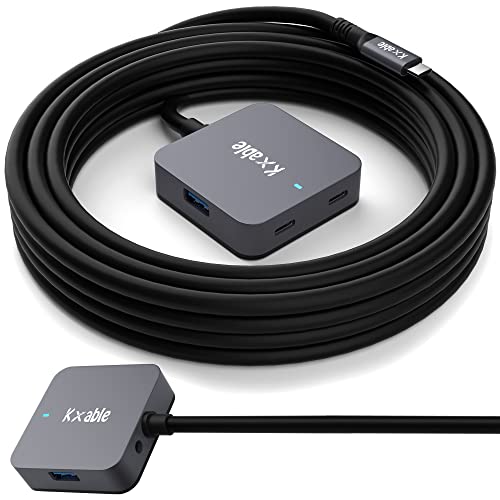 Kxable 25FT USB-C Hub
|
Budget | 25 ft active extension + 4 ports | Long-reach expansion for peripherals | Check Price | ||
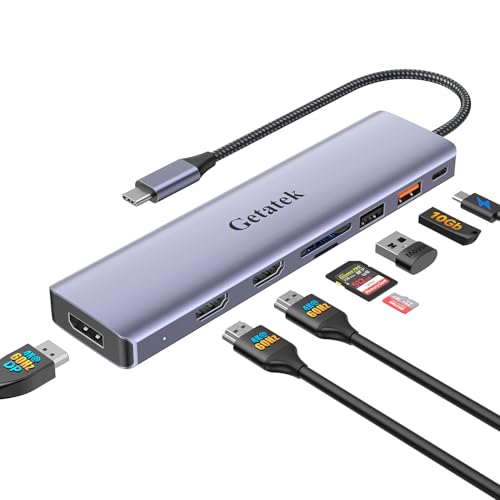 Getatek 8-in-1 Dock
|
Budget | Dual HDMI + DisplayPort triple-display | Windows users needing 3-monitor setups | Check Price | ||
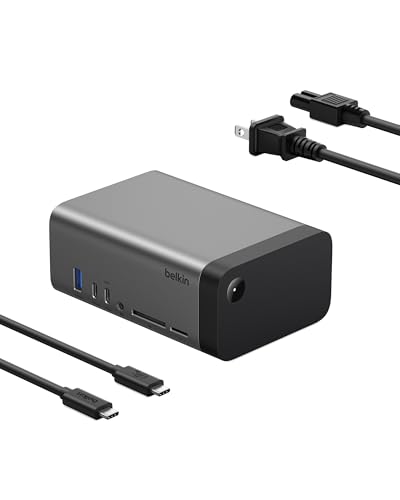 Belkin 11-in-1 Pro GaN
|
Premium | GaN 150W power + triple-monitor support | Power users and multi-monitor workstations | Check Price | ||
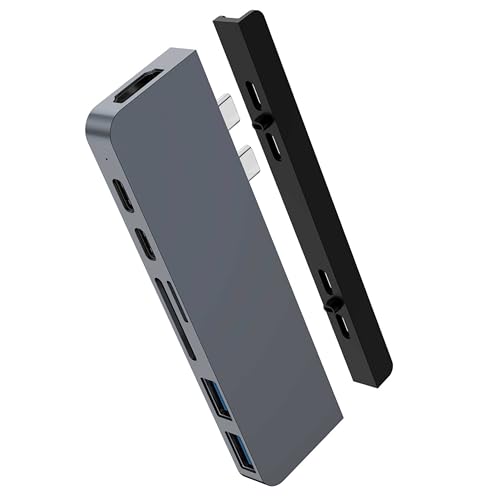 HyperDrive Duo 7-in-2
|
Premium | Magnetic mount + Thunderbolt-level PD | MacBook users who want side-mounted convenience | Check Price | ||
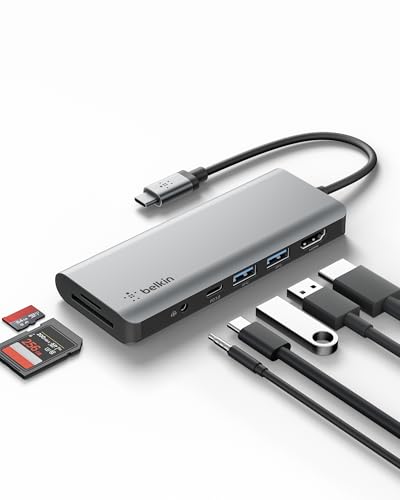 Belkin 7-in-1 Dock
|
Mid-Range | Compact 85W PD dock | Mobile creators who need a compact dock | Check Price |
1. Upgrade USB C Hub, Expander Multi USB Ports Cable 25FT, Long USB 3.1 C Extension Cable with 4-Port (2 USB-A Ports+2 USB-C Ports), USB C Y Splitter Hub, Type-C Male to A-Female + C-Female Extender Cord
A unique active repeater cable that converts a single USB port into four and stretches up to 25 feet—great for camera setups, external drives and peripherals when you need distance from your laptop. It emphasizes robust build and reliable connectivity for non-video peripherals.
Key Specs
- 25 ft active USB 3.1 repeater cable
- 2x USB-A 3.0 ports + 2x USB-C 3.1 ports
- Up to 5 Gbps data transfer (USB 3.0 speeds)
- Aluminum shell, integrated signal amplification chipset
Pros
- Very long cable for flexible camera and drive placement
- Solid build quality with aluminum shell
- Plug-and-play, no drivers required
Cons
- Not suitable for extended video output
- Not designed for charging high-power laptops
Best For: Long-reach expansion for peripherals
Check Latest Price on Amazon2. 10Gbps USB C Hub, USB-C Laptop Docking Station, 8in1 Triple Display Docking Station for Dell Hp Lenovo Surface Windows (Dual HDMI+ DisplayPort + PD3.0 100W +SD TF Card Reader +10GB USB Port)
A powerful budget dock that aims for triple-display workflows on Windows while offering 100W pass-through charging and a 10Gbps USB port for fast drive transfers. Good value for creators who prioritize monitor outputs and charging alongside SD card support.
Key Specs
- 2x HDMI 4K@60Hz + 1x DisplayPort 4K@60Hz (Windows)
- 100W USB-C Power Delivery pass-through
- 1x 10Gbps USB-A (USB 3.2) + 1x USB-A 2.0
- SD/TF card reader (up to ~200Mbps)
Pros
- True triple-monitor support on Windows
- Generous power delivery (up to 100W)
- High-speed 10Gbps USB-A port for fast external drives
Cons
- macOS multi-monitor support is limited
- Some reports of inconsistent connectivity with certain laptops
Best For: Windows users needing 3-monitor setups
Check Latest Price on Amazon3. Belkin USB-C Hub, 11-in-1 Pro GaN Dock 150W, Multi-Port Docking Station w/USB-C, USB-A, Ethernet, SD, MicroSD, 3.5mm Port, 4K HDMI Ports for Triple Monitor Display - Compatible w/MacBook Pro & More
A feature-packed dock that blends GaN power efficiency with versatile video support — up to a single 8K display or multiple 4K displays (Windows) — plus plenty of high-speed ports and Ethernet for a stable creator workstation.
Key Specs
- 11-in-1 dock with built-in 150W GaN power supply
- Triple-monitor capable (up to 8K@30Hz single, dual 4K@120Hz, triple 4K@60Hz on Windows)
- Multiple 10Gbps USB-C/USB-A ports, Gigabit Ethernet, SD and microSD
- Up to 96W host power delivery
Pros
- High power delivery for charging laptops and peripherals
- Advanced multi-monitor capability for demanding workflows
- Well-built, compact design with broad connectivity
Cons
- Premium price tier
- macOS limitations for multi-monitor layouts still apply
Best For: Power users and multi-monitor workstations
Check Latest Price on Amazon4. HyperDrive Duo 7-in-2 MacBook USB C Hub for Mac w/Dual Ports, 4K60Hz HDMI, 40Gbps USB-C 100W Power Delivery, USB-A, SD/MicroSD, Magnetic Mount (Space Gray)
A Mac-focused hub that mounts magnetically to the side of MacBooks, offering a 4K60Hz HDMI output, Thunderbolt-level USB-C PD and fast USB-A ports. It’s stylish and compact, tailored for creators who work on Mac laptops and value a seamless, integrated fit.
Key Specs
- 4K60Hz HDMI output
- USB-C 40Gbps with 100W Power Delivery (Thunderbolt 3 compatible)
- USB-C 5Gbps PD + 2x USB-A 5Gbps
- SD UHS-I and microSD UHS-I card readers
Pros
- Sleek aluminum build that matches MacBooks
- Magnetic mounting for tidy, integrated setup
- Thunderbolt-level data and power support
Cons
- Mixed reports on functionality with some setups
- Can run warm under heavy load
Best For: MacBook users who want side-mounted convenience
Check Latest Price on Amazon5. Belkin USB-C Hub, 7-in-1 MultiPort Docking Station for MacBook & Windows - 85W USB-C Power Delivery 3.0, 4K HDMI 1.4, 2x USB-A 3.0, SD 3.0, Micro SD 3.0, & 3.5mm Audio Jack
A compact multiport dock designed for portability and everyday creator tasks: HDMI, SD/microSD, audio and 85W pass-through charging make it a reliable companion for editing on the go. It targets users who want a tidy travel setup without sacrificing core ports.
Key Specs
- 85W USB-C Power Delivery
- 4K HDMI 1.4 (up to 30Hz)
- 2x USB-A 3.0, SD 3.0 and microSD 3.0
- 3.5mm audio jack, plug-and-play drivers included
Pros
- Compact and portable — good for mobile workflows
- Straightforward plug-and-play operation
- Includes both SD and microSD card readers
Cons
- Some users report inconsistent USB-C display support
- 4K limited to 30Hz due to HDMI 1.4
Best For: Mobile creators who need a compact dock
Check Latest Price on AmazonWhich One Should You Choose?
If budget is tight → choose the Kxable Upgrade USB C Hub (B0BCFX2DQ2) for affordable, long-reach peripheral expansion. If you need a portable all-rounder → the Belkin 7-in-1 (B091KKB74Y) balances size, SD card support and 85W charging for mobile editing. If premium performance and multi-monitor power matter → go with the Belkin 11-in-1 Pro GaN Dock (B0DK27PXNQ) for the highest power delivery and the most advanced video options.
Best for Specific Scenarios
- Dorm-room livestreaming: Getatek 8-in-1 Dock (B0CNVTC4SL) because its multiple HDMI/DP outputs plus 100W PD let you run a capture card, a monitor and keep your laptop charged.
- On-location shoots with laptop editing: Kxable 25FT USB-C Hub (B0BCFX2DQ2) because the active extension lets you place cameras and drives far from the laptop without signal loss.
- MacBook desktop replacement: HyperDrive Duo 7-in-2 (B089MCBR3P) or Belkin 11-in-1 (B0DK27PXNQ) because they offer tight Mac integration, powerful PD and high-speed ports for external drives and displays.
Frequently Asked Questions
Can these hubs run capture cards and external camera setups?
Yes — hubs with USB 3.1/3.2 or dedicated 10Gbps ports can handle capture cards and external cameras. For live capture you’ll want a high-speed USB port and stable power; avoid long passive cables for capture cards unless the hub uses an active repeater (like the Kxable 25 ft cable).
Do these docks support multiple external monitors on a MacBook?
Multi-monitor support varies by OS and hub. Many docks deliver full triple-display support on Windows, but macOS often limits extended displays due to hardware and OS restrictions. Premium docks (Belkin 11-in-1) provide the most flexible options, but check the product notes for macOS-specific behavior before buying.
Will the hub charge my laptop while powering drives and monitors?
If the hub includes USB-C Power Delivery passthrough (60W–100W or higher), it can charge your laptop while powering peripherals. For heavier setups with multiple monitors and drives, choose docks with higher PD capacity (e.g., 85W–150W) to avoid draining your laptop battery during intensive tasks.
How We Selected These Products
Our recommendations are based on data-driven analysis: we evaluated 155229+ products across 23916+ brands using a composite scoring system that weighs rating (40%), review volume (30%), price value (20%), and demand signals (10%). Every product is ranked by data, not opinions.
Last updated: September 22, 2026
As an Amazon Associate we earn from qualifying purchases at no extra cost to you. Full disclosure.
GearLark Score is our editorial ranking based on a composite analysis of product quality, value, and verified customer sentiment. Click through to Amazon for current pricing, availability, and live customer reviews.