As an Amazon Associate we earn from qualifying purchases. Learn more.
Budget Guide: Best USB‑C Hubs Under $80 for Dorm Desks (2026)
Small desks and shared outlets make dorm life a test of gear choices. This guide focuses on value USB-C hubs under $80 that expand ports without draining your laptop or desk space. You’ll find compact docks that add HDMI, USB-A, Ethernet, card readers and pass-through charging while staying portable and affordable. I evaluated these models by feature set, materials and real-customer feedback (build, functionality, heat, and longevity) so you know what to expect when balancing price and performance.
Quick Answer
For dorm desks that need maximum ports and minimal bulk, the HyperDrive iPad Pro USB C Hub (B084WTM4Q8) tops the list for its compact aluminum build and essential ports. If you want the best value-per-feature, the CableCreation 6‑in‑1 (B09C5MXBLN) delivers the most ports, 4K60Hz HDMI and 100W PD for the money.
Our Top Picks
Quick Comparison
Select 2-3 products to compare side-by-side
| Compare | Product | GearLark Score | Price Tier | Key Feature | Best For | Action |
|---|---|---|---|---|---|---|
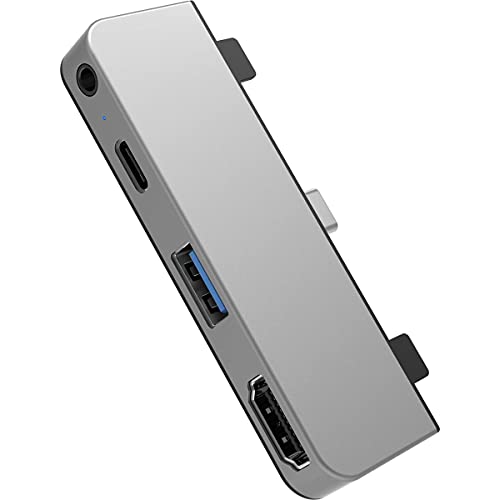 HyperDrive iPad Pro Hub (Silver)
|
Premium | Form-fitting aluminum sleeve | iPad users who want a tidy desk | Check Price | ||
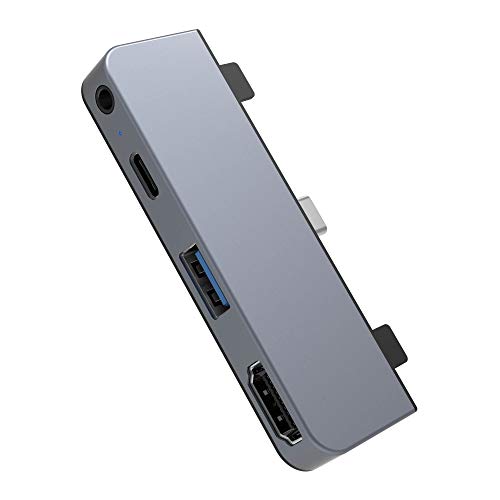 HyperDrive iPad Pro Hub (Space Gray)
|
Premium | Color-match aluminum finish | Students who want a discreet dock matching their tablet | Check Price | ||
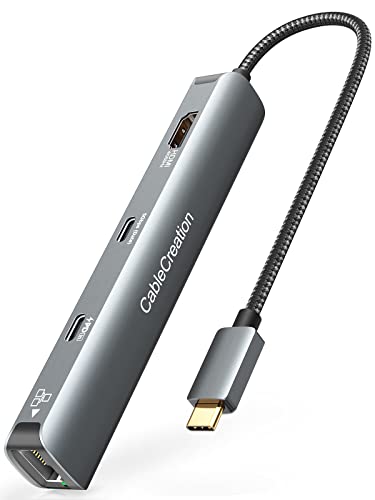 CableCreation 6‑in‑1 Hub
|
Mid-Range | 4K@60Hz HDMI plus 100W PD | Users who need ports and strong pass-through charging | Check Price | ||
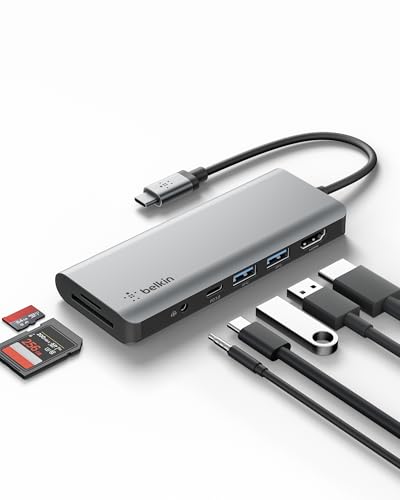 Belkin 7‑in‑1 Dock
|
Budget | SD + MicroSD slots with 85W PD | Students needing card readers and solid charging | Check Price | ||
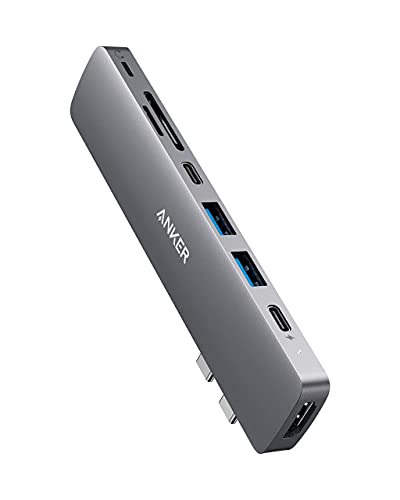 Anker 8‑in‑2 Hub
|
Budget | High-speed multi-function port (up to 5K support) | Users wanting broad compatibility and solid build | Check Price |
1. HyperDrive iPad Pro USB C Hub 4-in-1 USBC Hub w/ 4K30Hz HDMI, USB-C 5Gbps 60W PD, USB-A 5Gbps, 3.5mm Audio Jack Form-Fitting, Aluminum iPad Docking Station Compatible w/Air & Mini (Silver)
A compact, aluminum form-fitting dock built to match Apple devices — it adds HDMI, USB-C PD, USB-A and an audio jack without a full docking footprint. It’s a sleek option for small desks, but users report mixed fit/connectivity depending on device alignment, so check compatibility carefully.
Key Specs
- Ports: HDMI 4K@30Hz, USB-C 5Gbps (60W PD), USB-A 5Gbps, 3.5mm audio
- Material: Aluminum enclosure
- Designed for: iPad Pro/Air and compatible USB-C tablets
- Form factor: Side-mounted, plug-in docking
Pros
- Premium aluminum build that matches Apple finishes
- Essential port set for media and peripherals
- Keeps desk footprint minimal with a form-fitting design
Cons
- Some customers report inconsistent seat/fit on device edges
- A number of users experienced connectivity issues on certain devices
Best For: iPad users who want a tidy desk
Check Latest Price on Amazon2. HyperDrive iPad Pro USB C Hub 4-in-1 USBC Hub w/ 4K30Hz HDMI, USB-C 5Gbps 60W PD, USB-A 5Gbps, 3.5mm Audio Jack Form-Fitting, Aluminum iPad Docking Station Compatible w/Air & Mini (Space Gray)
Same hardware as the silver HyperDrive but in Space Gray — a tidy, design-forward hub for expanding an iPad’s connectivity. It offers the same port mix and charging support, with the same pros around build and minimal desk intrusion; pay attention to fit reports before buying.
Key Specs
- Ports: HDMI 4K@30Hz, USB-C 5Gbps (60W PD), USB-A 5Gbps, 3.5mm audio
- Material: Aluminum (Space Gray)
- Design: Form-fitting, side-mounted
- Use case: iPad Pro/Air docking
Pros
- Stylish finish that blends with Apple gear
- Good mix of ports for media and simple dock tasks
- Compact — conserves desk space
Cons
- Fit can be hit-or-miss on non-standard device edges
- Some reports of failing connectivity on a minority of units
Best For: Students who want a discreet dock matching their tablet
Check Latest Price on Amazon3. CableCreation 6-in-1 USB-C Hub/Multiport Adapter with 4K 60HZ HDMI, USB C Data Port, 1Gbps Ethernet, 100W Power Delivery, 2 USB 3.0 Port, for MacBook Pro Air M1, iPad Pro Air 2022-2018, XPS
A well-rounded mid-range hub that packs 4K60Hz HDMI, 100W pass-through charging and gigabit Ethernet into a slim, travel-ready shell. Customers praise its value, port mix and portability; a few users note heat buildup and occasional longevity concerns.
Key Specs
- Ports: 4K@60Hz HDMI, USB-C data, 2× USB 3.0, USB-C PD (100W), 1Gbps Ethernet
- Build: Aluminum shell with braided cable
- Extras: LED status indicator, travel pouch
- Compatibility: MacBook, iPad Pro, XPS and other USB-C devices
Pros
- Excellent value for the number of ports and PD wattage
- Supports 4K@60Hz for smoother external displays
- Includes Ethernet and a durable-feeling aluminum housing
Cons
- Tends to run hot under heavy use (HDMI + PD)
- Some users report functionality issues after months of use
Best For: Users who need ports and strong pass-through charging
Check Latest Price on Amazon4. Belkin USB-C Hub, 7-in-1 MultiPort Docking Station for MacBook & Windows - 85W USB-C Power Delivery 3.0, 4K HDMI 1.4, 2x USB-A 3.0, SD 3.0, Micro SD 3.0, & 3.5mm Audio Jack
A compact, budget-focused dock that covers everyday dorm needs: HDMI, SD/microSD, two USB-A ports and strong pass-through charging. Users like its portability and utility; others report mixed reliability and differences in power delivery behavior on some laptops.
Key Specs
- Ports: 4K HDMI 1.4 (30Hz), 2× USB-A 3.0, SD 3.0, MicroSD 3.0, 3.5mm audio, USB-C PD 85W
- Power: USB-C Power Delivery 3.0 support
- Design: Compact, plug-and-play
- Compatibility: Works with Mac and Windows laptops
Pros
- Wide port variety including SD/microSD for content creators
- Compact and easy to toss in a backpack
- Good pass-through charging potential for many laptops
Cons
- Mixed reports of functionality and occasional failures after months
- Some users find power delivery behavior inconsistent on certain models
Best For: Students needing card readers and solid charging
Check Latest Price on Amazon5. Anker USB-C Hub for MacBook, 8-in-2 Adapter Compatible with Thunderbolt 3 USB-C Port, 4K HDMI, USB-A&C 3.0 Data Ports, SD Card, Lightning Audio
Anker’s compact multiport hub brings an impressive spec sheet for the price, with high-speed ports, card readers and audio support. Owners praise its design and snug fit, but several report the hub gets hot when driving HDMI while charging — something to watch on small shared desks.
Key Specs
- Ports: HDMI (4K@30Hz), 2× USB-A, USB-C data, SD & microSD, Lightning audio
- Performance: Multi-function port supports high PD and up to 5K in some modes
- Warranty: 18-month coverage
- Design: Ultra-compact adapter
Pros
- Strong build quality and snug fit on many Macs
- High port density and flexible display options
- Trusted brand support and warranty
Cons
- Prone to heat buildup when HDMI and charging are used simultaneously
- Some users report reduced longevity under heavy daily use
Best For: Users wanting broad compatibility and solid build
Check Latest Price on AmazonWhich One Should You Choose?
If budget is tight → choose the Belkin 7‑in‑1 Dock (B091KKB74Y) for a broad set of everyday ports and compact size. If you want the most features per dollar → pick the CableCreation 6‑in‑1 (B09C5MXBLN) for 4K@60Hz, 100W PD and Ethernet. If you want a compact, premium-looking dock that preserves desk real estate and matches Apple styling → go with the HyperDrive iPad Pro Hub (B084WTM4Q8 / B084JFJGGP), but double‑check fit and compatibility before buying.
Best for Specific Scenarios
- Streaming lectures to an external monitor: CableCreation 6‑in‑1 (B09C5MXBLN) because it supports 4K@60Hz for smooth video and includes Ethernet for stable uploads.
- Small desk & sleek setup: HyperDrive iPad Pro Hub (B084WTM4Q8) because its form‑fitting aluminum design keeps the footprint minimal and matches Apple devices.
- Everyday student bundle (cards + charging): Belkin 7‑in‑1 Dock (B091KKB74Y) because it includes SD/microSD slots, audio jack and strong pass‑through charging in a compact package.
Frequently Asked Questions
Will these hubs charge my laptop while I use them?
Many of the reviewed hubs support USB‑C Power Delivery (PD) pass‑through that can charge a laptop while connected to peripherals. Check the hub’s PD wattage — higher wattage (e.g., 85–100W) handles larger laptops better. Confirm your laptop accepts power over its USB‑C port and that the hub’s PD rating matches your needs.
Do all hubs support external monitors at 4K 60Hz?
No. Video output depends on the hub’s HDMI/DP standard and your host device’s DP Alt Mode support. Some compact hubs offer 4K@30Hz (common in budget units), while mid‑range hubs can provide 4K@60Hz. Verify both the hub spec and your laptop/tablet’s video output capability.
Are these hubs safe to leave plugged in all the time?
Most are safe for continuous use, but hubs that report heat buildup (especially when driving HDMI and PD simultaneously) should be placed with ventilation and not stacked under devices. Aluminum shells help with heat dissipation; still avoid prolonged heavy load on poorly ventilated setups.
How We Selected These Products
Our recommendations are based on data-driven analysis: we evaluated 155229+ products across 23916+ brands using a composite scoring system that weighs rating (40%), review volume (30%), price value (20%), and demand signals (10%). Every product is ranked by data, not opinions.
Last updated: August 07, 2026
As an Amazon Associate we earn from qualifying purchases at no extra cost to you. Full disclosure.
GearLark Score is our editorial ranking based on a composite analysis of product quality, value, and verified customer sentiment. Click through to Amazon for current pricing, availability, and live customer reviews.