As an Amazon Associate we earn from qualifying purchases. Learn more.
Best Multi-Port USB-C Hubs for Dorm Desks (2026)
Dorm desks are small, power outlets and monitor arms are limited, and you often want to connect a monitor, wired Ethernet and a few USB peripherals with one tidy cable. This roundup tests hubs that add those essential ports and let you hook a monitor via a single USB-C connection. We focused on devices that balance port variety, build quality, and compact footprints suitable for small desks. Products were selected from recent multiport hubs with gigabit Ethernet, HDMI/DisplayPort outputs, PD passthrough and a mix of USB and card readers; customer feedback on reliability, heat and power delivery was also weighed.
Quick Answer
If you need a single-cable monitor hookup plus a full set of ports for a cramped dorm desk, the FALWEDI 14-in-1 Docking Station (ASIN B0B9BG7K1Z) is the best overall choice — it packs the most ports and supports 4K output while remaining compact. For strict budgets, the Lemorele 10-in-1 (ASIN B0BZPMX4MB) gives top port density for the price.
Our Top Picks
Quick Comparison
Select 2-3 products to compare side-by-side
| Compare | Product | GearLark Score | Price Tier | Key Feature | Best For | Action |
|---|---|---|---|---|---|---|
 FALWEDI 14-in-1 Dock
|
Budget | 14 ports incl. 2 HDMI + DP | Users needing many ports and 4K monitor hookup | Check Price | ||
 uni 8-in-1 Hub
|
Premium | Detachable cable + 100W PD | Traveling students who want a neat, replaceable cable | Check Price | ||
 LENTION Hub
|
Mid-Range | Stable Driver 3.0 standard | MacBook and Surface users wanting reliable basics | Check Price | ||
 Upgrow 13-in-1 Dock
|
Premium | All-in-one port selection | Students who need legacy video (VGA) + HDMI | Check Price | ||
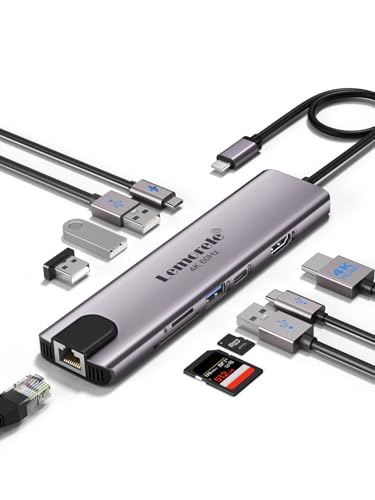 Lemorele 10-in-1
|
Budget | 4K@60Hz HDMI + 100W PD | Users who want higher-refresh 4K on a budget | Check Price | ||
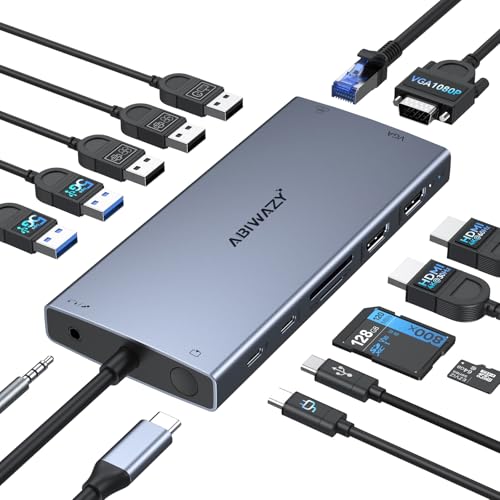 ABIWAZY 15-in-1 Dock
|
Mid-Range | Triple-display with screen switch | Users who want multi-monitor expansion from one hub | Check Price |
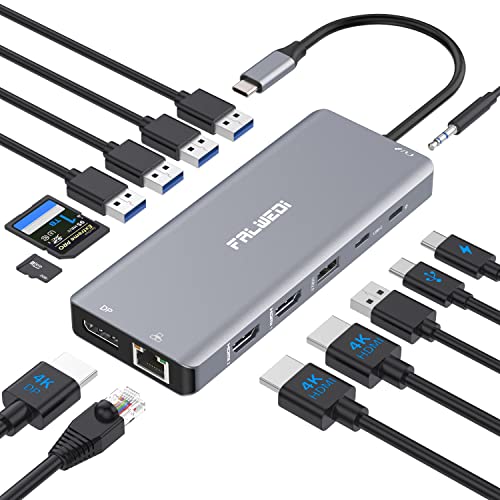
1. Laptop Docking Station Dual Monitor, 14 in 1 USB C Hub Multiport Adapter Dongle with 2 HDMI, DisplayPort, Ethernet, SD/TF, USB C/A Ports, PD, Mic/Audio, Compatible for MacBook Dell HP Lenovo
This compact aluminum 14-in-1 dock brings two HDMI ports, DisplayPort, gigabit Ethernet, SD/TF readers, multiple USB-A and a PD port into one unit — perfect for a dorm desk that needs a single-cable monitor and wired networking. Customers praise the build quality, port capacity and plug-and-play ease, though a minority report intermittent charging or connection drops on certain laptops.
Key Specs
- 2× HDMI + 1× DisplayPort (4K support)
- PD3.0 pass-through (input max 100W, ~87W output)
- Gigabit Ethernet (1000Mbps)
- SD & TF card reader, multiple USB-A ports
- Solid aluminum housing
Pros
- Very wide port selection for small desks
- Sturdy aluminum build and compact size
- Supports 4K external displays
Cons
- Some reports of intermittent charging/connectivity
- MacOS multitask display limits and DP/MST caveats
Best For: Users needing many ports and 4K monitor hookup
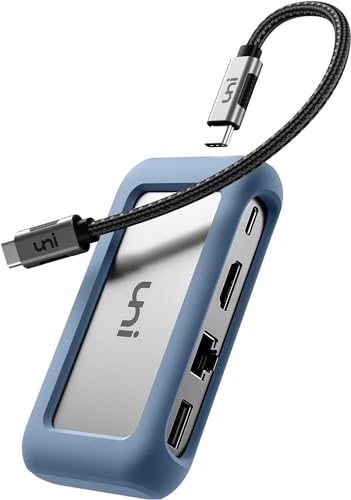
Check Latest Price on Amazon2. uni USB C Hub Multiport Adapter with Detachable Cable, 8-in-1 USB C Hub with 4K HDMI, 1Gbps Ethernet, SD Card Reader, 100W PD, Compatible for MacBook Pro 2023, iPad Pro 2023, Galaxy S24/S23 & More
uni's compact 8-in-1 hub stands out for its detachable cable and polished build — making it easy to pack and swap cables for different setups. It offers 4K HDMI, 1Gbps Ethernet, dual SD card readers and 100W PD charging. Users like the portability and value, though a few have reported mixed durability and occasional limits with certain USB accessories or 4K refresh expectations.
Key Specs
- HDMI up to 4K@30Hz
- 100W Power Delivery passthrough
- 1Gbps Ethernet port
- 2× USB 3.0, 1× USB 2.0, SD/MicroSD slots
- Detachable USB-C cable
Pros
- Detachable cable adds flexibility and longevity
- Solid build quality and compact footprint
- Good selection for common dorm needs
Cons
- Some users report durability concerns over time
- 4K limited to 30Hz on many hosts
Best For: Traveling students who want a neat, replaceable cable
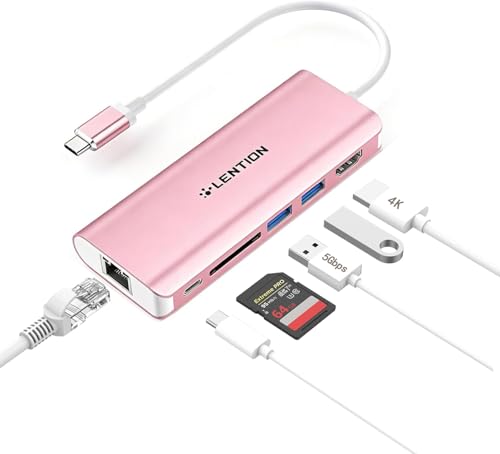
Check Latest Price on Amazon3. LENTION USB C Hub with 4K HDMI, SD Card Reader, 2 USB 3.0, Type C Charging & Ethernet Compatible 2025-2016 MacBook Pro, 2025-2018 Mac Air/Surface/Steam Deck, More, Stable Driver Adapter (Rose Gold)
LENTION focuses on a clean set of essentials: dual USB 3.0 ports, SD reader, gigabit Ethernet and 4K HDMI (30Hz) with 60W PD passthrough. The vendor promotes a 'Stable Driver 3.0' approach to reduce peripheral interference. Buyers appreciate the look and value, but expect the unit to run warm and understand 60W passthrough may be borderline for power-hungry laptops.
Key Specs
- HDMI up to 4K@30Hz (or 2K@60Hz)
- USB-C passthrough up to 60W
- Gigabit Ethernet (1000Mbps)
- 2× USB 3.0 ports, SD card slot
- Stable Driver 3.0 compatibility claim
Pros
- Well-made with attractive finish
- Good variety of everyday ports
- Designed to limit peripheral interference
Cons
- Can run hot under heavy use
- 60W PD may not fully charge larger laptops
Best For: MacBook and Surface users wanting reliable basics
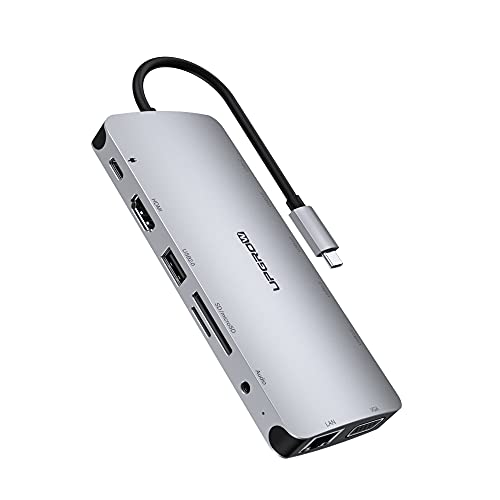
Check Latest Price on Amazon4. USB C Docking Station, MacBook HDMI Adapter 13-in-1 UPGROW Type-C Hub with 4K HDMI,VGA,USB 3.0&2.0, USB C/F, PD Charger, SD/TF, RJ45, Aux, USB C Ethernet Adapter Splitter for Most Type C Laptops
The Upgrow 13-in-1 packs HDMI, VGA, multiple USB ports, SD/TF readers, audio jack and gigabit Ethernet into a neat shell. It emphasizes portability and broad compatibility, and customers like the sleek look and practical layout. Note the vendor recommends keeping a PD charger connected for stable operation with high-draw USB devices.
Key Specs
- HDMI 4K@30Hz; VGA 1080p@60Hz
- 60W PD passthrough
- Gigabit Ethernet (RJ45)
- 5× USB ports (USB3.0 & 2.0), SD/TF slots
- 3.5mm audio jack
Pros
- Extensive legacy and modern ports in one unit
- Compact and attractive design
- Works well when PD power is supplied
Cons
- Needs PD connected for some peripherals to work reliably
- Manufacturer notes caveats about device current limits
Best For: Students who need legacy video (VGA) + HDMI
Check Latest Price on Amazon5. Lemorele USB C Hub Multiport Adapter 10-in-1 for MacBook Pro with HDMI 4K 60Hz, Gigabit Ethernet, 100W Power Delivery, 2 USB 3.0 Ports, SD/TF Card Reader, for HP/Dell/Lenovo Laptops
Lemorele advertises 4K@60Hz HDMI, 100W PD and strong protection circuitry in a compact hub — an attractive proposition for users who want higher-refresh 4K. Customers praise the port density and look, but some report the unit gets very hot and the short cable can be inconvenient on a desk.
Key Specs
- HDMI up to 4K@60Hz
- 100W Power Delivery passthrough
- Gigabit Ethernet (100/1000M)
- 2× USB 3.0 + 2× USB 2.0, SD/TF slots
- Compact size with short cable
Pros
- Supports 4K@60Hz on compatible hosts
- High power passthrough for fast charging
- Good port mix for the price
Cons
- Prone to running hot under load
- Very short USB-C cable limits placement
Best For: Users who want higher-refresh 4K on a budget
Check Latest Price on Amazon6. USB C Docking Station Dual Monitor for Dell/HP/Lenovo/Surface Laptop,15 in 1 Triple Display Multiport Adapter Hub, USBC Dock Dongle with 2 HDMI+VGA+6 USB C/A+Button+100W PD +Ethernet+SD/TF+Audio
ABIWAZY's 15-in-1 hub targets users who need two HDMI outputs plus VGA and a screen on/off button to manage displays. It supports 100W PD passthrough and many USB ports. While customers appreciate the port capacity and build, some report intermittent HDMI behavior and power supply limitations on certain laptops.
Key Specs
- 2× HDMI (4K@60Hz + 4K@30Hz) + VGA 1080p
- 100W Power Delivery passthrough (shared)
- Gigabit Ethernet (1000Mbps)
- Multiple USB-A/C ports, SD/TF card readers
- Screen on/off button and indicator lights
Pros
- Extremely broad port selection and monitor support
- Handy display switch button for dorm setups
- Solid construction and many connection options
Cons
- Some users report HDMI output instability
- Power allocation can be tight when many ports are active
Best For: Users who want multi-monitor expansion from one hub
Check Latest Price on AmazonWhich One Should You Choose?
If you want the most ports for a small desk and a single-cable monitor hookup, choose the FALWEDI 14-in-1 Dock (B0B9BG7K1Z). If budget is tight but you still want high power and good port density, go with the Lemorele 10-in-1 (B0BZPMX4MB). If you value portability and a replaceable cable, pick the uni 8-in-1 (B07Q6YS7W2). For a neat balance of design, reliability and standard features, LENTION (B076F71NQF) is the best value. If you need legacy video ports (VGA) or an all-in-one travel dock, Upgrow (B088GFHHHP) fits well. For maximum monitor expansion and controls, consider the ABIWAZY 15-in-1 (B0DTT1DPN8).
Best for Specific Scenarios
- Single-cable monitor + Ethernet: FALWEDI 14-in-1 — it combines DisplayPort/HDMI and gigabit Ethernet in a compact aluminum body.
- Small budget, high power passthrough: Lemorele 10-in-1 — offers 100W PD and 4K@60Hz at a low price point.
- Travel and replaceable parts: uni 8-in-1 — detachable cable and compact design make it easy to carry and adapt to different setups.
Frequently Asked Questions
Will a USB-C hub charge my laptop while also running a monitor?
Many hubs support Power Delivery passthrough so they can charge the laptop and drive a monitor at the same time. Check the hub's PD wattage — larger laptops may need 85–100W to charge while under heavy load; hubs with lower PD (60W) may only maintain or slowly charge smaller laptops.
Can I connect multiple external monitors through a single hub?
Some multiport docks support dual or triple monitors, but behavior varies by host and OS. Windows laptops with DisplayPort MST or Thunderbolt 4 often handle multiple extended displays; macOS may mirror rather than extend on some hubs. Verify the hub's multi-monitor support and your laptop's display output capability before assuming extended multi-monitor performance.
My hub gets hot — is that normal and should I be worried?
Hubs can run warm during heavy use because they contain active chips and power conversion. A warm-to-hot casing under load is common, but extreme heat that causes disconnections or discoloration isn't normal. Choose hubs with metal housings for better heat dissipation and look for units with customer reports of stable long-term use or a solid warranty.
How We Selected These Products
Our recommendations are based on data-driven analysis: we evaluated 155229+ products across 23916+ brands using a composite scoring system that weighs rating (40%), review volume (30%), price value (20%), and demand signals (10%). Every product is ranked by data, not opinions.
Last updated: August 06, 2026
As an Amazon Associate we earn from qualifying purchases at no extra cost to you. Full disclosure.
GearLark Score is our editorial ranking based on a composite analysis of product quality, value, and verified customer sentiment. Click through to Amazon for current pricing, availability, and live customer reviews.