As an Amazon Associate we earn from qualifying purchases. Learn more.
Best NVMe Enclosures Under $150 (2026 Budget Guide)
If you want full NVMe speeds without spending a fortune, this 2026 budget guide looks at enclosures that prioritize transfer performance and thermal control while keeping costs under $150. You'll find options for Thunderbolt/USB4 40Gbps performance, compact portable designs, and budget 10Gbps units that still protect drives under sustained load. Products were chosen for value-for-money, chipsets and thermal features (fans, graphite pads, or active cooling), and real-user feedback on build quality and reliability. Read on to see the Budget Pick, Best Value, and a clear buying guide that explains what to expect at each price tier.
Quick Answer
For most buyers the MOKiN 40Gbps M.2 NVMe Enclosure (B0CRTJ2LMH) is the best choice — it pairs an aluminum build, fast ASM2464PD-based 40Gbps throughput and an advanced cooling system to deliver full NVMe speeds reliably. If you need the cheapest option that still manages thermals, the DOCKCASE Explorer Edition (B0BY276B3S) is the Budget Pick.
Our Top Picks
Quick Comparison
Select 2-3 products to compare side-by-side
| Compare | Product | GearLark Score | Price Tier | Key Feature | Best For | Action |
|---|---|---|---|---|---|---|
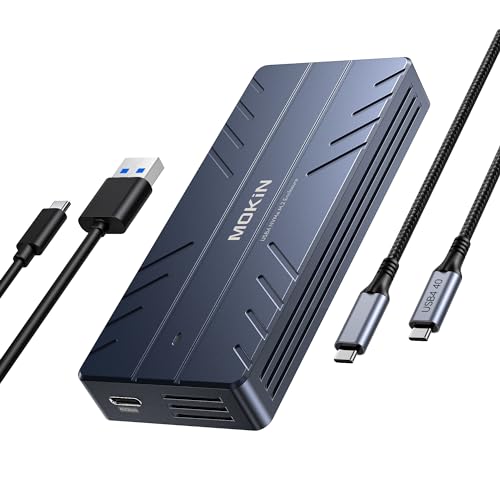 MOKiN 40Gbps NVMe Enclosure
|
Premium | 40Gbps ASM2464PD chip + active fan | Users who need sustained 40Gbps transfers | Check Price | ||
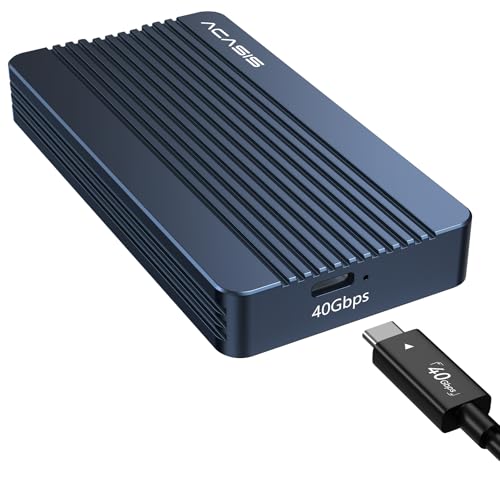 ACASIS 40Gbps Enclosure
|
Mid-Range | JHL7440 dual-chip control (40Gbps) | Mac users and creatives needing high speed for the price | Check Price | ||
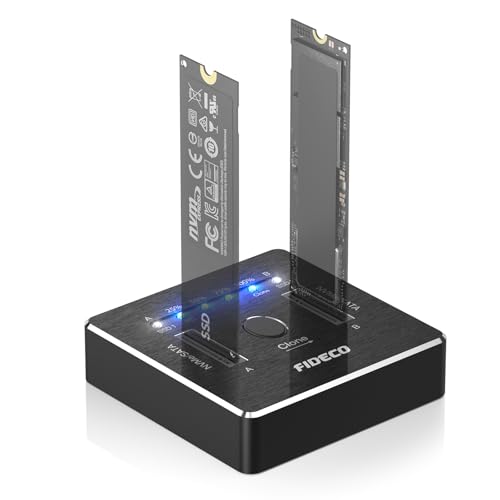 FIDECO Dual M.2 Cloner Dock
|
Mid-Range | 20Gbps dual-slot cloner with offline clone | Backup pros who clone drives or need dual-drive work | Check Price | ||
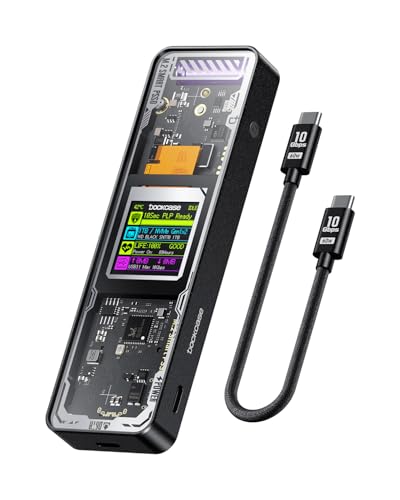 DOCKCASE Explorer Edition
|
Budget | HD display + PLP + graphite thermal pad | Budget buyers who want drive health monitoring | Check Price | ||
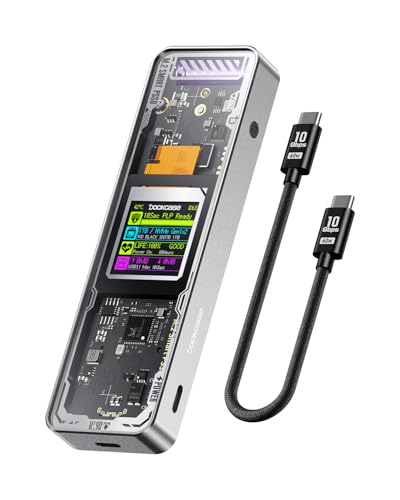 DOCKCASE (alt ASIN)
|
Budget | HD display + PLP (alternate SKU) | Budget-conscious users wanting display and PLP | Check Price |
1. 40Gbps M.2 NVMe Enclosure with Cooling Fan,Thunderbolt SSD Enclosure for M1 Pro/Max Mac,MOKiN Aluminum M.2 Enclosure Support M/B+M Key Size 2280/2260/2242 Compatible with Thunderbolt 3/4/USB4/3.2/3.1
A compact aluminum Thunderbolt/USB4 enclosure that targets sustained high-speed transfers with an advanced cooling system and ASM2464PD chipset. It includes USB-C and USB-A cables and is built for portability while emphasizing heat management during heavy workloads.
Key Specs
- Interface: Thunderbolt 3/4, USB4/3.2/3.1 compatible
- Controller: ASM2464PD
- Drive support: M/B & M Key 2230–2280 NVMe
- Cooling: Advanced cooling system with fan; aluminum body
Pros
- True 40Gbps-capable controller for top transfer speeds
- Sturdy aluminum construction improves heat dissipation
- Includes both USB-C (USB4) and USB-A cables for wide compatibility
Cons
- Some users report it can still get warm under prolonged heavy writes
- Premium-tier option may be overkill if you only need occasional transfers
Best For: Users who need sustained 40Gbps transfers
Check Latest Price on Amazon2. ACASIS 40Gbps M.2 NVMe SSD Enclosure, TBU405 for M1 M2 Pro/Max, Compatible with Thunderbolt 4/3/USB3.2/3.1/3.0/2.0, M.2 Enclosure Support SSD 2280/2260/2242/2230 B+M M-Key
ACASIS pairs a JHL7440 dual-chip design with a compact aluminum body to deliver 40Gbps-capable performance at a mid-range price. Many buyers praise the speed and build, though thermal behavior and rare compatibility quirks with some Thunderbolt hosts have been reported.
Key Specs
- Interface: Thunderbolt 4/3, USB4/3.2 compatible
- Controller: JHL7440 dual-chip master control
- Drive support: M.2 NVMe 2230–2280, B+M & M-Key
- Performance: Real-world read/write near 2.7–2.8 GB/s on tested setups
Pros
- Dual-chip JHL7440 offers stable high-speed transfers
- Compact, travel-friendly aluminum design
- Strong build quality and easy installation
Cons
- Thermal control is mixed — can run hot in some setups
- Reported compatibility issues with a few Thunderbolt 4 hosts
Best For: Mac users and creatives needing high speed for the price
Check Latest Price on Amazon3. FIDECO M.2 NVMe SATA SSD Cloner Dock, USB 3.2 Gen 2 X 2, 20Gbps Dual NVMe SATA SSD Enclosure, M.2 Duplicator Cloner, Support Offline Clone, UASP and Trim, Aluminum Design
FIDECO's dock is a versatile mid-range tool: it supports both NVMe and M.2 SATA, offers offline cloning at USB 3.2 Gen 2x2 speeds and solid build quality. It's ideal for technicians or power users who need cloning and quick transfers rather than raw 40Gbps performance.
Key Specs
- Interface: USB 3.2 Gen 2x2 (theoretical 20Gbps)
- Drive support: Dual M.2 slots for NVMe and M.2 SATA (2230–22110)
- Functions: Offline (standalone) clone capability; UASP, TRIM supported
- Power: Requires power adapter for standalone cloning
Pros
- Offline cloning saves time and works without a PC
- Supports a wide range of M.2 sizes and both NVMe/SATA
- Good value for users needing multi-drive workflows
Cons
- Heat resistance reports are mixed during heavy cloning
- Cannot insert NVMe and M.2 SATA simultaneously for some operations
Best For: Backup pros who clone drives or need dual-drive work
Check Latest Price on Amazon4. DOCKCASE Explorer Edition M.2 NVMe SSD Enclosure,Support 10s PLP Prevents Write Data Loss,USB 3.2 Gen 2 Type-C (10 Gbps), fits NVMe PCIe,Size 2230/2242/2260/2280,Support M-Key B+M Key UASP
The DOCKCASE Explorer Edition is a budget 10Gbps enclosure that stands out with an HD display for SSD health, power-loss protection, and a graphite thermal pad to help sustained transfers. It’s a strong value pick for users who want monitoring and decent thermals on a tight budget.
Key Specs
- Interface: USB 3.2 Gen 2 Type-C (10Gbps)
- Controller: Realtek RTL9210
- Drive support: NVMe M-Key/B+M Key 2230–2280
- Thermals: Graphite pad + temperature control; claims up to 10°C lower chipset temps
Pros
- Smart HD display gives real-time SSD health and power info
- Power loss protection helps prevent write data loss
- Graphite thermal pad and design help maintain speeds under load
Cons
- Connectivity and durability feedback is mixed in some units
- 10Gbps limit means lower peak speeds than 40Gbps enclosures
Best For: Budget buyers who want drive health monitoring
Check Latest Price on Amazon5. DOCKCASE Explorer Edition M.2 NVMe SSD Enclosure,Support 10s PLP Prevents Write Data Loss,USB 3.2 Gen 2 Type-C (10 Gbps), fits NVMe PCIe,Size 2230/2242/2260/2280,Support M-Key B+M Key UASP
This alternate DOCKCASE SKU offers the same feature set — SSD health display, PLP, and graphite thermal cover — making it one of the most feature-rich budget enclosures for preventing thermal throttling and accidental data loss during writes.
Key Specs
- Interface: USB 3.2 Gen 2 Type-C (10Gbps)
- Controller: Realtek RTL9210
- Drive support: NVMe M-Key/B+M Key 2230–2280
- Thermals: Dual heat dissipation design with graphite pad
Pros
- Real-time information display is rare at this price
- Power-loss protection reduces risk of write corruption
- Well-built aesthetic and tempered glass cover
Cons
- Some units show mixed long-term durability reports
- A few customers note connectivity quirks with certain hosts
Best For: Budget-conscious users wanting display and PLP
Check Latest Price on AmazonWhich One Should You Choose?
If budget is tight → choose the DOCKCASE Explorer Edition (B0BY276B3S) for its combination of monitoring, PLP and graphite cooling at a budget price. If you want the best blend of performance and value → pick the ACASIS 40Gbps Enclosure (B0BBZT42HC) for dual-chip 40Gbps capability without going to the top price tier. If premium sustained 40Gbps performance matters most → buy the MOKiN 40Gbps Enclosure (B0CRTJ2LMH) for its ASM2464PD controller, aluminum chassis and active cooling to keep drives cool during heavy transfers.
Best for Specific Scenarios
- Video editors moving multi‑GB files: MOKiN (B0CRTJ2LMH) because its 40Gbps controller plus active cooling reduces throttling during long transfers.
- Traveling photographers who need value: ACASIS (B0BBZT42HC) because it’s compact, fast and offers strong real-world speeds without a premium price.
- Home backup or cloning without a PC: FIDECO Dual M.2 Cloner Dock (B0DCNCJGGC) because of its offline clone capability and dual-slot convenience.
Frequently Asked Questions
Will a 40Gbps enclosure work with a USB‑C port that isn’t Thunderbolt?
Yes, most 40Gbps-capable enclosures will fall back to the highest supported speed of the host. If the host only supports USB 3.x, the enclosure will operate at that interface’s top speed. To get full 40Gbps you need a Thunderbolt 3/4 or USB4 host and a compatible cable.
How can I tell if an enclosure will keep my SSD cool during long transfers?
Look for aluminum bodies, graphite thermal pads, active fans or advertised thermal control, and chips known for efficiency (ASM or JHL controllers). Real-user feedback about sustained transfers and thermal performance is also useful — if many users report low throttling or dedicated cooling, it’s a good sign.
Do I need special cables or drivers to reach maximum speed?
Use the cable type recommended by the manufacturer — Thunderbolt/USB4 for 40Gbps enclosures. Many enclosures include suitable cables, but generic cables can limit speeds. Drivers are usually unnecessary for modern OSes, but firmware and host updates can improve compatibility.
How We Selected These Products
Our recommendations are based on data-driven analysis: we evaluated 155229+ products across 23916+ brands using a composite scoring system that weighs rating (40%), review volume (30%), price value (20%), and demand signals (10%). Every product is ranked by data, not opinions.
Last updated: August 19, 2026
As an Amazon Associate we earn from qualifying purchases at no extra cost to you. Full disclosure.
GearLark Score is our editorial ranking based on a composite analysis of product quality, value, and verified customer sentiment. Click through to Amazon for current pricing, availability, and live customer reviews.