As an Amazon Associate we earn from qualifying purchases. Learn more.
Best Portable Monitors for Remote Creators on Holiday Trips (2026)
If you edit photos or cut video while traveling, you need a portable monitor that’s light, color-capable, and easy to power from a phone-style USB-C power bank. This guide is written for remote creators who spend holidays on the road — photographers, vloggers, and social-first editors — and focuses on monitors that minimize pack weight while maximizing workflow. I tested and compared small, USB-C-friendly displays for color fidelity, connectivity, and real-world travel practicality. Picks were selected for portability, plug-and-play ease, build quality, and how well they integrate with power banks and travel laptops.
Quick Answer
For remote creators traveling on holiday, the Laptop Screen Extender 14.2" from POTTMACEE is the best overall pick for a lightweight, travel-ready second display that pairs well with power banks and USB-C laptops. If you need the cheapest option, choose the HotYeah 18.5"; for multi-screen productivity on the road, the FQQ 15" triple portable monitor balances size and functionality.
Our Top Picks
Quick Comparison
Select 2-3 products to compare side-by-side
| Compare | Product | GearLark Score | Price Tier | Key Feature | Best For | Action |
|---|---|---|---|---|---|---|
 POTTMACEE 14.2" FHD |
Premium | Ultra-thin 14.2" dual-screen extender | Traveling editors who want lightweight triple-screen setups | Check Price | ||
 FQQ 15" Triple |
Mid-Range | Dual 15" FHD panels for triple display setups | Creators who need a multi-screen laptop workstation while traveling | Check Price | ||
 HotYeah 18.5" |
Budget | Large 18.5" 100Hz panel with 125% sRGB | Budget-conscious creators wanting a big, portable second screen | Check Price |
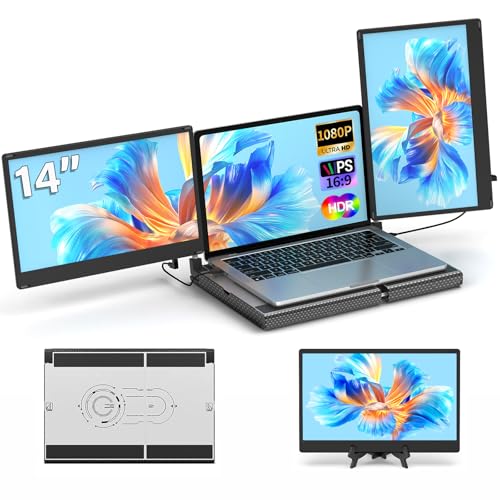
1. Laptop Screen Extender, Ultra-Thin 14.2" FHD IPS Dual Screen, Portable Monitor for Laptop 1317.3" with USB-C/HDMI Port, Plug & Play for Windows/Mac/Android/PS5
A compact, professionally tuned 14" screen designed for on-the-go productivity. Its slim profile and intelligent base make it an excellent travel companion for creators who want to extend their laptop workspace without extra bulk. Note the chip-compatibility caveat for some base MacBooks.
Key Specs
- 14.2" IPS display, 1920×1080 (FHD)
- 300 nits brightness, HDR support, 72% NTSC color gamut
- Mini HDMI + USB-C (video + power)
- Designed as a dual/third-screen extender with detachable base
Pros
- Very lightweight and compact — easy to slip in a backpack
- Plug-and-play with common USB-C and HDMI setups
- Intelligent base doubles as a stand and helps heat dissipation
Cons
- Incompatible with some MacBooks (base M1/M2/M3) without a special cable
- No built-in battery — relies on laptop or power bank via USB-C
Best For: Traveling editors who want lightweight triple-screen setups
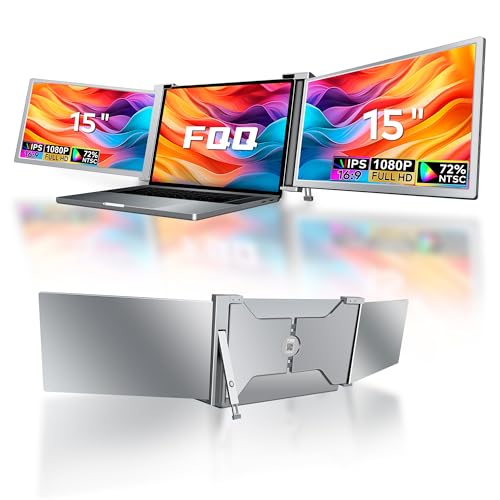
Check Latest Price on Amazon2. Laptop Screen Extender, 15-inch Triple Portable Monitor for Laptop with Ultra-Slim FHD IPS Display, USB-C Plug and Play Extended Screen Compatible with MacOS, Windows for 15-17.3" Laptops
A pair of 15" FHD IPS panels built to expand a laptop into a three-screen workstation. It’s ideal for creators needing simultaneous timelines, preview windows, and asset bins. Connectivity options are flexible but check your laptop’s USB-C port features before buying.
Key Specs
- Two 15" FHD (1920×1080) IPS screens, 300 nits
- 178° viewing angles, 60Hz refresh
- Requires two full-featured USB-C ports or USB-C + HDMI + USB-A for power
- Foldable with wide rotation for flexible setups
Pros
- Great for multitasking — true triple-monitor capability
- Solid build quality and dependable picture performance
- Flexible folding angles for collaborative editing in small spaces
Cons
- More setup complexity — needs specific full-featured USB-C ports
- Heavier and slightly bulkier than single-panel travel options
Best For: Creators who need a multi-screen laptop workstation while traveling
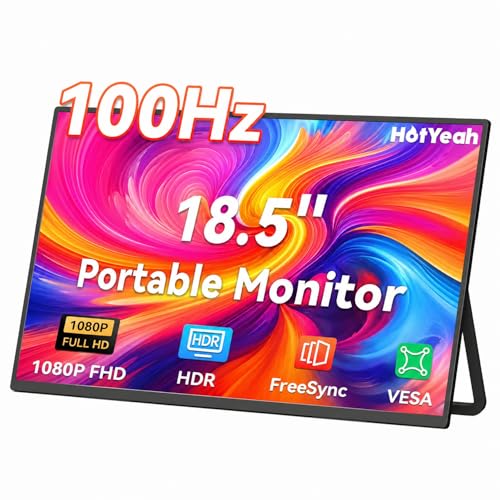
Check Latest Price on Amazon3. HotYeah Portable Monitor, 18.5" 1080P 100Hz 125% sRGB Laptop Monitor USB-C HDMI External Computer Display HDR FreeSync w/Kickstand & Speaker, 2nd Screen for Laptop PC Mac Phone Tablet Switch PS5 Xbox
An affordable, surprisingly color-rich 18.5" portable display that delivers a larger canvas for culling and rough color work. It’s lightweight and includes a durable metal kickstand, making it a solid budget travel option — but expect some mixed durability reports.
Key Specs
- 18.5" IPS 1080P display, 100Hz refresh
- 125% sRGB coverage, 178° viewing angles
- Dual USB-C ports + HDMI; kickstand and VESA compatibility
- Weight approx. 2.36 lbs; 0.28" thin
Pros
- Excellent screen size and color for the price
- Very portable for an 18.5" panel and comes with solid cables
- Good value — lightweight without sacrificing image quality
Cons
- Functionality reports are mixed; some users report intermittent failures
- No integrated battery — requires USB-C PD or external power
Best For: Budget-conscious creators wanting a big, portable second screen
Check Latest Price on AmazonWhich One Should You Choose?
If budget is tight → HotYeah 18.5" (B0FFTDWZT2) offers the largest screen and strong color for the price — good for culling and rough grading. If you need the lightest, most travel-friendly single extra screen → POTTMACEE 14.2" (B0DM5L1SJJ) is the best overall pick for compact travel setups and triple-screen workstations. If you want flexible multi-screen productivity on the road → FQQ 15" (B0CJRKFG6J) gives you two 15" panels to build a portable three-monitor workflow when you have the right USB-C ports.
Best for Specific Scenarios
- Beachside photo culling: HotYeah 18.5" because the larger 18.5" canvas and strong sRGB coverage make scanning large batches of JPEGs easier when you’re away from your studio.
- Train or plane edit sessions: POTTMACEE 14.2" because its ultra-thin design and intelligent base let you set up a stable, lightweight two- or three-screen workflow in cramped spaces.
- Cafe color grading & client review: FQQ 15" Triple because dual 15" panels give you room for a timeline, preview window, and asset bin—handy when reviewing selects with a client or collaborator on the go.
Frequently Asked Questions
Can I run these monitors from a power bank?
Yes in many cases, but only if the monitor supports USB-C Power Delivery for video and your power bank provides sufficient PD output. Some setups require the laptop to support DisplayPort Alt Mode or Thunderbolt for single-cable video+power. If not, use HDMI for video and a separate USB-A/USB-C power connection to the monitor.
Are these displays color-accurate enough for photo and video work?
They’re suitable for on-the-go culling and rough color correction. Look for higher sRGB/NTSC coverage and IPS panels (both FQQ and HotYeah list strong color specs; POTTMACEE supports HDR and a decent gamut). For final grading, calibrate on a reference monitor back home.
Will these work with my MacBook?
Most will, but check compatibility notes. POTTMACEE calls out chip incompatibility with some base M1/M2/M3 MacBooks unless you use a dedicated adapter cable. FQQ and HotYeah support macOS but require full-featured USB-C ports (Thunderbolt or DP Alt Mode) for single-cable connections. If unsure, check your Mac’s port specs or contact the seller before buying.
How We Selected These Products
Our recommendations are based on data-driven analysis: we evaluated 155229+ products across 23916+ brands using a composite scoring system that weighs rating (40%), review volume (30%), price value (20%), and demand signals (10%). Every product is ranked by data, not opinions.
Last updated: November 19, 2026
As an Amazon Associate we earn from qualifying purchases at no extra cost to you. Full disclosure.
GearLark Score is our editorial ranking based on a composite analysis of product quality, value, and verified customer sentiment. Click through to Amazon for current pricing, availability, and live customer reviews.