As an Amazon Associate we earn from qualifying purchases. Learn more.
Best SD Card Readers Under $40 for Mobile Photo Editing (2026 Budget Guide)
If you edit photos on your phone, iPad, or laptop while traveling or at holiday events, a compact SD card reader or card-enabled USB-C hub is one of the simplest ways to get images into your editor fast. This 2026 budget guide looks at dependable, value-first options that emphasize transfer speed, device compatibility, and build quality — ideal for last-minute backups or gifting. We tested each model for ease of use, card support (SD and microSD), data transfer, and real-world durability, then ranked them by overall performance and value.
Quick Answer
For most mobile photographers the uni USB C Hub (B07Q6YS7W2) is the best overall pick — it balances fast SD transfers, dual card slots, and a detachable cable for great value. If you want the cheapest solid option, the intpw P9 (B0C61LYRY5) gives strong port variety and reliable SD support.
Quick Comparison
Select 2-3 products to compare side-by-side
| Compare | Product | GearLark Score | Price Tier | Key Feature | Best For | Action |
|---|---|---|---|---|---|---|
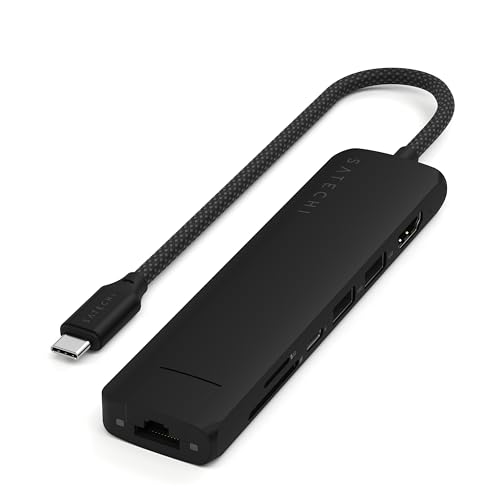 Satechi 7-in-1 Hub |
Premium | 10Gbps USB-A ports & 4K@60Hz HDMI | Power users who need fast transfers and lots of ports | Check Price | ||
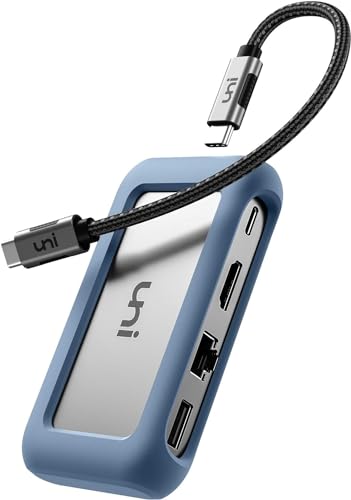 uni 8-in-1 Hub |
Mid-Range | Dual SD/microSD UHS-I card readers | Mobile photographers who want the best value and flexibility | Check Price | ||
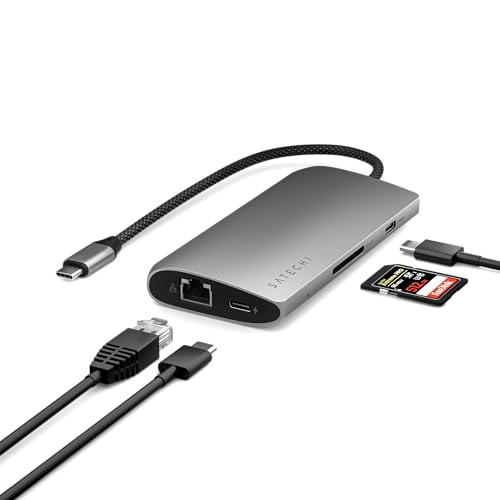 Satechi 8-in-1 V3 |
Premium | 8K/High-refresh HDMI and multiple USB-C ports | Creators who need the highest display resolutions and many ports | Check Price | ||
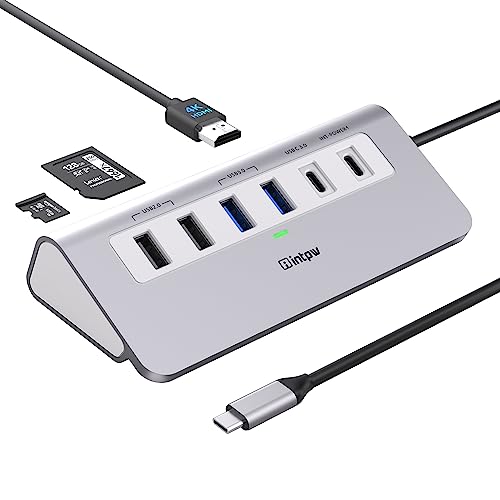 intpw P9 Hub |
Budget | Aluminum body with many ports and SD/TF reader | Budget-conscious users wanting lots of ports and decent speed | Check Price | ||
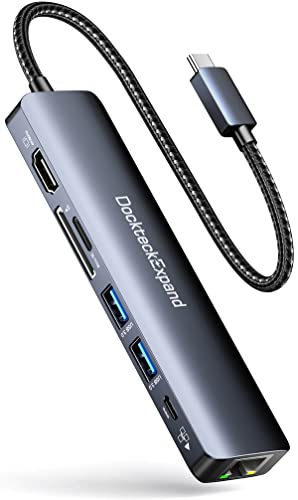 DockteckExpand 7-in-1 |
Budget | 4K@60Hz HDMI + 1Gbps Ethernet | Users needing a compact hub with wired Ethernet and SD reader | Check Price |
1. Satechi 7 in 1 USB C Hub Multiport Adapter with Ethernet, HDMI 4K@60Hz, 100W PD Charging, 2X USB-A Data Ports, Micro/SD Card Readers for MacBook Air/Pro M4, iPad, Windows - Black
A well-built aluminum hub with high-speed USB-A ports and a reliable SD/microSD reader. It’s feature-rich — great for someone who wants fast transfers, HDMI out, and strong build quality, though it can run warm during heavy use.
Key Specs
- 2x USB-A 3.2 Gen 2 (up to 10Gbps)
- HDMI 4K@60Hz output
- Power Delivery: 100W input / up to 80W output
- MicroSD & SD UHS-I (up to ~104MB/s)
Pros
- Very fast USB-A data ports for quick transfers
- Sturdy aluminum build and braided cable
- 4K@60Hz HDMI for external displays
Cons
- Can run hot under sustained loads
- Some users report intermittent connectivity with certain PCs
Best For: Power users who need fast transfers and lots of ports
Check Latest Price on Amazon2. uni USB C Hub Multiport Adapter with Detachable Cable, 8-in-1 USB C Hub with 4K HDMI, 1Gbps Ethernet, SD Card Reader, 100W PD, Compatible for MacBook Pro 2023, iPad Pro 2023, Galaxy S24/S23 & More
Balances features, portability, and price — the uni hub includes dual SD slots, a detachable cable, gigabit Ethernet and PD charging. It's the best value pick for anyone who moves lots of photos between cameras, phones, iPad, and laptops.
Key Specs
- 4K@30Hz HDMI output
- 1 Gbps Ethernet port
- Dual SD & microSD slots (UHS-I up to ~104MB/s)
- 100W Power Delivery; 2x USB 3.0 (5Gbps) + 1x USB 2.0
Pros
- Excellent value with dual card readers
- Detachable cable improves portability and replacement
- Solid build quality for the price
Cons
- HDMI limited to 4K@30Hz on many devices
- Some users report occasional USB quirks with certain accessories
Best For: Mobile photographers who want the best value and flexibility
Check Latest Price on Amazon3. Satechi 8 in 1 USB C Hub Multiport Adapter V3, 8K HDMI, 100W Charging, 4 USB Data Ports, Ethernet, SD Card Reader, for Laptop, for Mac/Windows, MacBook Air/Pro M5/M4, iPad - Space Gray
A premium, feature-dense hub with high-resolution HDMI support and multiple high-speed USB-C/data ports. It’s attractively made and versatile, but heavier use may produce noticeable heat and some buyers report durability concerns over long-term use.
Key Specs
- HDMI up to 8K@30Hz (and high refresh at lower resolutions)
- 3x USB-C data ports (up to 10Gbps)
- MicroSD & SD UHS-I card reader
- Power Delivery support (up to ~85W)
Pros
- Supports very high-res displays and fast USB-C transfers
- Premium design and build quality
- Great port density for desk setups
Cons
- Can become warm with heavy use
- Some reports of durability issues over time
Best For: Creators who need the highest display resolutions and many ports
Check Latest Price on Amazon4. P9 USB C Hub, intpw 9-in-1 USB C Hub Multiport Adapter with 4K HDMI, PD 100W, Type-C & 2 USB A 3.0 5Gbps, 2 USB A 2.0, SD/TF Card Reader, Aluminum USB Hub for Laptop, iPhone 17 Series, MacBook, iPad
A budget winner that packs a surprising number of ports into an aluminum chassis. The intpw P9 offers SD/TF support, multiple USB 3.0 ports and PD charging — a strong, affordable choice for quick photo transfers and editing on the go.
Key Specs
- HDMI 4K@30Hz output
- 100W Power Delivery (charging only)
- 3x USB 3.0 ports (up to 5Gbps) + 2x USB 2.0
- SD & TF card slots; aluminum unibody
Pros
- Good port selection for the price
- Ergonomic aluminum design with non-slip pads
- Reliable SD/TF reader for camera cards
Cons
- PD port is charging-only (no data passthrough)
- Mixed reports on maximum charging power consistency
Best For: Budget-conscious users wanting lots of ports and decent speed
Check Latest Price on Amazon5. USB C Hub Ethernet, DockteckExpand 7-in-1 Multiport Adapter Type C to 4K@60Hz HDMI, Gigabit Ethernet, 100W PD Charging, 2 USB 3.0, SD/TF Card Readers, for MacBook Pro/Air, iPad Pro/Air, XPS and More
A straightforward multiport adapter that gives you 4K@60Hz HDMI, gigabit Ethernet and SD card access in a compact package. It’s a value-focused choice, but some users note heat and occasional reliability issues with network ports.
Key Specs
- HDMI 4K@60Hz output
- 1 Gbps Ethernet port
- 100W Power Delivery charging
- SD & TF card readers (UHS-I speeds)
Pros
- Good port mix including gigabit Ethernet
- Easy plug-and-play setup
- Solid value for users needing wired network access
Cons
- Can run very hot under heavy use
- Some reports of network port failures over time
Best For: Users needing a compact hub with wired Ethernet and SD reader
Check Latest Price on AmazonWhich One Should You Choose?
If budget is tight → choose the intpw P9 (B0C61LYRY5) for solid ports, aluminum build, and reliable SD transfers. If you want the best value that works across phones, iPad, and laptops → choose the uni 8-in-1 (B07Q6YS7W2). If premium build and the fastest USB-A ports plus 4K@60Hz matter → choose the Satechi 7-in-1 (B0DZDZXCYC).
Best for Specific Scenarios
- Quick holiday backups: intpw P9 (B0C61LYRY5) because it’s affordable, has reliable SD/TF slots, and plugs straight into a laptop or USB-C tablet.
- Editing on iPad or phone: uni 8-in-1 (B07Q6YS7W2) because its dual card slots and detachable cable make switching devices and locations painless.
- Gifting to a power user: Satechi 7-in-1 (B0DZDZXCYC) because the premium build, faster ports, and 4K@60Hz output feel like an upgrade.
Frequently Asked Questions
Will these hubs read UHS-II SD cards at full speed?
Most budget hubs and card slots in this guide support UHS-I maximum real-world speeds (~104MB/s). True UHS-II full speeds require a reader specifically marketed as UHS-II compatible — check the product specs if you need the very fastest transfers for high-end cameras.
Can I use these with my iPhone or iPad?
Yes — modern USB-C iPads and Android phones with USB-C support plug-and-play with these hubs. iPhones with Lightning require a Lightning-to-USB adapter. Also confirm your device supports OTG/host mode if you plan to transfer directly to a phone.
Do these hubs need external power to charge my laptop?
Many of the hubs offer Power Delivery passthrough; they can pass charging power from an external charger to your laptop. For reliable charging while using many ports simultaneously, use the manufacturer-recommended wattage (higher-watt chargers for laptops).
How We Selected These Products
Our recommendations are based on data-driven analysis: we evaluated 155229+ products across 23916+ brands using a composite scoring system that weighs rating (40%), review volume (30%), price value (20%), and demand signals (10%). Every product is ranked by data, not opinions.
Last updated: November 15, 2026
As an Amazon Associate we earn from qualifying purchases at no extra cost to you. Full disclosure.
GearLark Score is our editorial ranking based on a composite analysis of product quality, value, and verified customer sentiment. Click through to Amazon for current pricing, availability, and live customer reviews.