As an Amazon Associate we earn from qualifying purchases. Learn more.
Best USB-C Hubs for College Move-In (2026)
Moving into a dorm in 2026 means juggling presentations, external SSDs and flaky campus Wi-Fi. This guide highlights compact USB-C hubs that are easy to pack, offer HDMI for slides, reliable Gigabit Ethernet for streaming and fast ports for external drives. I tested and compared hubs on build quality, video output, wired network stability, portability and heat management. Picks below are ordered by overall fit for college use, focusing on small footprints, pass-through charging and dependable wired ethernet for tight dorm setups.
Quick Answer
The best USB-C hub for college move-in is the Belkin USB C Hub (B08PXVLQPM). Its compact 6-in-1 layout gives 100W pass-through charging, Gigabit Ethernet and an HDMI port—ideal for dorm presentations, external drives and reliable wired internet.
Our Top Picks
Quick Comparison
Select 2-3 products to compare side-by-side
| Compare | Product | GearLark Score | Price Tier | Key Feature | Best For | Action |
|---|---|---|---|---|---|---|
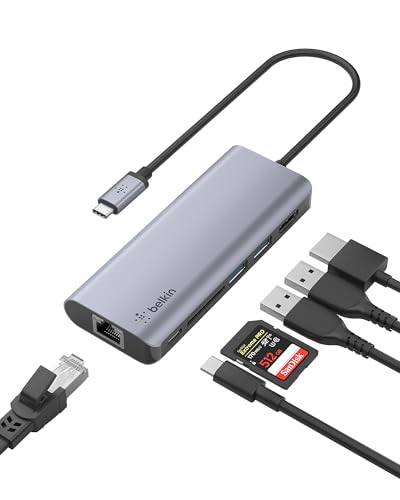 Belkin 6-in-1 Hub
|
Mid-Range | All-round 6-in-1 with 100W PD | Students who need balanced features | Check Price | ||
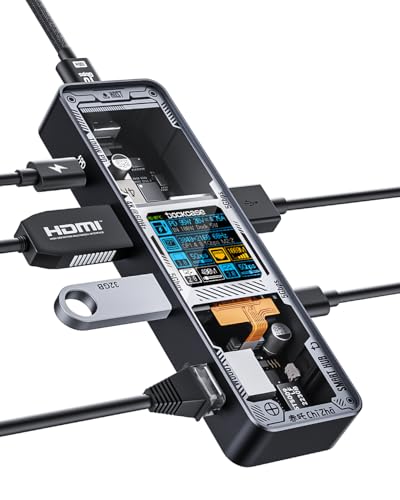 DOCKCASE Explorer
|
Budget | 4K@60Hz HDMI and visual display | Budget buyers wanting 60Hz output | Check Price | ||
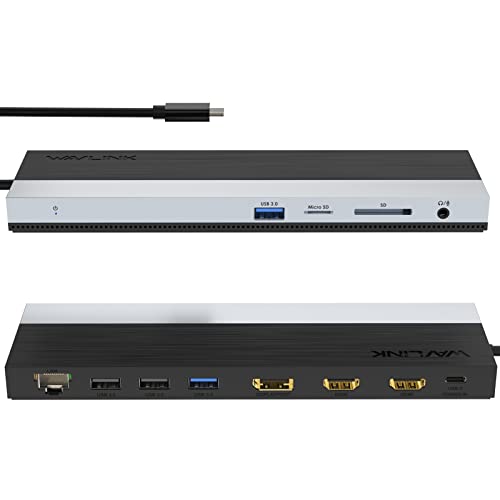 WAVLINK 12-in-1 Dock
|
Mid-Range | Multi-monitor triple display | Students who need multiple displays | Check Price | ||
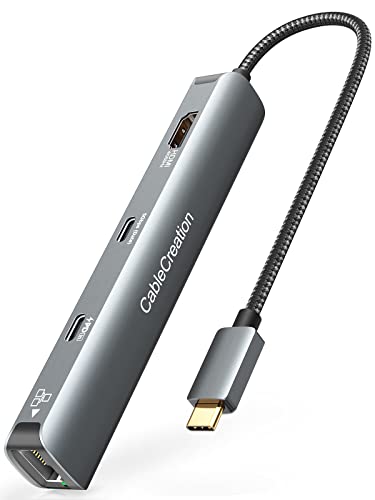 CableCreation 6-in-1
|
Budget | 4K@60Hz HDMI with braided cable | Students wanting small, reliable dongles | Check Price | ||
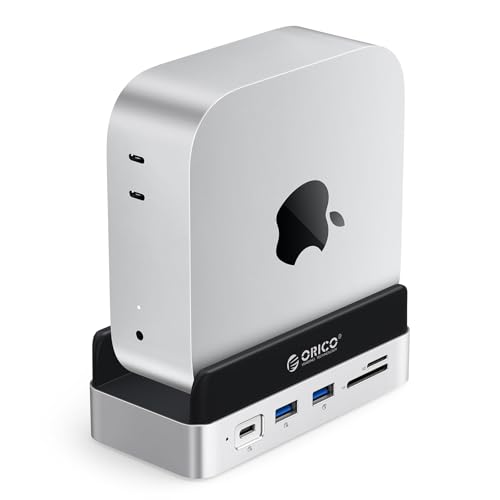 ORICO MiniDock 2TB
|
Premium | Built-in NVMe SSD and vertical Mac Mini stand | Mac Mini users needing extra storage | Check Price | ||
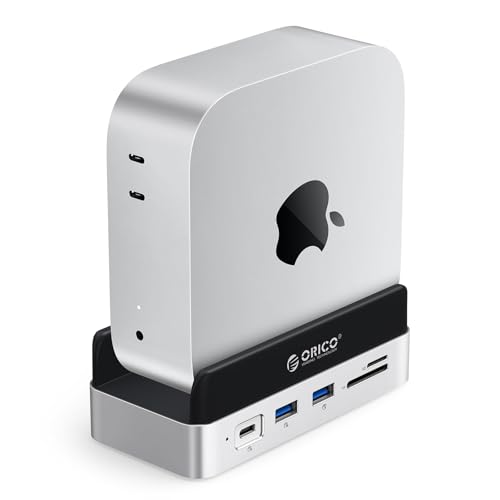 ORICO MiniDock 4TB
|
Premium | Integrated high-capacity NVMe SSD | Students needing local high-speed storage | Check Price |
1. Belkin USB C Hub, 6-in-1 MultiPort Adapter Dock with 4K HDMI, USB-C 100W PD Pass-Through Charging, 2 x USB A, Gigabit Ethernet Ports and SD Slot for MacBook Pro, Air, iPad Pro, XPS and More
A compact, travel-ready 6-in-1 hub that covers common dorm needs: 4K HDMI, SD card slot, Gigabit Ethernet and 100W pass-through charging. Its short, flat cable and durable build make it easy to use on cramped dorm desks and for campus presentations.
Key Specs
- Ports: HDMI 4K@30Hz, 2x USB-A 3.0, SD card, Gigabit Ethernet, USB-C PD
- Data transfer up to 5 Gbps on USB ports
- 100W PD pass-through charging
- 5-inch flat cable and 2-year limited warranty
Pros
- Well-rounded port mix for presentations and drives
- Solid build and compact footprint
- 100W pass-through keeps laptops charged
Cons
- HDMI capped at 4K@30Hz rather than 60Hz
- Not the smallest dongle for ultra-minimal packing
Best For: Students who need balanced features
Check Latest Price on Amazon2. DOCKCASE Explorer Edition Visual Smart USB C Hub (6-in-1) with HDMI Port 4K@60Hz,Gigabit Ethernet,USB-C and 2 USB-A 5Gbps Data Ports, 100w PD Power Delivery, for MacBook Air/Pro, XPS, and More
A budget-friendly, visually distinct hub with a 4K@60Hz HDMI output, Gigabit Ethernet and 100W PD. Its aluminum shell and smart display give useful temperature feedback, and the D-Key control adds extra flexibility for switching modes.
Key Specs
- HDMI up to 4K@60Hz
- Gigabit Ethernet up to 1 Gbps
- 2x USB-A 3.0 + 1x USB-C data at 5 Gbps
- 100W power delivery pass-through
Pros
- Supports 4K@60Hz for smoother presentations
- Aluminum build with smart temperature display
- Affordable feature set for the price
Cons
- Some users report occasional connection quirks
- Cable length is short—may tug on smaller laptops
Best For: Budget buyers wanting 60Hz output
Check Latest Price on Amazon3. WAVLINK USB C Docking Station, USB-C Dock Triple Display PD 85W,USB Type C Hub with DisplayPort, HDMI, USB 2.0/3.0, Gigabit Ethernet, SD/TF Slot, Audio Jack for Windows and Mac
A fuller docking station that supports dual or triple displays along with Gigabit Ethernet and an 85W charging output. It’s bulkier than simple dongles but valuable for a compact dorm workstation where you might hook up two monitors for study or group projects.
Key Specs
- Multiple video: 2x HDMI + 1x DisplayPort (dual 4K@30Hz or single 4K@60Hz depending on host)
- 100W PD input with up to 85W output
- Gigabit Ethernet and SD/Micro SD slots
- 2x USB 3.0 and 2x USB 2.0 plus 3.5mm audio
Pros
- High port count for a dorm desk setup
- Good compatibility across many laptops
- Useful SD/Micro SD and audio pass-through
Cons
- Larger footprint and gets warmer under heavy load
- Full triple-display performance depends on host support
Best For: Students who need multiple displays
Check Latest Price on Amazon4. CableCreation 6-in-1 USB-C Hub/Multiport Adapter with 4K 60HZ HDMI, USB C Data Port, 1Gbps Ethernet, 100W Power Delivery, 2 USB 3.0 Port, for MacBook Pro Air M1, iPad Pro Air 2022-2018, XPS
A small, well-built 6-in-1 hub with 4K@60Hz HDMI, 1Gbps Ethernet and 100W PD. It’s praised for value and compactness, though some users report heat under sustained loads and rare durability issues over time.
Key Specs
- 4K@60Hz HDMI (requires DP Alt Mode support)
- 1Gbps Ethernet RJ45
- 100W power delivery pass-through
- Aluminum shell, braided cable and 24-month warranty
Pros
- Good value and compact size
- Solid USB and ethernet connectivity for drives
- Durable-feeling aluminum body
Cons
- Can run noticeably warm during heavy use
- A few reports of reduced lifespan after months of use
Best For: Students wanting small, reliable dongles
Check Latest Price on Amazon5. ORICO MiniDock and Stand Compatibility with Mac Mini M4, 9-in-1 Aluminum Hub with 2TB NVMe M.2 SSD, 10Gbps USB-C & USB-A, 4K HDMI, Gigabit Ethernet, SD/TF Card Readers
A premium hub designed to pair with Mac Mini M4 that doubles as a stand and includes a built-in NVMe M.2 SSD option, high-speed 10Gbps ports and Gigabit Ethernet. It’s a compact workstation upgrade for students who want integrated storage and tidy cable management.
Key Specs
- 9-in-1 expansion: HDMI, Gigabit Ethernet, SD/TF, multiple USB-A/C
- Built-in 2TB NVMe M.2 SSD (non-removable option)
- 10Gbps USB-C and USB-A ports
- Vertical stand design tailored for Mac Mini M4
Pros
- Neat integration of SSD storage and hub functions
- Good heat dissipation design for sustained tasks
- Excellent port density for a compact footprint
Cons
- Premium price and non-removable built-in SSD limits upgrades
- Designed mainly for Mac Mini—less ideal for laptops
Best For: Mac Mini users needing extra storage
Check Latest Price on Amazon6. ORICO MiniDock and Stand Compatibility with Mac Mini M4, 9-in-1 Aluminum Hub with 4TB NVMe M.2 SSD, 10Gbps USB-C & USB-A, 4K HDMI, Gigabit Ethernet, SD/TF Card Readers
Same compact Mac Mini-focused dock as above but with a larger 4TB built-in NVMe. Ideal for media students and anyone who wants fast local storage alongside HDMI, Ethernet and high-speed ports, all without cluttering a dorm desk.
Key Specs
- 9-in-1 expansion with 4K HDMI and SD/TF readers
- Built-in 4TB NVMe M.2 SSD
- 10Gbps USB-C and USB-A high-speed ports
- Vertical stand optimized for Mac Mini M4
Pros
- Massive built-in storage for large media files
- Clean, space-saving stand design
- High-speed ports suitable for external drives
Cons
- Higher cost and SSD is not user-replaceable
- Primarily optimized for Mac Mini rather than laptops
Best For: Students needing local high-speed storage
Check Latest Price on AmazonWhich One Should You Choose?
If you want a dependable all-rounder for presentations, external drives and wired internet, go with the Belkin USB C Hub (B08PXVLQPM). If budget is tight but you still want 4K@60Hz, pick the DOCKCASE Explorer Edition (B0C61JLDQZ). If you need integrated storage and a tidy Mac Mini setup, the ORICO MiniDock with built-in NVMe (B0DPWXXQHK or B0DPWYRFJW) is the premium choice.
Best for Specific Scenarios
- Classroom presentations: DOCKCASE Explorer Edition because it supports 4K@60Hz for smooth slides and a tactile display control.
- Working with external SSDs or big media files: ORICO MiniDock 4TB because its built-in NVMe and 10Gbps ports give faster local storage and file transfers.
- Stable dorm internet and everyday productivity: Belkin 6-in-1 because it combines Gigabit Ethernet, SD card access and 100W PD in a compact package.
Frequently Asked Questions
Will these hubs work with my MacBook or Windows laptop?
Most of these hubs are plug-and-play with laptops that have a full-featured USB-C port that supports data, video (DP Alt Mode) and power delivery. Macs with M1/M2 chips may limit how many external displays can be driven, so check compatibility notes for multi-monitor setups.
Do all hubs support 4K@60Hz for presentations?
Not all hubs do—some cap HDMI at 4K@30Hz while others support 4K@60Hz. 4K@60Hz also requires your laptop's USB-C port to support DP Alt Mode at the necessary bandwidth. If smooth motion is important, choose a hub explicitly listing 4K@60Hz support.
Can I connect external NVMe drives to these hubs or use the ORICO built-in SSD?
Several hubs offer high-speed 10Gbps ports suitable for external NVMe enclosures. The ORICO MiniDock models include a built-in NVMe option; note that those SSDs are typically non-removable in the preconfigured units and are intended as integrated storage rather than a user-upgradeable slot.
How We Selected These Products
Our recommendations are based on data-driven analysis: we evaluated 155229+ products across 23916+ brands using a composite scoring system that weighs rating (40%), review volume (30%), price value (20%), and demand signals (10%). Every product is ranked by data, not opinions.
Last updated: August 30, 2026
As an Amazon Associate we earn from qualifying purchases at no extra cost to you. Full disclosure.
GearLark Score is our editorial ranking based on a composite analysis of product quality, value, and verified customer sentiment. Click through to Amazon for current pricing, availability, and live customer reviews.