As an Amazon Associate we earn from qualifying purchases. Learn more.
How to Fix Slow SD-to-Drive Transfers on iPad for On-the-Go Editors (2026 Guide)
Offloading RAW photos or multicam clips from an SD card to an external NVMe can feel painfully slow on an iPad. For mobile editors, each minute waiting to copy files disrupts the creative flow. In this guide you'll learn which hubs and cables actually remove bottlenecks, how to pair them with NVMe/SSD enclosures, and practical steps to speed SD→drive transfers. Products were selected for their card-reader performance, USB data lanes, power delivery capability and real-world user feedback on build and reliability.
Quick Answer
Slow SD-to-drive transfers on iPad are usually a bottleneck from the hub, card speed or cable. The NXPGKEA USB C HUB (B0915B3NPY) is our top pick because it provides a direct SD/microSD slot plus USB 3.0 and a USB-C data port that enable the fast host-side link iPadOS needs for quicker SD→SSD transfers.
Our Top Picks
Quick Comparison
Select 2-3 products to compare side-by-side
| Compare | Product | GearLark Score | Price Tier | Key Feature | Best For | Action |
|---|---|---|---|---|---|---|
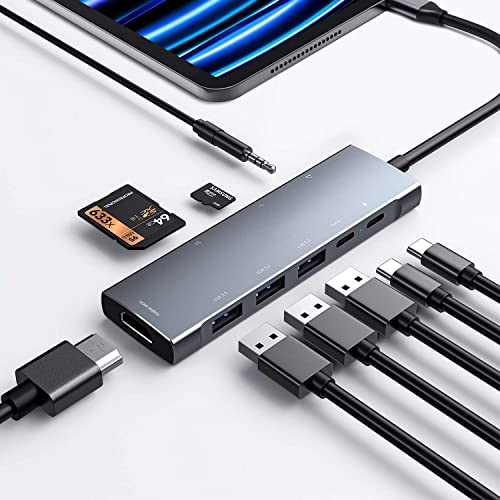 NXPGKEA 9-in-1 USB C Hub
|
Mid-Range | Built-in SD/microSD + USB 3.0 5Gbps | Mobile editors who need fast card access | Check Price | ||
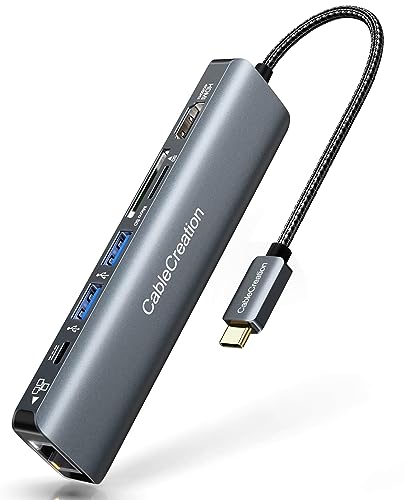 CableCreation 7-in-1 Hub
|
Mid-Range | 1Gbps Ethernet + 100W PD | Editors needing stable power and wired networking | Check Price | ||
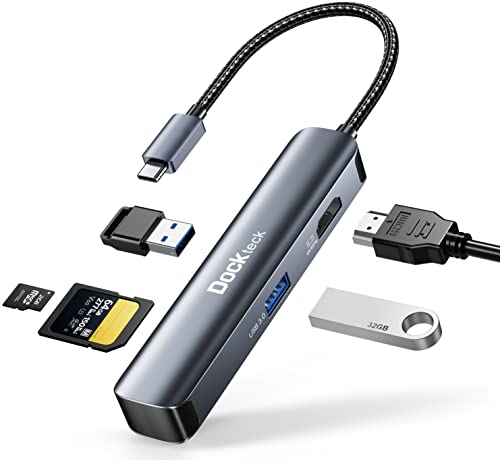 Dockteck 5-in-1 Hub
|
Budget | Compact SD + USB 3.0 (5Gbps) | Budget-conscious mobile editors | Check Price | ||
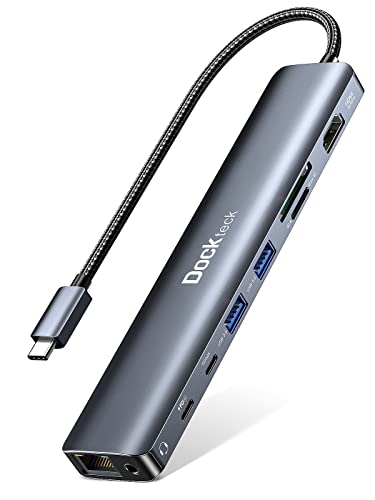 Dockteck 9-in-1 Hub
|
Premium | 100W PD + dual 5Gbps USB-A ports | Power users with multiple drives/peripherals | Check Price |
1. USB C HUB for iPad Pro 9-in-1 Adapter iPad Pro M4 M2 M1 13 12.9 11 inch iPad Air 5 4 Docking Station with 4K HDMI, USB-C PD, SD/TF Card Reader, USB 3.0, 3.5mm Headphone Jack, Type C Data, iPad mini 6
This 9‑in‑1 hub solves slow SD→drive transfers by giving the iPad a native SD/microSD reader and high‑speed USB 3.0 lanes so external SSDs can reach their bus speeds. It also supports PD pass‑through so you can keep the iPad charged while copying large media files, though some users report inconsistent charging behavior over long use.
Key Specs
- SD / microSD card reader
- USB 3.0 ports (5Gbps)
- USB-C Power Delivery (up to 100W)
- 4K HDMI output and 3.5mm audio
Pros
- Direct SD slot avoids slow multi-adapter chains
- Multiple high-speed ports for SSD + peripherals
- Solid build and versatile expansion
Cons
- Some users report mixed charging reliability
- Durability is mixed for heavy daily travel
Best For: Mobile editors who need fast card access
Check Latest Price on Amazon2. USB C Hub 4K 60Hz, CableCreation 7-in-1 USB-C Hub Multiport Adapter with 1Gbps Ethernet, HDMI, 2 USB 3.0 Ports, 100W PD and SD/TF Cards Reader, Compatible with Steam Deck MacBook Pro/Air, iPad Pro
CableCreation adds a reliable power delivery path and wired Ethernet that help maintain consistent transfer speeds to NVMe enclosures while offloading large files. Its SD slot and USB 3.0 ports provide the necessary data links, and the 100W PD port is useful when an SSD enclosure demands extra power, though the hub can run warm in sustained transfers.
Key Specs
- SD/TF card reader
- USB 3.0 ports (5Gbps)
- 100W USB-C PD pass-through
- 1Gbps Ethernet and 4K@60Hz HDMI
Pros
- Good value with wired Ethernet for stable connections
- Strong PD support to power bus-hungry enclosures
- Portable and well-built for travel
Cons
- Can run warm during long transfers
- Compatibility and power delivery are mixed on some hosts
Best For: Editors needing stable power and wired networking
Check Latest Price on Amazon3. USB C Hub Multiport Adapter - Dockteck 5 in 1 USB-C Dongle Hub with 4K 60Hz HDMI, USB 3.0 5Gbps Data, SD/Micro SD Card Reader for MacBook Pro/Air, iPad Pro/Air, Surface Pro, XPS, Laptops
The Dockteck 5‑in‑1 keeps things simple and affordable while providing a direct SD slot and USB 3.0 data lanes that eliminate common copy bottlenecks. It's an excellent on‑the‑road tool, though users note it can heat up under long file transfers and performance depends on the host iPad model and card speed.
Key Specs
- SD and microSD slots
- 2x USB 3.0 ports (5Gbps)
- 4K@60Hz HDMI
- Aluminum shell for portability
Pros
- Excellent value and pocketable size
- Direct card reader avoids cheap adapters
- Aluminum casing feels sturdy
Cons
- Gets warm during sustained transfers
- Functionality can vary by iPad model
Best For: Budget-conscious mobile editors
Check Latest Price on Amazon4. Dockteck 9-in-1 USB-C Hub: HDMI 4K@60Hz, Ethernet, 100W PD, Audio, 2x USB-A 5 Gbps, SD/TF Card Reader for MacBook, iPad, XPS, Microsoft
This fuller-featured Dockteck hub gives you every port you need — dual high-speed USB-A, USB-C data, SD reader and 100W PD — so you can connect an NVMe enclosure while powering drives and accessories. It’s built for heavier desktop-style mobile rigs, but expect it to run warm and verify Ethernet longevity for continuous use.
Key Specs
- SD / TF card reader
- 2x USB-A 5Gbps + USB-C data port
- 100W Power Delivery
- Ethernet and 4K@60Hz HDMI
Pros
- Plenty of ports for multi-drive workflows
- Strong PD for powering SSD/NVMe enclosures
- Good build quality and port capacity
Cons
- Can heat up; sustained-usage durability varies
- Some users report Ethernet issues over long term
Best For: Power users with multiple drives/peripherals
Check Latest Price on AmazonWhich One Should You Choose?
If budget is tight → Dockteck 5-in-1 Hub (B09VG7CYQT). It gives a direct SD slot and USB 3.0 speeds in a compact, affordable package. If you need portable wired networking and stronger power delivery → CableCreation 7-in-1 (B0967WZBGZ). Its 100W PD and Ethernet help maintain steady transfers and power-hungry enclosures. If you want the best blend of card access and overall performance → NXPGKEA 9-in-1 (B0915B3NPY). For full desktop-style setups with multiple drives and accessories choose Dockteck 9-in-1 (B0B7VQFJ8X).
Best for Specific Scenarios
- Quick field offloads: NXPGKEA 9-in-1 because its built‑in SD/microSD reader and USB 3.0 ports remove adapters and speed up copies.
- Remote shoots with tethering or wired internet: CableCreation 7-in-1 because the 1Gbps Ethernet and 100W PD stabilize transfers when you need reliable uploads.
- Lightweight travel kit: Dockteck 5-in-1 because its slim aluminum body and direct card reader are easy to pack and give solid speeds for casual editors.
Frequently Asked Questions
Why are SD→SSD transfers slow on my iPad?
Slow transfers usually come from a slow SD card (UHS‑I vs UHS‑II/V90), a hub that only provides USB 2.0 speeds, a weak cable or an underpowered SSD enclosure. Check card specs, use a hub with native SD and USB 3.x ports, and ensure the hub/cable and enclosure support UASP/USB 3.0+.
Do I need a powered hub or 100W PD to speed transfers?
Not always, but many NVMe enclosures benefit from extra power. A hub with 60–100W PD prevents the iPad from being the sole power source and reduces throttling, especially during sustained writes.
Will a better cable make a difference?
Yes. Use short, well‑shielded USB‑C cables rated for USB 3.1/3.2 Gen 2 (or Thunderbolt/USB4 for compatible iPads) to avoid bandwidth loss. Cheap or long cables can force lower link speeds.
How We Selected These Products
Our recommendations are based on data-driven analysis: we evaluated 155229+ products across 23916+ brands using a composite scoring system that weighs rating (40%), review volume (30%), price value (20%), and demand signals (10%). Every product is ranked by data, not opinions.
Last updated: September 29, 2026
As an Amazon Associate we earn from qualifying purchases at no extra cost to you. Full disclosure.
GearLark Score is our editorial ranking based on a composite analysis of product quality, value, and verified customer sentiment. Click through to Amazon for current pricing, availability, and live customer reviews.