As an Amazon Associate we earn from qualifying purchases. Learn more.
Best USB-C Hubs for Vacation Rentals and Short-Term Work (2026)
Working remotely from short-term rentals or vacation homes demands compact, reliable hubs that add HDMI, Ethernet and SD card access without weighing down your bag. This roundup tests portable USB-C hubs and compact docks to find models that are travel-friendly, offer stable wired networking and support external displays and storage. We prioritized build quality, portability, power delivery and true HDMI + RJ45 + SD support, leaning on product specs and verified customer feedback to choose six options that cover budget, value and premium needs.
Quick Answer
For most travelers the Sabrent USB-C Hub & SSD Enclosure (B0CH1N88Y7) is the best pick — it combines 4K@60Hz HDMI, Gigabit Ethernet, multiple USB ports and an M.2 slot in a rugged aluminum shell. If you want the best value for a Mac mini setup, the RayCue Mac mini M4 Dock (B0DT5LKD93) balances ports, speed and build.
Our Top Picks
Quick Comparison
Select 2-3 products to compare side-by-side
| Compare | Product | GearLark Score | Price Tier | Key Feature | Best For | Action |
|---|---|---|---|---|---|---|
 Sabrent 6-Port Hub
|
Budget | Built-in M.2 slot + aluminum body | Travelers needing storage and ports | Check Price | ||
 RayCue Mac mini M4 Dock
|
Mid-Range | Integrated M.2 enclosure (up to 8TB) | Mac mini M4 owners and desk setups | Check Price | ||
 RayCue SmartDock Pro
|
Premium | Vertical stand with smart UI displays | Users needing space-saving Mac mini dock | Check Price | ||
 ORICO MiniDock M4
|
Premium | Built-in SSD options (non-removable) | Users who want ready-made extra storage | Check Price | ||
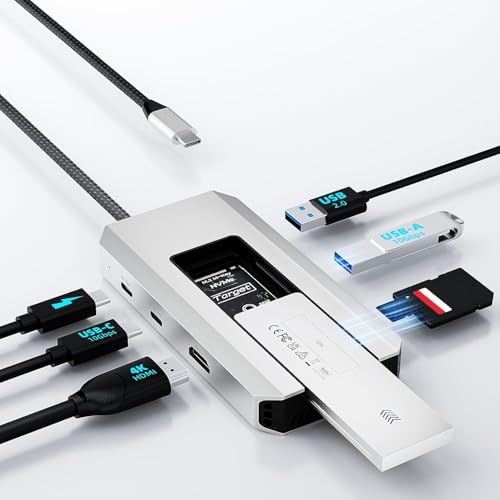 WAVLINK 8-in-1 Hub
|
Budget | Slide-in M.2 enclosure with 10Gbps ports | Budget-conscious travelers wanting SSD expansion | Check Price | ||
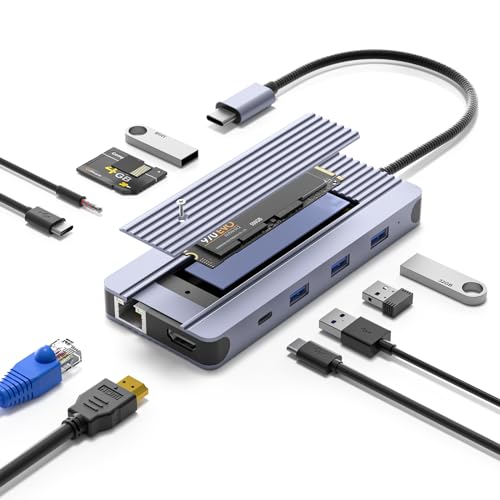 SENTANK 12-in-1 Hub
|
Budget | Comprehensive 12-in-1 port array | Users who need every port type in one device | Check Price |
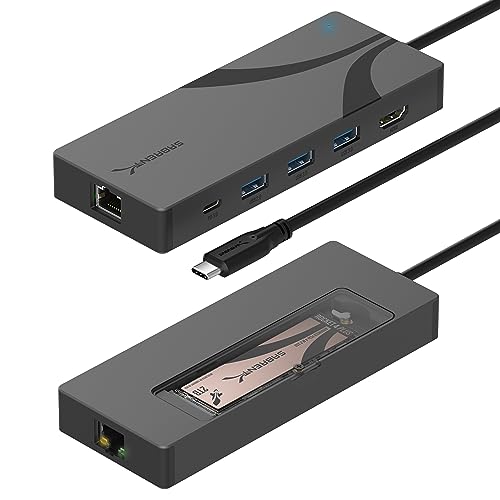
1. SABRENT USB-C Hub & SSD Enclosure, 6-Port Dock with M.2 SSD Slot, 90W Power Delivery, USB 3.0 & 2.0 Ports, 4K HDMI, RJ45 Gigabit Ethernet (HB-6PNV)
A rugged, travel-friendly hub that adds HDMI 4K@60Hz, Gigabit Ethernet and an internal M.2 slot while offering up to 90W pass-through charging. Customers praise its functionality and value for connecting drives and peripherals on the go.
Key Specs
- Integrated USB-C 10Gbps (USB 3.2 Gen 2x1)
- 90W Power Delivery (PD 3.0) bypass charging
- HDMI 2.0 output up to 4K@60Hz
- Gigabit Ethernet (1GbE) and M.2 2242/2260/2280 slot (up to 5Gbps)
Pros
- Strong port mix including M.2 storage
- Solid aluminum build suitable for travel
- Good value for the features included
Cons
- Some older external HDDs may show compatibility quirks
- Not all host ports provide full power for heavy setups
Best For: Travelers needing storage and ports
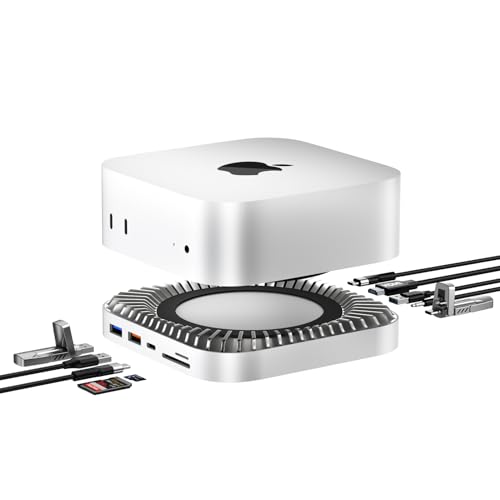
Check Latest Price on Amazon2. Mac mini M4 Dock, Aluminum Stand and HDMI Hub for Mac mini M4 and M4 Pro 2024 with M.2 NVMe/SATA SSD Enclosure, 4K60Hz HDMI,10G USB A/C, 5G USB A*2, USB-C Charge, SD/TF, Audio
A purpose-built aluminum dock and stand for Mac mini M4 that adds a 4K@60Hz HDMI port, fast 10Gbps USB-A/C ports, SD/TF readers and a built-in M.2 enclosure for up to 8TB. Reviewers highlight its thoughtful layout and solid build.
Key Specs
- 10-in-1 expansion with 4K@60Hz HDMI
- Built-in M.2 NVMe/SATA enclosure supporting up to 8TB
- 10Gbps USB-A and USB-C data ports
- SD/TF card readers and USB-C charging input
Pros
- Excellent design and fit for Mac mini M4
- Robust aluminum construction and port layout
- Fast data transfer and generous storage options
Cons
- May need additional power to run high-draw drives
- Single HDMI limits multi-monitor expansion
Best For: Mac mini M4 owners and desk setups
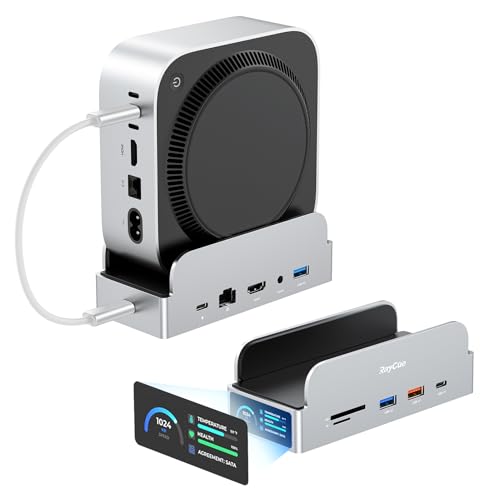
Check Latest Price on Amazon3. RayCue SmartDock Pro for Mac mini M4 Dock Stand with M.2 NVMe SSD Enclosure, 4K 60Hz HDMI, 10Gbps USB-C/A, Gigabit Ethernet, SD/TF Card Readers Space-Saving Vertical Hub Compatible with Mac mini
A premium vertical dock that saves desk space while offering 4K HDMI, 10Gbps ports, Gigabit Ethernet and M.2 NVMe expansion up to 8TB (NVMe only). Customers like the sleek design, fast transfers and reliable storage expansion.
Key Specs
- 11-in-1 expansion with 4K@60Hz HDMI
- M.2 NVMe slot up to 8TB (NVMe supported)
- 10Gbps USB-C and USB-A ports
- Gigabit Ethernet and SD/TF card readers
Pros
- Space-saving vertical design improves Wi‑Fi reception
- High-speed ports and fast storage expansion
- Solid build quality and polished finish
Cons
- NVMe-only note means some SATA drives won’t work
- Premium price and Mac-focused design
Best For: Users needing space-saving Mac mini dock
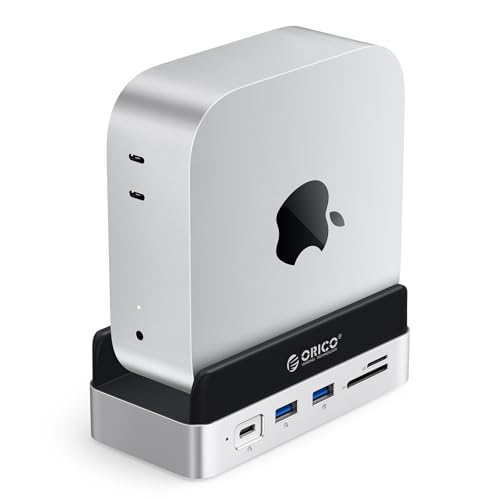
Check Latest Price on Amazon4. ORICO MiniDock and Stand Compatibility with Mac Mini M4, 9-in-1 Aluminum Hub with 512GB NVMe M.2 SSD, 10Gbps USB-C & USB-A, 4K HDMI, Gigabit Ethernet, SD/TF Card Readers
A compact, well-designed dock for Mac mini that offers a 9-in-1 port array and optional built-in SSD sizes up to 4TB. Customers praise the discreet design and heat dissipation but should note some models include non-removable SSDs.
Key Specs
- 9-in-1 expansion with 4K@60Hz HDMI
- Built-in SSD options (512GB–4TB depending on model)
- USB-C 10Gbps and USB-A 10Gbps ports
- PD100W support and Gigabit Ethernet
Pros
- Neat integrated storage options for instant capacity
- Good heat transfer and accessible power button
- Clean design that matches Mac mini
Cons
- Some versions use non-removable SSDs (less flexible)
- Model differences mean you must check exact spec carefully
Best For: Users who want ready-made extra storage
Check Latest Price on Amazon5. WAVLINK 8 in 1 USB C Hub with M.2 NVMe/SATA SSD Enclosure 10Gbps, 4K HDMI, USB-C/A 10Gb, 100W PD, Aluminum Alloy USB C SSD Enclosure for M.2 NVMe SATA SSD forM1/M2/M3/M4 macOS Systems
An affordable 8-in-1 hub that supports M.2 NVMe and SATA up to 4TB, 4K@60Hz output and up to ~87W charging for laptops. It’s a strong budget pick for expanding storage and adding HDMI and Ethernet on the road.
Key Specs
- M.2 PCIe NVMe (M-Key/B&M) and M.2 SATA support up to 4TB
- 4K@60Hz (DP1.4) HDMI output
- 10Gbps USB-A/C ports and SD/TF card slots
- USB-C PD support (up to ~87W for laptop charging)
Pros
- Great feature set for the price
- Easy slide-in SSD installation
- Aluminum alloy body feels sturdy
Cons
- Limited documentation on some compatibility edge cases
- Power delivery may be lower than some premium docks
Best For: Budget-conscious travelers wanting SSD expansion
Check Latest Price on Amazon6. 12-in-1 USB-C Hub with 10Gbps M.2 NVMe/SATA SSD Enclosure, Support 4K@60Hz HDMI,100W PD,SD/TF Card Reader,1Gbps RJ45,3 5Gbps USB 3.0,5Gbps USB-C DATA,48kHz Audio Compatible with MacBook Pro/Air/Lenovo
A feature-rich 12-in-1 hub offering 100W PD, M.2 enclosure, 4K HDMI, 1Gbps Ethernet and audio out. Users appreciate its connectivity breadth for tablets and laptops, though real-world speeds depend on the host and SSD used.
Key Specs
- 12-in-1 including 4K@60Hz HDMI and 100W PD
- M.2 NVMe/SATA enclosure (2230–2280)
- 1Gbps RJ45 Ethernet and SD/TF readers
- Multiple USB 3.0 and USB-C data ports, 3.5mm audio jack
Pros
- Extremely versatile port selection
- Works well as a compact docking station
- Good choice for tablet + laptop combos
Cons
- Feature-packed design can be bulky for ultralight travel
- Performance varies by connected SSD and host port
Best For: Users who need every port type in one device
Check Latest Price on AmazonWhich One Should You Choose?
If you want the most portable all-rounder with M.2 storage and solid ports → choose the Sabrent USB-C Hub (B0CH1N88Y7). If budget is tight but you still want SSD support and 4K video → pick the WAVLINK 8-in-1 (B0F29BYTHC). If you use a Mac mini M4 and want a clean, integrated desk setup → the RayCue Mac mini M4 Dock (B0DT5LKD93) gives the best balance of design and storage.
Best for Specific Scenarios
- Video calls and presentations: Sabrent (B0CH1N88Y7) because it reliably adds 4K HDMI and Gigabit Ethernet for stable displays and streaming.
- Mac mini workspace at a rental: RayCue Mac mini M4 Dock (B0DT5LKD93) because it doubles as a stand and provides integrated M.2 storage and fast ports.
- Lightpacking travelers: WAVLINK 8-in-1 (B0F29BYTHC) because it offers SSD expansion, HDMI and Ethernet at a budget-friendly weight.
Frequently Asked Questions
Do these hubs need external power adapters?
Most portable USB-C hubs work without a separate adapter for light use, but if you attach high-draw M.2 SSDs, multiple USB drives or need high laptop PD (100W), some docks recommend or require an external power connection to maintain stability.
Will a USB-C hub support my monitor at 4K@60Hz?
If the hub lists HDMI 2.0 or DisplayPort Alt Mode at 4K@60Hz and your laptop’s USB-C port supports video output (DP Alt Mode or Thunderbolt), it should. Check your host port’s specs — older USB-C ports may only support 30Hz or limited resolutions.
Can I use the M.2 slot as a daily external drive while traveling?
Yes — many of these hubs include M.2 enclosures designed for portable use. Look for thermal pads or cooling notes (customers often mention heat management). For long writes or editing directly from the drive, prefer NVMe support and a hub with robust cooling and reliable power delivery.
How We Selected These Products
Our recommendations are based on data-driven analysis: we evaluated 155229+ products across 23916+ brands using a composite scoring system that weighs rating (40%), review volume (30%), price value (20%), and demand signals (10%). Every product is ranked by data, not opinions.
Last updated: June 01, 2026
As an Amazon Associate we earn from qualifying purchases at no extra cost to you. Full disclosure.
GearLark Score is our editorial ranking based on a composite analysis of product quality, value, and verified customer sentiment. Click through to Amazon for current pricing, availability, and live customer reviews.