As an Amazon Associate we earn from qualifying purchases. Learn more.
Best USB-C Hubs for Vacation Rentals and Short Stays (2026)
Travelers and short-stay guests who use rental properties often run into missing ports: TVs that need HDMI, flaky Wi‑Fi that demands Ethernet, and peripheral-heavy workflows that require extra USBs. This guide reviews compact USB-C hubs ideal for vacation rentals and short stays in 2026 — focused on portability, HDMI output for TVs/monitors, wired Ethernet, and enough USB ports for keyboards, drives and dongles. I tested options that balance size, build quality and real-world functionality and prioritized hubs with integrated cables, clear specs, and practical port mixes so you can plug in and go whether you’re streaming, presenting or working remotely.
Quick Answer
For most short-stay travelers the Lenovo USB-C 4 in 1 Travel Hub Block is the best pick: it’s ultra-compact with 4K@60Hz HDMI and two USB-A ports for simple streaming and presentation setups. If you need Ethernet and card access on a budget choose the Verbatim 6-in-1; for the fastest data and full 100W pass-through, pick the premium ZAGG 4-Port Hub.
Our Top Picks
Quick Comparison
Select 2-3 products to compare side-by-side
| Compare | Product | GearLark Score | Price Tier | Key Feature | Best For | Action |
|---|---|---|---|---|---|---|
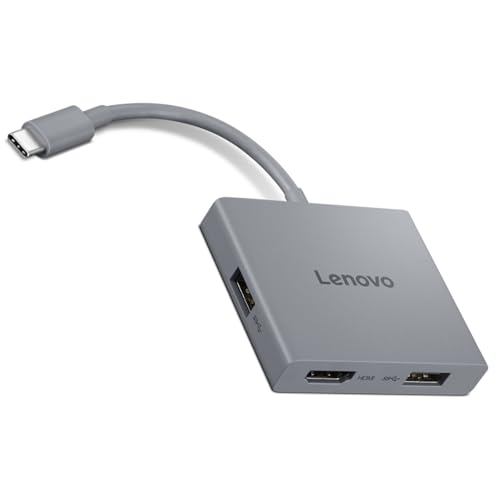 Lenovo USB-C 4-in-1 Travel Hub
|
Budget | 4K@60Hz HDMI in a tiny package | Minimalist travelers who stream or present | Check Price | ||
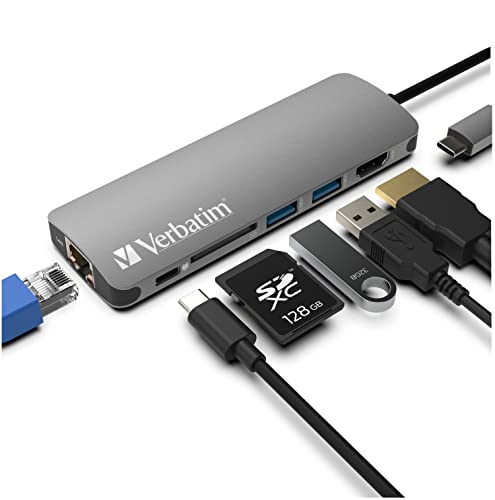 Verbatim 6-in-1 USB-C Hub
|
Budget | Ethernet + SD card in one compact unit | Travelers who need wired internet and card access | Check Price | ||
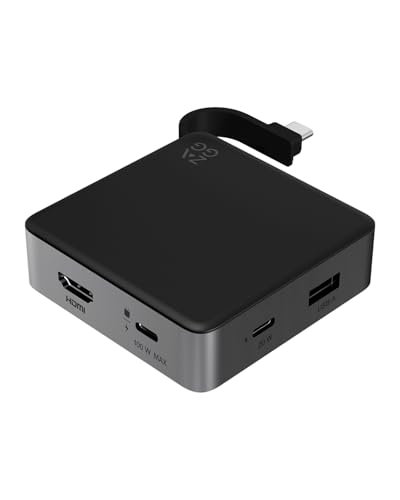 ZAGG 4-Port Hub
|
Premium | 4K@60Hz + 100W PD with 10Gbps transfers | Power users and creatives on short trips | Check Price |
1. Lenovo USB-C 4 in 1 Travel Hub Block with Integrated Cable, 1x HDMI 4K @ 60Hz, 2X USB-A 3.2, 1x 3.5mm Combo, Luna Grey Portable, Compact, High-Speed Connectivity Laptops PC Gaming Console Charging
A very compact, travel-focused hub with integrated USB-C cable, 4K@60Hz HDMI and two USB-A ports. It’s ideal for short stays where you just need to connect a laptop to a rental TV, add a mouse/drive, and keep your bag lightweight. Users praise its build and value, though some report intermittent HDMI behavior on certain TVs.
Key Specs
- HDMI output: 4K @ 60Hz
- 2x USB-A 3.2 (up to 5Gbps)
- 1x 3.5mm combo audio jack
- Integrated fixed USB-C cable, compact Luna Grey design
Pros
- True 4K@60Hz HDMI for crisp streaming/presentation
- Integrated cable keeps setup simple and compact
- Small, lightweight and good value for travel
Cons
- No Ethernet or power-delivery pass-through
- Some users report inconsistent HDMI connections on certain displays
Best For: Minimalist travelers who stream or present
Check Latest Price on Amazon2. Verbatim 6-in-1 USB C Hub w/Dongle - USB Hub for Laptop w/ 2 USB 3.0, USB C, SD Card Reader, 4K HDMI, Ethernet, Compact & Portable USB-C Hub
A feature-packed budget hub that adds Ethernet, SD card access, HDMI and PD pass-through (supports up to 100W) — great for guests who need a stable connection for remote work or to offload photos. It gives excellent port variety for the price, but can run warm under heavy use and its HDMI caps at 4K@30Hz in some modes.
Key Specs
- HDMI output: up to 4K @ 30Hz
- 2x USB 3.0 ports (up to 5Gbps) + USB-C PD pass-through (up to 100W)
- SD card reader
- Gigabit Ethernet port; aluminum housing; 90g
Pros
- Adds wired Ethernet and SD card reader — ideal for rentals
- Pass-through charging (up to 100W) keeps laptops powered
- Good port mix and strong value for money
Cons
- Can get hot during sustained use
- HDMI compatibility and 4K@30Hz limit may affect some TV/monitor setups
Best For: Travelers who need wired internet and card access
Check Latest Price on Amazon3. ZAGG 4-Port Hub - Versatile USB-C PD, USB-A HDMI Adapter, High-Speed Charging & 4K Display Support, Compact for Travel, Compatible with Windows, macOS, iPadOS, ChromeOS, Android
A compact premium hub built for performance: 4K@60Hz HDMI, 100W pass-through and high-speed data up to 10Gbps. It’s great for photographers, editors or business travelers who need fast transfers and reliable charging in a small footprint. As a premium option it costs more and focuses on core ports rather than extras like Ethernet or SD slots.
Key Specs
- HDMI output: 4K @ 60Hz
- USB-C PD pass-through: up to 100W
- High-speed USB data up to 10Gbps
- Integrated cable and non-slip grip for travel
Pros
- High-res 4K@60Hz HDMI and fast 10Gbps data
- 100W pass-through keeps laptops charged while in use
- Travel-friendly, well-engineered premium build
Cons
- Higher price than basic travel hubs
- No built-in Ethernet or SD card reader for photographers
Best For: Power users and creatives on short trips
Check Latest Price on AmazonWhich One Should You Choose?
If budget is tight → Verbatim 6-in-1 USB C Hub. It delivers the most useful ports for remote work (Ethernet, SD, PD) at a budget price. If you need the most portable, simplest setup for streaming and quick presentations → Lenovo USB-C 4 in 1 Travel Hub Block: tiny, with integrated cable and 4K@60Hz HDMI. If premium quality and fastest transfers matter → ZAGG 4-Port Hub: best for creatives and power users who want high-res output and 100W pass-through without a full docking station.
Best for Specific Scenarios
- Streaming to a rental TV: Lenovo USB-C 4 in 1 Travel Hub Block — its 4K@60Hz HDMI and compact form make it easy to mirror your laptop to the living-room TV without extra cables.
- Reliable video calls / remote work: Verbatim 6-in-1 USB C Hub — includes Gigabit Ethernet and PD pass-through so you can join meetings on wired internet while keeping your laptop charged.
- Photography or fast file work: ZAGG 4-Port Hub — fast 10Gbps transfers and 100W charging help you offload RAW files and edit on the go without long wait times.
Frequently Asked Questions
Will these hubs let me mirror my laptop to a rental TV?
Yes — all three hubs include HDMI outputs designed to mirror or extend your laptop display. Choose a hub with 4K@60Hz (Lenovo and ZAGG) for the smoothest video and best TV compatibility; some hubs support 4K@30Hz which is adequate for many streaming needs but may stutter with high-motion content.
Can I charge my laptop through these hubs while using HDMI and other ports?
Verbatim and ZAGG support power-delivery pass-through (up to 100W), so you can charge your laptop while using HDMI and USB devices. The Lenovo 4-in-1 hub does not include PD pass-through, so it won’t charge most laptops while in use.
Do I need drivers to use these USB-C hubs with different devices?
Most modern USB-C hubs are plug-and-play with Windows, macOS, ChromeOS and many tablets/phones. Card readers, Ethernet and standard USB ports typically work without drivers, but very old systems may need network drivers or OS updates. Check compatibility notes if you use specialized hardware or older operating systems.
How We Selected These Products
Our recommendations are based on data-driven analysis: we evaluated 155229+ products across 23916+ brands using a composite scoring system that weighs rating (40%), review volume (30%), price value (20%), and demand signals (10%). Every product is ranked by data, not opinions.
Last updated: May 21, 2026
As an Amazon Associate we earn from qualifying purchases at no extra cost to you. Full disclosure.
GearLark Score is our editorial ranking based on a composite analysis of product quality, value, and verified customer sentiment. Click through to Amazon for current pricing, availability, and live customer reviews.