As an Amazon Associate we earn from qualifying purchases. Learn more.
Best Compact USB-C Hubs with HDMI for Vacation Rentals (2026)
Vacation rental hosts, property managers, and traveling guests: this guide is for you. If you want a compact USB-C hub that lets renters plug a laptop into a TV or projector without hauling a bulky dock, these tested picks will help. We evaluated portability, HDMI video performance (especially 4K/60Hz), plug-and-play ease for non-technical guests, and practical extras like Ethernet/SD and power delivery. Products were chosen from real-customer feedback (build quality, video reliability, heat) and technical specs so you can choose the right hub to simplify check-in instructions and cut support calls.
Quick Answer
For vacation rental hosts and guests who need a small, reliable way to mirror laptops to TVs, the Lenovo USB-C 4 in 1 Travel Hub (B0F8P21R4C) is the top pick for 2026 thanks to 4K@60Hz HDMI, plug-and-play simplicity, and strong value. If you want the cheapest multiport option, the Verbatim 6-in-1 (B08FBLXMN9) gives the most ports for the budget; the ZAGG 4-Port Hub (B0D2FG8SGC) is the premium choice for 4K@60Hz plus 100W pass-through.
Our Top Picks
Quick Comparison
Select 2-3 products to compare side-by-side
| Compare | Product | Rating | Price Tier | Key Feature | Best For | Action |
|---|---|---|---|---|---|---|
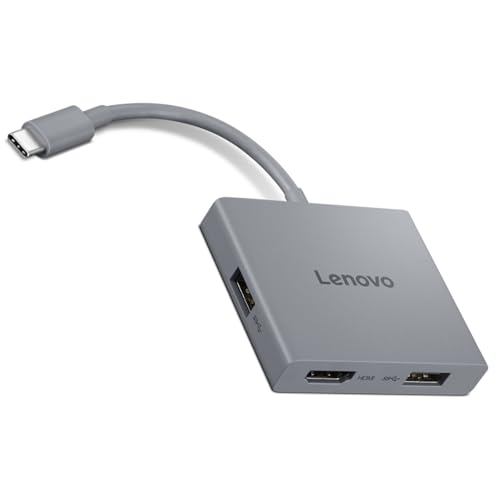 Lenovo USB-C 4-in-1 Travel Hub
|
(1.1K+ ratings) | Budget | 4K@60Hz HDMI with integrated cable | Hosts who need simple, plug-and-play setup | Check Price | |
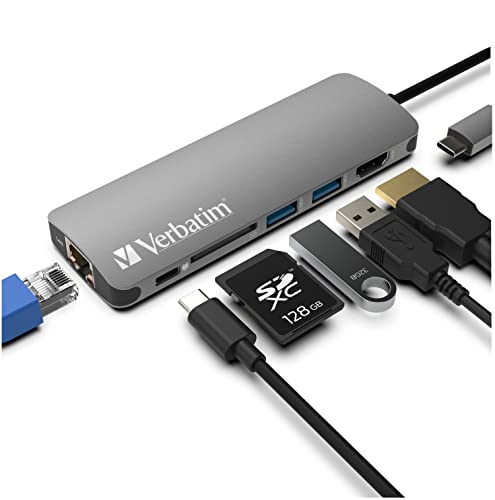 Verbatim 6-in-1 USB-C Hub
|
(400+ ratings) | Budget | Ethernet + SD card + 100W PD | Hosts needing wired internet and many ports | Check Price | |
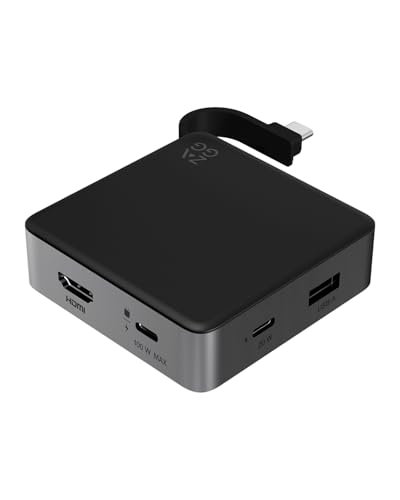 ZAGG 4-Port Hub
|
(30+ ratings) | Premium | 4K@60Hz HDMI + 100W PD + 10Gbps | Hosts wanting premium performance and charging | Check Price |
1. Lenovo USB-C 4 in 1 Travel Hub Block with Integrated Cable, 1x HDMI 4K @ 60Hz, 2X USB-A 3.2, 1x 3.5mm Combo, Luna Grey Portable, Compact, High-Speed Connectivity Laptops PC Gaming Console Charging
The Lenovo 4-in-1 Travel Hub is a compact, easy-to-use adapter built for travel and quick TV/projector hookups. Its integrated USB-C cable and 4K@60Hz HDMI make it ideal for hosts wanting a straightforward way for guests to mirror laptops without extra cords. Customers praise its build quality, value, and small footprint, though a minority report occasional HDMI inconsistencies.
Key Specs
- HDMI output: 4K @ 60Hz
- 2x USB-A 3.2 (up to 5Gbps)
- 1x 3.5mm combo audio jack
- Built-in USB-C upstream cable; portable Luna Grey design
Pros
- Plug-and-play with integrated cable—easy for guests
- True 4K@60Hz HDMI for smooth video and presentations
- Compact, well-built, and considered good value by customers
Cons
- A portion of users report intermittent HDMI/video issues
- No USB-C power delivery pass-through (can't charge laptop)
Best For: Hosts who need simple, plug-and-play setup
Check Latest Price on Amazon2. Verbatim 6-in-1 USB C Hub w/Dongle - USB Hub for Laptop w/ 2 USB 3.0, USB C, SD Card Reader, 4K HDMI, Ethernet, Compact & Portable USB-C Hub
Verbatim's 6-in-1 hub packs an Ethernet jack, SD card reader, HDMI, USB-A ports and a USB-C pass-through that supports up to 100W PD—handy for rentals that double as workspaces. It gives excellent port density and strong perceived value, but some users note it runs hot under load and the HDMI output is limited to 4K@30Hz on this model, which can matter for higher-frame sources.
Key Specs
- HDMI output: up to 4K@30Hz
- 2x USB 3.0 (5Gbps), 1x USB-C PD (100W)
- SD card reader included
- Gigabit Ethernet port; aluminum housing; ~90g
Pros
- Lots of ports including Ethernet and SD—versatile for guests
- Supports high-watt PD passthrough for charging laptops
- Good value and compact aluminum build
Cons
- Can get noticeably hot during heavy use
- HDMI limited to 4K@30Hz; some users report monitor compatibility issues
Best For: Hosts needing wired internet and many ports
Check Latest Price on Amazon3. ZAGG 4-Port Hub - Versatile USB-C PD, USB-A HDMI Adapter, High-Speed Charging & 4K Display Support, Compact for Travel, Compatible with Windows, macOS, iPadOS, ChromeOS, Android
ZAGG's 4-Port Hub targets guests who need premium display and charging performance in a tiny package: 4K@60Hz HDMI, 100W pass-through, and up to 10Gbps data transfer. It's a compact, travel-friendly choice with a non-slip grip and integrated cable, though it's priced at a premium and has fewer ports than bigger dongles—worthwhile when smooth video and fast charging are priorities.
Key Specs
- HDMI output: 4K @ 60Hz
- USB-C PD pass-through up to 100W
- High-speed data up to 10Gbps; USB-A & USB-C ports
- Integrated cable and non-slip grip; travel-friendly
Pros
- True 4K@60Hz plus 100W pass-through—best for high-res video and charging
- Fast data transfer (up to 10Gbps) for large file moves
- Compact, premium build designed for travel
Cons
- Higher price compared with basic dongles
- Limited port count compared to multiport adapters
Best For: Hosts wanting premium performance and charging
Check Latest Price on AmazonWhich One Should You Choose?
If budget is tight → Choose the Lenovo USB-C 4 in 1 Travel Hub (B0F8P21R4C) for simple, reliable 4K@60Hz output and plug-and-play ease. If you need the most ports and wired internet → Choose the Verbatim 6-in-1 USB C Hub (B08FBLXMN9) for Ethernet, SD card, and 100W PD on a budget. If premium quality and charging performance matter → Choose the ZAGG 4-Port Hub (B0D2FG8SGC) for true 4K@60Hz plus 100W pass-through and high-speed data.
Best for Specific Scenarios
- Quick guest streaming or movie night: Lenovo USB-C 4-in-1 because its integrated cable and 4K@60Hz HDMI make TV hookups fast for non-technical guests.
- Remote workers who need wired internet: Verbatim 6-in-1 because the Ethernet port and 100W PD keep video calls stable and laptops charged all day.
- Presentations & high-res media creators: ZAGG 4-Port Hub because 4K@60Hz, 10Gbps data speed and 100W pass-through handle demanding displays and large file transfers.
Frequently Asked Questions
Will these hubs work with both Mac and Windows laptops?
Yes—these hubs are listed as compatible with macOS and Windows (and most support ChromeOS and iPadOS). There can be occasional quirks—always test a hub with the specific laptop model and TV/AV receiver in your property before handing it to guests.
Do I need 4K@60Hz for a vacation rental TV hookup?
Most casual streaming looks fine at 4K@30Hz or 1080p. Choose 4K@60Hz (Lenovo or ZAGG) if guests will use games, high-frame-rate video, or do professional presentations; otherwise a 30Hz connection is usually acceptable and cheaper.
Should I provide a hub in the rental or let guests bring their own?
Providing a small, labeled hub reduces support requests and makes your listing more attractive—choose one with integrated cable and simple instructions. Keep a spare hub and a short how-to card in the welcome book to save time when guests need help.
How We Selected These Products
Our recommendations are based on data-driven analysis: we evaluated 155229+ products across 23916+ brands using a composite scoring system that weighs rating (40%), review volume (30%), price value (20%), and demand signals (10%). Every product is ranked by data, not opinions.
Last updated: May 13, 2026
As an Amazon Associate we earn from qualifying purchases at no extra cost to you. Full disclosure.
Ratings and review counts reflect data at time of writing and may have changed. Click through to Amazon for current information.