As an Amazon Associate we earn from qualifying purchases. Learn more.
Best Webcams for Student Streamers and Creators (2026)
If you livestream late-night study sessions, vlog between classes, or record group projects in dim campus spaces, you need a webcam that performs in low light, is quick to set up, and travels well. This guide tests and compares webcams chosen for campus creators: excellent low-light sensors, simple plug-and-play setup, compact mounting options, and useful audio or lighting extras. Products were selected for real student use — dorm-friendly size, easy installation, and value — and are ordered by how well they match those needs.
Quick Answer
For student streamers who need strong low-light performance and flexible framing, the SVPRO USB Web Camera (B08YRCCPWD) is the top pick thanks to its ultra-low-light sensor and 5–50mm optical zoom. If you want a budget wide-angle option or a premium plug-and-play lighting bundle, the Arducam (B07ZS75KZR) and Logitech C920e + Litra Glow (B0B82F92DK) are smart alternatives.
Our Top Picks
Quick Comparison
Select 2-3 products to compare side-by-side
| Compare | Product | GearLark Score | Price Tier | Key Feature | Best For | Action |
|---|---|---|---|---|---|---|
 SVPRO 1080P Varifocal
|
Mid-Range | 5–50mm optical zoom & 0.01 lux low-light | Late-night streamers who need zoom | Check Price | ||
 Arducam IMX291 Fisheye
|
Budget | 160° ultra-wide view + IMX291 low-light | Vloggers who film campus scenes | Check Price | ||
 Logitech C920e + Litra Glow
|
Premium | Integrated Litra Glow soft LED lighting | Streamers wanting plug-and-play lighting | Check Price | ||
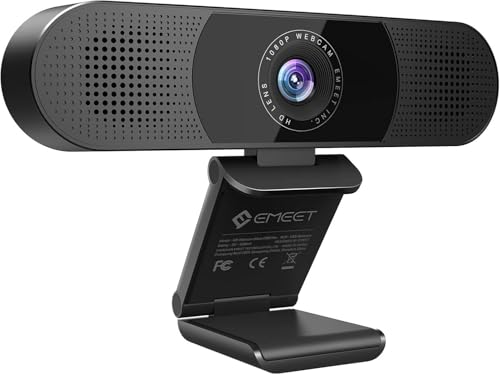 EMEET C980 Pro
|
Premium | All-in-one camera, 4 mics, 2 speakers | Group presentations and study-room calls | Check Price |
1. SVPRO USB Web Camera 1080P Full HD Webcam with Zoom Lens, 5-50mm Telephoto Webcam Manual Focus with Sony IMX323 Sensor, H.264 0.01lux Low Light Camera for Industrial Machine Vision,UVC Free Drive
The SVPRO is focused on low-light capture and flexible framing: a Sony IMX323 sensor plus a 5–50mm varifocal optical lens gives students the ability to film closeups or zoom across a room without extra glass. It’s plug-and-play via USB and built in a compact aluminum body that mounts to a tripod or clamp — ideal for dorm desks and portable rigs.
Key Specs
- Sony IMX323 2MP sensor, 1920x1080 @30fps
- 5–50mm manual varifocal lens, 10x optical zoom
- Ultra low-light sensitivity: 0.01 lux
- USB2.0 UVC plug-and-play, 3m cable, aluminum case
Pros
- Exceptional low-light sensitivity for dim dorm rooms
- Optical zoom and manual focus for flexible framing
- Sturdy aluminum case and long USB cable for versatile setup
Cons
- Manual focus and zoom can be fiddly during live streams
- Some users report uneven color reproduction in certain lighting
Best For: Late-night streamers who need zoom
Check Latest Price on Amazon2. Arducam 1080P Low Light WDR Ultra Wide Angle USB Camera Module for Computer, 2MP CMOS IMX291 160 Degree Fisheye Mini UVC USB2.0 Webcam Board with Microphone, 3.3ft Cable for Windows Linux Mac OS
Arducam’s IMX291 board camera gives students an ultra-wide field of view and outstanding low-light sensitivity (claimed down to 0.001 lux), making it great for tight spaces, hallway vlogs, and capturing more of a room. Its compact board design is highly portable and budget-friendly, though the fisheye lens means noticeable edge distortion for headshots.
Key Specs
- 2MP IMX291 sensor, up to 1920x1080 @30fps
- 160° diagonal M12 ultra-wide-angle lens
- Low-light WDR performance, minimum illumination ~0.001 lux
- UVC plug-and-play, built-in single microphone
Pros
- Outstanding low-light sensor for the price
- Very wide field of view for vlog-style campus shots
- Compact, lightweight board design fits in small rigs
Cons
- Fisheye distortion at edges — not ideal for tight headshots
- Bare-board look and basic mic quality compared with integrated webcams
Best For: Vloggers who film campus scenes
Check Latest Price on Amazon3. Logitech C920e HD 1080p Webcam + Litra Glow Premium LED Streaming Light - Zoom and Microsoft Teams Compatible Webcam with Adjustable Desktop Mounting
The Logitech C920e bundled with the Litra Glow light makes low-light streaming much easier without juggling external lamps. The webcam provides reliable 1080p video and two integrated mics, while the Litra Glow offers adjustable brightness and color temperature — a strong all-in-one choice for students who stream from dorm desks or small studios.
Key Specs
- 1080p HD video with autofocus and auto light correction
- Two omnidirectional microphones; attachable privacy cover
- Includes Litra Glow LED light with adjustable brightness & color temp
- USB plug-and-play, adjustable clip and tripod thread
Pros
- Included Litra Glow lamp dramatically improves low-light appearance
- Reliable plug-and-play performance and wide app compatibility
- Privacy cover and sturdy adjustable mount for dorm setups
Cons
- Larger footprint than basic webcams — less discreet in tiny desks
- More premium tier hardware; not as compact for pocket portability
Best For: Streamers wanting plug-and-play lighting
Check Latest Price on Amazon4. EMEET C980 PRO 3-in-1 1080P Webcam with Microphone and Speaker, 60-98 Wide Angle Webcam w/ 4 Noise Cancel Mics, 2 Speakers, Auto Low Light Correction W/Cover, USB Camera for Online Conference/Class
EMEET’s C980 Pro is built for group calls and hybrid classes — it combines a 1080p camera, four noise-cancelling microphones, and two speakers in a single USB device. Students running study groups, remote presentations, or hybrid project meetings will appreciate the simplicity, while automatic low-light correction helps in dim study rooms.
Key Specs
- 1080p camera with adjustable 60–98° field of view
- 4 omnidirectional microphones with active noise cancellation
- Built-in twin speakers and auto low-light correction
- USB plug-and-play, includes lens cover and universal clip
Pros
- All-in-one audio/video unit simplifies group calls in study rooms
- Strong auto low-light correction for darker environments
- Easy setup — plug-and-play compatibility with common OSes
Cons
- Speaker sound quality can be inconsistent on some units
- Fixed-focus design limits close-up framing and zooming
Best For: Group presentations and study-room calls
Check Latest Price on AmazonWhich One Should You Choose?
If your budget is tight → choose the Arducam (B07ZS75KZR) for the best low-light bang for your buck and ultra-wide vlogging shots. If you need flexible framing and optical zoom for demos and creative shots → choose the SVPRO (B08YRCCPWD). If you want the fastest route to great-looking streams with built-in controllable lighting → choose the Logitech C920e + Litra Glow (B0B82F92DK). If you run group presentations or hybrid class sessions often and want an all-in-one audio/video device → choose the EMEET C980 Pro (B088BY9PJG).
Best for Specific Scenarios
- Late-night dorm streams: SVPRO because its ultra-low-light sensor and optical zoom help you stay sharp under desk lamps without extra lights.
- Walk-and-talk campus vlogs: Arducam because the 160° ultra-wide lens captures more of the quad and hallway with minimal gear.
- Study-group video calls / hybrid presentations: EMEET C980 Pro because its multi-mic array and built-in speakers simplify group audio in small rooms.
- Polished, on-camera lectures or long streams: Logitech C920e + Litra Glow because the included light and reliable webcam pairing produce a professional look fast.
Frequently Asked Questions
Will these webcams work with a Chromebook or mobile phone?
Most UVC-compliant USB webcams will work with Chromebooks and Android phones that support USB OTG. Check the product feature list for UVC or OTG support; for phones you'll need a USB-C adapter. macOS and Windows typically support UVC devices without driver installs.
How can I improve low-light video without buying a separate light?
Choose a webcam with a strong low-light sensor or built-in light correction. Positioning matters — face a window or bias a desk lamp toward your face. If possible, use a webcam that includes an LED (like the Litra Glow) or clip-on light; these give the biggest immediate improvement for campus setups.
Are built-in microphones good enough for streaming and vlogging?
For casual streaming and video calls, built-in mics (especially noise-cancelling arrays) are usually adequate. For music, ASMR, or higher-production voice work, an external USB microphone or lavalier will deliver noticeably better clarity and control of background noise.
How We Selected These Products
Our recommendations are based on data-driven analysis: we evaluated 155229+ products across 23916+ brands using a composite scoring system that weighs rating (40%), review volume (30%), price value (20%), and demand signals (10%). Every product is ranked by data, not opinions.
Last updated: September 10, 2026
As an Amazon Associate we earn from qualifying purchases at no extra cost to you. Full disclosure.
GearLark Score is our editorial ranking based on a composite analysis of product quality, value, and verified customer sentiment. Click through to Amazon for current pricing, availability, and live customer reviews.