As an Amazon Associate we earn from qualifying purchases. Learn more.
Best Compact Webcams for Small Home Office Desks (2026)
If your desk is short on real estate but your video quality still matters, this guide is for you. We tested and compared compact webcams and the small-footprint mounts that keep them off your work surface — prioritizing low-light performance, sturdy clips and minimal clutter. Products were chosen for compact size, image enhancements (software or optics), mounting options and real-world build feedback from buyers. Read on to find a compact webcam or mounting solution that improves your presence on video calls without eating desk space.
Quick Answer
For small home office desks the NearStream 2K Webcam (B0D5B4RKHY) is the best pick for 2026: it pairs a compact footprint with 2K/1080p capture, autofocus and software FOV controls to improve image quality without crowding your desk.
Our Top Picks
Quick Comparison
Select 2-3 products to compare side-by-side
| Compare | Product | GearLark Score | Price Tier | Key Feature | Best For | Action |
|---|---|---|---|---|---|---|
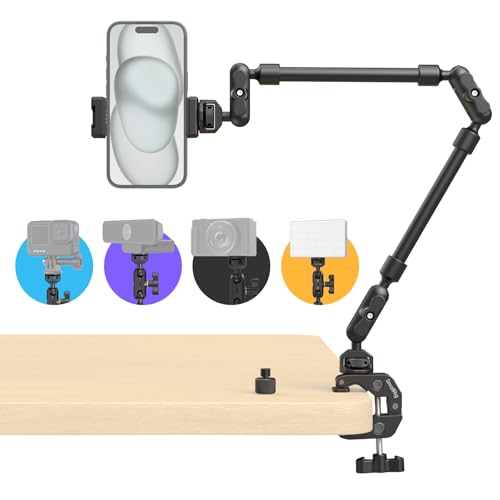 SMALLRIG 22" Magic Arm
|
Budget | Long 22" articulating arm | Anyone needing a low-footprint mount | Check Price | ||
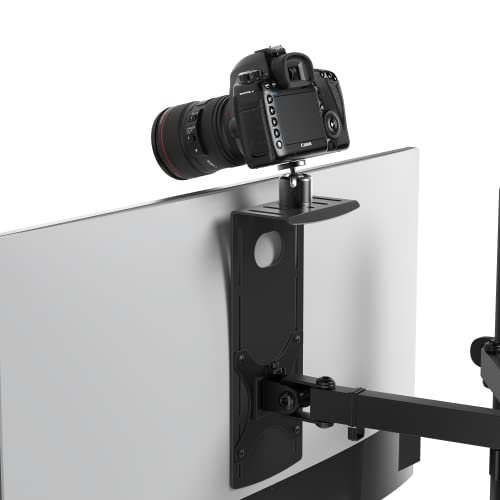 HumanCentric Monitor Shelf
|
Mid-Range | VESA-mounted compact shelf | Monitor-mounted webcam setups | Check Price | ||
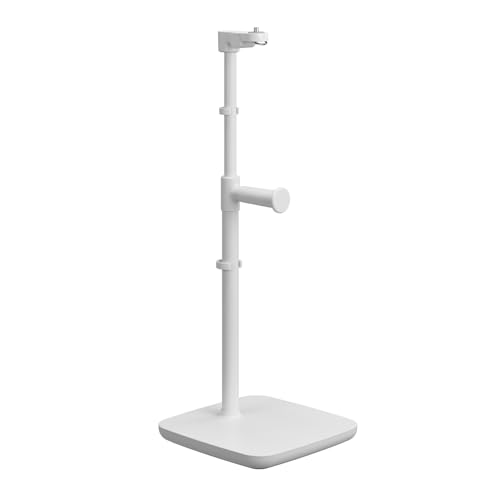 Elgato Neo Mount Stand
|
Budget | Weighted, low-wobble base | Clean desktop placement for lights/webcams | Check Price | ||
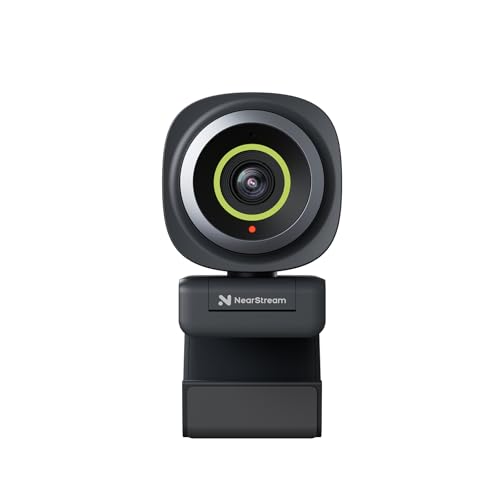 NearStream 2K Webcam
|
Mid-Range | 2K FHD sensor with software FOV controls | Compact webcam with strong control features | Check Price | ||
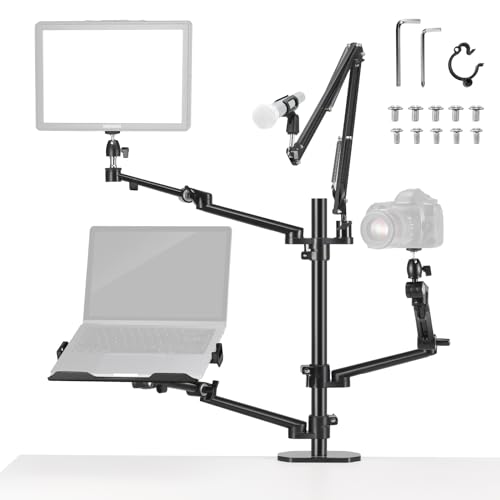 NEEWER Overhead Stand DS007
|
Premium | Multi-arm desk tree with high load capacity | Heavy setups wanting an all-in-one stand | Check Price | ||
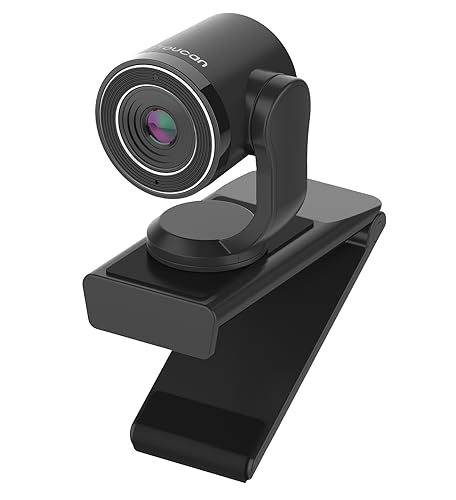 TOUCAN 1080P Webcam
|
Premium | 1080p@60fps with flip privacy cover | Users wanting high-frame 1080p capture | Check Price |
1. SMALLRIG 22" Magic Arm Clamp, Overhead Phone Mount Holder Stand, Flexible Desk Camera Mount, Articulating Friction Boom Arm, for POV Shot, Filming, Light, Webcam, Action Camera
A long, flexible magic arm that clamps to the desk edge to free up surface space. Solid materials and anti-slip pads make it a versatile budget mount for webcams, phones and small lights, though fit and long-term durability have mixed reports.
Key Specs
- 56 cm (22") articulating magic arm
- Recommended load capacity: 600 g (21 oz)
- Aluminum alloy construction
- Clamp opens to 63.5 mm; rotatable friction pads
- Includes 1/4"-20 screws, phone clamp and adapter
Pros
- Extremely flexible positioning and long reach
- Anti-slip pads protect desk and improve grip
- Good value for a multi-use mount
Cons
- Some users report mixed long-term durability
- Phone fit can be hit-or-miss with wider devices
Best For: Anyone needing a low-footprint mount
Check Latest Price on Amazon2. HumanCentric DSLR Monitor Mount Small, Desk Camera Mounting, Light Webcam, Microphone Shelf for Monitor VESA Arm, Replace Clamp Tripods, 100x100mm Patterns, Aluminum, Hardware Included
A compact VESA shelf that mounts behind a monitor to hold a webcam, light or microphone. It keeps accessories centralized without poles crowding the desk and includes hardware, though installation and compatibility with some monitors can be tricky.
Key Specs
- Compatible with 100 x 100 mm VESA patterns
- Shelf dimensions: 4.92" wide x 3.04" deep
- Accepts 1/4"-20 screws for cameras and lights
- Includes M4 VESA screws, spacers and 1/4"-20 screws
- Aluminum construction with ball joint for tilt
Pros
- Cleans up desk space by mounting behind monitor
- Solid build and useful positioning flexibility
- Includes mounting hardware for quick setup
Cons
- Installation can be tricky on some monitors
- Size/fit issues reported with certain monitor backs
Best For: Monitor-mounted webcam setups
Check Latest Price on Amazon3. Elgato Neo Mount Desk Stand for Lights, Webcams, and Compact Cameras, Weighted Base, Adjustable Height & Tilt, Headset Holder, Clean White Supports up to 1.1 lb (0.5 kg)
A well-made desktop stand with a weighted base that holds compact lights, webcams and accessories off your desk surface. It keeps your workspace tidy and adds small touches like cable clips and a headset holder, but some buyers note mixed durability in the ball head.
Key Specs
- Supports up to 1.1 lb (0.5 kg)
- Weighted base for wobble-free placement
- Adjustable height, tilt and orientation
- Integrated headset holder and cable clips
- Made using recycled plastic materials
Pros
- Professional, sturdy feel and tidy aesthetics
- Adjustable positioning with a compact footprint
- Useful cable management and headset storage
Cons
- Ball head durability reported mixed by users
- Extension pieces can stick or require adjustment
Best For: Clean desktop placement for lights/webcams
Check Latest Price on Amazon4. NearStream 2K Webcam for PC, Full HD 1080P Webcam with Noise-Canceling Mic, Auto Focus,Software Control, Adjustable FOV, Plug&Play, Compact Web Camera for Desktop Computer for Zoom/Skype/Teams (V02AF)
A compact webcam that delivers up to 2K capture (2MP sensor) with true autofocus and software-configurable FOV and image settings. It includes an AI-backed noise-canceling mic and flexible mounting options for low-footprint desks.
Key Specs
- 2K FHD (2MP) up to 30FPS; 1080p up to 60FPS
- True autofocus for sharper framing
- NearSync software with adjustable FOV (60/75/95)
- HNR AI noise-canceling microphone
- Plug-and-play USB with clip and 1/4" mount hole
Pros
- Crisp image and flexible software tuning
- Autofocus keeps you sharp when you move
- Compact head and multiple mounting options
Cons
- Limited public customer feedback available
- Software controls may require a short setup step
Best For: Compact webcam with strong control features
Check Latest Price on Amazon5. NEEWER Overhead Camera Stand Desk Mount Rig with 4 Boom Arms for Photography Video Light Ring Light Phone Mount Webcam Mic Compact DSLR for Live Streaming Broadcast Online Teaching Meeting, DS007
A full desktop tree rig with multiple boom arms and a high load rating that clears desk clutter by stacking gear vertically. It's highly adjustable and great value for complex setups, though a broken unit was reported by one buyer and it occupies more vertical space than ultra-compact mounts.
Key Specs
- Max load capacity: 17.6 lb (8 kg)
- Aluminum alloy center column with four boom arms
- Adjustable desk clamp fits 10–60 mm thickness
- Includes ball head mount, phone & tablet clamps, VESA adapter
- Hidden cable organizer for cleaner routing
Pros
- Very flexible positioning and heavy load capacity
- Good value for multi-device streaming rigs
- Sturdy aluminum construction for most builds
Cons
- Some buyers reported receiving broken units
- Larger footprint vertically; not as minimal as single mounts
Best For: Heavy setups wanting an all-in-one stand
Check Latest Price on Amazon6. TOUCAN 1080P Webcam with Microphone,FHD Streaming Camera with 1080P/60fps,Privacy Protection Plug Play Ultra Compact Web Cam w/ 89View for Computer/Meeting/Online Classes/Zoom/YouTube
An ultra-compact 1080p60 webcam with a privacy flip cover and omnidirectional mic. It offers vivid picture quality and easy USB plug-and-play setup; microphone performance appears mixed across users.
Key Specs
- 1080p Full HD up to 60FPS
- Omnidirectional noise-reducing microphone (up to ~1 m)
- 89° field of view
- Flip-down privacy lens cover
- USB 2.0 plug-and-play compatibility
Pros
- Lifelike picture quality and smooth frame rate
- Simple plug-and-play setup via USB
- Privacy cover is convenient for security-conscious users
Cons
- Microphone quality and reliability reported mixed
- Some users experienced intermittent functionality
Best For: Users wanting high-frame 1080p capture
Check Latest Price on AmazonWhich One Should You Choose?
If budget is tight → SMALLRIG 22" Magic Arm Clamp (B0D5YJ42CX) is the most cost-effective way to lift a phone or small camera off your desk and regain surface space. If you need a compact, portable webcam with strong software control → NearStream 2K Webcam (B0D5B4RKHY) offers 2K/1080p capture, autofocus and adjustable FOV in a small package. If premium capture and features matter most → TOUCAN 1080P Webcam (B0CHW2Z5CM) provides 1080p@60fps and a privacy cover for a smoother, more polished image.
Best for Specific Scenarios
- Tight desk with existing phone/camera: SMALLRIG 22" Magic Arm — clamp it to the edge and free up the surface while getting flexible angles.
- Plug-and-play compact webcam for clearer meetings: NearStream 2K Webcam — compact head, autofocus and software FOV make it easy to improve your image without extra gear.
- Multi-device streaming or teaching setup: NEEWER Overhead Stand DS007 — multiple booms and high load capacity keep lights, cameras and mics off your desk in a tidy vertical rig.
Frequently Asked Questions
Do compact webcams work well in low light?
Compact webcams can perform acceptably in low light if they combine a decent sensor with good software processing and autofocus. For the best results, use a small LED key light (mounted on a clamp or small stand) to eliminate noise and improve clarity.
Will a clamp or VESA shelf damage my monitor?
Most quality clamps and VESA shelves use silicone or rubber pads to protect surfaces. Choose mounts with anti-slip pads and make sure your monitor meets the mount’s compatibility specs to avoid stress on the casing.
Is it better to use the webcam mic or a separate microphone?
A dedicated microphone generally provides clearer, more consistent audio, especially for noisy environments. Built-in webcam mics are convenient, and models with noise-canceling features can be good for casual calls, but podcasters or frequent presenters will benefit from a separate mic.
How We Selected These Products
Our recommendations are based on data-driven analysis: we evaluated 155229+ products across 23916+ brands using a composite scoring system that weighs rating (40%), review volume (30%), price value (20%), and demand signals (10%). Every product is ranked by data, not opinions.
Last updated: October 06, 2026
As an Amazon Associate we earn from qualifying purchases at no extra cost to you. Full disclosure.
GearLark Score is our editorial ranking based on a composite analysis of product quality, value, and verified customer sentiment. Click through to Amazon for current pricing, availability, and live customer reviews.