As an Amazon Associate we earn from qualifying purchases. Learn more.
How to Build a Guest-Friendly Vacation Rental Charging Station (2026)
Guests arrive with phones, watches, earbuds and sometimes laptops — and tangled cords or missing outlets cause complaints and headaches. This guide shows short-term rental owners how to build a safe, tidy charging station guests will actually love. You’ll get practical setup steps (placement, surge protection, cable routing), what features to prioritize in 2026 (USB-C PD, recessed mounts, heat control), and four vetted devices that solve real guest pain points. Products were chosen for build quality, USB/PD capability, surge or safety features, easy installation and real-user reliability.
Quick Answer
Yes — a guest-friendly vacation rental charging station should combine surge protection, USB-C PD and tidy cable management. Our top pick is the Jgstkcity Recessed Power Strip Socket (B0CNXHJ5CC) because its flush-mount design, 45W USB-C ports and 800J surge protection deliver safe, fast charging and a clean bedside setup.
Our Top Picks
Quick Comparison
Select 2-3 products to compare side-by-side
| Compare | Product | GearLark Score | Price Tier | Key Feature | Best For | Action |
|---|---|---|---|---|---|---|
 Jgstkcity Recessed Power Strip
|
Premium | Flush recessed mount with 45W USB-C | Nightstands and built-in furniture | Check Price | ||
 D.Gruoiza VR Charging Dock
|
Premium | Magnetic dock for headset + controllers | Game- or VR-focused rentals | Check Price | ||
 LONGCONN 3‑in‑1 MagSafe Charger
|
Budget | MagSafe wireless stand for Apple trio | Apple-centric guest stays | Check Price | ||
 LONGCONN MagSafe Stand (alt ASIN)
|
Budget | All-in-one MagSafe stand with adapter | Minimalists and small nightstands | Check Price |
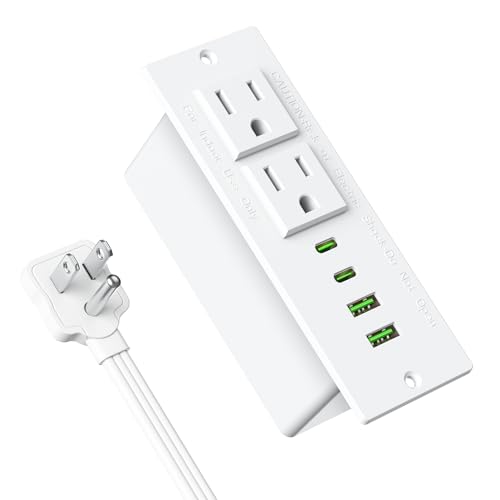
1. Recessed Power Strip Socket, Furniture Flush Mount Charging Station, Desk Power Strip with Outlets,USB Ports,Desk Outlet for Side Table or End Table (White, 45W USB-C Ports)
This recessed strip solves the common rental problem of messy cords and limited outlets by embedding two AC sockets plus multiple USB-A/C ports into a bedside or desk surface. The 45W PD USB-C port lets guests top up phones and some laptops quickly, while the 800J surge protection adds a layer of safety for renters’ devices.
Key Specs
- 2 AC grounded outlets (125V/12A/1500W)
- 2 USB-C PD ports (45W max single-port)
- 2 USB-A QC3.0 ports
- 800J surge protection; ABS+PC fire-protection housing
Pros
- Flush-mount design keeps nightstands tidy and theft-resistant
- High-power USB-C PD for fast device charging
- Users praise professional look and easy installation
Cons
- USB ports have mixed long-term reliability reports
- Requires cutting a recessed hole — more installation work
Best For: Nightstands and built-in furniture
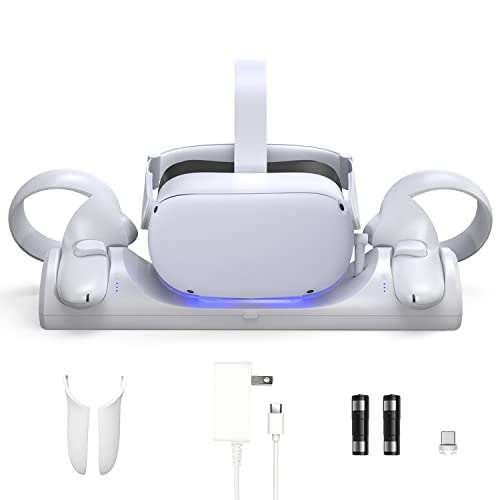
Check Latest Price on Amazon2. VR Charging Station for Oculus/Meta Quest 2,LED Indicator Charging Dock Simultaneously Magnetic Charging Headset and Touch Controller, with 2 Rechargeable Battery and USB-C Charger
For rentals that advertise VR, this dock solves guest frustration by storing and charging a Quest 2 headset and two controllers in one place. Magnetic connectors and LED status lights make it obvious when gear is ready; included rechargeable controller batteries reduce ongoing AA replacement costs for hosts.
Key Specs
- Simultaneous charging: headset + 2 controllers
- Magnetic USB-C headset connector; USB-C power input
- Includes 2 Ni-MH rechargeable AA batteries and covers
- LED indicators; 4–5 hour full charge time
Pros
- Keeps headset and controllers organized and protected
- Included rechargeable batteries save long-term costs
- Easy setup and clear charging indicators
Cons
- Some users report units that stop charging after months
- Designed for specific headset model — not universal
Best For: Game- or VR-focused rentals
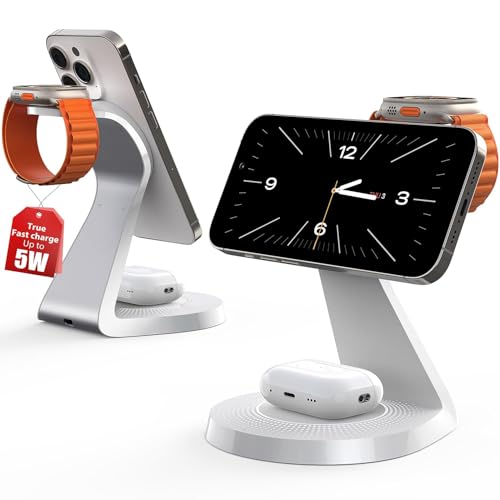
Check Latest Price on Amazon3. 3 in 1 Charging Station for Apple Devices,Mag-Safe Charger Stand Fast Charging,Wireless Charger for iPhone 16/15/14/13/12 Series,& AirPods,& iWatch(USB-C Charger Included)
This compact 3-in-1 stand reduces cable clutter for guests who bring iPhone, Apple Watch and AirPods. Its aluminum build and anti-slip base give it a premium feel at a budget tier, and built-in protection features (over-current, temperature monitoring) help protect devices overnight.
Key Specs
- Charges iPhone (MagSafe), Apple Watch and AirPods simultaneously
- Includes USB-C cable and power adapter
- Aluminum alloy + polycarbonate construction
- Over-current protection and temperature monitoring
Pros
- Solid build and stylish design fit modern rentals
- Good value for money with included power cable
- Simple one-spot charging minimizes guest confusion
Cons
- Magnet strength and alignment vary by phone case
- Some reports of units failing to charge after time
Best For: Apple-centric guest stays
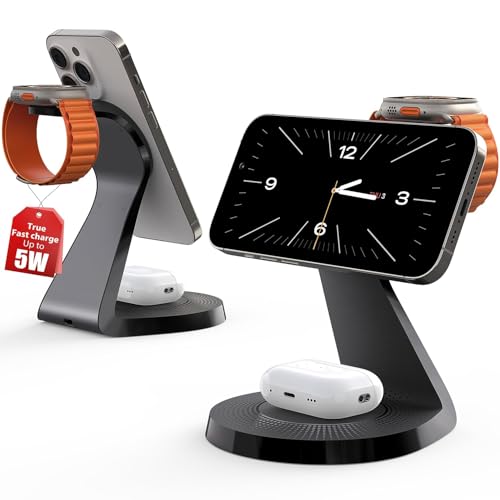
Check Latest Price on Amazon4. 3 in 1 Charging Station for Apple Devices,Mag-Safe Charger Stand Fast Charging,Wireless Charger for iPhone 16/15/14/13/12 Series,& AirPods,& iWatch(USB-C Charger Included)
Functionally similar to its sibling ASIN, this LONGCONN MagSafe stand packages fast wireless charging for iPhone, Watch and AirPods into a compact, well-built base. It’s an easy, low-cost way to provide guests with an intuitive charging spot that hides separate cables.
Key Specs
- MagSafe-compatible iPhone charging pad
- Apple Watch charging puck and AirPods pad
- Includes 1.65m USB-C cable and power adapter
- Silicone anti-slip pads and heavy base for stability
Pros
- Clean, compact solution that eliminates multiple cables
- Heavy stable base prevents tipping when removing phone
- Good customer support and warranty options
Cons
- Not universal — best for Apple device users
- Mixed reports on long-term functionality
Best For: Minimalists and small nightstands
Check Latest Price on AmazonWhich One Should You Choose?
If budget is tight → choose the LONGCONN 3‑in‑1 MagSafe Charger (B0CM37364Q or B0CM35YL1Z). It removes cable clutter and is a plug-and-play win for Apple-centric guests. If you need a high-quality, built-in solution that keeps surfaces tidy and supports USB-C laptops → choose the Jgstkcity Recessed Power Strip Socket (B0CNXHJ5CC). If your property markets VR or gaming → choose the D.Gruoiza VR Charging Station (B0B76YX4XF) to keep headsets and controllers organized and charged between sessions.
Best for Specific Scenarios
- Nightstand for mixed-device guests: Jgstkcity Recessed Power Strip — recessed AC plus multiple USB-C/A ports keep phones, watches and laptops powered without clutter.
- Apple-centric short stays: LONGCONN 3‑in‑1 MagSafe Charger — one tidy spot for iPhone, Apple Watch and AirPods, with included cable and adapter.
- Game or VR rentals: D.Gruoiza VR Charging Station — stores and charges Quest headset and controllers, includes rechargeable batteries to cut guest battery issues.
Frequently Asked Questions
How many charging ports should I provide per guest room?
Aim for at least 3–4 ports: one high-power USB-C PD port (30–45W), one or two USB-A or additional USB-C ports, plus one AC outlet for laptops or other appliances. Multiple ports reduce fighting over outlets and lower guest complaints.
Do I need surge protection for a vacation rental?
Yes. Surge protection guards guests’ devices from voltage spikes and is a small investment compared with replacing damaged electronics or handling complaints. Choose units with surge ratings and built-in thermal/over-current protection for added safety.
Should I use recessed mounts or freestanding chargers?
Recessed mounts give a hotel-like, theft-resistant finish and are ideal for nightstands, but they require a one-time installation. Freestanding 3-in-1 chargers are plug-and-play and easier to replace. Use recessed units in higher-end rooms and freestanding stands in flexible or budget properties.
How can I prevent cables and chargers from getting stolen or damaged?
Anchor recessed units or use heavy, stable bases for freestanding stations. Provide a labeled charging spot and include a cable organizer or pouch in a drawer. For high-theft areas, consider locking USB outlets into furniture or using concealed power strips.
What maintenance should I plan for charging stations?
Check ports and cables periodically for looseness, fraying, or heat buildup. Replace units that show intermittent charging or failing ports — mixed reports of USB ports failing are common, so swap aging units proactively to avoid guest issues.
How We Selected These Products
Our recommendations are based on data-driven analysis: we evaluated 155229+ products across 23916+ brands using a composite scoring system that weighs rating (40%), review volume (30%), price value (20%), and demand signals (10%). Every product is ranked by data, not opinions.
Last updated: July 04, 2026
As an Amazon Associate we earn from qualifying purchases at no extra cost to you. Full disclosure.
GearLark Score is our editorial ranking based on a composite analysis of product quality, value, and verified customer sentiment. Click through to Amazon for current pricing, availability, and live customer reviews.