As an Amazon Associate we earn from qualifying purchases. Learn more.
How to Build a College Move-In Charging Station (2026 Guide)
Moving into college with roommates means sharing space, outlets, and lots of devices. This guide shows a complete, roommate-friendly charging station you can build for a dorm desk or shared common area in 2026. You’ll learn which components to combine (stand + hub, power strip, cable management and extenders), why each item matters, and how we chose products based on build quality, connectivity, portability and real customer feedback. Selections favor multiport functionality, durable materials (aluminum/plastic blends), and ease of setup so roommates can share power cleanly and safely.
Quick Answer
Build a compact, roommate-ready charging station around the tounee Laptop Stand with Detachable USB-C Hub (B0DRCHWB8Q) as the hub/stand — add a surge-protected power tower (B0DL9BXLLD), a reliable Surface hub (B09V2SZHFW) or extension cable (B0BJVM882K) for stretched setups. This combo balances fast charging, multiple ports, and stable power for shared dorm setups.
Our Top Picks
Quick Comparison
Select 2-3 products to compare side-by-side
| Compare | Product | GearLark Score | Price Tier | Key Feature | Best For | Action |
|---|---|---|---|---|---|---|
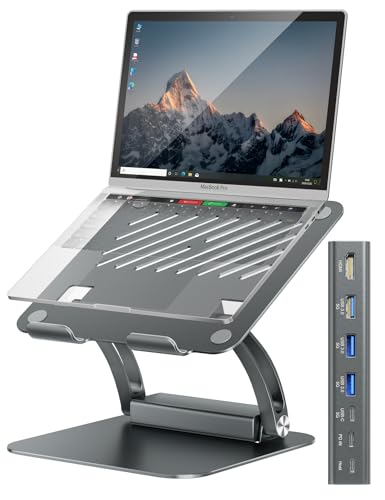 tounee Stand + Detachable Hub
|
Premium | Detachable USB-C hub with 100W PD | MacBook/Windows students needing a desk hub | Check Price | ||
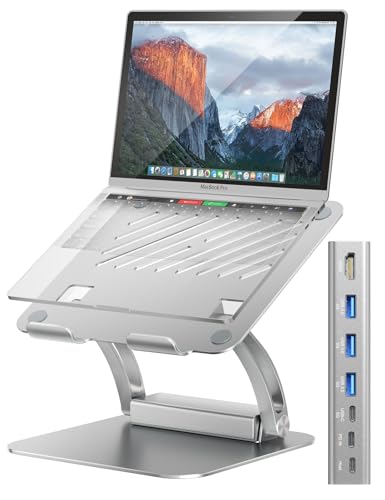 tounee Stand (Silver)
|
Premium | Same dock features in a Silver finish | Users wanting a color-matched docking stand | Check Price | ||
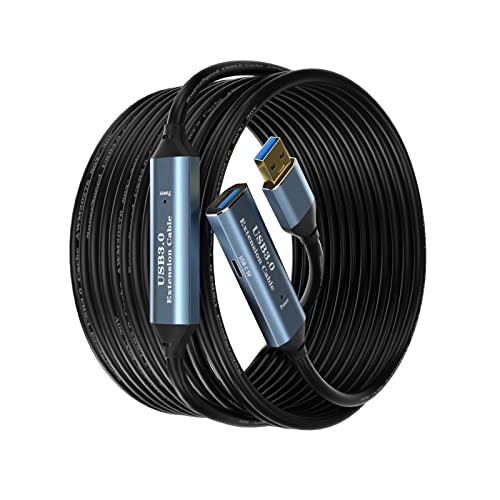 SSSGRGB USB 3.0 Extender
|
Mid-Range | Active USB 3.0 extension with signal booster | Stretched desks or remote-peripheral setups | Check Price | ||
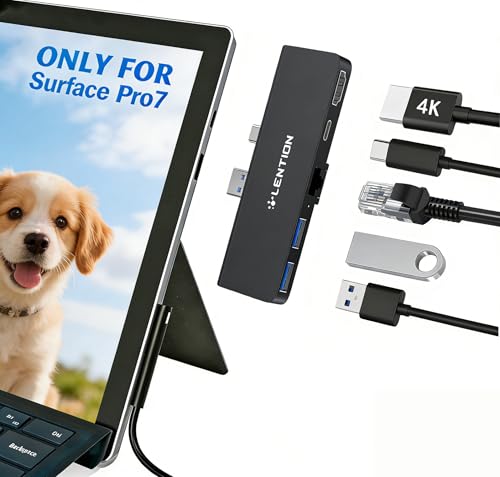 LENTION Surface Pro 7 Hub
|
Mid-Range | Surface Pro 7-specific 5-in-1 hub | Surface Pro 7 users needing Ethernet + HDMI | Check Price | ||
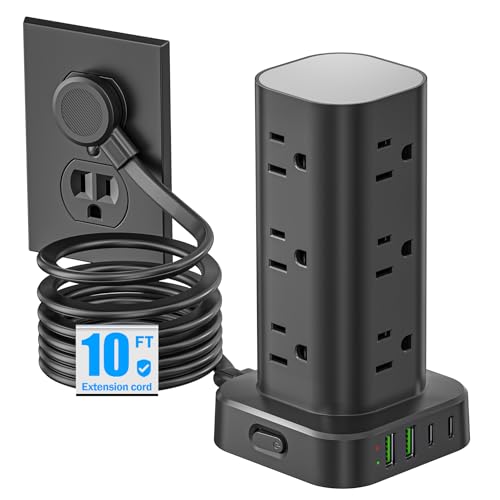 Pluackg Power Strip Tower
|
Budget | 12 AC outlets + 4 USB (2 USB-C) | Roommates who need many outlets on a budget | Check Price |
1. tounee Laptop Stand with Detachable USB-C Hub, 100W PD Charging, 4K@60Hz HDMI, 3 USB Ports, Ergonomic Laptop Holder Docking Station for 10-17" Laptops, MacBook & More - Gray
A premium aluminum laptop stand that doubles as a docking station, the tounee stand provides an ergonomic lift plus a detachable USB-C hub with 100W power delivery and 4K@60Hz HDMI out. It’s built for students who want a tidy, USB-C-first desk setup and frequent monitor connections without extra adapters.
Key Specs
- Detachable USB-C hub
- 100W Power Delivery (PD) charging
- 4K@60Hz HDMI output
- Supports 10"–17" laptops, aluminum construction
Pros
- Sturdy aluminum build with ergonomic lift
- High-speed 100W PD for fast laptop charging
- 4K HDMI plus multiple USB ports for peripherals
Cons
- Premium price compared with basic stands
- Detachable hub adds complexity for some users
Best For: MacBook/Windows students needing a desk hub
Check Latest Price on Amazon2. tounee Laptop Stand with Detachable USB-C Hub, 100W PD Charging, 4K@60Hz HDMI, 3 USB Ports, Ergonomic Laptop Holder Docking Station for 10-17" Laptops, MacBook & More - Silver
The silver variant offers the same detachable hub, 100W PD, and 4K HDMI as the gray model but in a finish that pairs well with silver MacBooks and aluminum desks. It’s ideal if aesthetics and matching gear are important in a roommate-shared setup.
Key Specs
- Detachable USB-C hub
- 100W Power Delivery
- 4K@60Hz HDMI output
- Ergonomic aluminum stand, supports 10"–17" laptops
Pros
- Premium build and finish that matches aluminum laptops
- Powerful PD charging keeps larger laptops topped up
- Multiple connectivity options reduce additional hubs
Cons
- Higher cost for an aesthetic variant
- Hub-specific design may be overkill for light users
Best For: Users wanting a color-matched docking stand
Check Latest Price on Amazon3. USB 3.0 Extension Cable 50FT Type A Male to Female Active Extender Cord with 2 Extension Chipsets Signal Booster and 1 USB-C Charging Port, for Webcam, USB Hub, PlayStation, Printer, Camera
This active USB 3.0 extension lets you move hubs, webcams or hard drives farther from the outlet and up onto shared desks without signal loss. It supports up to 5Gbps data transfer, includes a side USB-C charging port, and is built with a braided shield and gold-plated connectors for durability.
Key Specs
- Up to 5Gbps USB 3.0 data transfer
- Charging output ~2A, includes USB-C charging port
- Braided shield and aluminum alloy connectors
- Multiple length options (e.g., 50FT)
Pros
- Adds reach for hubs or cameras across a dorm room
- Good value for extending device placement
- Solid connectors and braided cable for protection
Cons
- Reported mixed durability in a few cases
- Some users experienced intermittent failures
Best For: Stretched desks or remote-peripheral setups
Check Latest Price on Amazon4. LENTION Surface Pro 7 USB C Hub Docking Station,5-in-1 Surface Pro 7 Hub,4K@60Hz USB-C to HDMI Hub,USB C to Gigabit Ethernet Hub,2 USB 3.0 Hub,PD 60W Type C Charging Port Hub(CS35,Black)
A compact 5-in-1 hub designed to pair with the Surface Pro 7, the LENTION hub adds 4K@60Hz HDMI, Gigabit Ethernet, two USB 3.0 ports and 60W PD passthrough. It’s a neat, integrated option for students who rely on wired networks and external displays for classes or group projects.
Key Specs
- 4K@60Hz HDMI output
- Gigabit RJ45 Ethernet port
- 2 x USB 3.0 ports
- PD 60W Type-C charging passthrough
Pros
- Tailored fit and clean look for Surface Pro 7
- Reliable wired networking and monitor support
- Solid build and good port selection for a small hub
Cons
- Marketed specifically for Surface Pro 7 — limited fit
- Some reports of heat buildup under heavy load
Best For: Surface Pro 7 users needing Ethernet + HDMI
Check Latest Price on Amazon5. Flat Plug Power Strip Tower Surge Protector, 10FT Flat Extension Cord with Multiple Outlets, 12 AC Outlets, 4 USB Ports (2 USB C) Charging Station for Office Home Dorm Room Travel (Black)
A vertical power tower built for shared spaces, the Pluackg tower gives up to 12 AC outlets plus four USB ports (including 2 USB-C), a flat plug for tight spaces, and basic surge protection. Customers praise its port density and compact footprint — great for charging many phones, earbuds and small devices at once.
Key Specs
- 12 AC outlets and 4 USB ports (2 USB-C)
- Flat ultra-thin plug design for tight wall spaces
- Built-in surge, overload and short-circuit protection
- 10ft extension cord
Pros
- High port capacity keeps multiple roommates charged
- Space-saving vertical design with flat plug
- USB-C ports provide modern charging convenience
Cons
- Tower can be tall and awkward in some desk setups
- Total USB output is shared — high loads slow charging
Best For: Roommates who need many outlets on a budget
Check Latest Price on AmazonWhich One Should You Choose?
If budget is tight → Pluackg Power Strip Tower (B0DL9BXLLD) gives the most outlets and basic USB-C at the lowest cost. If you need portable reach or to move a webcam/hub across the room → SSSGRGB USB 3.0 Extender (B0BJVM882K) solves long-distance placement. If premium quality and an all-in-one desk hub are your priority → tounee Laptop Stand with Detachable Hub (B0DRCHWB8Q) provides the best mix of PD charging, monitor support and a tidy desk footprint. If you use a Surface Pro 7 and want Ethernet + HDMI in one click → LENTION Surface Pro 7 Hub (B09V2SZHFW) is tailored for that workflow.
Best for Specific Scenarios
- Two roommates sharing a desk: Pluackg Power Strip Tower (B0DL9BXLLD) because its 12 outlets and multiple USB ports let both people plug phones, lamps and chargers simultaneously.
- One-person workstation with external monitor: tounee Laptop Stand (B0DRCHWB8Q) because it provides 100W PD, 4K@60Hz HDMI and an ergonomic stand for a tidy, desk-focused setup.
- Remote camera or far-away hub: SSSGRGB USB 3.0 Extender (B0BJVM882K) because it extends USB signal and adds a convenient USB-C charging port where you need it.
Frequently Asked Questions
Do I need a surge protector for a dorm charging station?
Yes. A surge protector protects devices from voltage spikes and is a smart safety upgrade for shared dorm outlets. Look for one with overload and short-circuit protection and a flat plug if outlets are in tight spaces.
Will a USB-C hub charge my laptop as well as connect monitors?
Many hubs offer Power Delivery (PD) passthrough. Choose a hub with PD rated for your laptop — 60W works for small laptops and tablets; 85–100W is safer for larger notebooks. Confirm the hub lists '100W PD' or similar in the specs.
How do I keep cables tidy in a roommate charging station?
Use a vertical power tower to consolidate AC outlets, short braided cables to reduce slack, adhesive cable clips or a small cable box to hide excess cord, and label chargers so roommates know which cable belongs to whom.
How We Selected These Products
Our recommendations are based on data-driven analysis: we evaluated 155229+ products across 23916+ brands using a composite scoring system that weighs rating (40%), review volume (30%), price value (20%), and demand signals (10%). Every product is ranked by data, not opinions.
Last updated: August 25, 2026
As an Amazon Associate we earn from qualifying purchases at no extra cost to you. Full disclosure.
GearLark Score is our editorial ranking based on a composite analysis of product quality, value, and verified customer sentiment. Click through to Amazon for current pricing, availability, and live customer reviews.