As an Amazon Associate we earn from qualifying purchases. Learn more.
Complete Back-to-School Study Desk Setup Guide (2026)
Setting up a productive study desk means thinking beyond a laptop and a lamp: you need reliable power, neat cable management, accessible fast charging, and lighting that reduces eye strain. This guide walks parents and students through an all-in-one desk build for back-to-school 2026 focused on monitor placement, portable power and chargers, cable management, and task lighting. We evaluated products on build quality, ease of installation, functionality, and customer feedback (durability and charging reliability were weighed heavily). The picks below concentrate on power and charging solutions that anchor a tidy, productive workspace.
Quick Answer
For an all-in-one back-to-school desk power and cable hub, the Pezin & Hulin Desktop USB Charging Station (B07DNQJSC4) is our top pick for its polished bamboo organizer and multi-port charging. For tight budgets choose the CCCEI recessed desk outlet (B0C5C75MCF); if you want a desk-mounted surge protector, the Jgstkcity clamp power strip (B0BXP2ZTWB) balances features and installation convenience.
Our Top Picks
Quick Comparison
Select 2-3 products to compare side-by-side
| Compare | Product | GearLark Score | Price Tier | Key Feature | Best For | Action |
|---|---|---|---|---|---|---|
 Pezin & Hulin Bamboo Station
|
Premium | Bamboo organizer + 5-port USB hub | Stylish desks that need multi-device charging | Check Price | ||
 CCCEI Recessed (6 FT)
|
Budget | Recessed desk outlet with PD 45W | Built-in desk or nightstand power access | Check Price | ||
 CCCEI Recessed (10 FT)
|
Mid-Range | Same recessed outlet with longer cord | Larger rooms where outlet is far from desk | Check Price | ||
 CCCEI Recessed White
|
Budget | White recessed outlet with PD 45W | White desks and lighter decor | Check Price | ||
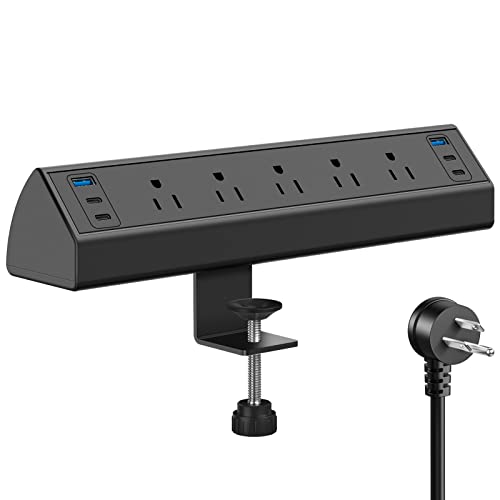 Jgstkcity Clamp (Black)
|
Mid-Range | Clamp-mount surge protector with PD ports | Desks with limited surface area that need quick access | Check Price | ||
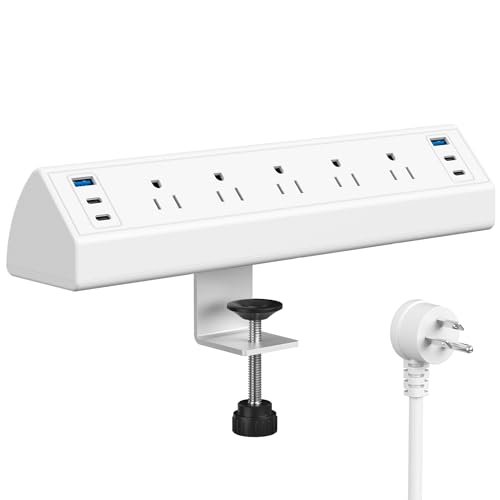 Jgstkcity Clamp (White)
|
Mid-Range | White clamp-mount with surge protection | Bright/white desk setups needing mounted power | Check Price |
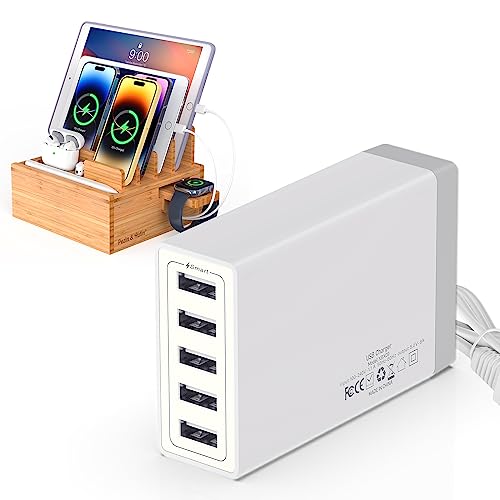
1. Pezin & Hulin Desktop USB Charging Station with Bamboo Charging Station, Desktop Charger Block, Compatible with Tablet, Cell Phone, Earbuds, Smartwatch
A premium-looking bamboo charging dock that combines a five-port USB charger with a multi-device stand and cable-hiding base. It’s ideal for users who want a tidy, display-friendly charger for phones, tablets, watches and earbuds; some buyers report excellent organization and charging, while a minority note occasional port or magnetic-hold issues.
Key Specs
- 5-port USB charger hub (external detachable)
- Bamboo charging station holds up to 8 devices
- Includes assorted cables (Type-C, Android, iOS)
- Magnetic wide base hides cables and power blocks
- Detachable watch stand
Pros
- Elegant bamboo design improves desk aesthetics
- Charges multiple devices and includes cables
- Built-in cable management hides clutter
Cons
- Some reports of USB ports failing or inconsistent charging
- Magnetic top can slide on certain desks
Best For: Stylish desks that need multi-device charging
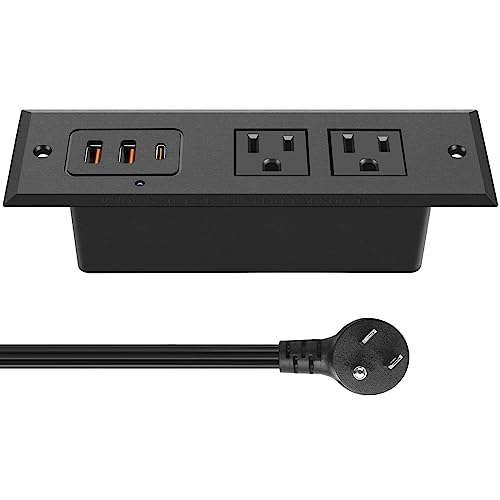
Check Latest Price on Amazon2. CCCEI Recessed Power Strip with 45 W USB C Port, Fast Charging USB A Port, Desk Outlet, Furniture Hidden Charging Station for Side Table, End Table, with 6 FT 45 Degree Flat Plug Extension Cord.
A budget-friendly recessed power strip designed to mount in a desk hole for hidden charging. It offers a PD 45W USB-C port plus QC3.0 USB-A ports and two AC outlets — a practical choice for dorms and small desks. Customers praise its fit and finish and easy installation, though durability and occasional port failures are mentioned by some.
Key Specs
- PD 3.0 USB-C (up to 45W max)
- QC3.0 USB-A (up to 36W max across ports)
- 2 AC outlets; cutout size 4.9" x 1.7"
- 6 ft 45-degree flat plug extension cord
- ETL listed, fire-resistant shell
Pros
- Neat, professional in-desk finish
- Good value and easy to install
- Fast-charge capable USB-C port useful for laptops/tablets
Cons
- Some users report USB ports that stop working
- Needs clearance under desk for installation
Best For: Built-in desk or nightstand power access
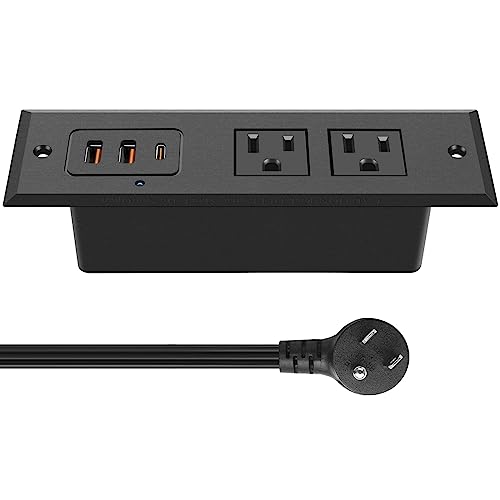
Check Latest Price on Amazon3. CCCEI Recessed Power Strip with 45 W USB C Port, Fast Charging USB A Port Desk Outlet, Furniture Hidden Charging Station for Side Table, End Table, with 10 FT 45 Degree Flat Plug Extension Cord.
Same recessed desk outlet as the budget variant but with a 10 ft extension cord for more placement flexibility. It supports PD 45W USB-C and QC3.0 USB-A ports and is frequently praised for fit and appearance. durability reports are mixed — the longer cord makes it more convenient for certain setups.
Key Specs
- PD 3.0 USB-C (up to 45W max)
- QC3.0 USB-A ports (varied outputs)
- 2 AC outlets; cutout size 4.9" x 1.7"
- 10 ft 45-degree flat plug extension cord
- ETL listed and fire-resistant housing
Pros
- Longer 10 ft cord increases installation options
- Professional look when flush-mounted
- Useful PD output for fast charging laptops/tablets
Cons
- Same mixed durability reports as other recessed units
- Requires accurate cutout and under-desk clearance
Best For: Larger rooms where outlet is far from desk
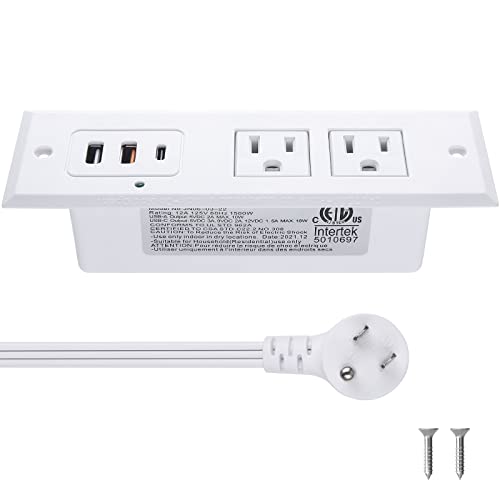
Check Latest Price on Amazon4. CCCEI Recessed Power Strip with 45 W USB C Port, Fast Charging USB A Port Desk Outlet, Furniture Hidden Charging Station for Side Table, End Table, with 6 FT 45 Degree Flat Plug Extension Cord White
A color-matched recessed charging outlet for white or light wood desks that combines PD 45W USB-C, QC USB-A ports, and AC outlets. It’s widely liked for its look and installation ease, making it a solid budget pick for built-in charging, though a minority of users note intermittent port failures over time.
Key Specs
- PD 3.0 USB-C (up to 45W max)
- QC3.0 USB-A ports
- 2 AC outlets; desk cutout 4.9" x 1.7"
- Comes with an extension cord (length varies by SKU)
- ETL safety listing
Pros
- Looks clean and integrates well with light desks
- Affordable way to add in-desk charging
- Straightforward installation
Cons
- Reports of USB ports losing functionality over time
- Requires under-desk space and a precise cutout
Best For: White desks and lighter decor
Check Latest Price on Amazon5. Jgstkcity Desk Clamp Power Strip USB C,40W Total Fast Charging Station,4 PD 20W USB C Ports,Desk Edge Mount Surge Protector,5 Outlets,Fit 1.96" Tabletop Edge,ETL Listed
A desk-edge clamp power dock offering 4 PD 20W USB-C ports, two USB-A ports and five AC outlets, plus surge protection. It clamps to the desk edge for semi-permanent mounting and keeps outlets off the desktop. Users like the design and installation; some report USB reliability issues and remember that 40W is the total output limit.
Key Specs
- 4 x PD 20W USB-C ports (total 40W shared)
- 2 x QC3.0 USB-A ports
- 5 AC outlets; 1200 Joules surge protection
- Fits tabletop edges up to 1.96" thick
- 6 ft flat plug; ETL listed
Pros
- Edge clamp frees desktop space and looks tidy
- Multiple fast-charge USB-C ports for phones/tablets
- Good build and easy to install
Cons
- 40W total USB output limits simultaneous high-watt devices
- Some reports of USB ports becoming unreliable
Best For: Desks with limited surface area that need quick access
Check Latest Price on Amazon6. Jgstkcity Desk Clamp Power Strip USB C,40W Total Fast Charging Station,4 PD 20W USB C Ports,Desk Edge Mount Surge Protector,5 Outlets,Fit 1.96" Tabletop Edge,ETL Listed,White
White variant of the clamp-mounted power station with the same port mix: four PD 20W USB-C, two USB-A and five AC outlets. It’s praised for build quality and looks on white or light desks, but shares the same overall output limitation and some mixed reports on long-term USB reliability.
Key Specs
- 4 PD 20W USB-C ports (shared 40W total)
- 2 QC3.0 USB-A ports
- 5 AC outlets; 1200 Joules surge protection
- Clamps to desks up to 1.96" thick
- 6 ft flat plug; fire-resistant materials
Pros
- Clean white finish suits lighter desks
- Good build quality and convenient access
- Simple clamp installation without cutting
Cons
- Total USB output shared between ports can limit charging
- Some users cite long-term USB-C reliability concerns
Best For: Bright/white desk setups needing mounted power
Check Latest Price on AmazonWhich One Should You Choose?
If budget is tight → choose the CCCEI recessed outlet (B0C5C75MCF) for a low-cost, built-in charging option that looks clean and installs quickly. If you need quick access without cutting your desk → pick the Jgstkcity Desk Clamp Power Strip (B0BXP2ZTWB) for easy clamp installation and reachable outlets. If premium style + a multi-device organizer matters → go with the Pezin & Hulin Bamboo Charging Station (B07DNQJSC4) for an elegant, cable-hiding dock that holds phones, tablets and a watch.
Best for Specific Scenarios
- Dorm room with limited outlets: CCCEI Recessed (B0C5C75MCF) because it adds fast USB-C charging and hides clutter in a small footprint.
- Shared family study table: Jgstkcity Desk Clamp (B0BXP2ZTWB) because the clamp keeps outlets accessible to multiple users and provides surge protection.
- Minimalist or designer desk: Pezin & Hulin Bamboo Station (B07DNQJSC4) because it blends with decor while organizing multiple devices and cables.
Frequently Asked Questions
Will these USB-C ports charge my laptop?
Check the PD (Power Delivery) wattage: recessed units with PD 45W can charge many thin laptops and tablets, while PD 20W ports are best for phones and smaller tablets. For larger laptops you may need a higher-watt USB-C charger or the laptop’s OEM adapter.
Can I install a recessed outlet in a dorm or rental desk?
Recessed outlets require drilling or cutting a small hole and access to clearance under the desk, so check dorm/rental rules before modifying furniture. If you can’t alter furniture, choose a clamp-mount or desktop charging dock instead.
How do I avoid USB ports failing over time?
Avoid constantly yanking cables, use quality cables rated for PD/QC, and don’t exceed the device’s total shared output by running multiple high-watt devices at once. Look for products with safety listings (ETL/UL) and vendor warranties; that reduces risk and gives recourse if ports fail.
How We Selected These Products
Our recommendations are based on data-driven analysis: we evaluated 155229+ products across 23916+ brands using a composite scoring system that weighs rating (40%), review volume (30%), price value (20%), and demand signals (10%). Every product is ranked by data, not opinions.
Last updated: September 04, 2026
As an Amazon Associate we earn from qualifying purchases at no extra cost to you. Full disclosure.
GearLark Score is our editorial ranking based on a composite analysis of product quality, value, and verified customer sentiment. Click through to Amazon for current pricing, availability, and live customer reviews.