As an Amazon Associate we earn from qualifying purchases. Learn more.
Complete Portable Monitor & Docking Setup for Presentations (2026)
Creating a reliable, portable presentation rig means more than a single monitor — you need the right portable screens, a robust USB-C hub or docking station, dependable power and simple cables. This guide walks you through a complete 2026 setup for presenters, consultants, and road warriors who want a fast, repeatable workflow for client demos, boardroom slides, and hybrid meetings. I selected products based on connectivity options, portability, power delivery, and real-world buyer feedback on build and ease of use. Read on to see the best portable monitors and hubs to assemble a compact, reliable presentation kit.
Quick Answer
For the most flexible, travel-ready presentation setup choose the KEFEYA Laptop Screen Extender (B0D9M3H74L) for its triple-screen flexibility and broad connection options; for a touchscreen dual-monitor rig pick the JSAUX FlipGo Touchscreen (B0D4QLMNCP); budget hub users should consider the VANGREE 4-Port USB C Hub (B0D5VTBG8F).
Our Top Picks
Quick Comparison
Select 2-3 products to compare side-by-side
| Compare | Product | GearLark Score | Price Tier | Key Feature | Best For | Action |
|---|---|---|---|---|---|---|
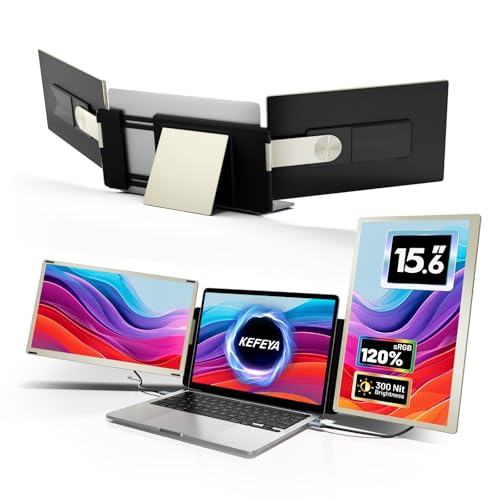 KEFEYA 15.6" Screen Extender
|
Premium | Triple-screen extender with 120% sRGB | Power users who need triple displays | Check Price | ||
![JSAUX FlipGo Touchscreen 16" Dual Portable Monitor, 2.5K Triple Laptop Touch IPS Screen Foldable Extender for Laptop[for Windows/Linux] One Cable to Dual/Magnetic Design/Built-in HUB/HiDPI Display](/assets/images/products/B0D4QLMNCP.jpg) JSAUX FlipGo 16" Touch
JSAUX FlipGo 16" Touch
|
Premium | Dual 2.5K touch screens with built-in hub | Presenters who prefer touch interaction | Check Price | ||
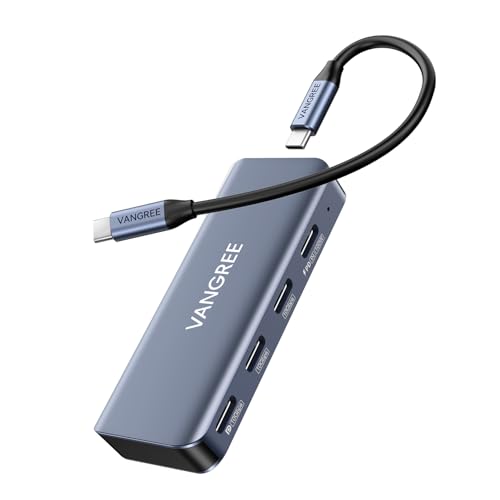 VANGREE 4-Port USB C Hub
|
Budget | 4K@60Hz DisplayPort + 100W PD | Budget-conscious presenters needing 4K output | Check Price | ||
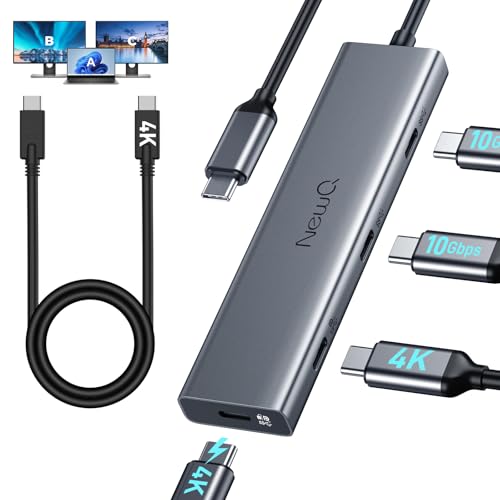 NEWQ USB C Video Splitter
|
Mid-Range | Dual 4K display support with multiple USB-C ports | Users needing multiple USB-C monitor outputs | Check Price | ||
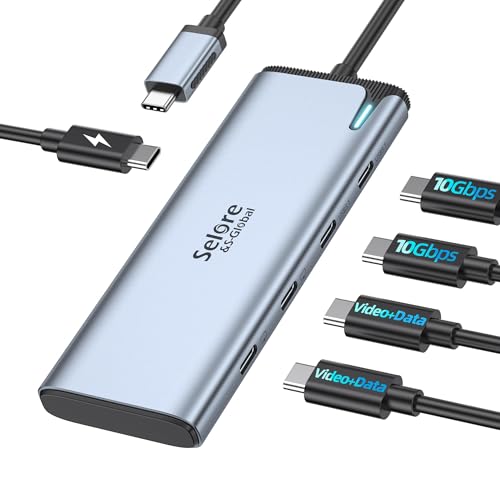 Selore&S-Global USB C Splitter
|
Budget | Dual 4K via Intel JHL8140, 100W PD | Windows/Thunderbolt users needing MST dual displays | Check Price | ||
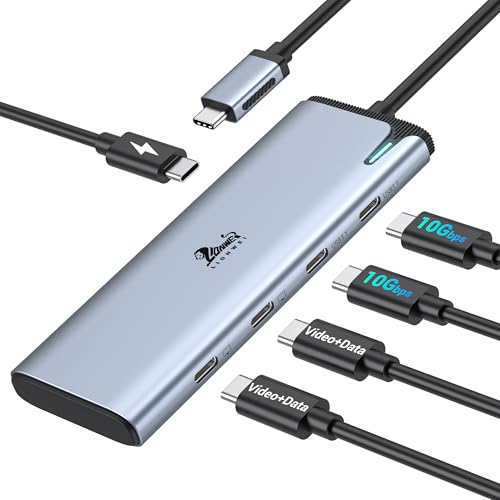 LIONWEI USB C Docking Hub
|
Budget | Dual 4K@60Hz DP Alt Mode hub | Windows laptop users wanting a simple dual-monitor hub | Check Price | ||
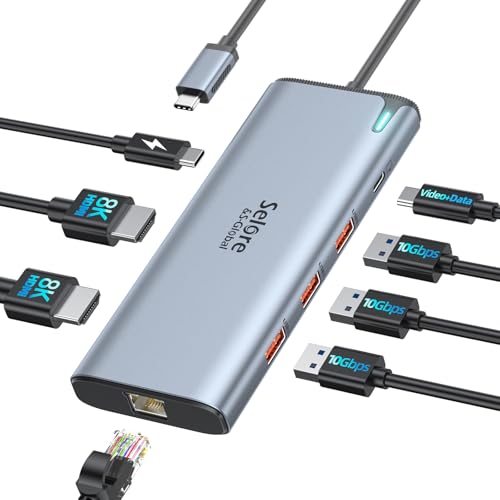 Selore 8K Docking Station
|
Mid-Range | 8K-capable docking with many ports | Users needing a full docking station with Ethernet | Check Price |
1. Laptop Screen Extender, 15.6" Portable Monitor for Laptop with 120% sRGB, FHD IPS & USB to HDMI Hub & 235 Rotation, Triple Monitor Extender Plug & Play Fits for All Laptops (Mac/Win/Android)
KEFEYA’s 15.6" extender is designed for users who want to scale a laptop into a 3-screen workstation on the go. It offers FHD IPS panels with strong color coverage, multiple connection methods (USB-C, USB-A + HDMI) and flexible magnetic framing and rotation for easy transport and setup. Expect a premium, travel-ready option when you need more than a single external screen.
Key Specs
- 15.6" FHD IPS panels
- 120% sRGB color gamut
- Multiple inputs: USB-C, USB-A + HDMI
- Magnetic frame, up to 360° rotation
Pros
- Great color and picture clarity for presentations
- Flexible triple-screen layouts boost productivity
- Portable magnetic design makes travel easier
Cons
- Setup with certain Mac chipsets requires an extra hub and drivers
- Weight is heavier than some single portable displays
Best For: Power users who need triple displays
Check Latest Price on Amazon2. JSAUX FlipGo Touchscreen 16" Dual Portable Monitor, 2.5K Triple Laptop Touch IPS Screen Foldable Extender for Laptop[for Windows/Linux] One Cable to Dual/Magnetic Design/Built-in HUB/HiDPI Display
The JSAUX FlipGo combines two 16" 2.5K IPS panels with 10-point touch for a tactile, high-resolution presentation surface. It can power both displays from one USB-C cable (depending on laptop support) and includes a magnetic back and built-in hub for extra connectivity. Ideal for Windows/Linux users who value touch control and bright, sharp screens in a portable package.
Key Specs
- Dual 2.5K IPS displays (16")
- 10-point touch support (Windows/Linux only)
- One-cable connection for dual screens (system dependent)
- Built-in hub: USB-C display & power, mini HDMI, USB-A/C ports
Pros
- Excellent resolution and touch responsiveness
- Compact magnetic design for transport
- Built-in hub reduces cable clutter
Cons
- Extended multi-screen modes are limited on macOS
- Some users report mixed build quality and setup quirks
Best For: Presenters who prefer touch interaction
Check Latest Price on Amazon3. 4-Port USB C Hub with 4K@60Hz Displayport, 3 USBC 3.2 10Gbps Ports, 100W Power Delivery, Detachable Cable, USB C Splitter Multiport Adapter for MacBook Pro/Air, iPad, iPhone 15, Portable Monitor
VANGREE’s compact 4-port USB-C hub delivers a 4K@60Hz DisplayPort, three USB-C 3.2 ports and up to 100W power delivery in a pocketable package. It’s a straightforward, value-oriented hub for travel rigs or simple docking on client sites. Buyers praise connectivity and size, though some report heat and inconsistent power delivery under heavy loads.
Key Specs
- 4K@60Hz DisplayPort output
- Three USB-C 3.2 (10Gbps) ports
- 100W power delivery (pass-through)
- Detachable cable for portability
Pros
- Good connectivity for the price
- Small, travel-friendly footprint
- Supports high-res external displays
Cons
- Can run hot during sustained use
- Some users report mixed power delivery performance
Best For: Budget-conscious presenters needing 4K output
Check Latest Price on Amazon4. USB C Video Splitter Dual Monitor, 4-Port USB-C 3.2 Gen 2 10Gbps Hub,for USBC PD Monitor, Type C Monitors, Portable Screen, DP Alt 4K@30-60Hz, 100W PD, for Win/Chrome Laptop, AR Glasses, Game Console
The NEWQ video splitter emphasizes dual 4K support and high-speed USB-C ports for a multi-monitor portable rig. It’s practical for gaming or on-the-go multi-screen work, but the hub’s dual-screen performance depends on laptop and monitor power—external chargers are often necessary. Customers like the functionality and value, while noting power/setup requirements for dual-screen use.
Key Specs
- Dual 4K@30-60Hz display support (DP Alt/USB-C)
- Four USB-C 3.2 Gen2 (10Gbps)
- 100W PD support
- Full-featured cable for portable monitors
Pros
- Solid value for multi-screen setups
- Plenty of USB-C ports for peripherals
- Works well with consoles and gaming setups
Cons
- Dual-monitor setups often require external power for both screens
- Power consumption handling can be confusing
Best For: Users needing multiple USB-C monitor outputs
Check Latest Price on Amazon5. Selore&S-Global USB C Splitter with 4K/60Hz Video Output,USB C Hub Dual Monitor with DP Alt Mode,10Gbps Data Transfer,100W PD,Docking Station Dual Monitor for Windows Laptop,Portable Monitors
Selore’s splitter uses an Intel JHL8140 chip to enable dual 4K outputs (with compatible USB4/Thunderbolt ports) and includes 100W pass-through charging and high-speed data. Customers praise compactness and build quality, but note Mac compatibility limits and occasional power delivery quirks. It’s a value-packed choice if your laptop supports the required DP Alt/MST modes.
Key Specs
- Dual 4K@60Hz USB-C video via DP Alt Mode
- Intel JHL8140 chip for MST support
- Two 10Gbps USB-C data ports
- Up to 87-100W pass-through charging
Pros
- Compact and well-built for the price
- Good port selection for multi-monitor setups
- Solid value for Thunderbolt/USB4 laptops
Cons
- Mac compatibility and MST limitations
- Some users report inconsistent power delivery
Best For: Windows/Thunderbolt users needing MST dual displays
Check Latest Price on Amazon6. USB C Docking Station Dual Monitor 4K@60Hz DP Alt Mode, USB C Video Hub with 10Gbps Data Transfer, 100W PD Charging, USBC Splitter for Dell/HP/Lenovo, Portable Monitor and More Type C Devices
LIONWEI offers a budget-conscious docking hub aimed at Thunderbolt/USB4 Windows laptops that need dual 4K outputs and 100W pass-through charging. It’s praised for solid connectivity and clean layouts but some buyers mention heat under load and uneven longevity. A dependable, low-cost docking option if you accept the caveats.
Key Specs
- Dual 4K@60Hz over DP Alt Mode
- Two USB-C 10Gbps data ports
- 100W pass-through PD (up to ~87W safe)
- Supports MST/SST for Windows (not macOS)
Pros
- Good port capacity for peripherals and monitors
- Reasonable build and value for money
- Straightforward for Windows/Thunderbolt setups
Cons
- Hub can get warm during heavy use
- Durability reports are mixed over time
Best For: Windows laptop users wanting a simple dual-monitor hub
Check Latest Price on Amazon7. Docking Station USB C Video,8K Laptop Docking Station Dual Monitor 8K@60Hz 2*HDMI,USB-C Hub with USBC Video Output,4 * 10Gbps USB Port,Ethernet,100W PD for Portable Monitor,MacBook Pro/Air,Dell,HP
This Selore docking station packs high-end features—8K-capable output, dual 4K options, multiple 10Gbps USB ports, Ethernet and 100W PD—into a compact docking form. It’s suited to users who want a single device for conference rooms or extended desktop docking. Buyers like the functionality and compact size, though heat and occasional transfer speed reports deserve consideration.
Key Specs
- 8K@60Hz-capable USB-C video output + dual 4K options
- 4 x 10Gbps USB ports and Ethernet
- 100W PD charging (up to ~85W safe)
- Intel JHL8140 multiport chip
Pros
- Comprehensive port selection for desk docking
- Compact size relative to features
- Good functionality for Mac and Windows (with port caveats)
Cons
- Can become warm during heavy use
- Data transfer speed reports vary between setups
Best For: Users needing a full docking station with Ethernet
Check Latest Price on AmazonWhich One Should You Choose?
If budget is tight → pick the VANGREE 4-Port USB C Hub (B0D5VTBG8F) to get core connectivity and 4K output without a premium price. If you need a portable touch-driven rig → choose the JSAUX FlipGo Touchscreen (B0D4QLMNCP) for two 2.5K touch displays and a built-in hub. If premium triple-screen flexibility and color quality are your priority → the KEFEYA 15.6" Screen Extender (B0D9M3H74L) is the most versatile overall choice. For full desk docking with Ethernet and many ports, consider the Selore 8K Docking Station (B09B1VXDYH).
Best for Specific Scenarios
- Quick client pitch: VANGREE 4-Port USB C Hub (B0D5VTBG8F) because it’s compact, offers 4K output and is easy to carry in a laptop bag.
- Interactive demos & whiteboarding: JSAUX FlipGo Touchscreen (B0D4QLMNCP) because of its 10-point touch on dual 2.5K panels for hands-on interaction.
- Data-heavy presentations / multi-window work: KEFEYA 15.6" Screen Extender (B0D9M3H74L) because the triple-screen layout and strong color gamut help show dense spreadsheets and visuals clearly.
Frequently Asked Questions
Do I need a special hub to run two portable monitors from one laptop?
Often yes. Dual USB-C monitor setups typically require either a laptop with Thunderbolt/USB4 and MST support or a hub/dock that explicitly supports dual video outputs. Some hubs can split a single USB-C into two displays, but they may need external power or specific laptop ports to work correctly.
How can I avoid connection or power problems during a presentation?
Use high-quality, USB-C cables rated for PD and video, bring a 100W USB-C charger if you run multiple monitors, and pre-test the exact device combination (monitor + hub + laptop) before the meeting. Have an HDMI or single-cable backup if your multi-screen mode fails.
Are touch portable monitors worth it for presentations?
If your presentation relies on live annotations, whiteboarding, or interactive demos, touch screens (like the JSAUX FlipGo) greatly enhance engagement. For slide-based talks where you mainly advance slides, a non-touch high-resolution monitor may be lighter and simpler.
How We Selected These Products
Our recommendations are based on data-driven analysis: we evaluated 155229+ products across 23916+ brands using a composite scoring system that weighs rating (40%), review volume (30%), price value (20%), and demand signals (10%). Every product is ranked by data, not opinions.
Last updated: September 07, 2026
As an Amazon Associate we earn from qualifying purchases at no extra cost to you. Full disclosure.
GearLark Score is our editorial ranking based on a composite analysis of product quality, value, and verified customer sentiment. Click through to Amazon for current pricing, availability, and live customer reviews.