As an Amazon Associate we earn from qualifying purchases. Learn more.
Complete Portable Photo Backup & Power Kit for Student Photographers (2026 Guide)
Student photographers need a compact, reliable workflow to offload cards, keep backups, and recharge gear between classes and shoots. This guide builds a full portable kit for 2026: fast card readers and enclosures, multiport docks for laptops and phones, a simple optical drive option, and a vertical dock for desktop students who double as editors. Products were chosen for transfer speed, build value, portability, and real-world reliability reported by users—balancing budget-friendly picks and a few premium options for longer-term durability. Read on to assemble a carry-friendly kit that fits a backpack or small camera bag.
Quick Answer
For an end-to-end portable photo backup and power kit, the SMALLRIG 9-in-1 CFexpress Type B Card Reader Dock (ASIN B0DTHWSHYV) is the best overall pick for its wide port array, CFexpress and UHS-II support, and 100W PD pass-through. Pair it with Anker's PowerExpand SD reader and a rugged NVMe or SSD enclosure for fast, reliable on-location backups on a student budget.
Our Top Picks
Quick Comparison
Select 2-3 products to compare side-by-side
| Compare | Product | GearLark Score | Price Tier | Key Feature | Best For | Action |
|---|---|---|---|---|---|---|
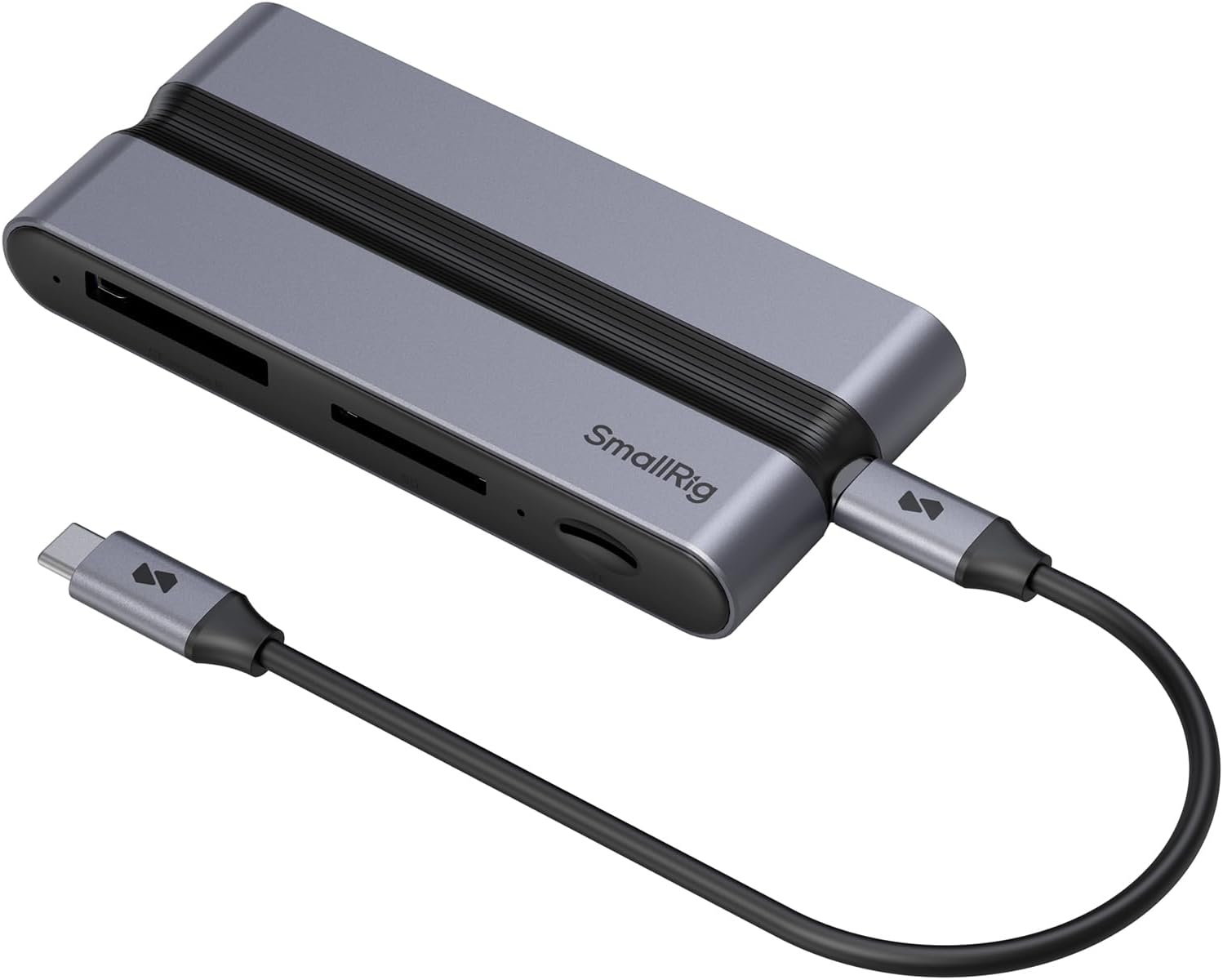 SMALLRIG 9-in-1 Dock
|
Premium | CFexpress Type B + 100W PD-IN | Students shooting high-bandwidth video | Check Price | ||
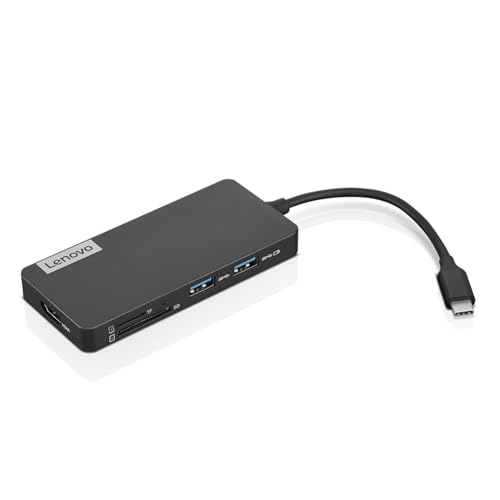 Lenovo 7-in-1 Hub
|
Mid-Range | Two card readers + HDMI | Traveling students needing basic expansion | Check Price | ||
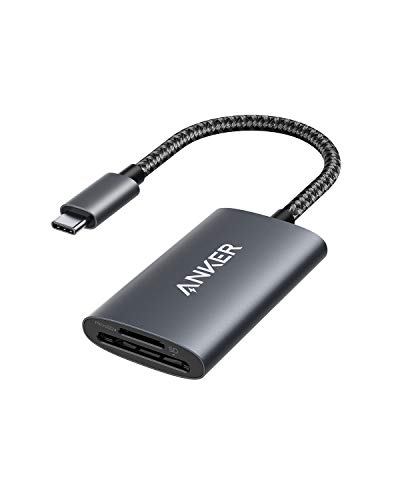 Anker SD 4.0 Reader
|
Budget | UHS-II SD 4.0 support (up to 312 MB/s) | Budget-conscious students and mobile transfers | Check Price | ||
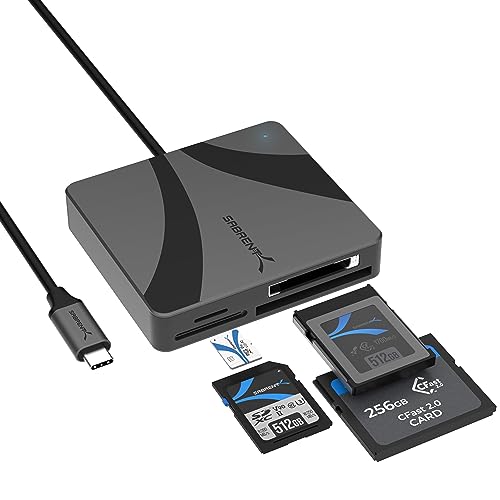 Sabrent CFexpress Reader
|
Mid-Range | CFexpress up to 950MB/s | Users with CFexpress or CFast cameras | Check Price | ||
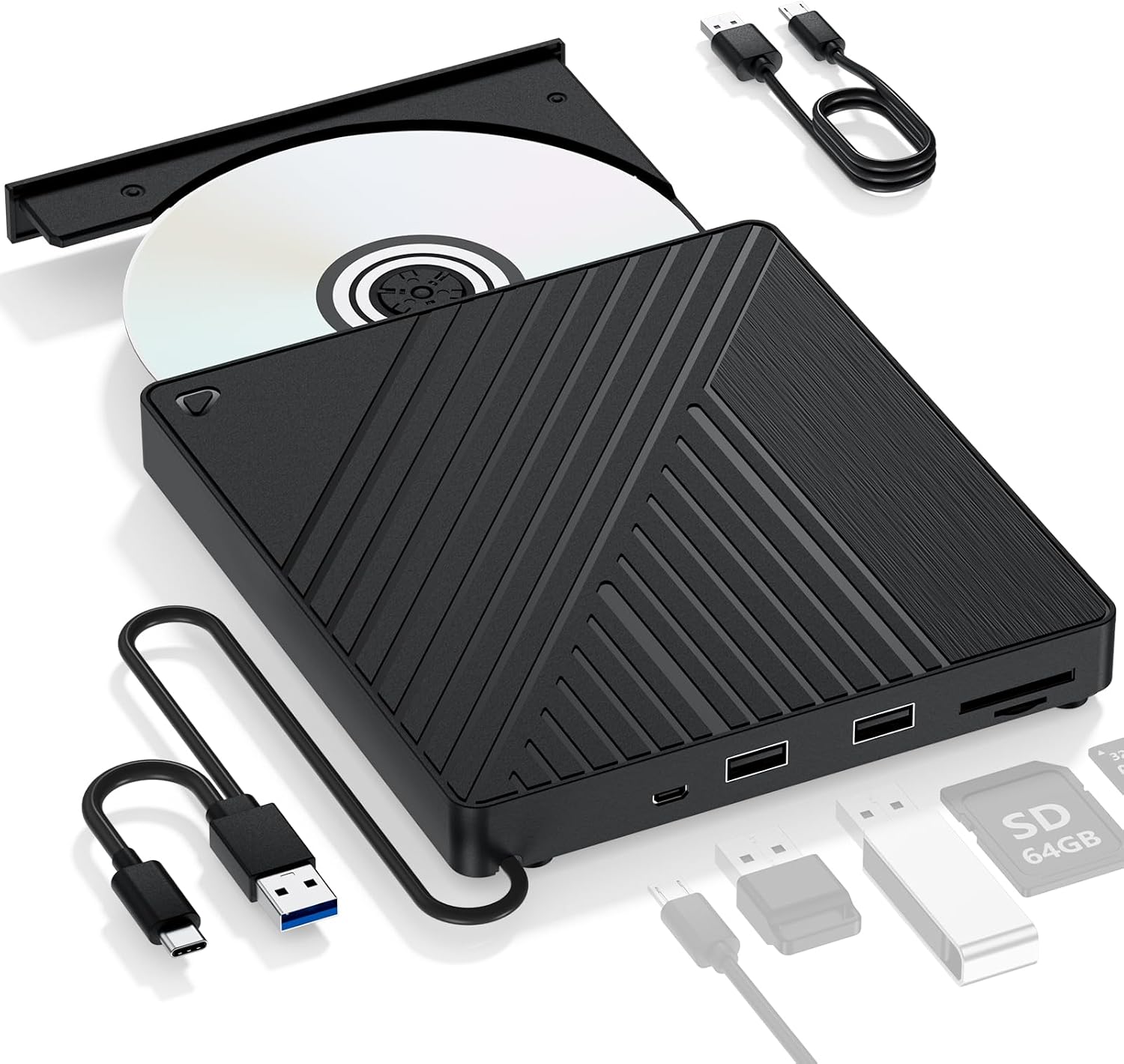 LLMHHKYK 5-in-1 Blu-ray
|
Mid-Range | Blu-ray/DVD playback + SD slots | Students who still use optical media | Check Price | ||
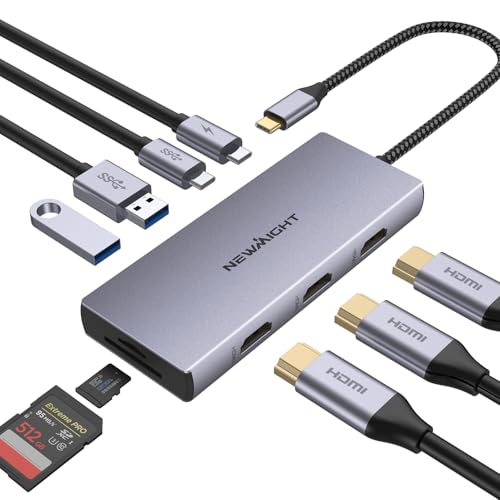 Newmight 9-in-1 Dock
|
Budget | Triple HDMI + 100W PD | Multi-monitor setups on a budget | Check Price | ||
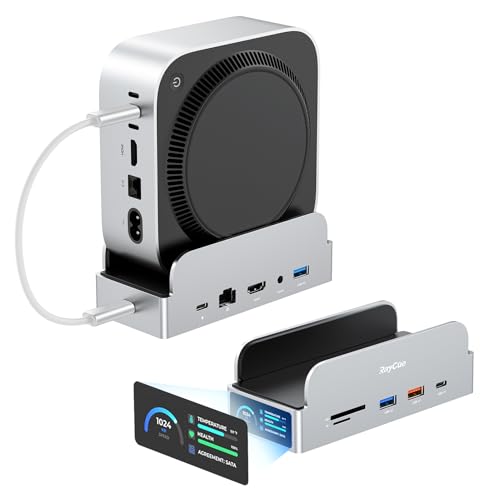 RayCue SmartDock Pro
|
Premium | Built-in M.2 NVMe enclosure | Desktop students/editors with Mac mini M4 | Check Price |
1. SMALLRIG 9 in 1 CFexpress Type B Card Reader Docking Station with USB3.2 (Gen 2) 10Gbps, SD/TF/CFexpress Type B Readers, USB-A/USB-C/HDMI/Gigabit Ethernet Ports, for iPhone for Mac - 4662
A compact multiport dock built around CFexpress and UHS-II media with a 10Gbps USB-C port and 100W PD input. It gives students a single hub for super-fast offloads, HDMI output, Ethernet, and simultaneous device charging—ideal for high-res photo and video workflows.
Key Specs
- CFexpress Type B slot (10Gbps theoretical total)
- UHS-II SD 4.0 and microSD 4.0 slots
- 1x 10Gbps USB-C, 2x 5Gbps USB-A ports
- 4K@30Hz HDMI, Gigabit Ethernet, 100W PD-IN
Pros
- Very versatile port selection for an all-in-one field hub
- Supports CFexpress Type B and UHS-II SD for fast transfers
- Compact and portable design with heat-dissipating fins
Cons
- Performance can vary when many ports are used simultaneously
- Surface can warm during heavy sustained transfers
Best For: Students shooting high-bandwidth video
Check Latest Price on Amazon2. Lenovo USB-C 7-in-1 Hub Computer Networking Laptop Accessory Laptop Docking Station - 4K via HDMI, 3 USB-A devices, 2 SD/TF Card Readers USB-C Power Pass Through
A travel-friendly 7-in-1 USB-C hub that adds HDMI, three USB-A ports, and dual SD/TF readers with USB-C power pass-through. Users praise its compact build and value, making it a solid all-rounder for students who need extra ports and occasional media offloads.
Key Specs
- 4K HDMI output
- Three USB-A ports and USB-C power pass-through
- Two SD/TF card readers
- Supports 45W/65W power adapters for passthrough
Pros
- Lightweight, compact and easy to carry
- Good build quality and perceived value
- Plug-and-play simplicity on most systems
Cons
- Some users report intermittent connectivity issues over time
- Lacks Ethernet and some advanced pro-level media support
Best For: Traveling students needing basic expansion
Check Latest Price on Amazon3. Anker USB-C SD 4.0 Card Reader, PowerExpand+ 2-in-1 Memory Card Reader, for SDXC, SDHC, MicroSD, MMC, RS-MMC, Micro SDXC, Micro SDHC, UHS-II, and UHS-I
A tiny, reliable USB-C SD and microSD reader optimized for speed and portability. It’s often praised for fast transfers and a solid feel in hand—an excellent pocketable choice to offload photos quickly between classes or on short shoots.
Key Specs
- UHS-II SD 4.0 slot (up to 312 MB/s)
- Dual card slots: SD and microSD
- Ultra-compact, bus-powered
- 18-month warranty and brand support
Pros
- Fast transfers for a budget reader
- Very compact and travel-friendly
- Solid build quality for the price
Cons
- Some compatibility reports with certain tablets or iPad Pro models
- Not a multi-format CFexpress solution
Best For: Budget-conscious students and mobile transfers
Check Latest Price on Amazon4. SABRENT USB-C Multi-Card Reader for CFexpress Type B, CFast 2.0, and microSD/SD Cards (CR-C4PM)
A focused, rugged multi-card reader that handles CFexpress Type B and CFast 2.0 alongside SD/microSD. It delivers pro-level speeds for heavy photo and video shoots and is built in aluminum for portability and durability.
Key Specs
- CFexpress Type B support (up to 950 MB/s)
- CFast 2.0 support (up to 460 MB/s)
- UHS-II SD/microSD support (up to 312 MB/s)
- Integrated USB-C cable and aluminum body
Pros
- Very fast transfers for CFexpress and CFast media
- Compact aluminum construction feels durable
- Good cross-platform compatibility
Cons
- Some users report device disconnects after extended use
- Can run warm during sustained transfers
Best For: Users with CFexpress or CFast cameras
Check Latest Price on Amazon5. Ultra-Portable 5-in-1 External Blu-ray Drive: USB 3.0 & USB-C DVD/CD Burner, BD Reader with Dual USB-A Ports & SD/TF Card Readers Seamless Laptop/PC Compatibility for Windows, Mac, Linux (5 IN 1)
An all-in-one optical drive with DVD/CD burning plus SD/TF card slots and extra USB-A ports. Good value for those who need occasional disc work and a multi-function peripheral, though optical features rely on third-party playback software.
Key Specs
- Blu-ray, DVD, CD playback and DVD/CD burning (Blu-ray burning not supported)
- USB 3.0 and USB-C connectivity
- Two USB-A ports and SD/TF card slots
- Optional external 5V power input
Pros
- Multi-function device saves desk space
- Affordable way to keep optical compatibility
- Works plug-and-play for basic disc tasks
Cons
- Build quality and longevity receive mixed feedback
- Blu-ray playback requires extra software
Best For: Students who still use optical media
Check Latest Price on Amazon6. 9 in 1 USB C Docking Station, Newmight 3 HDMI Adapter with 100W PD, 2 USB-A 3.0, USB-C 3.0, SD/TF Card Reader, HDMI Multiport Adapter for MacBook Pro 2023-2015/Air 2022-2018,iPhone 15/15 Pro, HP,Dell
A low-cost multiport hub that offers triple HDMI outputs, USB-A/C ports, SD/TF readers and 100W PD. It’s a powerful spec sheet for the price, but users should be mindful of occasional monitor glitches and platform-specific display limits.
Key Specs
- Three HDMI outputs (4K@60Hz single, 4K@30Hz dual)
- 100W power delivery charging port
- Two USB-A 3.0 and one USB-C 3.0 ports
- SD/TF card reader and plug-and-play operation
Pros
- Excellent port density for the price
- Good value for driving multiple displays
- Straightforward setup on most systems
Cons
- Monitor reliability can be inconsistent on some laptops
- Triple-display features depend on host device capabilities
Best For: Multi-monitor setups on a budget
Check Latest Price on Amazon7. RayCue SmartDock Pro for Mac mini M4 Dock Stand with M.2 NVMe SSD Enclosure, 4K 60Hz HDMI, 10Gbps USB-C/A, Gigabit Ethernet, SD/TF Card Readers Space-Saving Vertical Hub Compatible with Mac mini
A premium vertical dock with an M.2 NVMe slot for up to 8TB expansion, 10Gbps ports, 4K@60Hz HDMI and Ethernet—perfect for students who edit on a Mac mini and want a tidy, high-speed desktop setup with local SSD expansion.
Key Specs
- M.2 NVMe SSD slot supporting 2230-2280 (up to 8TB)
- 4K@60Hz HDMI output and 10Gbps USB-C/A
- Gigabit Ethernet, SD/TF card readers
- Vertical stand design and multiple UI status displays
Pros
- Elegant space-saving design with strong build quality
- Fast local NVMe expansion without extra enclosure
- High-speed ports for editing workflows
Cons
- Custom-fit for Mac mini M4 only
- Premium cost compared with simple hubs or enclosures
Best For: Desktop students/editors with Mac mini M4
Check Latest Price on AmazonWhich One Should You Choose?
If budget is tight → choose the Anker USB-C SD 4.0 Card Reader (B091GHVBSZ) for fast, pocketable SD transfers. If you need portable CFexpress / CFast support and high-speed raw video offloads → choose the SABRENT USB-C Multi-Card Reader (B0CH1SRWWW). If you want an all-in-one portable hub with CFexpress, HDMI, Ethernet and PD for an end-to-end field workstation → choose the SMALLRIG 9-in-1 Dock (B0DTHWSHYV). For Mac mini users who want desktop SSD expansion and a tidy setup → choose the RayCue SmartDock Pro (B0FPFHRNJ7).
Best for Specific Scenarios
- Campus-to-shoot quick transfers: Anker SD 4.0 Reader because its compact size and UHS-II speeds make it perfect for quick multicard offloads between classes.
- High-bitrate video shoots: SABRENT CFexpress Reader because it supports CFexpress Type B and CFast at pro-level speeds to minimize downtime.
- Mobile editing with charging: SMALLRIG 9-in-1 Dock because it combines CFexpress and SD slots, 100W PD input and Ethernet for a stable, portable editing station.
Frequently Asked Questions
Do I need a CFexpress reader or will an SD reader be enough?
It depends on your camera. Most DSLRs and mirrorless stills cameras use SD cards—UHS-II readers like the Anker deliver fast performance for those. If you shoot high-bitrate video or use cinema cameras that record to CFexpress or CFast, a reader that explicitly supports CFexpress (like the Sabrent or SMALLRIG dock) is necessary to get full transfer speeds.
Can I power my laptop through these docks while transferring files?
Yes—several reviewed hubs support USB-C power delivery passthrough (SMALLRIG, Lenovo, Newmight). Use a compatible PD charger at the hub's supported wattage (check the hub spec). Be cautious: some hubs warn not to unplug PD during active transfers to avoid interruptions.
Is a portable NVMe SSD better than a traditional external SSD for backups?
Portable NVMe SSDs (or NVMe in an enclosure) typically offer much higher read/write speeds and smaller size than SATA-based external SSDs, which speeds up large offloads. However, NVMe can run warmer and are usually pricier. For student photographers who value speed and compactness, NVMe is a great investment; for tight budgets, a reliable SATA SSD still provides solid backups.
How We Selected These Products
Our recommendations are based on data-driven analysis: we evaluated 155229+ products across 23916+ brands using a composite scoring system that weighs rating (40%), review volume (30%), price value (20%), and demand signals (10%). Every product is ranked by data, not opinions.
Last updated: August 21, 2026
As an Amazon Associate we earn from qualifying purchases at no extra cost to you. Full disclosure.
GearLark Score is our editorial ranking based on a composite analysis of product quality, value, and verified customer sentiment. Click through to Amazon for current pricing, availability, and live customer reviews.