As an Amazon Associate we earn from qualifying purchases. Learn more.
Complete Dual Portable Monitor Setup for Holiday Photo Editing (2026)
Heading out for holiday travel but want a true dual-monitor setup for photo editing? This guide shows a complete, portable kit — monitors, cables, and the key hub and power pieces — tuned for fast, color-accurate editing away from the studio. You’ll learn which monitors are best for color, which cables and hubs will reliably deliver high-resolution video and power, and how to pack a compact kit that minimizes setup time. Products were selected from models that emphasize connectivity, color accuracy, portability and real-world build quality reported by users.
Quick Answer
For reliable high-bandwidth connections in a portable dual-monitor editing kit, the Cable Matters 2-Pack Unidirectional USB C to DisplayPort 1.4 Cable is our top connectivity pick for 8K/4K workflows. Pairing that with a color-accurate monitor like the INNOCN 15.6" OLED gives the best combination of connectivity and color for holiday photo edits on the road.
Our Top Picks
Quick Comparison
Select 2-3 products to compare side-by-side
| Compare | Product | GearLark Score | Price Tier | Key Feature | Best For | Action |
|---|---|---|---|---|---|---|
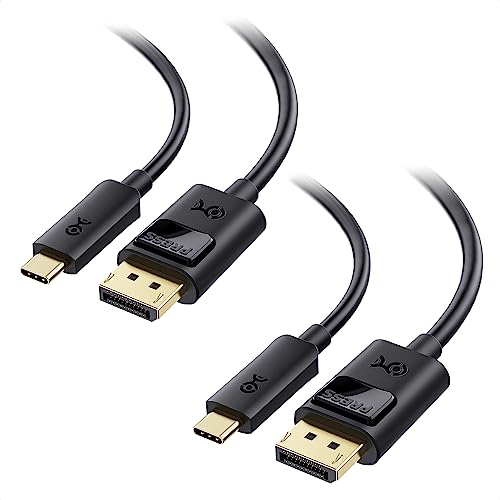 Cable Matters USB-C→DP (2-Pack) |
Budget | Unidirectional USB-C → DisplayPort 1.4 | High-bandwidth laptop-to-monitor links | Check Price | ||
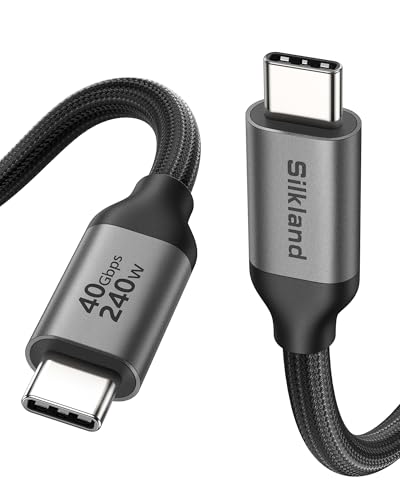 Silkland USB4 40Gbps Cable |
Budget | USB4/Thunderbolt-compatible, 240W PD | Single-cable video + power for mobile setups | Check Price | ||
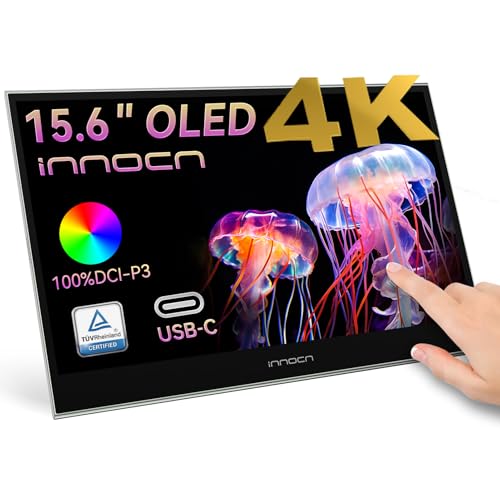 INNOCN 15.6" OLED Touch |
Premium | 4K OLED, 100% DCI-P3, 10-bit | Color-critical photo and retouching work | Check Price | ||
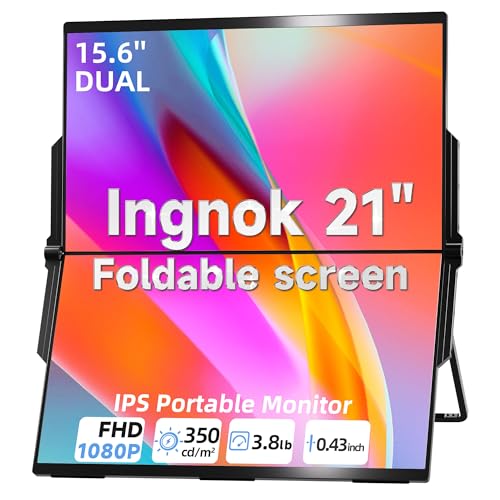 Ingnok 15.6" Dual Monitor |
Mid-Range | Foldable stacked dual monitor design | Travel editors needing more screen real estate | Check Price | ||
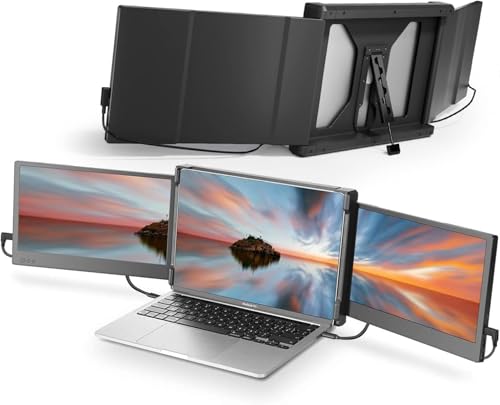 Teamgee 12" Dual Extender |
Mid-Range | Dual 12" Full HD IPS extenders | Compact triple-screen setups with laptops | Check Price | ||
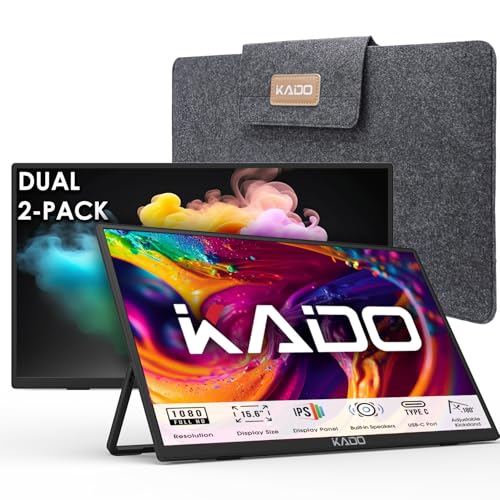 Kado 15.6" Dual Monitors |
Mid-Range | Two 15.6" FHD IPS portable monitors | Affordable dual-monitor travel setups | Check Price | ||
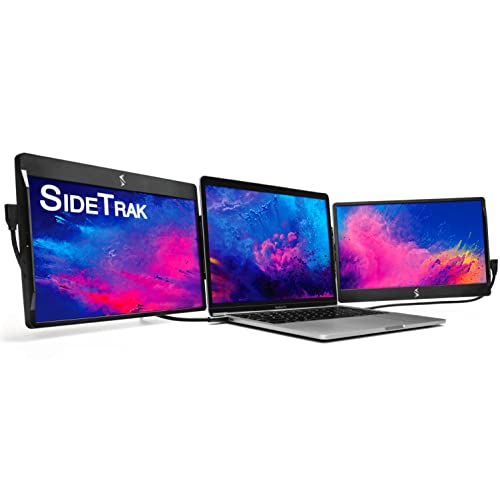 SideTrak Swivel 12.5" |
Premium | Patented swivel hinge for triple setups | Laptop-attached triple-screen workflows | Check Price |
1. Cable Matters 2-Pack Unidirectional USB C to DisplayPort 1.4 Cable - 6ft, Support 8K@60Hz / 4K@240Hz, Thunderbolt 4 to DisplayPort Cable, Display Port to USB C, Black - Not for Portable USBC Monitor
A strong choice when you need high-bandwidth, reliable video links between modern laptops and DisplayPort monitors. The 2-pack covers both sides of a dual-monitor setup and supports very high resolutions and refresh rates when paired with compatible Thunderbolt/USB4 ports.
Key Specs
- Unidirectional USB-C to DisplayPort 1.4
- Supports up to 8K@60Hz or 4K@240Hz (host must support DP1.4 HBR3 + DSC)
- Locking DisplayPort latches for secure connections
- 6 ft length, two-cable pack
Pros
- High-performance video bandwidth for color and resolution
- Secure, durable connectors with DP latches
- Good value as a two-pack for dual-monitor setups
Cons
- Some users report intermittent connection issues on certain systems
- Unidirectional — requires compatible host DisplayPort-over-USB-C support
Best For: High-bandwidth laptop-to-monitor links
Check Latest Price on Amazon2. Silkland USB 4 Cable 6.6FT/2M for Thunderbolt 4, 40Gbps Data Transfer, 8K/5K@60Hz, 4K@240Hz, 240W Charging, Braided USB C Video Cable Compatible with MacBook, Portable Monitor, SSD, Docking, iPad
A future-proof USB4/Thunderbolt-style cable that combines 40Gbps data, high-res video paths and up to 240W power delivery. It’s ideal for editors who want a single-cable link from a laptop or dock to a portable monitor and a fast PD charger for laptops.
Key Specs
- 40Gbps data support (USB4/Thunderbolt compatibility)
- Supports 8K/5K@60Hz, dual 4K@60Hz setups
- Up to 240W charging (EPR) with E-Marker chip
- 6.6 ft (2 m) braided aluminum-shell cable
Pros
- Very high transfer and video bandwidth
- Supports high-watt PD for charging laptops on the go
- Solid braided construction and materials
Cons
- Cable can be stiff for some users
- Full EPR/240W requires a compatible charger and host
Best For: Single-cable video + power for mobile setups
Check Latest Price on Amazon3. INNOCN 15.6" Portable Monitor OLED Touch Second Screen for Photo Editing with 4K, 100% DCI-P3, 100000:1, 10Bits, USB C External Monitor for Laptop,PC, Phone,Consoles, Brown, PU15 Pre C6
A premium portable OLED with 4K resolution and wide DCI-P3 coverage, designed for photographers who need deep blacks, excellent contrast and accurate colors on the road. Touch support and compact size make it a flexible second screen for editing and selective retouching.
Key Specs
- 15.6" OLED panel, 4K resolution
- 100% DCI-P3 color gamut, 10-bit color
- 10-point touch input, USB-C and mini HDMI inputs
- High contrast (100000:1) and true blacks
Pros
- Outstanding color vibrancy and deep blacks for editing
- Portable and touch-enabled for quick adjustments
- Good value among premium portable OLEDs
Cons
- Some users report mixed power/connectivity behavior with certain laptops
- Brightness variability reported by a minority of users
Best For: Color-critical photo and retouching work
Check Latest Price on Amazon4. Laptop Screen Extender 15.6" 1080P Dual USB-C HDMI, Foldable Stacked Design,Dual Portable Monitors Compatible with Windows/Mac, Easy Setup
A practical dual-monitor extender with an ultra-slim, foldable design that fits into a laptop bag. It offers FHD resolution with reliable color and a tilt-adjustable stand — a good balance of portability and extra workspace for on-the-go editing.
Key Specs
- 15.6" dual portable monitors, 1920x1080 FHD
- 100% sRGB, 1200:1 contrast ratio (manufacturer stated)
- Single Type-C plug-and-play setup
- Foldable stacked construction with adjustable stand
Pros
- Compact, travel-friendly foldable design
- Easy plug-and-play setup
- Good color and picture quality for the price
Cons
- Some users report occasional functionality drop-offs
- Not as color-accurate as premium OLED panels
Best For: Travel editors needing more screen real estate
Check Latest Price on Amazon5. Teamgee 12" Laptop Screen Extender, Dual Display Triple Setup, Portable Monitor for 13"16" Laptops, USB-C/HDMI/USB-A Plug & Play, Ideal for Remote Work & Multitasking
A lightweight, tried-and-tested dual extender that pairs well with 13–16" laptops to create a triple-display workflow. It’s easy to set up and great for document-heavy or multitasking workflows while traveling.
Key Specs
- Two 12" Full HD IPS displays
- Plug-and-play; multiple connectivity options (USB-C, HDMI, USB-A)
- Built-in speakers and brightness controls
- Folds flat for travel
Pros
- Very portable and easy to fold into a bag
- Good build quality and reliable for routine travel
- Great for multitasking with spreadsheets and timelines
Cons
- Compatibility requires specific port combos (not compatible with some M1/M2 MacBook Airs)
- Cable setup can be confusing for some users
Best For: Compact triple-screen setups with laptops
Check Latest Price on Amazon6. Kado Dual Portable Monitor Setup - 2-Pack 15.6'' FHD 1080p, Ultra-Slim Laptop Monitor 1920x1080 with Built-in Speakers, IPS Display 180 Kickstand Stacked Desktop Setup Office Gaming Daytrading
A straightforward, lightweight dual-monitor pack for users who want two full-size portable screens without premium pricing. It’s easy to set up, has built-in speakers and covers basic color and brightness needs for most editing tasks.
Key Specs
- Two 15.6" FHD (1920x1080) IPS displays
- HDMI and USB-C inputs
- Built-in speakers and 180° kickstand
- Ultra-slim, lightweight design
Pros
- Good value for two full-size portable screens
- Lightweight and travel-ready
- Easy setup with included cords
Cons
- Not as color-accurate as higher-end panels
- Build and long-term durability vary by unit
Best For: Affordable dual-monitor travel setups
Check Latest Price on Amazon7. SideTrak Swivel 12.5" Portable Monitor for Laptop, Patented Swivel Hinge, Triple Screen Laptop Setup | FHD Dual Screen w/Kickstand, USB-C & HDMI, Mac, PC, Chrome Compatible (Triple Monitor)
An innovative attachable display that turns a laptop into a triple-screen workstation with a patented swivel hinge. Ideal for collaboration and presentations, it’s a niche choice for users who prioritize seamless attachment and in-line expansion.
Key Specs
- 12.5" FHD portable monitor
- Patented 360° swivel and 270° rotation hinge
- Magnetic attachment plate for laptop mounting
- USB-C, USB-A and HDMI connectivity
Pros
- Unique hinge enables flexible triple-screen layouts
- Quick attach/detach workflow
- Good for meetings and screen sharing
Cons
- Durability and magnet strength reported as inconsistent by some
- Connection and cable durability issues reported
Best For: Laptop-attached triple-screen workflows
Check Latest Price on AmazonWhich One Should You Choose?
If budget is tight → Choose the Kado 15.6" Dual Monitors or Ingnok 15.6" Dual Monitor for a practical, affordable two-screen setup with simple, travel-friendly hardware. If you need maximum portability and a compact triple-screen workflow → Choose the Teamgee 12" Dual Extender or SideTrak Swivel 12.5" for attachable/stacked options that prioritize mobility. If premium color and contrast matter most → Choose the INNOCN 15.6" OLED Touch for deep blacks and wide DCI-P3 coverage, then pair with high-bandwidth cables like the Cable Matters USB-C→DP or the Silkland USB4 cable for reliable, high-resolution delivery.
Best for Specific Scenarios
- On-the-road wedding or holiday shoot editing: INNOCN 15.6" OLED Touch because its OLED contrast and DCI-P3 gamut help you judge skin tones and highlight detail quickly.
- Compact travel productivity + editing: Teamgee 12" Dual Extender because it folds flat, adds two screens without much luggage bulk, and speeds up triage and culling.
- Highest reliability for dual 4K workflows: Cable Matters USB-C→DP (2-Pack) paired with a USB4-capable host because the unidirectional DP link gives stable, high-bandwidth video needed for large files and high resolutions.
Frequently Asked Questions
Do portable monitors offer accurate colors for photo editing?
Yes—some portable monitors (especially OLED and higher-end IPS panels) offer wide gamut coverage and 10-bit color that are suitable for editing. For critical work, pick a model advertising 100% DCI-P3 or high sRGB coverage and use a hardware colorimeter to calibrate before final edits.
What cables or ports do I need to run two portable monitors from a laptop?
Check your laptop’s ports: Thunderbolt 4/USB4 or two full-function USB-C ports are ideal. Use USB4/Thunderbolt cables or USB-C→DisplayPort 1.4 cables for high-resolution/refresh rates. If your laptop lacks multiple video outputs, add a compact docking station that provides multiple HDMI/DP outputs and PD passthrough.
How do I power a dual-monitor kit while traveling?
Options include powering monitors from your laptop’s USB-C PD port (if it supplies enough current) or carrying a high-wattage GaN charger and USB4/PD-capable cables. For extended off-grid use, a USB-C PD power bank with sufficient capacity and output ports will keep both laptop and monitors running; verify each monitor’s power draw before buying.
How We Selected These Products
Our recommendations are based on data-driven analysis: we evaluated 155229+ products across 23916+ brands using a composite scoring system that weighs rating (40%), review volume (30%), price value (20%), and demand signals (10%). Every product is ranked by data, not opinions.
Last updated: November 23, 2026
As an Amazon Associate we earn from qualifying purchases at no extra cost to you. Full disclosure.
GearLark Score is our editorial ranking based on a composite analysis of product quality, value, and verified customer sentiment. Click through to Amazon for current pricing, availability, and live customer reviews.