As an Amazon Associate we earn from qualifying purchases. Learn more.
NVMe vs SATA vs External SSD for Backups (2026)
Students juggling projects, photos and coursework need backups that balance cost, speed and reliability. This head-to-head comparison looks at three practical tools you can use in 2026: a dual‑bay SATA docking station and two Unitek SATA/IDE-to-USB adapters. You’ll learn how SATA dock/adapter workflows compare to NVMe or external SSD choices in cost and speed, and which product here fits common student use cases. Products were selected for real-world utility (cloning, data recovery, transfer speeds), supported formats, and consistent customer praise for build quality and ease of use.
Quick Answer
For most students who need affordable, reliable backups, the SABRENT Dual Bay Dock (B0759567JT) is the best pick — it balances low per-gig cost, easy cloning and solid build. If you need the cheapest option to read old drives pick the Unitek B09PQRPNS6; if you want the best value USB‑C adapter with wide compatibility pick Unitek B0DB5BNLK6.
Our Top Picks
Quick Comparison
Select 2-3 products to compare side-by-side
| Compare | Product | GearLark Score | Price Tier | Key Feature | Best For | Action |
|---|---|---|---|---|---|---|
![SABRENT USB 3.0 to SATA I/II/III Dual Bay External Hard Drive Docking Station for 2.5 or 3.5in HDD, SSD with Hard Drive Duplicator/Cloner Function [20+TB Support] (EC-HD2B)](/assets/images/products/B0759567JT.jpg) SABRENT Dual Bay Dock
SABRENT Dual Bay Dock
|
Premium | Dual‑bay SATA docking + offline cloning | Students needing cheap high‑capacity backups | Check Price | ||
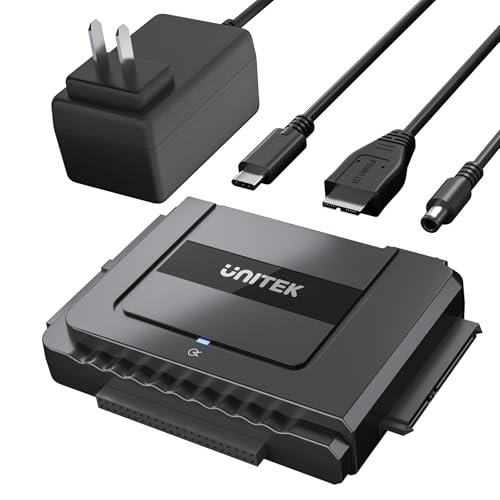 Unitek USB‑C Adapter Kit
|
Mid-Range | USB‑C 6Gbps SATA support + 12V power | Students needing wide compatibility and USB‑C convenience | Check Price | ||
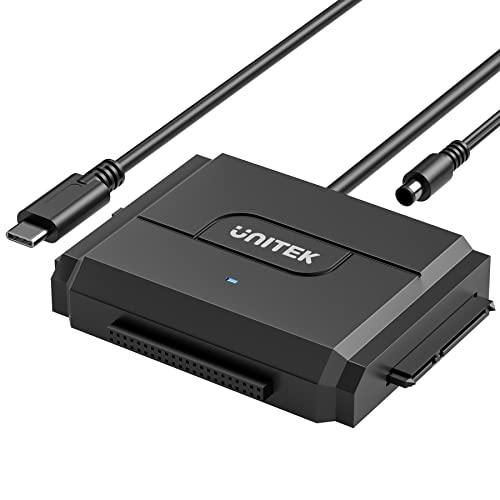 Unitek Little Triangle
|
Budget | Budget SATA/IDE adapter with USB 3.0 | Students on a tight budget needing occasional access to drives | Check Price |
1. SABRENT USB 3.0 to SATA I/II/III Dual Bay External Hard Drive Docking Station for 2.5 or 3.5in HDD, SSD with Hard Drive Duplicator/Cloner Function [20+TB Support] (EC-HD2B)
A dual‑bay docking station that makes bulk backups and drive cloning straightforward. It gives a low cost per GB when you populate 2.5"/3.5" drives and offers simple offline cloning — a practical top pick for campus backups where reliability and flexibility matter more than pocket portability.
Key Specs
- Supports 2.5" and 3.5" SATA HDD/SSD
- Supports drives up to 10TB (per drive)
- USB 3.0 host interface — up to 5Gbps
- Offline cloning supported (up to ~60Mbps practical cloning)
Pros
- Better cloning functionality than the Unitek adapters — supports offline duplicate without PC
- Stronger build quality and stability praised by customers compared with cheaper adapters
- Lower per‑GB cost when using larger SATA drives vs portable SSDs
Cons
- Less portable than external SSDs — bulkier desktop device
- Cloning speed and transfer rate limited by SATA/USB 3.0 bottlenecks
Best For: Students needing cheap high‑capacity backups
Check Latest Price on Amazon2. Unitek USB C to SATA 6Gbps IDE Adapter External Hard Drive Converter Kit for Universal 2.5/3.5 inch HDD/SSD Hard Drive Disk, DVD-ROM/CD-ROM/CD-RW, with USB C Connector & 12V/2A Power Adapter
A versatile USB‑C to SATA/IDE adapter kit offering 6Gbps SATA support and a stable powered connection for 3.5" drives. It’s an excellent mid‑range choice when you need to recover files, connect various drives, or use a laptop with USB‑C ports.
Key Specs
- SATA 3.1 support — up to 6Gbps theoretical
- Backward compatible with USB 3.0/2.0
- Includes 12V/2A power adapter and 4‑pin power cable
- Supports hot swapping, on/off switch and activity LED
Pros
- Wider compatibility than the SABRENT dock — works with SATA and IDE and optical drives
- Better USB‑C convenience for modern laptops than older USB 3.0 docks
- Good balance of price and functionality compared with premium docking stations
Cons
- Some users report occasional recognition issues on certain systems
- Not as fast or as convenient for multi‑drive cloning as a dedicated docking station
Best For: Students needing wide compatibility and USB‑C convenience
Check Latest Price on Amazon3. Unitek IDE/SATA to USB C 3.0 Adapter, Universal IDE Hard Drive Little Triangle pro Converter for 2.5"/3.5" Inch IDE and SATA External HDD/SSD, Support 10TB
A no‑frills, budget‑friendly SATA/IDE adapter that gets old drives connected fast. It’s ideal for occasional data recovery or cloning tasks and praised for value, ease of use, and plug‑and‑play simplicity.
Key Specs
- USB‑C to USB 3.0 interface — up to 5Gbps
- Supports 2.5"/3.5" SATA and IDE drives up to 10TB
- Includes 12V/2A power adapter and 4‑pin power cable
- Auto sleep mode and hot swap support
Pros
- Cheaper than both the SABRENT dock and the Unitek kit — great value for occasional use
- Compact and lightweight compared with the SABRENT docking station
- Easy to use for quick file access and recovery from old drives
Cons
- Less robust build quality and occasional drive recognition complaints
- Fewer features for multi‑drive workflows and no offline cloning function
Best For: Students on a tight budget needing occasional access to drives
Check Latest Price on AmazonWhich One Should You Choose?
If budget is tight → choose Unitek Little Triangle (B09PQRPNS6). It’s the cheapest way to access and back up old drives, compact for dorm life, and great for occasional recovery. If you want the best balance of features, compatibility and price → choose Unitek USB‑C Adapter Kit (B0DB5BNLK6). It adds USB‑C convenience and stable power for 3.5" drives. If you need desktop reliability, multi‑drive backups and offline cloning → choose SABRENT Dual Bay Dock (B0759567JT). It’s the best overall pick for students who prioritize long‑term backups and easier cloning of semester images.
Best for Specific Scenarios
- Semester full‑drive backups: SABRENT Dual Bay Dock because offline cloning and two drive bays make swapping and archiving simple.
- Recovering files from an old laptop HDD: Unitek Little Triangle because it’s the cheapest, most portable way to connect an old 2.5" or 3.5" drive.
- Working from a modern USB‑C laptop: Unitek USB‑C Adapter Kit because it supports 6Gbps SATA, includes power for larger drives, and offers broad compatibility.
Frequently Asked Questions
Should I choose NVMe, SATA or an external SSD for student backups?
For low cost per GB and archive backups choose SATA HDDs in a dock/adapter. For portable high‑speed backups choose an external SSD or NVMe in an enclosure. Balance your need for speed, portability and cost when deciding.
Can these adapters and docks clone drives without a PC?
The SABRENT dual‑bay docking station supports offline cloning between drives without a PC. The Unitek adapters are primarily for host‑connected transfers and typically require a computer.
Will these work with my laptop’s USB‑C port?
The Unitek USB‑C Adapter Kit is designed for USB‑C and is backward compatible with USB 3.0. The Unitek Little Triangle uses USB‑C to USB 3.0 speeds as well. The SABRENT dock uses USB 3.0; you can connect via a USB‑C to USB‑A or C cable depending on your laptop’s ports.
How We Selected These Products
Our recommendations are based on data-driven analysis: we evaluated 155229+ products across 23916+ brands using a composite scoring system that weighs rating (40%), review volume (30%), price value (20%), and demand signals (10%). Every product is ranked by data, not opinions.
Last updated: August 23, 2026
As an Amazon Associate we earn from qualifying purchases at no extra cost to you. Full disclosure.
GearLark Score is our editorial ranking based on a composite analysis of product quality, value, and verified customer sentiment. Click through to Amazon for current pricing, availability, and live customer reviews.