As an Amazon Associate we earn from qualifying purchases. Learn more.
Thunderbolt Dock vs USB-C Hub vs Portable Monitor for Dual-Screen Setup (2026 Comparison)
Traveling creatives and streamers need a reliable second screen that’s easy to pack, quick to set up, and good enough for color‑critical edits. This head‑to‑head comparison tests three popular portable monitor solutions for 2026: the premium foldable LUMIPIX 15.6" dual screen, the mid‑range G‑STORY laptop extender, and the budget ELECROW 10.1" touchscreen. We selected these by portability, connection simplicity (USB‑C/HDMI), color and audio capabilities, and real user feedback on build, value, and ease of use. Read on to see which one gives the best dual‑screen workflow for holiday editing and live streaming.
Quick Answer
For the best dual‑screen workflow for holiday editing and streaming choose the LUMIPIX Portable Monitor (B0FC5XB9JC): it delivers the strongest color accuracy, HDR support, and a compact foldable design. If you need the best value that attaches to your laptop directly pick the G‑STORY extender (B0DG8X196Y); on a tight budget the ELECROW 10.1" (B082HWF2HW) is the most affordable, highly portable secondary screen.
Our Top Picks
Quick Comparison
Select 2-3 products to compare side-by-side
| Compare | Product | GearLark Score | Price Tier | Key Feature | Best For | Action |
|---|---|---|---|---|---|---|
 LUMIPIX 15.6" Foldable |
Premium | 100% sRGB + HDR10 color | Color‑critical editing on the go | Check Price | ||
 G‑STORY 14" Extender |
Mid-Range | One‑cable laptop attachment | Laptop users wanting built‑in dual screens | Check Price | ||
 ELECROW 10.1" Touch |
Budget | 10‑point capacitive touch | Budget travelers and streamers needing a lightweight second screen | Check Price |
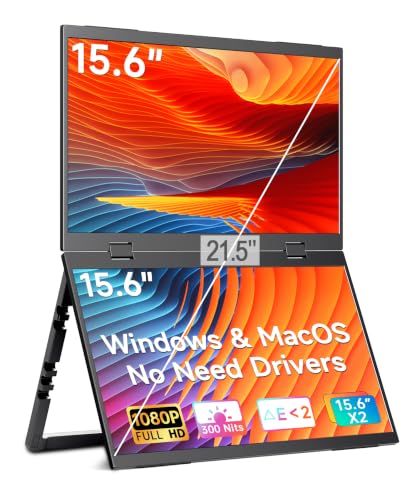
1. Portable Monitor 15.6" Foldable Dual Screen | Plug & Play for PC/Android/Switch/Xbox/PS5 | FHD 1080P HDR Foldable Travel Display with HDMI/USB-C | Ideal for Gaming, Office & Outdoor
A premium foldable dual 15.6" solution built for travel, offering true plug‑and‑play across consoles and PCs, HDR10 and 100% sRGB for accurate edits, and a robust aluminum chassis. It’s the strongest pick for creators who want desktop‑class color and a compact footprint.
Key Specs
- 2 × 15.6" IPS FHD (1920×1080)
- 100% sRGB, HDR10, E<2 color accuracy
- USB‑C + HDMI input; single‑cable power/signal (30W+ recommended)
- 2.33 lb foldable design; VESA compatible; military‑grade hinges
Pros
- Superior color accuracy and HDR for editing—better than G‑STORY and ELECROW
- More durable aluminum build than most budget portable monitors
- Better multi‑device plug‑and‑play support than the G‑STORY extender
Cons
- Premium price compared with G‑STORY and ELECROW
- Requires 30W+ USB‑C power for full functionality; may need a stronger power source than small laptops
Best For: Color‑critical editing on the go
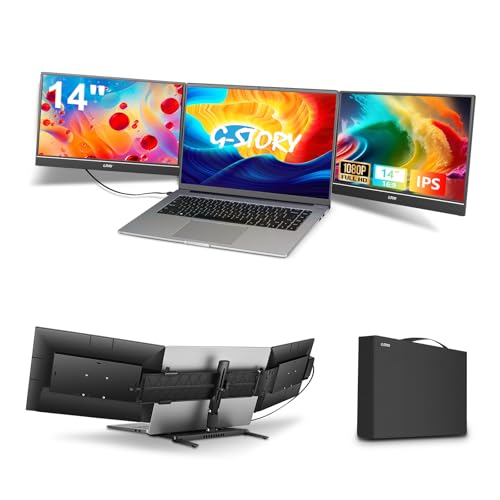
Check Latest Price on Amazon2. G-STORY Triple Laptop Screen Extender, 14" FHD 1080P Portable Laptop Extended Monitor, One Cable Connect Dual Screen Monitor Compatible with Mac/Windows Fits 13"-17.3" Laptops
A clever mid‑range laptop extender that clamps to 13–17.3" machines to give two extra 14" FHD panels. It’s an excellent balance of price, portability and functionality—especially for users who prefer extending from the laptop body rather than carrying a separate monitor.
Key Specs
- 2 × 14" IPS FHD (1920×1080)
- 72% NTSC color gamut
- One‑cable connection; fits 13"–17.3" laptops
- Foldable stand, driver support for macOS and Windows
Pros
- Better value for laptop‑attached dual screens than LUMIPIX
- Simpler single‑cable setup beats multi‑cable portable monitors in many travel setups
- Sturdier feel reported by users versus some budget alternatives
Cons
- Lower color gamut than LUMIPIX—less ideal for color‑critical editing
- May require driver installs or extra power on some systems
Best For: Laptop users wanting built‑in dual screens
Check Latest Price on Amazon3. ELECROW 10.1 Inch Portable Monitor - IPS Capacitive Touchscreen Monitor with HD VGA Port,1920x1080P LCD Display Built-in Dual Speakers Touch Sceen for Raspberry Pi 5/4/3, PS Xbox, Windows 11/10/8/7
A compact 10.1" IPS touchscreen that’s very affordable and lightweight. It’s best as a supplemental monitor for quick edits, monitoring chat or game capture, and Raspberry Pi or console use—though audio and brightness opinions vary among users.
Key Specs
- 10.1" IPS FHD (1920×1080)
- 10‑point capacitive touch, VGA/HD inputs
- Built‑in dual speakers and 3.5mm jack
- VESA 75 mountable; adjustable stand included
Pros
- Lowest cost option and very lightweight—better for tight budgets than LUMIPIX and G‑STORY
- Touchscreen and compact size make it flexible for stream overlays or chat monitoring
- Good picture quality for the price
Cons
- Speakers and brightness receive mixed feedback versus the larger LUMIPIX
- Smaller screen means less useful for detailed timeline editing compared with 15.6" or 14" options
Best For: Budget travelers and streamers needing a lightweight second screen
Check Latest Price on AmazonWhich One Should You Choose?
If premium color accuracy and a compact, travel‑ready dual 15.6" setup matter most for holiday photo/video editing and streaming, buy the LUMIPIX (B0FC5XB9JC) — it gives the best image fidelity and build quality. If you want the best balance of price and convenience that attaches directly to your laptop for fast multi‑window work, choose the G‑STORY (B0DG8X196Y). If budget and absolute portability are the priorities—use it for chat, OBS panels, or travel quick edits—pick the ELECROW 10.1" (B082HWF2HW).
Best for Specific Scenarios
- Holiday travel photo/video editing: LUMIPIX because its 100% sRGB and HDR support give you reliable color for final tweaks on the road.
- Live streaming with minimal luggage: G‑STORY because it clamps to your laptop and delivers two extra screens without adding a full monitor to your bag.
- Budget monitoring / Raspberry Pi or chat window: ELECROW because it’s lightweight, touchscreen capable and the most affordable way to add a dedicated second display.
Frequently Asked Questions
Will these monitors work with my MacBook or M1/M2/M3 Mac?
LUMIPIX and most USB‑C monitors work plug‑and‑play with modern Macs that support USB‑C display output. G‑STORY supports M‑series Macs but may require a driver or software install for full functionality; check the product notes for the macOS driver disk. Always confirm your Mac’s display outputs and power delivery before travel.
Can I edit color‑critical video on a portable monitor?
Yes — but only if the monitor has a wide color gamut and accurate calibration (look for sRGB coverage, low delta E, and HDR support). The LUMIPIX’s 100% sRGB and HDR10 make it the best choice here. Budget and mid‑range panels are fine for rough edits and social content but consider a calibrated desktop reference for final grading.
How important is USB‑C power delivery for travel setups?
Very important. Single‑cable USB‑C that provides both power and video makes setup faster and reduces the adapters you carry. Some monitors require higher wattage (30W+); if your laptop or power bank can’t supply that, you may need an extra power adapter or a powered USB‑C hub.
How We Selected These Products
Our recommendations are based on data-driven analysis: we evaluated 155229+ products across 23916+ brands using a composite scoring system that weighs rating (40%), review volume (30%), price value (20%), and demand signals (10%). Every product is ranked by data, not opinions.
Last updated: November 05, 2026
As an Amazon Associate we earn from qualifying purchases at no extra cost to you. Full disclosure.
GearLark Score is our editorial ranking based on a composite analysis of product quality, value, and verified customer sentiment. Click through to Amazon for current pricing, availability, and live customer reviews.