As an Amazon Associate we earn from qualifying purchases. Learn more.
Thunderbolt vs USB-C 4K HDMI Adapters for Hotel Editing Stations (2026)
Remote editors who work from hotels and Airbnbs face weird TVs, flaky HDMI handshakes, and frequent desktop reflows. This head‑to‑head compares three practical tools — a driver‑based multi‑display adapter (WAVLINK), an EDID emulator that stabilizes HDMI handshakes (Evanlak), and a compact USB‑C to HDMI dongle pack (RayCue). You’ll learn which item prevents glitches, which gives true 4K60 vs 4K30, and how to combine these pieces for a dependable hotel editing station. Products were chosen for real‑world reliability, portability, and direct customer feedback on functionality and durability.
Quick Answer
For the most reliable 4K playback in hotel/Airbnb editing setups, use the Evanlak EDID Emulator (B07YMNDZT8) to lock an HDMI handshake and avoid display drops. For a portable adapter that’s easy to carry choose the RayCue USB‑C to HDMI (B01LXK0NRU); for multi-monitor productivity with a wired driver-based solution consider the WAVLINK USB‑C/USB3 dual HDMI adapter (B0943VNT67).
Our Top Picks
Quick Comparison
Select 2-3 products to compare side-by-side
| Compare | Product | GearLark Score | Price Tier | Key Feature | Best For | Action |
|---|---|---|---|---|---|---|
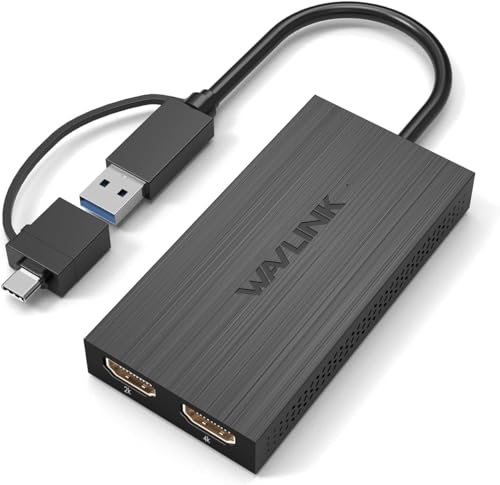 WAVLINK Dual HDMI Adapter
|
Premium | Driver-based dual monitor over USB3.0 | Editors needing multi-monitor productivity | Check Price | ||
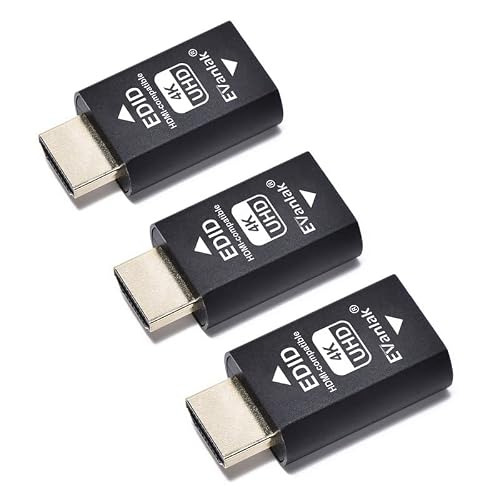 Evanlak EDID Emulator
|
Mid-Range | Locks EDID/handshake for stable 4K60 | Editors who need glitch-free 4K on hotel TVs/receivers | Check Price | ||
![RayCue USB C to HDMI Adapter 4K for Mac OS, Type-C to HDMI Adapter [Thunderbolt 3/4], Compatible with iPhone 15 Pro/Max, MacBook Pro/Air, Galaxy, Dell XPS, Pixelbook, Microsoft and More (5 Pack)](/assets/images/products/B01LXK0NRU.jpg) RayCue USB‑C to HDMI
RayCue USB‑C to HDMI
|
Budget | Compact plug‑and‑play HDMI dongle (4K@30Hz) | Fast, portable single‑screen hotel playback | Check Price |
1. WAVLINK HDMI Splitter Extended Display for Dual Monitor, USB A or USB-C to Dual HDMI Adapter, Multi-Monitor Display 3 Separate Screens for Windows and macOS,4K30Hz,1080p@60Hz
A premium, driver‑based USB3.0/USB‑C adapter that extends to two displays for productive hotel editing stations. It’s tuned for office and editing workflows rather than high‑end color grading or gaming and requires driver installation for best results.
Key Specs
- Supports dual displays: up to 1920x1080@60Hz or 1x2560x1440@60Hz + 1x1920x1080@60Hz
- Works over USB3.0, USB‑C, Thunderbolt 3/4 hosts
- Driver installation required (not plug‑and‑play)
- Compatible with Windows 7–11, macOS 10.10+, Chrome OS; not compatible with Linux or iPadOS
Pros
- Better multi‑monitor support than the single‑port RayCue dongle
- More feature‑rich for productivity than Evanlak (which is an EDID tool)
- Premium build and long warranty compared with budget dongles
Cons
- Requires driver install — less plug‑and‑play friendly for quick hotel setups
- Does not deliver native 4K@60Hz output; optimized for office/generic apps
Best For: Editors needing multi-monitor productivity
Check Latest Price on Amazon2. Hdmi Edid Emulator Passthrough Eliminated Emulator Adapter 3rd Generrtion Work with Mac Thunderbolt to HDMI Switches/Extender/AV Receiver/Video Splitters 4k- 3840x2160@60Hz-3pack
An EDID emulator that stabilizes HDMI handshakes so your laptop won’t rearrange displays when a hotel TV or AV receiver powers on/off. It supports bi‑directional EDID, multiple pixel formats and true 4K@60Hz modes — ideal when hotels cause flicker, desktop reflow, or unexpected resolution drops.
Key Specs
- Bi‑directional EDID passthrough; locks display EDID
- Supports pixel formats YCbCr 4:4:4 / 4:2:2 / 4:2:0 and RGB
- Supports resolutions up to 3840x2160@60Hz and 4096x2160
- Acts as virtual monitor to prevent desktop rearrange when displays disconnect
Pros
- Prevents HDMI handshake glitches more reliably than raw dongles
- Better at preserving desktop layout and preventing reflows than WAVLINK alone
- Universal compatibility with TVs, receivers and splitters when configured
Cons
- Functionality can be mixed on certain displays — some customers report flicker on specific gear
- Not a complete adapter — you still need an HDMI adapter or cable to connect to laptops
Best For: Editors who need glitch-free 4K on hotel TVs/receivers
Check Latest Price on Amazon3. RayCue USB C to HDMI Adapter 4K for Mac OS, Type-C to HDMI Adapter [Thunderbolt 3/4], Compatible with iPhone 15 Pro/Max, MacBook Pro/Air, Galaxy, Dell XPS, Pixelbook, Microsoft and More (5 Pack)
A no‑frills, plug‑and‑play USB‑C to HDMI dongle that’s extremely portable and sold in multi‑packs. It reliably gives 4K@30Hz mirror/extend modes for client playback, though it’s limited to 30Hz and customers report mixed long‑term durability.
Key Specs
- Supports up to 3840x2160@30Hz (4K30)
- Plug‑and‑play; no drivers required
- Aluminum casing and triple shielding for signal stability
- Wide device compatibility (Thunderbolt 3/4 and many USB‑C phones/laptops)
Pros
- More portable and plug‑and‑play than WAVLINK
- Better value for short trips compared with buying a full dock
- Aluminum casing gives better heat insulation than cheap plastic dongles
Cons
- Limited to 4K@30Hz — not ideal for 4K60 timeline playback or high‑frame editing
- Durability concerns reported more often than the other two options
Best For: Fast, portable single‑screen hotel playback
Check Latest Price on AmazonWhich One Should You Choose?
If your priority is avoiding glitches and preserving desktop/layout when connecting to unpredictable hotel TVs or receivers, buy the Evanlak EDID Emulator (B07YMNDZT8) — it’s the best single purchase to stop handshake flicker and desktop reflows. If budget is tight and you need a tiny, portable adapter for single‑screen client playback, the RayCue USB‑C to HDMI dongle (B01LXK0NRU) is the practical pick — bring extras as spares. If you need a dock‑style, multi‑monitor editing station for longer stays and don’t mind installing drivers, go with the WAVLINK Dual HDMI adapter (B0943VNT67) for its multi‑display workflow support.
Best combined setup for hotel editors: pair the Evanlak EDID emulator with a reliable USB‑C to HDMI dongle (RayCue or similar) — the emulator stabilizes the HDMI chain and the dongle gives portable connectivity. For heavy multi‑monitor work, WAVLINK plus a dedicated EDID solution will give the most stable, productive environment.
Best for Specific Scenarios
- Quick client playback on a hotel TV: RayCue — tiny and plug‑and‑play for mirroring a single screen.
- Fixing flicker, dropouts and desktop reflows: Evanlak EDID Emulator — locks the HDMI handshake so displays don’t cause OS rearranges.
- Multi‑monitor timeline + scopes on a temporary desk: WAVLINK Dual HDMI Adapter — driver‑based extended displays for productivity.
Frequently Asked Questions
Do I need an EDID emulator for every hotel TV?
Not always, but many hotel TVs present inconsistent EDID/handshake info. If you see the laptop reorder displays, lose a monitor when the TV powers off, or get resolution drops, an EDID emulator stabilizes the connection and stops most of those issues.
Can a USB‑C dongle deliver 4K60 for grading and playback?
Some Thunderbolt 3/4 native adapters can deliver 4K@60, but many compact USB‑C dongles are limited to 4K@30Hz. Check the adapter spec for 4K@60 support or pair an EDID emulator with a Thunderbolt‑capable adapter to improve handshake reliability.
Will driver‑based adapters work on macOS and Windows?
Driver‑based adapters like WAVLINK list compatibility with Windows and macOS but may require manual driver installs and occasional troubleshooting with new OS versions. Always test your setup before an important client playback in a hotel.
How We Selected These Products
Our recommendations are based on data-driven analysis: we evaluated 155229+ products across 23916+ brands using a composite scoring system that weighs rating (40%), review volume (30%), price value (20%), and demand signals (10%). Every product is ranked by data, not opinions.
Last updated: July 23, 2026
As an Amazon Associate we earn from qualifying purchases at no extra cost to you. Full disclosure.
GearLark Score is our editorial ranking based on a composite analysis of product quality, value, and verified customer sentiment. Click through to Amazon for current pricing, availability, and live customer reviews.