As an Amazon Associate we earn from qualifying purchases. Learn more.
USB-C Hub vs Docking Station vs Portable Monitor: What Students Need (2026)
Students with small dorm desks need gear that expands connectivity without taking up the whole workspace. This head-to-head looks at three multiport docking solutions — a high-port USB-C dock, an affordable USB 3.0 dual-HDMI adapter, and a premium dock with a built-in stand — and compares ports, power delivery, portability and price for typical student workflows (remote classes, note-taking, light editing, and streaming). Products were selected for real dorm-friendly mixes of connectivity and compactness and tested for fit, build quality, ease of use and practicality.
Quick Answer
For cramped dorm desks the Selore&S-Global USB C Docking Station (B0F1T419FS) is the best overall — it offers the widest multi-monitor support and the strongest power delivery. If you need the cheapest multiport option, choose the LIONWEI (B08PV132WJ); for a premium all-in-one with an ergonomic stand, pick the Baseus (B0FCLTGQTZ).
Our Top Picks
Quick Comparison
Select 2-3 products to compare side-by-side
| Compare | Product | GearLark Score | Price Tier | Key Feature | Best For | Action |
|---|---|---|---|---|---|---|
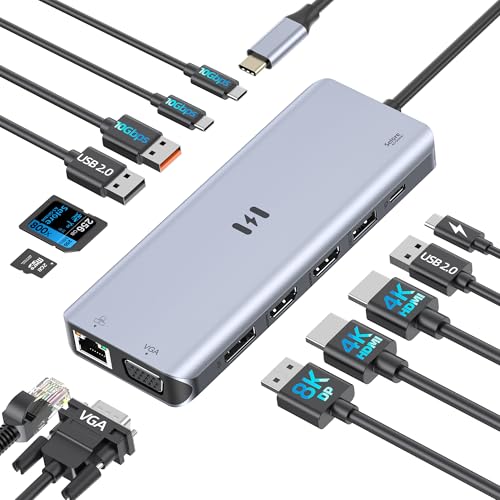 Selore 13-in-1 Dock
|
Mid-Range | Supports up to 4 displays (MST for Windows) | Students needing many external monitors | Check Price | ||
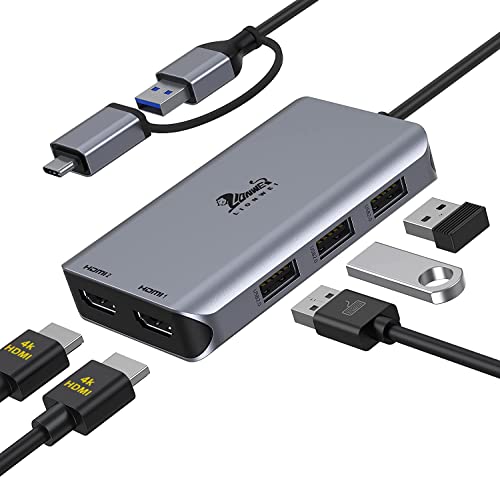 LIONWEI Dual HDMI
|
Budget | Simple dual-HDMI solution | Students on a tight budget who need two screens | Check Price | ||
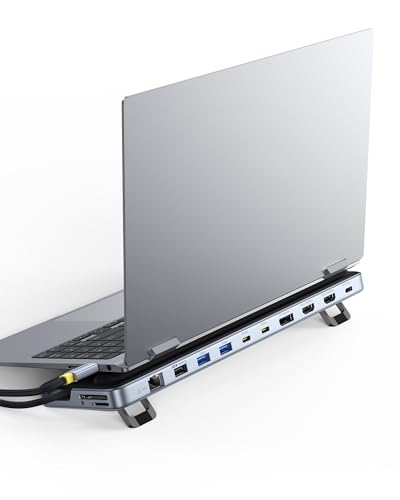 Baseus 12-in-1 Dock Stand
|
Premium | Built-in ergonomic laptop stand | Students wanting an organized, elevated workstation | Check Price |
1. USB C Docking Station 4 Monitors,13 in 1 Laptop Docking Station 3 Monitors with Dual HDMI,8K DP,VGA,10Gbps USB A/C Data Transfer, PD Charging,USB C Hub Multiport Adapter for Windows/Mac OS Laptop
A versatile mid-range USB-C docking station that maximizes screen real estate and delivers strong data and charging performance. It packs multiple high-speed ports and an 85–100W power delivery path, making it a solid dorm desk centerpiece for multitasking and light design work.
Key Specs
- 13 ports including dual 4K HDMI and 8K DisplayPort
- Supports up to 4 displays (MST; macOS limits apply)
- 10Gbps USB-A/C data ports and 1Gbps Ethernet
- Up to 100W PD input (85W output to laptop)
Pros
- More monitor outputs than LIONWEI and Baseus (best for multi-monitor setups)
- Higher data throughput than LIONWEI thanks to 10Gbps ports
- Stronger PD charging than budget options
Cons
- macOS users may hit MST limitations for multiple monitors
- Reports of intermittent monitor dropouts in some setups
Best For: Students needing many external monitors
Check Latest Price on Amazon2. LIONWEI USB 3.0 to Dual HDMI Docking Station for Windows & macOS, USB C Adapter 2 Monitor Splitter for MacBook Pro/Air/M1/M2/Dell/HP/Lenovo/Surface
A budget-friendly USB 3.0 adapter that turns a single port into two HDMI outputs and a few USB ports. It’s a compact, value-focused option that covers basics for extended displays and peripheral hookups but requires driver installation and can be less reliable in some setups.
Key Specs
- Dual HDMI: 4K@30Hz + 1080p@60Hz (via USB 3.0)
- Includes 3x USB 2.0 ports
- Driver required; compatible with many Windows and macOS versions
- Certified (FCC, CE, RoHS) with 18-month support
Pros
- Cheaper and smaller than Selore and Baseus for tight desks
- Good basic port count for peripherals compared with price
- Many customers praise its initial ease of use and value
Cons
- Requires driver installation and can have connection issues
- Lower data speeds (USB 2.0 ports) and weaker video specs than the others
Best For: Students on a tight budget who need two screens
Check Latest Price on Amazon3. Baseus Laptop Docking Station Stand, 12 in 1 Triple 4K Display HDMI/DP, 10Gbps USB A/C Fast Data, PD 100W, Ethernet, TF/SD, USB C Docking Station with Stand for Windows/Dell/HP/Lenovo/Asus/Acer/Mac
A premium docking station that doubles as a laptop stand to save desk space and improve posture. It supports triple displays, high-speed data ports, and strong PD charging, making it ideal for students who want a tidy, top-tier setup on a small desk.
Key Specs
- 12-in-1 with 2x 4K HDMI and 1x 4K DisplayPort (triple display)
- 10Gbps USB A/C ports and TF/SD card readers
- 100W PD input with ~85W output
- Ergonomic stand design for laptop elevation and heat dissipation
Pros
- Keeps a small desk neater than Selore and LIONWEI with its integrated stand
- Triple-display support on par with Selore for complex workflows
- High-quality build and travel-friendly portability praised by users
Cons
- More expensive than the other two (premium tier)
- Some users report mixed experience with certain display configurations
Best For: Students wanting an organized, elevated workstation
Check Latest Price on AmazonWhich One Should You Choose?
If budget is tight → Choose the LIONWEI USB 3.0 Dual HDMI (B08PV132WJ). It’s the least expensive way to get two external displays and basic USB ports on a tiny desk, but be prepared for driver setup and modest bandwidth.
If you need the best mix of multi-monitor flexibility and charging for classes, streaming and light creative work → Choose the Selore&S-Global 13-in-1 Dock (B0F1T419FS). It delivers the most display options and higher-speed ports, making it the most versatile dorm-desk hub.
If premium organization and posture matter and you want an elegant, compact setup → Choose the Baseus 12-in-1 Dock with Stand (B0FCLTGQTZ). It keeps cables tucked and raises your laptop while still supporting triple displays and high-speed transfers.
Best for Specific Scenarios
- Remote classes + note-taking: LIONWEI — budget-friendly dual screens for lecture slides and notes.
- Multitasking & light media editing: Selore&S-Global — more display outputs and faster data ports for editing and reference windows.
- Small desk organization & streaming: Baseus — integrated stand keeps a tiny desk neat while supporting multiple monitors and fast charging.
Frequently Asked Questions
Do I need a dock if my laptop has multiple USB-C ports?
If you need extra display outputs, a wired Ethernet connection, SD card slots or multiple high-speed USB ports simultaneously, a dock simplifies connections and reduces cable swapping even if your laptop has several USB-C ports.
Will these docks charge my laptop while I use it?
Most full docking stations listed provide power delivery (the Selore and Baseus advertise up to ~85–100W input/output ranges). Check your laptop’s required wattage; budget adapters often do not provide high PD output and may not keep power-hungry laptops topped up.
Are these compatible with macOS and M1/M2 Macs?
Compatibility varies: LIONWEI supports many macOS versions but requires a driver; Selore notes macOS MST limitations so multiple-monitor behavior may differ from Windows; Baseus lists broad support but display configurations can vary. Always verify your Mac’s external-display limitations before buying.
How We Selected These Products
Our recommendations are based on data-driven analysis: we evaluated 155229+ products across 23916+ brands using a composite scoring system that weighs rating (40%), review volume (30%), price value (20%), and demand signals (10%). Every product is ranked by data, not opinions.
Last updated: August 05, 2026
As an Amazon Associate we earn from qualifying purchases at no extra cost to you. Full disclosure.
GearLark Score is our editorial ranking based on a composite analysis of product quality, value, and verified customer sentiment. Click through to Amazon for current pricing, availability, and live customer reviews.