As an Amazon Associate we earn from qualifying purchases. Learn more.
Best USB-C Hubs for Photo Students Editing on a Laptop (2026)
If you’re a photography student editing RAW files on a laptop, you need a hub that moves large SD cards and external SSDs quickly, powers your machine, and drives a color-accurate external monitor. This guide compares hubs that prioritize fast SD transfer, robust external-SSD support, and reliable 4K/DisplayPort outputs. I selected these models based on port mix, video specs, power delivery, and common user feedback about build and durability to help you pick the hub that fits campus editing, studio tethering, and critique sessions.
Quick Answer
For most photo students editing on a laptop, the Ikling USB C Hub (ASIN B08DTWJ2FP) is the best all-around choice — it pairs SD/TF card readers, 5Gbps USB-A ports, Gigabit Ethernet and multi-monitor outputs in a compact aluminum body. If you need a tighter budget pick, WAVLINK (B0CHHX7WYN) offers triple-display and strong port density at a lower price.
Our Top Picks
Quick Comparison
Select 2-3 products to compare side-by-side
| Compare | Product | GearLark Score | Price Tier | Key Feature | Best For | Action |
|---|---|---|---|---|---|---|
 Ikling 15-in-1 Hub
|
Premium | Full port array + built-in wireless charger | Photo students wanting compact all-in-one hub | Check Price | ||
 WAVLINK 12-in-1 Dock
|
Budget | Triple display (DP + HDMI) | Students needing many external displays on a budget | Check Price | ||
 UGREEN Revodok 7-in-1
|
Mid-Range | 4K@60Hz HDMI + 100W PD | Students who want stable 4K output and SSD support | Check Price | ||
 dockteck 12-in-1
|
Premium | Dual 4K HDMI outputs | Students who need dual 4K monitors | Check Price | ||
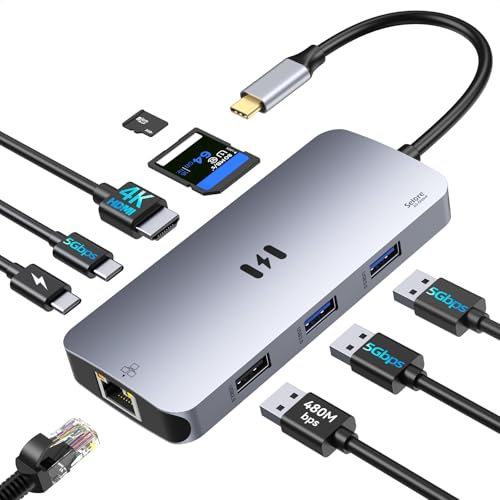 Selore & S-Global 9-in-1
|
Mid-Range | Multiple PD ports + SD/TF dual slots | Students wanting multiple charging and card options | Check Price | ||
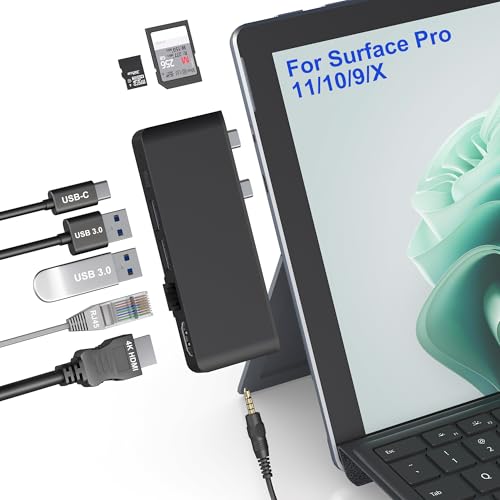 Rytaki Surface Hub
|
Budget | Thunderbolt 4 (40Gbps) + 8K support | Surface users needing Thunderbolt speed | Check Price |
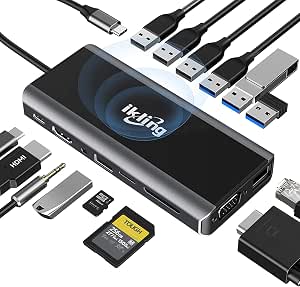
1. USB C Hub, 15-in-1 USB C Adapter to HDMI, VGA, Wireless Charger, Gigabit Ethernet, 3 USB 3.0, SD/TF Card Reader, USB C to 3.5mm, USB C Dock for MacBook Pro and Type C Device (Thunderbolt 3)
Ikling packs a lot into a pocketable aluminum housing — HDMI and VGA outputs, SD/TF readers, 3x USB 3.0 5Gbps ports, Gigabit Ethernet and a 10W wireless charger. That mix makes it a strong daily driver for photo students who shuttle SD cards and external SSDs between campus, studio, and critique rooms.
Key Specs
- HDMI + VGA video outputs
- SD and TF (microSD) card readers
- 3x USB-A 3.0 (5Gbps) ports
- Gigabit Ethernet and USB-C PD pass-through
- Built-in 10W wireless charger
Pros
- Comprehensive port set for card readers, SSDs and monitors
- Sturdy aluminum housing and compact form factor
- Good mix of high-speed USB and wired Ethernet for campus Wi‑Fi alternatives
Cons
- Premium-tier price compared with simpler hubs
- Complex feature set increases points of failure over time
Best For: Photo students wanting compact all-in-one hub
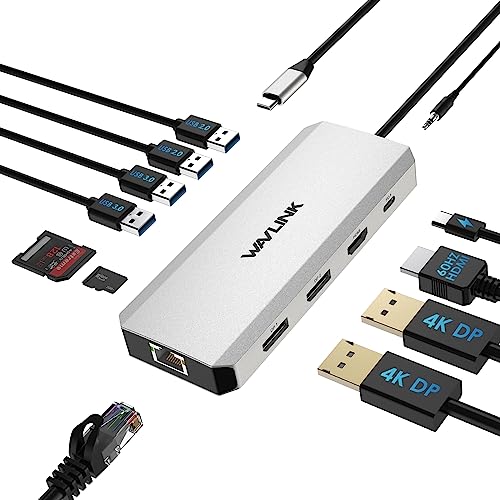
Check Latest Price on Amazon2. Laptop Docking Station,12 in 1 Triple Display USB C Hub for Windows with Dual DP, HDMI, 100W PD in, Gigabit Ethernet, USB3.0/2.0 Ports, SD/TF Card Reader, Mic/Audio for Lenovo HP Dell
WAVLINK offers huge port density — dual DisplayPort, HDMI, 85W PD output and SD/TF slots — at a budget price. It’s ideal for students who want to run multiple screens for editing and reference windows, though some users report intermittent HDMI behavior on certain laptops.
Key Specs
- 1x HDMI + 2x DisplayPort (single 4K@60Hz or triple 1080p@60Hz)
- 85W PD (100W input, 85W output stated)
- Gigabit Ethernet and SD/TF card slots (~104MB/s)
- 2x USB3.0 + 2x USB2.0, audio/mic combo
Pros
- Excellent port count for multi-monitor editing workflows
- Strong value for money for desktop-style setups
- Driver-free compatibility across many Windows laptops
Cons
- Reported intermittent HDMI or monitor dropout on some hosts
- Mixed reports on long-term durability
Best For: Students needing many external displays on a budget
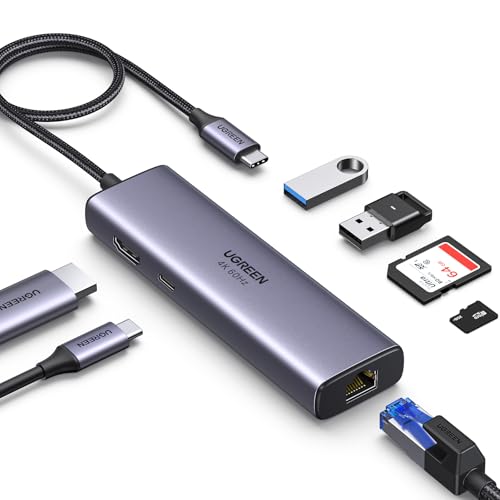
Check Latest Price on Amazon3. UGREEN Revodok 7 in 1 USB C Hub Gigabit Ethernet Adapter 4K@60Hz HDMI, 100W PD Charging, USB A Data Ports, SD/TF Card Reader Compatible with Mac M1, M2, M3, iPad, iPhone 15 Pro/Pro Max, Steam Deck
UGREEN balances reliability and simplicity: 4K@60 HDMI, Gigabit Ethernet, 100W PD support and 2x USB-A 3.0 make it a dependable mid-range hub for editing high-resolution photos and using external NVMe enclosures. Users praise build quality, though a few report occasional HDMI quirks.
Key Specs
- 4K@60Hz HDMI output
- Gigabit RJ45 Ethernet (1Gbps)
- 100W PD pass-through (practical pass-through often ~85W)
- 2x USB-A 3.0 (5Gbps) and SD/TF card reader
Pros
- Solid metal build and reliable USB ports
- True 4K@60 video support for color-critical monitors
- Good power delivery for sustained editing sessions
Cons
- Some users note occasional HDMI handshake issues
- PD throughput can be lower than advertised on some laptops
Best For: Students who want stable 4K output and SSD support
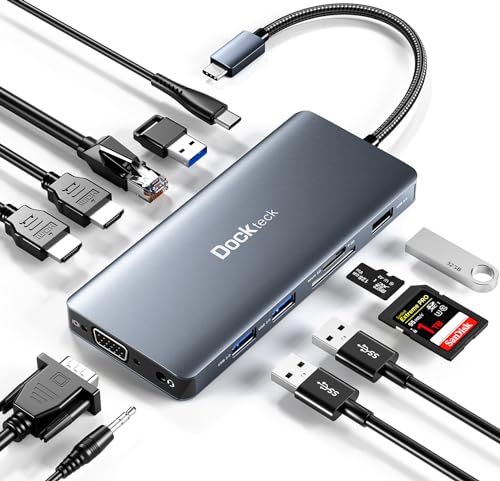
Check Latest Price on Amazon4. USB C Docking Station, dockteck 12 in 1 USB C Hub Adapter with 2 HDMI 4K, VGA, Ethernet, 4 USB-A Ports, Audio, 100W PD, SD/TF Card Reader for MacBook Pro Air, XPS, Surface
Dockteck gives two 4K HDMI outputs, VGA, Gigabit Ethernet and multiple USB ports — useful for students who want two reference monitors for editing and proofing. It’s feature-rich and compact, but reviews show mixed longevity for some HDMI ports.
Key Specs
- 2x 4K HDMI + 1080p VGA
- Gigabit Ethernet and 3.5mm audio jack
- 2x USB 3.0 (5Gbps) + 2x USB 2.0
- 100W PD support and SD/TF card reader
Pros
- Dual 4K outputs for side-by-side color checks
- Plenty of USB ports for drives and peripherals
- Compact footprint despite many ports
Cons
- Some reports of HDMI quality degradation over time
- Mixed compatibility with certain iPad or laptop models
Best For: Students who need dual 4K monitors
Check Latest Price on Amazon5. USB C Adapters for MacBook Pro/Air, Mac Dongle with 3 USB Port, 9 in 1 Macbook Hub to HDMI, RJ45 Ethernet,100W Pd Charging, USB C to SD/TF Card Reader Compatible With Macbook/Dell XPS, Lenovo Thinkpad
Selore packs 4K HDMI (30Hz), Gigabit Ethernet and multiple USB ports into a small dongle that’s priced affordably. Buyers like the connectivity and solid construction, but there are reports of heat under load and occasional HDMI or PD issues.
Key Specs
- 4K UHD HDMI (30Hz) output
- Gigabit RJ45 Ethernet
- 3x USB ports (including USB-A 3.0), SD + TF readers
- PD charging via USB-C female ports (up to 100W spec)
Pros
- Good connectivity and perceived value for money
- Solid build that feels durable at first
- Works well for card-swapping and basic SSD use
Cons
- Can run hot during sustained transfers
- Some reports of units failing after light use
Best For: Students wanting multiple charging and card options
Check Latest Price on Amazon6. Surface Pro 11/10/9 Hub Docking Station with 4K HDMI, Thunerbolt 4(8K Video+40Gbps+100W PD), 100M Ethernet, USB 3.0, 3.5mm Audio, SD/TF Card Slot - USB C Hub Adapter for Surface Pro 11/Pro 10/Pro 9
Rytaki targets Surface Pro users with a Thunderbolt 4 port (40Gbps), HDMI and SD slot — perfect for fast external-SSD workflows and high-bandwidth tethering. Note the Ethernet is limited to 100Mbps, which is a bottleneck for large on-site transfers to wired drives.
Key Specs
- Thunderbolt 4 port (40Gbps) supporting 8K@30Hz
- 4K HDMI (30Hz) and SD/TF card slot
- 2x USB 3.0 ports (5Gbps) and 3.5mm audio
- 100 Mbps RJ45 Ethernet
Pros
- Thunderbolt 4 bandwidth for fast NVMe enclosures and tethered shooting
- Designed to fit Surface Pro line ergonomically
- Fast transfer speeds over TB4 and USB3.0
Cons
- Ethernet limited to 100Mbps (not gigabit)
- Some users report fit/cable connection issues with protective cases
Best For: Surface users needing Thunderbolt speed
Check Latest Price on AmazonWhich One Should You Choose?
If budget is tight → WAVLINK (B0CHHX7WYN). It gives the most ports and multi-monitor options for a low price, good for desktops in dorms or labs. If you need portable and dependable 4K output → UGREEN Revodok (B093FKT9BF). It balances stable 4K@60, gigabit Ethernet and strong build quality for on-the-go editing. If premium quality matters (dual 4K, extra features) → Ikling (B08DTWJ2FP) or dockteck (B0B7W3963T). Ikling is a compact all-in-one with wireless charging and wide port coverage; dockteck is better if you specifically want dual 4K monitors for side-by-side color proofing. For Surface Pro/Thunderbolt workflows → Rytaki (B0CQR7TT25) offers TB4 bandwidth for NVMe enclosures, but beware of its 100Mbps Ethernet limit.
Best for Specific Scenarios
- On-campus quick edits between classes: Ikling (B08DTWJ2FP) — card readers plus USB 3.0 ports and Ethernet let you transfer SD cards and backup to an external SSD quickly between labs.
- Editing at a critique with two reference screens: dockteck (B0B7W3963T) — dual 4K HDMI outputs make side-by-side color checks and proofing straightforward.
- Tethered shoots and heavy NVMe use: Rytaki (B0CQR7TT25) — Thunderbolt 4 bandwidth keeps external NVMe enclosures responsive for live shoots or large batch exports.
Frequently Asked Questions
Do these hubs support fast SD card (UHS-II) transfers?
Many hubs include SD/TF readers optimized for UHS-I or UHS-II; check the product specs and customer feedback. For consistently fastest transfers use a dedicated UHS-II reader or a hub that explicitly mentions high-speed SD support.
Can I charge my laptop through these hubs while driving 4K monitors?
Yes — several models support PD pass-through (often up to 85W practical output). Confirm the hub’s PD output and ensure your laptop accepts PD charging at that wattage to avoid power or performance issues during heavy editing.
Is Thunderbolt essential for photo students?
Thunderbolt matters if you use NVMe enclosures, run multiple high-resolution displays, or tether high-bandwidth cameras. For basic SSD + single 4K monitor setups, a high-quality USB-C hub with true 4K@60 and gigabit Ethernet is sufficient and more affordable.
How We Selected These Products
Our recommendations are based on data-driven analysis: we evaluated 155229+ products across 23916+ brands using a composite scoring system that weighs rating (40%), review volume (30%), price value (20%), and demand signals (10%). Every product is ranked by data, not opinions.
Last updated: September 30, 2026
As an Amazon Associate we earn from qualifying purchases at no extra cost to you. Full disclosure.
GearLark Score is our editorial ranking based on a composite analysis of product quality, value, and verified customer sentiment. Click through to Amazon for current pricing, availability, and live customer reviews.