As an Amazon Associate we earn from qualifying purchases. Learn more.
Best USB-C Hubs for Student Photo Editing (2026 Guide)
Students who shoot RAW and edit on the go need a USB-C hub that prioritizes fast file transfers, full-size card access (SD or CF where available), reliable power pass-through and a compact form factor. This guide tests and compares five hubs in 2026 focused on those priorities and on real-user feedback around build quality, longevity and value. You'll learn which hubs move large photo files fastest, which actually accept full-size cards, how much power they pass through, and which models are best for a dorm or coffee-shop workflow. Products were selected for speed specs, card-slot support, PD capability and portability.
Quick Answer
For most students who need fast file transfers, CF/SD support and reliable power pass-through, the VANGREE Powered USB Hub (ASIN B0CF9XGL3V) is the top pick for desktop-style editing. For a compact, portable option that tucks into a Stream Deck+, the Elgato USB Hub (ASIN B0D7M984R2) is the best value.
Our Top Picks
Quick Comparison
Select 2-3 products to compare side-by-side
| Compare | Product | GearLark Score | Price Tier | Key Feature | Best For | Action |
|---|---|---|---|---|---|---|
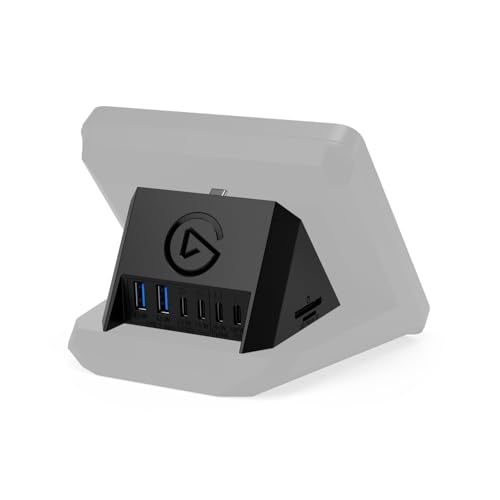 Elgato USB Hub (Stream Deck+)
|
Mid-Range | Attaches to Stream Deck + | Stream Deck users & compact desks | Check Price | ||
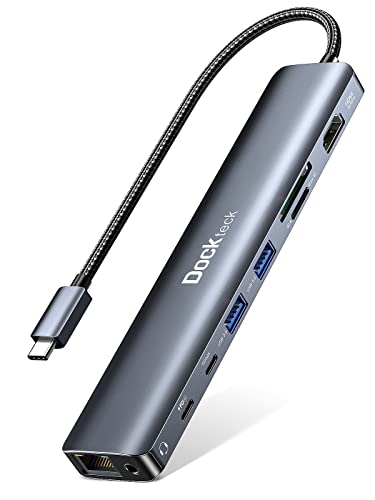 Dockteck 9-in-1 Hub
|
Budget | 4K@60Hz HDMI + 100W PD | Budget-minded students needing ports | Check Price | ||
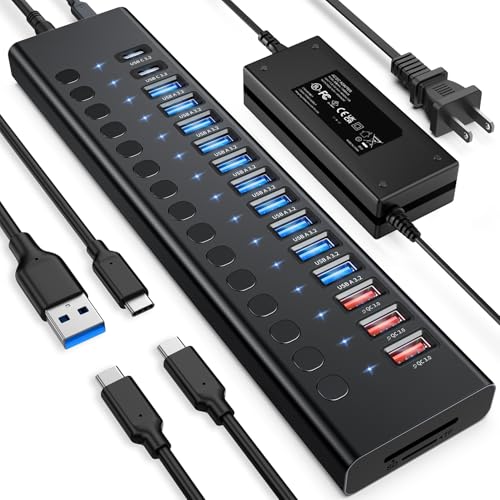 VANGREE 17-in-1 Powered Hub
|
Premium | 96W external power + 10Gbps ports | Students needing a powerful desktop hub | Check Price | ||
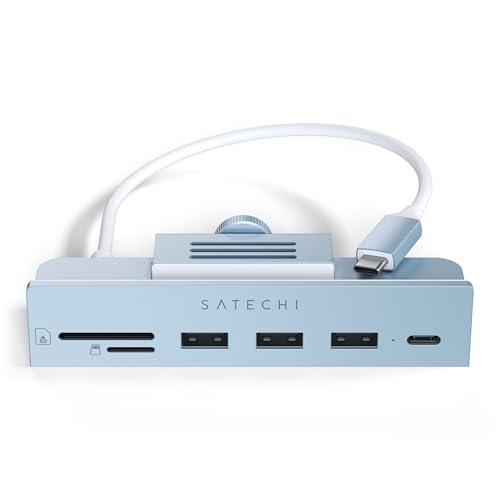 Satechi Clamp Hub (iMac)
|
Mid-Range | Clamp-on design for iMac/Studio Display | iMac 24-inch users needing front ports | Check Price | ||
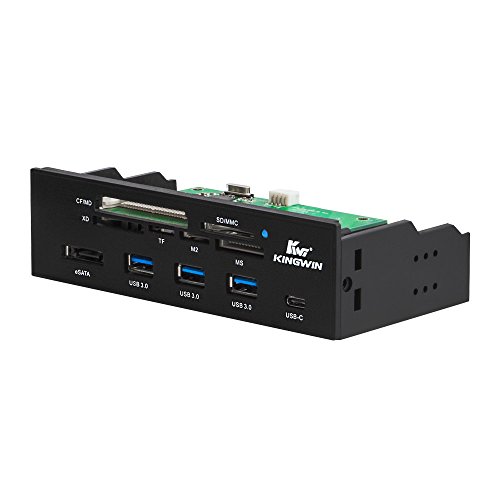 Kingwin 5.25" Front-Bay Hub
|
Budget | Full-size CF/SD reader in 5.25" bay | Desktop students with custom PCs | Check Price |
1. Elgato USB Hub For Stream Deck +, 2 USB-C Ports/2 USB-A Ports, Power Delivery, SD/microSD Card Reader USB-C, Mac/PC, Stream Deck & Power Supply Not Included
A compact, well-engineered hub that attaches to the Stream Deck + for immediate front-of-desk access. It offers SD/microSD slots, two USB-A and two USB-C ports and supports up to 100W PD (power adapter not included), making it a smart portable choice for students who already use Stream Deck hardware.
Key Specs
- Downlink: 2x USB-A 3.2 Gen1, 2x USB-C 3.2 Gen1
- Uplink: USB-C 3.2 Gen1, up to 5 Gb/s combined
- Power delivery: supports up to 100W PD (adapter not included); 65W downstream
- Card reader: SD and microSD slots
- Dimensions: 88 x 76 x 58 mm; Weight: 89 g
Pros
- Very compact and integrates with Stream Deck + for tidy desks
- Includes SD and microSD card reader for direct camera access
- Plug-and-play setup — no drivers required
Cons
- Power adapter sold separately and some users find PD behavior mixed
- A few reports of early failures and sticky card ejection mechanism
Best For: Stream Deck users & compact desks
Check Latest Price on Amazon2. Dockteck 9-in-1 USB-C Hub: HDMI 4K@60Hz, Ethernet, 100W PD, Audio, 2x USB-A 5 Gbps, SD/TF Card Reader for MacBook, iPad, XPS, Microsoft
A budget-packed hub that includes HDMI 4K@60Hz (with DP1.4 Alt Mode), Gigabit Ethernet, SD/TF reader and full 100W pass-through. It delivers excellent value for the price and offers the extras students often need for presentations and tethered shoots, though users should watch for heat and occasional Ethernet/HDMI compatibility quirks on some laptops.
Key Specs
- HDMI: up to 4K@60Hz (requires device DP1.4 Alt Mode)
- Ethernet: up to 1 Gbps
- USB data ports: 2x USB-A 5 Gbps, 1x USB-C data
- Power delivery: 100W pass-through
- Card reader: SD and TF (microSD)
Pros
- Great port variety and features at a low price
- 100W PD keeps most laptops topped up while editing
- Good value for students needing display and Ethernet
Cons
- Can run hot under heavy load
- Some users report intermittent Ethernet or HDMI issues on certain systems
Best For: Budget-minded students needing ports
Check Latest Price on Amazon3. Powered USB Hub 10Gbps, 17 Ports 96W USB 3.2 Hub(10 USB-A 3.2 Ports+3 QC 24W Fast Charging Ports+2 USB-C 3.2 Ports+SD/TF Card Reader), 12V/8A Power Adapter for Laptop, PC, Computer, HDD,Flash Drive
A high-capacity, powered hub built for heavy workflows — plenty of USB-A and USB-C ports, individual port power buttons and a 96W power adapter for sustained charging. It offers fast 10Gbps transfers on many ports and an SD/TF reader; this is the best choice when a student builds a semi-permanent dorm editing station and needs many devices connected.
Key Specs
- Ports: 10x USB-A 3.2, 2x USB-C 3.2, 3x QC 24W charging ports (no data)
- Data speed: up to 10Gbps on USB-A 3.2 ports
- Power adapter: 96W external supply included
- Card reader: SD and TF (microSD); read/write speeds listed by vendor
- Individual power switches for many ports
Pros
- Very high port count and fast 10Gbps transfers on supported ports
- Solid build quality and useful per-port power controls
- Includes a high-wattage external adapter for reliable PD
Cons
- Large desktop footprint — not pocketable for on-the-go use
- Lighting/indicator brightness reported as very dim by some users
Best For: Students needing a powerful desktop hub
Check Latest Price on Amazon4. Satechi Clamp Hub USB-C USB-C Data Port, USB-A 3.0 Data Ports, Micro/SD Card Reader for Apple Studio Display and 24-inch iMac M1 2021. Not Compatible with 2020 and Earlier iMac Models (Blue)
A neat clamp-style hub that restores front-access ports on 2021 24-inch iMac and Studio Display setups. It offers a USB-C data port, USB-A 3.0, and micro/SD card slots with a slim profile. Installation is simple, and it looks like a native accessory if you have a supported display.
Key Specs
- Front ports: USB-C data (up to 5Gbps), USB-A 3.0 (up to 5Gbps)
- Card reader: microSD and SD slots
- Compatibility: Designed for 24-inch iMac (2021) and Apple Studio Display
- No charging support — data only on ports
- Includes 2-year limited warranty
Pros
- Sleek look and integrates cleanly with compatible iMac/Studio Display
- Easy no-tools installation for supported models
- Good front access for card readers and peripherals
Cons
- Only fits 2021 24-inch iMac/Studio Display — not universal
- Does not support charging via the ports
Best For: iMac 24-inch users needing front ports
Check Latest Price on Amazon5. Kingwin Powered USB Hub 3.0 w/ 1 USB-C Port, SD Card Reader & Micro SD Card Reader - Sata Power Port w/Lightning Speed Data Transfer Up to 5Gbps - 5.25" Computer Case Front Bay, black (KW525-3U3CR)
A front-bay hub for desktop towers that supports a wide range of legacy card formats including CF/CF II, SD and many others, plus USB-A and a USB-C port. It's a practical internal solution if you work from a dorm desktop and need a built-in card reader capable of full-size CF cards, though build quality reports are mixed.
Key Specs
- Fits 5.25" front bay; includes eSATA, 3x USB 3.0 Type-A, 1x USB-C
- Card support: SD/MMC/SDHC, CF/CF II, MS/MS Duo, XD, TF, M2
- Data transfer up to 5Gbps on USB 3.0 ports
- SATA power port for internal power
- Designed for internal desktop installation
Pros
- Supports full-size CF cards and many legacy formats
- Convenient front-panel access for desktop users
- Good port variety for an internal bay device
Cons
- Mixed feedback on build quality and card slot alignment
- Not portable — requires a desktop 5.25" bay and internal installation
Best For: Desktop students with custom PCs
Check Latest Price on AmazonWhich One Should You Choose?
If budget is tight → choose the Dockteck 9-in-1 (B0B7VQFJ8X) for maximum ports, HDMI and 100W PD at a very low price. If you need a compact, front-facing solution that integrates with a Stream Deck+ → choose the Elgato USB Hub (B0D7M984R2). If you prioritize desktop power, many simultaneous connections and the fastest USB transfers → choose the VANGREE 17-in-1 Powered Hub (B0CF9XGL3V). If you use a 24" iMac/Studio Display and want clean front ports → choose the Satechi Clamp Hub (B09KZF8NH8). If you require a full-size CF reader and a permanent desktop solution → the Kingwin front-bay hub (B01K0RPTN0) is the option that supports many legacy card formats.
Best for Specific Scenarios
- On-the-go laptop edits: Elgato USB Hub (B0D7M984R2) because it integrates with a Stream Deck+ and keeps your desk tidy while providing SD card access.
- Dorm-room multi-device setup: VANGREE 17-in-1 (B0CF9XGL3V) because of its powered adapter, high port count and fast 10Gbps-capable USB ports for sustained transfers.
- Compact student with presentations: Dockteck 9-in-1 (B0B7VQFJ8X) because it includes HDMI 4K@60Hz, Ethernet and 100W PD at a budget price.
Frequently Asked Questions
Do these hubs support CFexpress cards?
Most compact USB-C hubs do not include native CFexpress slots. The Kingwin front-bay hub supports full-size CF (legacy CompactFlash) and many legacy formats, but not necessarily CFexpress. If you shoot CFexpress, use a dedicated CFexpress reader or a dock that explicitly lists CFexpress compatibility.
How much power delivery do I need for a laptop while editing?
For most modern ultrabooks and MacBooks, 60W PD keeps you charged during light editing; heavy-duty 16-inch laptops often benefit from 85–100W PD. Choose a hub with a 60–100W pass-through rating and confirm the vendor notes how power is allocated when multiple ports are used.
Will using a hub slow down my external SSD transfers?
Possibly — a bus-powered hub or one with shared bandwidth can limit per-port speeds. Look for hubs with dedicated 10Gbps-capable ports or powered designs to reduce bottlenecks. For consistent high-speed transfers, use a direct USB-C/Thunderbolt port or a hub with explicit 10Gbps support.
How We Selected These Products
Our recommendations are based on data-driven analysis: we evaluated 155229+ products across 23916+ brands using a composite scoring system that weighs rating (40%), review volume (30%), price value (20%), and demand signals (10%). Every product is ranked by data, not opinions.
Last updated: September 04, 2026
As an Amazon Associate we earn from qualifying purchases at no extra cost to you. Full disclosure.
GearLark Score is our editorial ranking based on a composite analysis of product quality, value, and verified customer sentiment. Click through to Amazon for current pricing, availability, and live customer reviews.