As an Amazon Associate we earn from qualifying purchases. Learn more.
Best USB-C Hubs for Student Photographers (2026 Back-to-School Picks)
Student photographers juggling classes, shoots and editing on the move need a USB-C hub that’s compact, rugged, and built for fast media transfers. This guide looks specifically at hubs with SD readers and high-speed ports so you can offload RAW files, tether cameras, run external displays and charge your laptop between shoot locations. I evaluated five popular hubs across durability, bus-powered reliability, SD transfer capability, and USB-C/Thunderbolt compatibility to recommend practical picks for back-to-school 2026.
Quick Answer
For student photographers who need a compact, durable hub with a fast SD reader and reliable pass-through charging, the Belkin USB-C Hub (B0DTJT2GJ8) is our top pick. It balances 4K@60Hz output, 100W PD pass-through, gigabit Ethernet and an SD slot in a travel-ready design ideal for editing on the go.
Our Top Picks
Quick Comparison
Select 2-3 products to compare side-by-side
| Compare | Product | GearLark Score | Price Tier | Key Feature | Best For | Action |
|---|---|---|---|---|---|---|
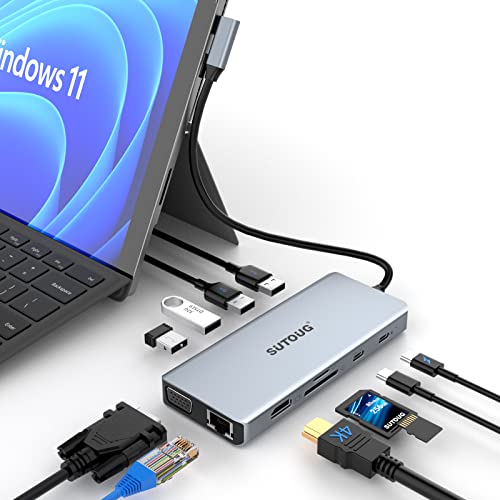 SUTOUG 12-in-1 Hub
|
Mid-Range | 12 ports incl. SD/TF reader | Students needing many ports & SD slots | Check Price | ||
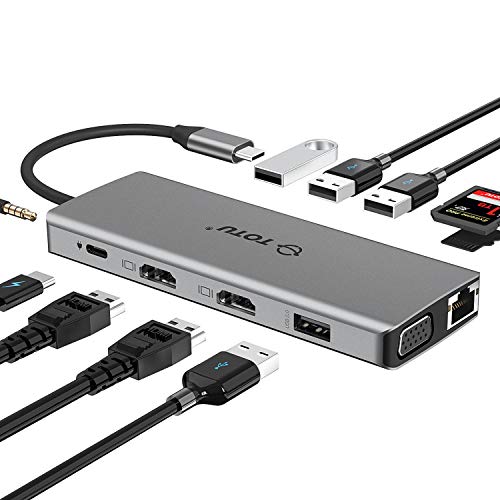 TOTU 13-in-1 Pro
|
Premium | Dual HDMI + 100W PD | Students who run multi-monitor setups | Check Price | ||
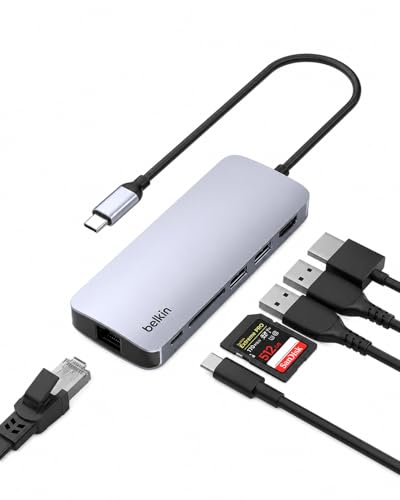 Belkin 6-in-1 Hub
|
Mid-Range | 4K@60Hz HDMI + 100W PD | On-the-go editors needing reliability | Check Price | ||
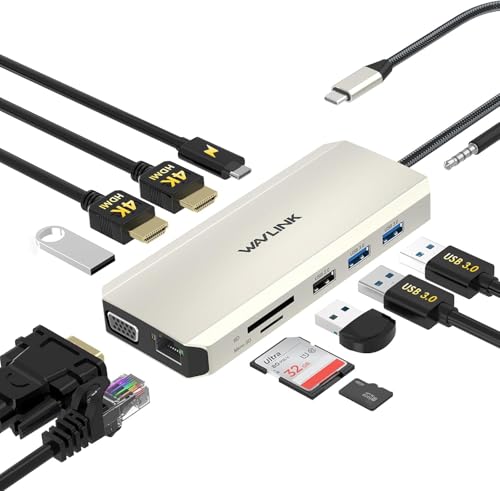 WAVLINK 12-in-1 Dock
|
Budget | Very high port count | Students on a tight budget who need many ports | Check Price | ||
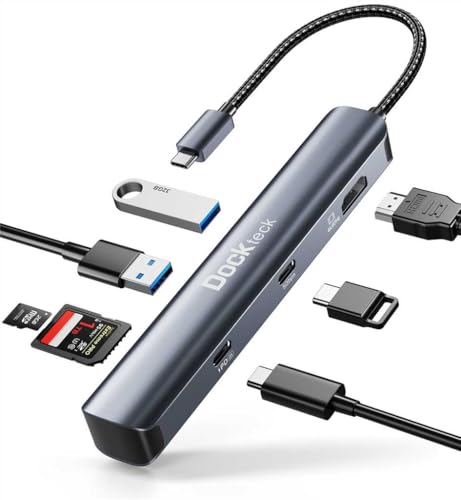 dockteck 7-in-1
|
Budget | 4K@60Hz + 100W PD in compact shell | Traveling students who prioritize compact size | Check Price |
1. USB C Hub, SUTOUG 12 in 1 Docking Station with 4K HDMI & 1080P VGA, 92W PD, 1Gbps Ethernet, USB-C 3.0 & 4 USB-A Data Ports, SD TF Card Reader, USB C Adapter for Surface Pro MacBook Pro Air & Windows
SUTOUG packs a full desktop dock into a pocketable aluminum body — great for student photographers who need lots of ports for card readers, external drives and Ethernet when editing in labs or dorms. The 92W PD pass-through and SD/TF slots make it a practical all-in-one for media offloads.
Key Specs
- 4K HDMI output (up to 3840x2160@30Hz)
- 92W USB-C Power Delivery pass-through
- Gigabit RJ45 Ethernet
- Built-in SD and microSD (TF) card reader
Pros
- Very wide port selection for multi-device workflows
- Aluminum shell is travel-friendly and feels durable
- Good PD wattage for charging laptops while editing
Cons
- HDMI limited to 4K@30Hz (not ideal for 60Hz displays)
- Requires host DisplayPort Alt Mode; dual-display behavior is limited
Best For: Students needing many ports & SD slots
Check Latest Price on Amazon2. TOTU 13-in-1 USB-C Hub with Ethernet, 4K HDMI, VGA, PD, SD/TF Cards Reader, Mic/Audio Docking Station for MacBook Pro Air XPS and Other USB-C Laptops
The TOTU 13-in-1 is a feature-dense hub for power users — dual HDMI, VGA, Ethernet and a 100W PD passthrough let you set up multi-monitor editing stations in labs or shared studios. Customers consistently praise its connectivity and compact footprint, making it a strong premium pick for serious student creators.
Key Specs
- Two HDMI outputs (one 4K@30Hz; Windows supports triple display modes)
- 100W PD pass-through
- SD and microSD card reader
- Gigabit Ethernet and audio/mic jack
Pros
- Exceptional port capacity for desktop-style setups
- 100W charging handles heavier laptops
- Compact design despite many ports
Cons
- Mac OS limits multi-monitor modes (MST unsupported)
- Premium feature set comes with a higher price tier
Best For: Students who run multi-monitor setups
Check Latest Price on Amazon3. Belkin USB-C Hub - 6-in-1 Multi-Port Adapter Dock with 4K HDMI, USB-C 100W PD Pass-Through Charging, 2X USB-A Ports, Gigabit Ethernet Ports, and SD Slot for MacBook Pro, Air, iPad, Pro, XPS and More
Belkin’s compact 6-in-1 balances portability and reliability, offering 4K@60Hz HDMI, 100W PD pass-through and a gigabit Ethernet port in a slim aluminum chassis. For students who edit on campus or travel between shoots, this hub is durable, easy to use and tailored for consistent bus-powered performance.
Key Specs
- 4K HDMI 2.0 output at 60Hz
- USB-C PD 3.0 pass-through up to 100W
- SD 2.0 card reader and 2x USB-A 3.0 ports
- Gigabit Ethernet
Pros
- 4K@60Hz HDMI for smoother external-monitor editing
- Designed for durability and travel with a flat cable
- Strong pass-through charging for longer sessions
Cons
- Fewer ports than larger multiport docks
- SD card reader is SD 2.0 — slower than some UHS-II readers
Best For: On-the-go editors needing reliability
Check Latest Price on Amazon4. WAVLINK USB C Docking Station Dual Monitor for Dell HP Surface Lenovo MacBook Laptop, Triple Display USB-C Hub Multiport Adapter Dongle- 2 HDMI, VGA, Ethernet,100W PD, 5 USB, SD/TF Card Reader,Audio
WAVLINK offers the most ports for the price — two HDMI, VGA, multiple USBs and SD/TF slots make it appealing for students who use shared workstations or want flexible hookups. It’s the budget pick for building a full desk setup without buying an expensive dock.
Key Specs
- 2x HDMI plus VGA (varied resolutions depending on combos)
- 100W PD pass-through (87W typical)
- Gigabit Ethernet, SD & TF card slots
- 3.5mm audio jack and five USB ports
Pros
- Unbeatable port density for the price
- Supports multiple displays on Windows systems
- Good basic PD charging support
Cons
- Some users report the unit runs hot during extended use
- Mixed reliability reported; quality control can vary
Best For: Students on a tight budget who need many ports
Check Latest Price on Amazon5. dockteck USB C Hub Multiport Adapter, 7 in 1 USB C Dongle with 4K@60Hz HDMI, 100W PD, USB-C, 2 USB-A 5Gbps Data Slots and TF/SD Card Reader, Dongle for MacBook Air/Pro, Dell XPS, Lenovo HP, Surface
dockteck squeezes 4K@60Hz HDMI, 100W PD and dual 5Gbps USB ports into a tiny dongle—perfect for photographers who need a minimalist carry. It’s an affordable, compact choice when you want straightforward transfers and charging without a full docking station.
Key Specs
- 4K@60Hz HDMI output
- 100W PD pass-through (up to ~85W charging typical)
- USB-A and USB-C 5Gbps ports; SD/TF slots
- Compact dongle form factor
Pros
- Compact and travel-friendly for field work
- High-speed USB ports for quick transfers
- Most features expected of pricier hubs in a small package
Cons
- Some reports of durability issues over months of use
- Unit can run hot under heavy load
Best For: Traveling students who prioritize compact size
Check Latest Price on AmazonWhich One Should You Choose?
If budget is tight → WAVLINK 12-in-1 Dock (B09J8FLW29). If you need portable and reliable performance for on-the-go edits → Belkin 6-in-1 Hub (B0DTJT2GJ8). If premium connectivity and maximum port density matter for a campus workstation → TOTU 13-in-1 Pro (B07Q9JXWTP).
Best for Specific Scenarios
- Quick campus edits between classes: Belkin 6-in-1 (B0DTJT2GJ8) because it offers 4K@60Hz, strong 100W PD and a compact, durable body that fits a camera bag.
- Setting up a dorm or lab workstation: TOTU 13-in-1 (B07Q9JXWTP) because its many video outputs and Ethernet let you build a multi-monitor editing station for collaborative projects.
- Field shoots and tight budgets: WAVLINK 12-in-1 (B09J8FLW29) or dockteck 7-in-1 (B0B7VHLBVS) because they deliver core ports and SD readers at a lower cost and are easy to pack into a backpack.
Frequently Asked Questions
Will a USB-C hub work with my Thunderbolt laptop?
Most Thunderbolt 3/4 laptops are backward compatible with USB-C hubs. However, to get video output and full bandwidth you still need a host port that supports DisplayPort Alt Mode or Thunderbolt. Check the hub’s notes for compatible modes (MST/SST) and whether macOS or Windows limitations apply.
Can I charge my laptop through these hubs while editing?
Yes — hubs with USB-C Power Delivery (PD) passthrough can charge your laptop while connected. Look for 60–100W PD ratings for reliable charging; heavier laptops benefit from 87–100W. Keep in mind that powering many attached drives from a bus-powered dongle can reduce available power for charging.
How do I get the fastest transfers for RAW files?
Fast transfers depend on three things: the SD card’s speed class (UHS-I vs UHS-II), the hub’s card-reader speed, and the USB port bandwidth. Prefer hubs that advertise USB 3.x 5Gbps or higher and UHS-II-capable readers. If speed is critical, a dedicated, powered UHS-II card reader will usually outperform multiport hubs’ built-in readers.
How We Selected These Products
Our recommendations are based on data-driven analysis: we evaluated 155229+ products across 23916+ brands using a composite scoring system that weighs rating (40%), review volume (30%), price value (20%), and demand signals (10%). Every product is ranked by data, not opinions.
Last updated: August 21, 2026
As an Amazon Associate we earn from qualifying purchases at no extra cost to you. Full disclosure.
GearLark Score is our editorial ranking based on a composite analysis of product quality, value, and verified customer sentiment. Click through to Amazon for current pricing, availability, and live customer reviews.