As an Amazon Associate we earn from qualifying purchases. Learn more.
Best USB-C Hubs for Students & Remote Learners (2026 Guide)
Students and remote learners need small, dependable hubs that add ports for presentations, storage, and group projects without weighing down a backpack. This guide looks at compact multiport USB-C hubs released or relevant in 2026, focusing on portability, video-out for classroom presentations, and durable builds that survive dorm-life. Products were chosen from manufacturer specs and customer feedback emphasizing build quality, functionality, and value. You’ll learn which hubs suit quick presentations, Mac mini desk setups, and on-the-go study sessions, plus how to pick the right hub for your workflow.
Quick Answer
For most students the HyperDrive Tube 6-in-1 USB-C Hub is the best pick: it combines a very compact, classroom-ready design with the essential ports students need for presentations and portable study. If you need a desk-focused Mac mini expansion, the PULWTOP Mac mini M4 Dock is the best choice for added storage and ports.
Our Top Picks
Quick Comparison
Select 2-3 products to compare side-by-side
| Compare | Product | GearLark Score | Price Tier | Key Feature | Best For | Action |
|---|---|---|---|---|---|---|
 HyperDrive Tube
|
Mid-Range | Compact 6-in-1 design | Students needing a pocket hub | Check Price | ||
 StarTech 3-Port Hub
|
Mid-Range | 10Gbps USB + Ethernet adapter | Students needing fast USB and wired networking | Check Price | ||
 Mac mini M4 Dock
|
Budget | Vertical dock + M.2 SSD slot | Mac mini M4 users needing expansion | Check Price | ||
 YOTUO 2TB Dock
|
Premium | Built-in 2TB HDD plus hub | Students needing lots of portable storage | Check Price | ||
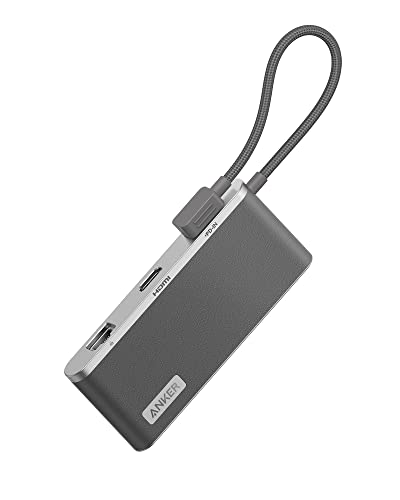 Anker 655 8-in-1
|
Premium | 100W PD + 4K HDMI | Students who give presentations and need premium build | Check Price | ||
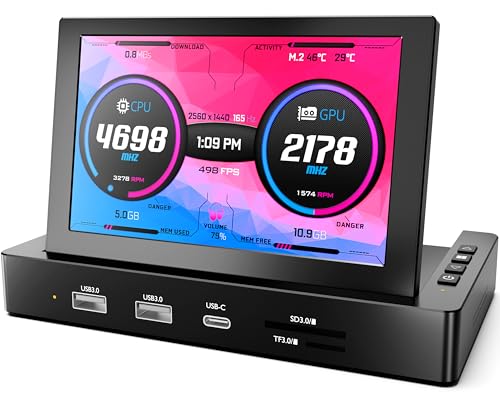 ROADOM 5" Mini Monitor
|
Premium | Portable 5" IPS monitor + hub | Students doing Raspberry Pi projects or needing a tiny second screen | Check Price |
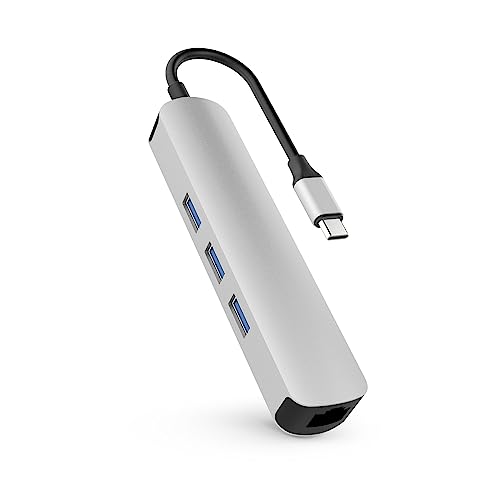
1. HyperDrive Tube 6-in-1 USB-C Hub - Silver
The HyperDrive Tube is a compact, tube-shaped 6-in-1 hub that prioritizes portability for students who move between classes and study spots. Its small footprint fits in backpacks and laptop cases, making it an easy grab for quick presentations, file transfers, and connecting a mouse and flash drive.
Key Specs
- 6-in-1 USB-C hub
- Compact tubular form (silver finish)
- USB-C host connection
- Designed for portability and desktop use
Pros
- Very compact and easy to carry between classes
- Sleek aluminum-like look that matches modern laptops
- Covers essential ports without extra bulk
Cons
- Fewer ports than larger docks — may need extra adapters
- May not deliver full laptop charging power on some systems
Best For: Students needing a pocket hub
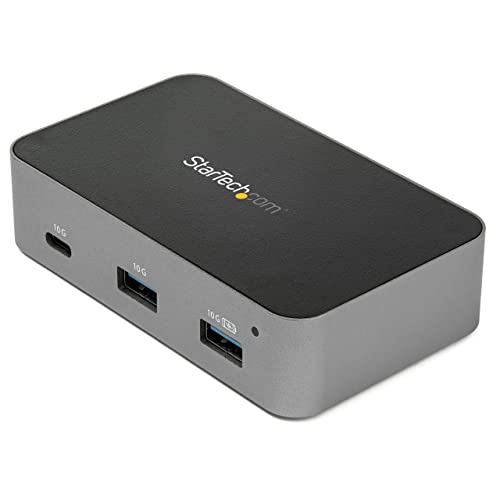
Check Latest Price on Amazon2. StarTech.com 3 Port USB C 3.1 Gen 2 Hub with Ethernet Adapter - 10Gbps USB Type C to 2X USB-A & 1x USB-C Ports - USB Hub w/BC 1.2 Phone Fast Charging (HB31C2A1CGS)
StarTech’s compact 3-port hub focuses on fast data transfers and wired networking — useful for students who rely on file-heavy coursework or dorm networks. It combines superspeed USB-A ports with a built-in Ethernet adapter and phone fast-charging support, which can be handy during group projects or when Wi‑Fi is unreliable.
Key Specs
- 2x USB-A 10Gbps (SuperSpeed)
- 1x USB-C port
- Built-in Ethernet adapter for wired networks
- BC 1.2 phone fast-charging support
Pros
- Very fast USB data throughput for large file transfers
- Includes Ethernet for stable classroom or dorm connections
- Simple plug-and-play design
Cons
- Limited to three ports — lacks HDMI or SD card slots
- No dedicated display output for presentations
Best For: Students needing fast USB and wired networking
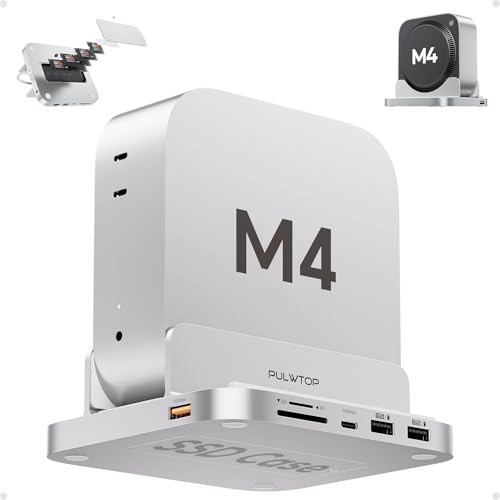
Check Latest Price on Amazon3. Mac mini M4 Dock with 4TB M.2 SSD Enclosure, 8-in-1 Aluminum Vertical USB-C Hub for Mac mini M4 Pro Hub Stand with USB-A/C 3.2 10Gbps, 2xUSB-A 2.0, 3.5mm Audio, SD/TF Slots (SSD NOT Included)
This PULWTOP dock is built specifically for the Mac mini M4 and acts as both a stand and a feature-rich hub. It adds an M.2 NVMe bay for up to 4TB of extra storage, multiple USB ports, card readers and audio — ideal for students using a compact desktop as a study workstation with lots of local media or project files.
Key Specs
- 8 ports: USB-C 10Gbps & USB-A 10Gbps + 2x USB-A 2.0
- Supports up to 4TB M.2 NVMe SSD (enclosure included, SSD not included)
- Micro/SD card readers
- 3.5mm audio/mic jack; 40cm TPE cable
Pros
- Unique vertical design fits Mac mini footprint and improves desk organization
- Built-in M.2 SSD slot provides massive local storage expansion
- Good port variety for a dorm or small desk setup
Cons
- Non-detachable cable may limit placement options
- USB ports on this dock do not support video output or laptop charging
Best For: Mac mini M4 users needing expansion
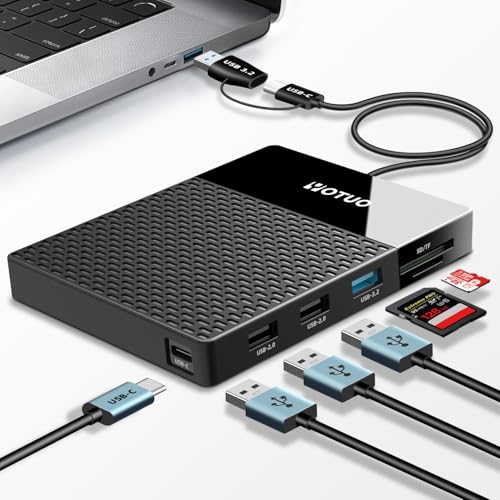
Check Latest Price on Amazon4. 2TB Docking Station External Hard Drive Storage, USB-C Hub + HDD 7-in-1, USB 3.0, SD/TF Card, HDD for Windows, Mac, Android, TV, Phone, Laptop, Desktop, PC
YOTUO combines a multiport hub with a built-in 2TB external hard drive to give students a single device for storage and connectivity. It’s useful for media-heavy coursework, backups, and carrying a substantial file library between home and campus, though transfer speed reports are mixed among users.
Key Specs
- Integrated 2TB external hard drive
- Supports USB-C, USB 3.2, USB 2.0 ports
- SD and TF card slots
- Wide OS compatibility (Windows, Mac, Linux, Android, iOS)
Pros
- Large built-in storage removes need for separate HDD
- Multiple ports and card readers reduce cable clutter
- Portable form factor for on-the-go access to files
Cons
- Mixed reports on transfer speeds — may be slower than standalone SSD/hubs
- Some users reported setup hiccups; reliability varies by unit
Best For: Students needing lots of portable storage
Check Latest Price on Amazon5. Anker USB C Hub, 655 USB-C Hub (8-in-1), with 2 USB-A 10 Gbps Data Ports, 100W Power Delivery, 4K HDMI, 1 Gbps Ethernet, microSD and SD Card Slots, 3.5 mm AUX, for MacBook, and More (Charcoal Gray)
Anker’s 655 8-in-1 hub mixes a premium faux leather exterior and braided cable with a full connector set aimed at creative students: 100W Power Delivery, 4K HDMI output, fast USB-A ports, Ethernet and card readers. It’s engineered for polished classroom presentations and reliable daily use.
Key Specs
- 100W USB-C Power Delivery input
- 2x USB-A 3.2 Gen 2 data ports (up to 10Gbps)
- 4K HDMI (up to 60Hz with DP 1.4 host)
- Gigabit Ethernet, microSD/SD slots, 3.5mm AUX
Pros
- Premium build materials and braided cable for longevity
- High-power PD keeps most laptops charged while using the hub
- 4K HDMI and fast USB make it ideal for presentations and media work
Cons
- Higher price tier compared with simpler hubs
- 4K@60Hz output requires a DP 1.4–capable laptop (some hosts limited to 30Hz)
Best For: Students who give presentations and need premium build
Check Latest Price on Amazon6. 5'' Mini Monitor for PC Raspberry Pi 5/4/3-ROADOM Multi-Port Docking Station with Built-in USB Hub & Dual Speakers,USB-C/HDMI Connection for DIY Projects,Gaming & Programming,System Monitoring AIDA64
ROADOM’s 5-inch portable IPS monitor includes a built-in USB hub, speakers and card slots — a compact all-in-one for makers and students running Raspberry Pi labs, programming demos, or tiny secondary displays. It’s extremely portable but the small size and modest resolution mean it’s best for specific tasks rather than long study sessions.
Key Specs
- 5-inch IPS panel, 800x480 resolution
- Built-in USB 3.0 ports and SD/TF card slots
- USB-C one-cable option for power + display + data
- Integrated dual speakers and 120° adjustable tilt
Pros
- All-in-one solution for Raspberry Pi projects and portable demos
- Built-in speakers remove need for separate audio
- Multiple display modes and simple setup
Cons
- Very small screen — not ideal for extended document editing
- Image quality and resolution receive mixed feedback
Best For: Students doing Raspberry Pi projects or needing a tiny second screen
Check Latest Price on AmazonWhich One Should You Choose?
If budget is tight → choose the PULWTOP Mac mini M4 Dock (B0DSFSL4SW) for a budget-friendly desk hub and large local storage expansion. If you need something ultra-portable → pick the HyperDrive Tube 6-in-1 (B07GVGPDVJ) for pocketable, classroom-ready portability. If polished build quality and presentation-ready features matter → the Anker 655 8-in-1 (B09QXK45TG) offers 100W PD and 4K HDMI in a premium package. For built-in storage on the go, consider the YOTUO 2TB Dock (B0FJFBZD37). And if your workflow includes Raspberry Pi or tiny second-screen demos, the ROADOM 5" mini monitor (B0FJRDDVKZ) doubles as a hub and display.
Best for Specific Scenarios
- In-class presentations: Anker 655 8-in-1 — because its 4K HDMI output and 100W PD let you connect and power a laptop while presenting with clean cabling.
- Dorm-room desk with a Mac mini: PULWTOP Mac mini M4 Dock — because it snaps to the Mac mini footprint, adds many ports and an M.2 SSD slot for local coursework and media storage.
- On-the-go study sessions & sharing files: HyperDrive Tube 6-in-1 — because its small size fits in a laptop sleeve and provides the core ports students need for quick group work.
Frequently Asked Questions
Will a USB-C hub charge my laptop?
Some hubs pass through Power Delivery (PD) and can charge laptops; check the hub’s PD wattage. Hubs with higher PD (for example, 60–100W) can keep most thin laptops charged, while compact hubs may only supply limited power and won’t fully charge larger machines.
Do these hubs support 4K at 60Hz for presentations?
Support for 4K@60Hz depends on both the hub and your laptop’s USB-C/DisplayPort Alt Mode. Some hubs (like the Anker 655) support 4K@60Hz only when the host offers DP 1.4. Always confirm the hub’s video spec and your laptop’s output capabilities before relying on 60Hz for high-resolution presentations.
Are these hubs compatible with Chromebooks, iPads, or Raspberry Pi?
Many hubs work with Chromebooks and iPads that support USB-C Alt Mode and PD, but functionality varies by OS. The ROADOM mini monitor is explicitly built for Raspberry Pi models and includes a mounting kit, while other hubs will generally work for file transfers and peripherals—check compatibility notes for features like Alt Mode video and OTG support.
How We Selected These Products
Our recommendations are based on data-driven analysis: we evaluated 155229+ products across 23916+ brands using a composite scoring system that weighs rating (40%), review volume (30%), price value (20%), and demand signals (10%). Every product is ranked by data, not opinions.
Last updated: August 10, 2026
As an Amazon Associate we earn from qualifying purchases at no extra cost to you. Full disclosure.
GearLark Score is our editorial ranking based on a composite analysis of product quality, value, and verified customer sentiment. Click through to Amazon for current pricing, availability, and live customer reviews.