As an Amazon Associate we earn from qualifying purchases. Learn more.
Best USB-C to HDMI Adapters for Streaming From Laptops (2026)
If you stream video from a laptop for presentations or movie nights, a compact USB‑C to HDMI adapter that just works can save time and frustration. This guide reviews five plug‑and‑play adapters and hubs that add one or more HDMI outputs, emphasizing ease of setup, picture and sound quality, and practical fit for meetings or living‑room playback. Products were selected for real‑world reliability, cross‑platform compatibility, build quality, and value. Read on to find the best pick for your setup and what to watch for (drivers, HDCP limits, and ports) when buying in 2026.
Quick Answer
For most Windows and ChromeOS users who need a reliable, plug-and-play adapter for presentations and streaming unprotected videos, the Plugable 4K DisplayPort and HDMI Dual Monitor Adapter (ASIN B08F2SZQYX) is the best choice — it delivers easy setup and dual 4K output. Budget shoppers should consider the GIQ USB 3.0 to Dual HDMI Adapter (ASIN B0CJM1K3CW) for good value and broad compatibility.
Our Top Picks
Quick Comparison
Select 2-3 products to compare side-by-side
| Compare | Product | GearLark Score | Price Tier | Key Feature | Best For | Action |
|---|---|---|---|---|---|---|
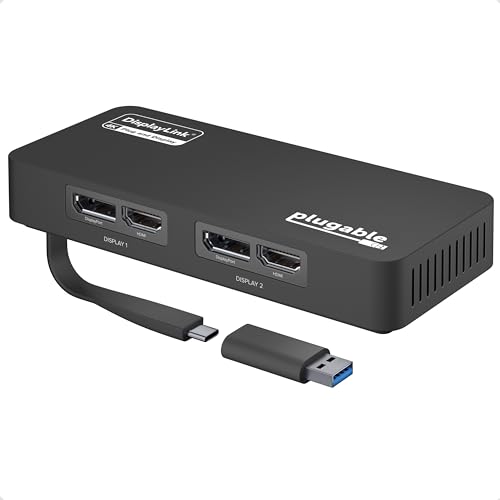 Plugable Dual 4K Adapter
|
Mid-Range | Dual 4K outputs (DisplayLink) | Windows & ChromeOS dual-monitor setups | Check Price | ||
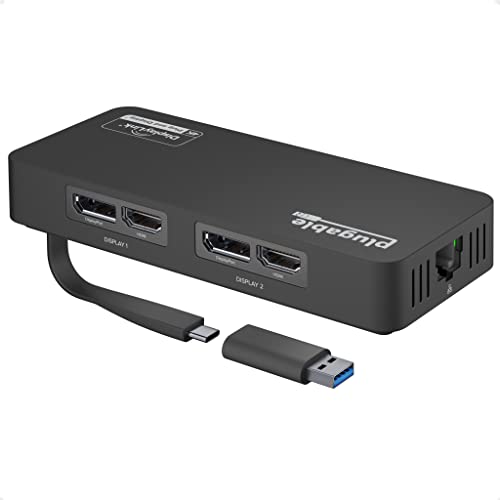 Plugable Dual 4K + Ethernet
|
Premium | Dual 4K@60 plus Gigabit Ethernet | Power users who want Ethernet + dual displays | Check Price | ||
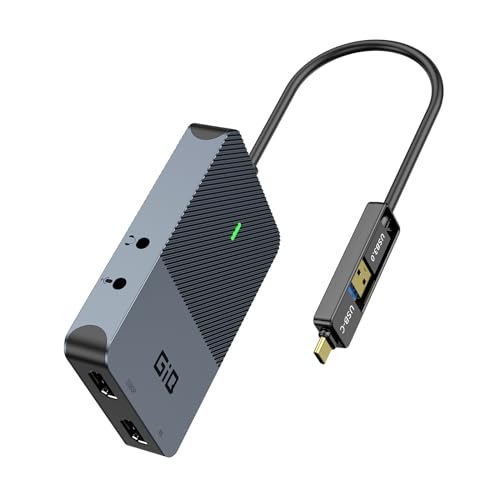 GIQ Dual HDMI Adapter
|
Budget | 2-in-1 USB-C/USB-A cable | Budget-conscious users who need extra HDMI ports | Check Price | ||
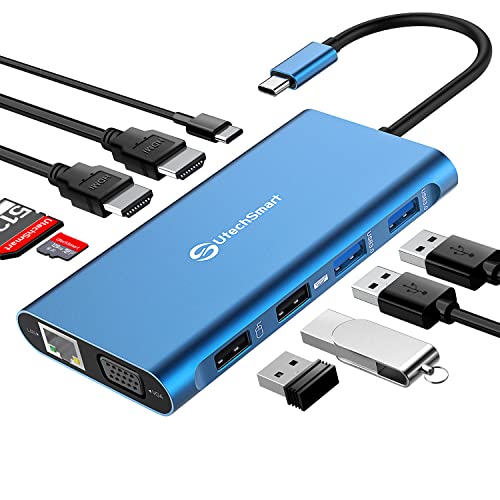 UtechSmart Triple Dock
|
Mid-Range | Triple-monitor capability | Portable workstations needing many ports | Check Price | ||
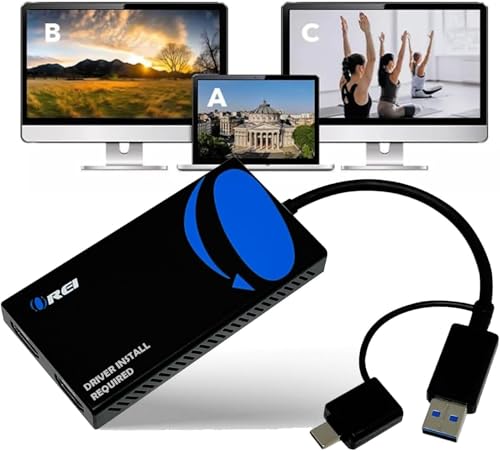 OREI SplitExtend Adapter
|
Budget | SplitExtend for multiple screens | Splitting or extending one HDMI feed to two displays | Check Price |
1. Plugable 4K DisplayPort and HDMI Dual Monitor Adapter for USB 3.0 and USB-C, Compatible with Windows
A well‑built DisplayLink adapter that auto‑installs drivers on most Windows systems and adds two high‑resolution outputs for presentations and productivity. It’s plug‑and‑play for many Windows/ChromeOS laptops, delivers crisp picture quality, and is ideal for meeting rooms — but it’s not recommended for macOS and doesn’t support HDCP for protected streaming.
Key Specs
- Supports two 4K displays (3840x2160 @ 60Hz)
- DisplayLink driver auto-installs via Windows Update
- Includes USB-C to USB 3.0 adapter
- Compatible with Windows 10/11 & ChromeOS (not recommended for macOS)
Pros
- Easy setup on Windows — drivers auto-install
- Solid build and consistent image quality
- Adds two high-resolution outputs for productivity
Cons
- Not recommended for macOS (M1/M2 limitations)
- No HDCP support; some users report occasional flicker/disconnects
Best For: Windows & ChromeOS dual-monitor setups
Check Latest Price on Amazon2. Plugable 4K DisplayPort and HDMI Dual Monitor Adapter for USB 3.0 and USB-C, Compatible with Windows and ChromeOS
A premium multiport adapter that pairs dual 4K@60 outputs with a built‑in Gigabit Ethernet port for stable networked presentations. It’s praised for display quality and connectivity but sits at a higher price tier and has a relatively short cable; like similar DisplayLink solutions it won’t play HDCP‑protected content.
Key Specs
- Dual DisplayPort and HDMI for dual 4K@60Hz
- Built-in Gigabit Ethernet port
- DisplayLink driver installs via Windows Update
- Best for Windows/ChromeOS productivity (not gaming)
Pros
- Excellent display quality and port selection
- Reliable wired network via Gigabit Ethernet
- Plug-and-play setup for supported systems
Cons
- Cable is shorter than some users expect
- No HDCP support — cannot play encrypted streaming services
Best For: Power users who want Ethernet + dual displays
Check Latest Price on Amazon3. USB 3.0 to Dual HDMI Adapter 4K+1080P,Dual Monitor Adapter,Universal Video Graphics Card,USB to Hdmi Splitter Extender Monitor USB 3.0 A or USB-C Compatible with Mac OS,Windows - Grey
A budget dual‑HDMI adapter with a 2‑in‑1 cable for USB‑C or USB‑A connections and broad OS compatibility. It’s a strong value for casual use and family movie nights with local or unprotected files, though only one output supports 4K@30 and a driver is required for best results.
Key Specs
- Dual HDMI outputs — up to 4K@30 + 1080p@60 in extend mode
- 2-in-1 USB-C / USB-A cable for wide compatibility
- USB 3.0 data rate up to 5Gbps
- Supports macOS and Windows; display driver required
Pros
- Excellent value and wide device compatibility
- Simple 2-in-1 cable works with older USB-A and USB-C ports
- Good picture quality for unprotected content
Cons
- Limited to 4K@30 on one output (not dual 4K@60)
- Driver required and performance can vary by system
Best For: Budget-conscious users who need extra HDMI ports
Check Latest Price on Amazon4. UtechSmart 11 in 1 Docking Station, Triple Monitors USBC Laptop Docking Station with 2 HDMI, VGA, PD3.0, SD TF Card Slot, 4 USB Ports USB-C Adapter Compatible for MacBook & Windows(Blue)
A compact aluminum docking station that supports three external displays (triple 1080p or single/dual 4K configurations), with PD charging up to 87W and Gigabit Ethernet. It’s a solid mobile workstation option, though macOS/ChromeOS have display mode limitations and some users report intermittent USB connectivity issues.
Key Specs
- Triple display modes: single/dual 4K@30 or triple 1920x1080@60
- PD 3.0 power delivery rated up to 87W
- Aluminum housing with Gigabit RJ45 and multiple USB ports
- Compact, portable design but limited macOS extend support
Pros
- Very flexible port selection for a small hub
- Durable aluminum design and portable size
- Strong power delivery for charging laptops
Cons
- Doesn't support extend mode on Mac OS & Chrome OS
- Some reports of intermittent USB/port connectivity
Best For: Portable workstations needing many ports
Check Latest Price on Amazon5. OREI SplitExtend HDMI Splitter Extended Display for Dual Monitor - Multi-Monitor Display 3 Separate Screens - USB A & USB-C Adapter to HDMI 2.0, 4K@30Hz Output 1, 1080p Output 2 for Windows, Mac OS G
OREI’s SplitExtend is designed to split and extend a laptop screen to two HDMI displays, supporting a wide set of operating systems. Setup is straightforward for productivity use, and the picture quality is generally good — but it requires a Siliconmotion driver and doesn’t support HDCP, so streaming protected services will not work.
Key Specs
- Split/extend one source to two HDMI outputs (4K@30 + 1080p)
- Supports Windows, Mac OS, Android (mirroring on Android)
- Siliconmotion driver installation required
- Not compatible with HDCP-protected playback
Pros
- Effective splitter for presentations and dual-screen desks
- Easy setup and solid picture/sound for unprotected content
- Good value for multi-screen use
Cons
- Some users experience signal loss with certain TVs
- Does not support HDCP-protected streaming services
Best For: Splitting or extending one HDMI feed to two displays
Check Latest Price on AmazonWhich One Should You Choose?
If budget is tight → GIQ Dual HDMI Adapter (ASIN B0CJM1K3CW) is the best value pick for adding two screens or a single HDMI when you only need basic 4K@30 capability. If you need a portable, compact solution for quick demos and light movie playback (unprotected files) → Plugable Dual 4K Adapter (ASIN B08F2SZQYX) offers easy setup and strong picture quality for Windows/ChromeOS. If premium quality, Ethernet and the most extensive port selection matter → Plugable Dual 4K + Ethernet (ASIN B08F2TSR43) provides dual 4K@60 and wired networking for stable meetings and workstation use.
Best for Specific Scenarios
- Office presentations: Plugable Dual 4K Adapter (B08F2SZQYX) because it auto‑installs drivers on Windows and reliably drives two external displays for slide decks and spreadsheets.
- Movie nights (local/unprotected files): Plugable Dual 4K + Ethernet (B08F2TSR43) because it supports dual 4K@60 and wired networking for streaming local media over the network; note that protected streaming services may be blocked on many adapters.
- Portable demos & multi-device use: GIQ Dual HDMI Adapter (B0CJM1K3CW) because its 2‑in‑1 USB‑C/USB‑A cable and low price make it easy to carry and connect to a variety of laptops and older devices.
Frequently Asked Questions
Will these adapters let me stream Netflix or other DRM‑protected services?
Most USB graphics adapters that rely on DisplayLink or similar chipsets do not pass HDCP, so DRM‑protected streams (Netflix, Disney+, Prime Video) often won’t play through them. For those services, use your TV’s built‑in app, a streaming stick, or a direct laptop HDMI port that explicitly supports HDCP.
Do I need to install drivers for these adapters?
Many of the reviewed adapters require a driver (DisplayLink or SiliconMotion) for extended/multi‑monitor functionality. Some Plugable models auto‑install drivers via Windows Update on supported Windows systems, reducing setup work; budget adapters typically require a manual driver install for the best results.
Can I run dual 4K@60 with any of these?
Dual 4K@60 is supported by the higher‑end Plugable adapters on compatible Windows/ChromeOS hosts. Budget options typically limit one output to 4K@30 or cap refresh rates. Whether you can achieve dual 4K@60 also depends on your laptop’s bandwidth (Thunderbolt/USB4 vs. USB‑C with limited lanes) and driver support.
How We Selected These Products
Our recommendations are based on data-driven analysis: we evaluated 155229+ products across 23916+ brands using a composite scoring system that weighs rating (40%), review volume (30%), price value (20%), and demand signals (10%). Every product is ranked by data, not opinions.
Last updated: August 05, 2026
As an Amazon Associate we earn from qualifying purchases at no extra cost to you. Full disclosure.
GearLark Score is our editorial ranking based on a composite analysis of product quality, value, and verified customer sentiment. Click through to Amazon for current pricing, availability, and live customer reviews.