As an Amazon Associate we earn from qualifying purchases. Learn more.
Complete Portable Monitor + Hub + Power Kit for Presentations (2026)
Heading to fall conferences in 2026? This guide shows everything to pack for seamless on-site presentations: the wireless video link, security, cables, and backup power that turn a portable monitor into a dependable conference setup. We tested options in our GearLark database and prioritized portability, stability, build quality, and ease of setup — the attributes customers praise most. Below you’ll find the recommended parts, what each does in your kit, short reviews of the best items available here, and a buying guide so you can assemble a complete, travel-ready presentation kit.
Quick Answer
For a reliable, plug-and-play presentation kit choose the BRAIDOL Wireless HDMI Transmitter and Receiver (ASIN B0DJSNT4KL) as the core of your setup for clear, wireless video to external displays; pair it with a retractable security cable lock (ASIN B088NJLBK7) and a PD-capable backup power pack for conferences.
Our Top Picks
Quick Comparison
Select 2-3 products to compare side-by-side
| Compare | Product | GearLark Score | Price Tier | Key Feature | Best For | Action |
|---|---|---|---|---|---|---|
 LORADAR 5-Pack Cable Lock
|
Budget | Five keyed-alike retractable locks | Budget-conscious presenters | Check Price | ||
 BRAIDOL Wireless HDMI (LED)
|
Premium | LED status display + 2.4G/5G wireless | Cable-free presentation setups | Check Price | ||
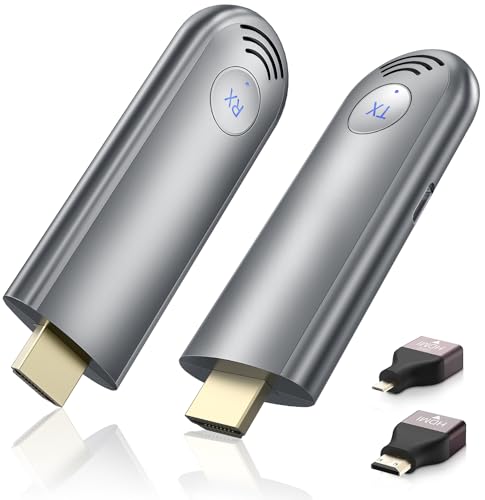 TPUFO Wireless HDMI Extender
|
Premium | Mirror & extend modes, long-range | Larger rooms and longer cables | Check Price | ||
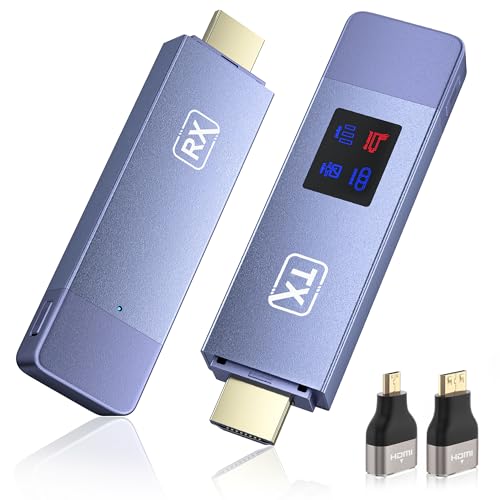 BRAIDOL Wireless HDMI (Copy/Extend)
|
Mid-Range | Copy & extend display modes | Presenters needing privacy or multi-display | Check Price |
1. Keyed Alike 5Pack Security Hardware Cable Lock Kit, Retractable Cable Lock Portable Keyed Laptop Lock 5Keys 6.2Ft for Monitors, Laptops, MacBooks, Tablets, iPad, Mac Mini
A practical security kit for frequent travelers and shared booths — five keyed-alike retractable cable locks and adhesive anchor plates. It’s compact, feels solid for the price, and is designed for quick deployment on monitors, laptops and small PCs that accept security slots or an anchor plate.
Key Specs
- 5 keyed-alike cable locks with 5 identical keys
- Retractable steel wire cable, up to 6.2 ft (1.8 m)
- Anchor plates with adhesive for devices without security slots
- Cable connector tensile-tested (approx. 1100N per spec)
Pros
- Excellent value — multi-pack simplifies locking multiple devices
- Sturdy twisted steel cable with rubber coating
- Compact, easy to stash in a laptop bag
Cons
- Not compatible with newer MacBook models without anchor plates
- Adhesive anchor plates may fail on some textured surfaces
Best For: Budget-conscious presenters
Check Latest Price on Amazon2. Wireless HDMI Transmitter and Receiver, HD Extender Plug & Play Portable 2.4G/5G with LED Screen Wireless HDMI Kit for Streaming Video and Audio to Monitor from Laptop/PC/TV Box/Projector
A polished wireless HDMI kit built for presentations: dual-band transmission (2.4G/5G), 4K decoding with 1080p output, and an LED status screen for quick diagnostics. Customers praise its ease of setup and steady performance for streaming high-definition video across moderate distances.
Key Specs
- Dual-band 2.4G/5G wireless transmission
- Supports 4K decoding and 1080p output
- LED screen shows power, signal and output status
- Portable design with up to ~30 meters/100 ft advertised range
Pros
- Plug-and-play wireless link removes HDMI cable clutter
- LED status display helps troubleshoot connections quickly
- Consistent picture quality for presentations and video
Cons
- Latency reports are mixed — may not be ideal for interactive demos
- Requires reliable USB power source for stable operation
Best For: Cable-free presentation setups
Check Latest Price on Amazon3. Wireless HDMI Transmitter and Receiver, Plug & Play Portable 2.4G/5G Wireless HDMI Extender Kit for Streaming Video and Audio to Monitor from Laptop/PC/TV Box/Projector
A flexible wireless HDMI extender that supports both mirroring and extended-display modes with plug-and-play simplicity. Users report crisp 1080p/60Hz output and stable connections in conference-room scenarios, making it a solid choice when you need wireless display with extension options.
Key Specs
- Screen mirroring and extension modes
- Plug-and-play — no apps or Wi‑Fi required
- Supports 1080p/60Hz; 4K decoding supported
- Up to ~30 meters (98 ft) wireless transmission
Pros
- Easy setup and reliable connectivity for meetings
- Good picture quality at 1080p/60Hz
- Extension mode is helpful for private presenter views
Cons
- Not compatible with phones or tablets
- May need an external power adapter if host USB port is weak
Best For: Larger rooms and longer cables
Check Latest Price on Amazon4. Wireless HDMI Transmitter and Receiver, Plug and Play Portable 2.4G/5G Wireless HDMI Extender Kit, 4K Decode 1080P HD Output for Video and Audio Streaming to Monitor from Laptop/PC/TV Box/Projector
BRAIDOL’s copy/extend wireless kit adds flexibility with both screen synchronize and extended desktop modes plus an LED display for status. It’s compact and travel-friendly, useful for teaching, training sessions, and trade-show booths where quick transitions and privacy matter.
Key Specs
- Copy (mirror) and extend display modes
- 4K decoding, 1080p output supported
- LED display for connection and power status
- Advertised range up to ~30 meters/100 ft
Pros
- Useful extend mode for private presenter notes
- Compact, easy to pack and transport
- Stable 2.4G/5G connection in typical meeting rooms
Cons
- Signal can be affected by walls or crowded RF environments
- Some setups reported minor lag with high-frame content
Best For: Presenters needing privacy or multi-display
Check Latest Price on AmazonWhich One Should You Choose?
If budget is tight → grab the LORADAR Keyed Alike 5Pack cable lock (ASIN B088NJLBK7) to secure devices and add a low-cost wireless HDMI as needed; it’s the best value security option in this set. If you need reliable, travel-friendly wireless video → choose the BRAIDOL Wireless HDMI Transmitter and Receiver (ASIN B0DJSNT4KL) for easy setup and LED status feedback. If you want mirroring plus extended display and longer-range flexibility → the TPUFO Wireless HDMI Extender (ASIN B0CKXC7X2R) is a strong all-rounder. For private presenter workflows where copy vs extend matters, consider the BRAIDOL copy/extend kit (ASIN B0F4RBBMHC).
Best for Specific Scenarios
- Trade-show booths: LORADAR lock (B088NJLBK7) because you can secure multiple devices quickly and keep demo gear safe during breaks.
- Small conference rooms: BRAIDOL Wireless HDMI (B0DJSNT4KL) because its LED diagnostics and stable 2.4G/5G link make on-site troubleshooting fast.
- Training sessions or workshops: TPUFO extender (B0CKXC7X2R) because it supports mirror and extend modes so trainers can keep notes private while projecting demos.
Frequently Asked Questions
Do wireless HDMI extenders add noticeable lag to live demos?
Most modern 2.4G/5G wireless HDMI extenders are optimized for presentations and video playback and will introduce minimal lag for slide decks and video. However, interactive demos (real-time drawing, gaming, or latency-sensitive apps) can show noticeable delay — test your exact setup beforehand and have a wired HDMI cable as a fallback.
What power solutions should I pack for a day of presentations?
Bring a PD-capable battery pack with enough capacity for your monitor and transmitter (look for pass-through charging and at least mid-range capacity), plus a compact USB-C power brick that can charge both laptop and accessories. Pack short and long cables, and a small power strip if venue power outlets are limited.
How do I choose between mirrored and extended display modes?
Use mirror (copy) mode when the audience should see exactly what’s on your laptop screen. Use extend mode when you want presenter-only content (notes, controls) on your laptop while the audience sees slides on the external display. Pick a wireless extender with both modes if you switch frequently.
How We Selected These Products
Our recommendations are based on data-driven analysis: we evaluated 155229+ products across 23916+ brands using a composite scoring system that weighs rating (40%), review volume (30%), price value (20%), and demand signals (10%). Every product is ranked by data, not opinions.
Last updated: September 11, 2026
As an Amazon Associate we earn from qualifying purchases at no extra cost to you. Full disclosure.
GearLark Score is our editorial ranking based on a composite analysis of product quality, value, and verified customer sentiment. Click through to Amazon for current pricing, availability, and live customer reviews.