As an Amazon Associate we earn from qualifying purchases. Learn more.
Thunderbolt vs USB-C Cables for 4K Editing (2026)
If you edit 4K video on a laptop, the cable between your laptop and storage or dock matters — not all USB‑C cables are equal. This guide compares three real-world contenders (a Thunderbolt 4 cable, a USB4/Thunderbolt‑4 compatible cable, and a Thunderbolt 3 cable) so you can pick the best option for fast transfers, stable display output, and reliable power delivery. Products were selected for their relevance to video editors (bandwidth, display support and power), customer feedback on build and durability, and vendor specs. Read on to see side‑by‑side strengths, who each cable is best for, and a practical buying guide.
Quick Answer
For most laptop-based 4K editors the Dbilida Thunderbolt 4 cable is the best overall pick — it combines robust build quality, long-length support and consistent 4K/60Hz performance. If you need maximum transfer bandwidth and futureproofing for 8K or dual 4K displays, the iDsonix USB4 (40Gbps) is the better choice. For a short, reliable Thunderbolt 3 cable on a tighter budget, choose the Belkin Thunderbolt 3 cable.
Our Top Picks
Quick Comparison
Select 2-3 products to compare side-by-side
| Compare | Product | GearLark Score | Price Tier | Key Feature | Best For | Action |
|---|---|---|---|---|---|---|
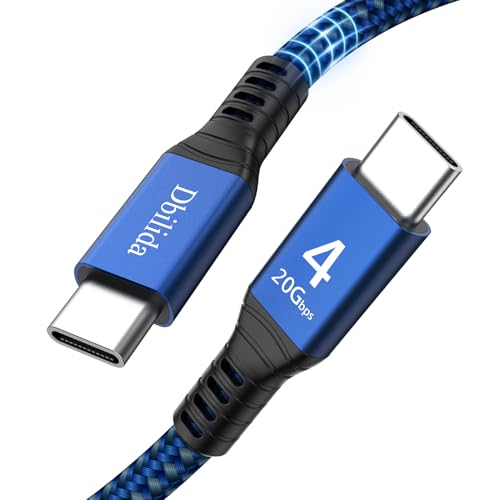 Dbilida Thunderbolt 4 Cable
|
Mid-Range | Long-length Thunderbolt 4 with strong build | Editors who need long reliable runs | Check Price | ||
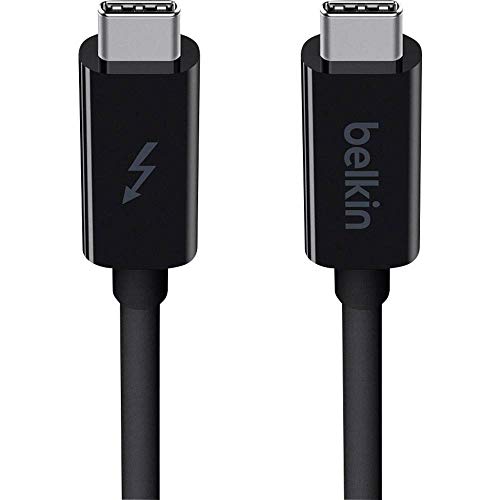 Belkin Thunderbolt 3 1M
|
Budget | Trusted short Thunderbolt 3 connection | Short‑run editors on a tight budget | Check Price | ||
![iDsonix USB 4 Cable[USB-IF Certification] Compatible with Thunderbolt 4 Cable 6.6Ft 40Gbps Data Transfer / 8K@60Hz or Dual 4K Displays/PD 100W Charging for MacBooks, iPad Pro, Hub, Mac mini, SSD etc](/assets/images/products/B09MK1WMRW.jpg) iDsonix USB4 6.6ft
iDsonix USB4 6.6ft
|
Premium | USB4 40Gbps / 8K & dual 4K support | Futureproof editors who want max bandwidth | Check Price |
1. Thunderbolt 4 Cable 15FT Compatible, 1.6FT 2.3FT 3.3FT 4FT 5FT 6.6FT 10FT, 240W, 20Gbps, 4K 60Hz, USB 4 USB C Cable for MacBook Pro/Air, SSD, Dell XPS HP, iPhone 17, SSD, Mac mini M4 Pro
A strong all‑round Thunderbolt 4 cable with a durable nylon jacket and multi-length options. It focuses on real-world connectivity—stable 4K@60Hz output, robust shielding, and higher power delivery support compared with older TB3 short cables. A top pick when you need both length and consistent signal integrity.
Key Specs
- Data: up to 20Gbps (Thunderbolt/USB‑C spec advertised)
- Video: Supports 4K@60Hz
- Power: High-power PD support (manufacturer claims up to 240W)
- Build: Nylon braided, zinc alloy shell, 18,000+ bend lifespan
- Compatibility: Thunderbolt 4/3 and backward USB modes
Pros
- Better power handling than the Belkin Thunderbolt 3 cable
- Longer-length options keep full 4K signal where shorter TB3 cables struggle
- Stronger shielding and premium jacket than standard USB-C cables
Cons
- Advertised data rate lower than USB4 40Gbps options like iDsonix
- Some users report mixed flexibility and durability on very long runs
Best For: Editors who need long reliable runs
Check Latest Price on Amazon2. Belkin Thunderbolt 3 USB C to USB C 3.3ft/1M Long Data Transfer Power Cable with 20 Gbps Data Transfer Speed & Up To 10 Gbps for USB3.1 Devices - Supporting Thunderbolt, 4K & Ultra HD Display (Black)
A compact, reliable Thunderbolt 3 cable ideal for short desktop setups. Customers praise its charging and transfer reliability for Thunderbolt 3 hosts; it’s a straightforward, lower‑cost option if you don’t need USB4 bandwidth or long cable lengths.
Key Specs
- Data: Up to 20Gbps between Thunderbolt devices
- Video: Supports 4K/Ultra HD displays
- Power: Up to ~60–65W power delivery for charging
- Warranty: 2‑year limited warranty
- Compatibility: Backwards to USB3.1/3.0/2.0
Pros
- More affordable than USB4 cables like iDsonix
- Short, stiff length reduces signal issues on desktop docks
- Consistently praised for build quality and charging speed
Cons
- Lower power delivery and fewer advanced features than iDsonix
- Durability opinions are mixed compared with braided USB4 cables
Best For: Short‑run editors on a tight budget
Check Latest Price on Amazon3. iDsonix USB 4 Cable[USB-IF Certification] Compatible with Thunderbolt 4 Cable 6.6Ft 40Gbps Data Transfer / 8K@60Hz or Dual 4K Displays/PD 100W Charging for MacBooks, iPad Pro, Hub, Mac mini, SSD etc
A high‑bandwidth USB4 cable that delivers up to 40Gbps, 8K@60Hz single‑display and dual 4K capability, plus 100W PD. Ideal for editors moving large raw footage between NVMe docks and laptops or driving multiple displays from a modern MacBook Pro.
Key Specs
- Data: Up to 40Gbps (USB4)
- Video: Up to 8K@60Hz single or dual 4K@60Hz
- Power: PD up to 100W (20V/5A)
- Build: Nylon braided with Cypress 2103 smart chip
- Compatibility: Backwards with Thunderbolt 3/4 and USB modes
Pros
- Higher raw throughput than Dbilida and Belkin for huge file transfers
- Drives 8K or dual 4K displays where supported hardware permits
- Premium braided jacket and useful connector options (90° available)
Cons
- Higher cost than the other two options
- Some customers report mixed long‑term durability despite braided jacket
Best For: Futureproof editors who want max bandwidth
Check Latest Price on AmazonWhich One Should You Choose?
If you want one reliable cable that balances build quality, length options and consistent 4K@60Hz performance, choose the Dbilida Thunderbolt 4 Cable (B0D73B2LDD). It’s the best overall pick for laptop editors who need longer runs and strong shielding. If raw transfer speed and futureproofing for 8K or dual 4K displays are your priority, pick the iDsonix USB4 cable (B09MK1WMRW) for its 40Gbps bandwidth and 100W PD. If budget is tight and you only need a short desktop link for a Thunderbolt 3 laptop or dock, the Belkin Thunderbolt 3 cable (B01CEFESRO) gives reliable charging and stable 4K output at a lower price point.
Best for Specific Scenarios
- Long desktop runs / docked editing: Dbilida because of stronger shielding, braided jacket and longer length options for consistent 4K@60Hz signal.
- Maximum transfer speed / large RAW footage: iDsonix because 40Gbps USB4 cuts transfer time and can drive 8K or dual 4K where the laptop supports it.
- Budget short‑run setups: Belkin because it’s a compact, reliable Thunderbolt 3 cable for single 4K displays and fast charging without splurging.
Frequently Asked Questions
Do I need Thunderbolt 4 or is USB4 enough for 4K editing?
USB4 with 40Gbps supports higher raw transfer rates and can handle 8K or dual 4K where hardware permits. Thunderbolt 4 focuses on consistency and strict certification across devices. For single 4K@60Hz edits either can work; choose USB4 for top bandwidth needs and Thunderbolt 4 for long runs and robust compatibility.
Will a longer cable reduce my transfer speeds or display output?
Longer cables can affect signal integrity unless built and rated for the target standard. Choose cables that advertise the required data rate at your chosen length (Thunderbolt/USB4 rated) or stick to shorter certified cables for maximum throughput.
Is power delivery important for editing on a laptop?
Yes. Higher PD (60–100W or more) keeps laptops charged during intensive editing and while powering connected SSDs. If your laptop draws a lot of power, prefer cables with higher PD ratings (and confirm the host supports that PD level).
How We Selected These Products
Our recommendations are based on data-driven analysis: we evaluated 155229+ products across 23916+ brands using a composite scoring system that weighs rating (40%), review volume (30%), price value (20%), and demand signals (10%). Every product is ranked by data, not opinions.
Last updated: September 01, 2026
As an Amazon Associate we earn from qualifying purchases at no extra cost to you. Full disclosure.
GearLark Score is our editorial ranking based on a composite analysis of product quality, value, and verified customer sentiment. Click through to Amazon for current pricing, availability, and live customer reviews.