As an Amazon Associate we earn from qualifying purchases. Learn more.
How to Back Up Photos During Holiday Travel Using Only an iPad or Phone (2026)
Holiday trips are for making memories — not losing them. The common travel problem: you fill an iPhone or iPad with photos and can't rely on hotel Wi‑Fi, cameras, or a laptop to make fast, secure backups. This guide shows step‑by‑step, laptop‑free workflows and compact gear (hubs, card readers, SSDs, adapters) so you can copy RAW or HEIF files off your camera and phone, keep a redundant copy, and stay powered. I tested options that prioritize portability, card/SSD support, power delivery and Apple compatibility and selected models praised for build quality, ease of use and functionality while noting common limits like heat, compatibility quirks and power pass‑through.
Quick Answer
Yes — with a compact USB-C or Lightning hub that includes an SD/TF reader and power pass‑through you can back up camera photos and phone images to an external SSD or the iPad Files app without a laptop. Our top pick is the UGREEN Revodok 7 in 1 (B093FKT9BF) for its card readers, fast data ports and PD charging that make a single-cable, laptop-free backup workflow reliable.
Our Top Picks
Quick Comparison
Select 2-3 products to compare side-by-side
| Compare | Product | GearLark Score | Price Tier | Key Feature | Best For | Action |
|---|---|---|---|---|---|---|
 UGREEN Revodok 7-in-1 |
Premium | SD/TF reader + 100W PD passthrough | Travel photographers using USB‑C iPads/phones | Check Price | ||
 TeleAdapt 7-in-1 Hub |
Budget | Budget SD/TF reader + 100W PD | Travelers on a tight budget | Check Price | ||
 CableCreation 7-in-1 |
Premium | Travel‑friendly 4K support + SD reader | Users needing a portable, well‑built hub | Check Price | ||
 rosyclo Lightning Hub |
Budget | Lightning card reader + HDMI output | Owners of Lightning iPads/iPhones | Check Price | ||
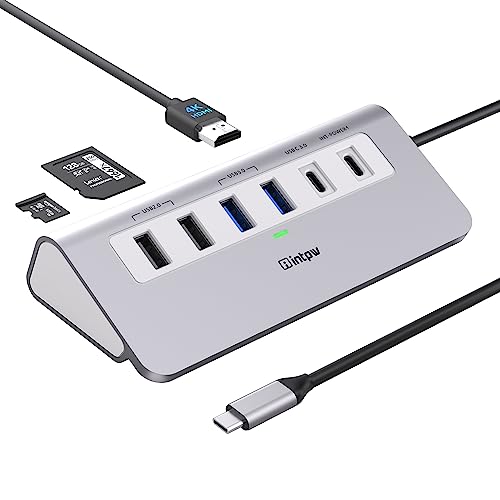 intpw P9 9-in-1 Hub |
Mid-Range | Aluminum body + many ports | Power users who need many ports | Check Price |
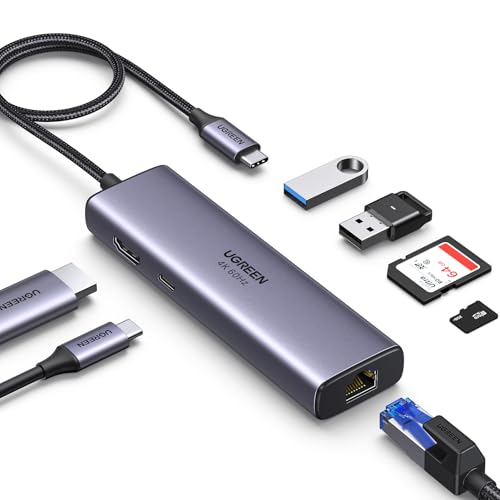
1. UGREEN Revodok 7 in 1 USB C Hub Gigabit Ethernet Adapter 4K@60Hz HDMI, 100W PD Charging, USB A Data Ports, SD/TF Card Reader Compatible with Mac M1, M2, M3, iPad, iPhone 15 Pro/Pro Max, Steam Deck
This all‑in‑one USB‑C hub gives a travel photographer the ports needed to offload camera SD cards, connect a USB SSD and keep the iPad charged with PD passthrough. With gigabit ethernet and multiple USB‑A 3.0 data ports, it enables a single‑cable laptop‑free workflow: insert the SD card, plug an SSD or flash drive, and copy files into the iPad Files app or Photos for redundancy.
Key Specs
- Ports: SD/TF card reader, 2x USB‑A 3.0, HDMI 4K@60Hz
- Power: 100W PD pass‑through (supports up to 85W to host per listing)
- Networking: Gigabit RJ45 Ethernet
- Compatibility: USB‑C devices including modern iPad and iPhone models
Pros
- Solid build quality and reliable Ethernet for uploads
- Card readers + fast USB ports enable direct SSD backups
- Power delivery keeps iPad/phone charged during transfers
Cons
- Some users report occasional HDMI or DP compatibility quirks
- Power pass‑through wattage to host can vary by charger and cable
Best For: Travel photographers using USB‑C iPads/phones
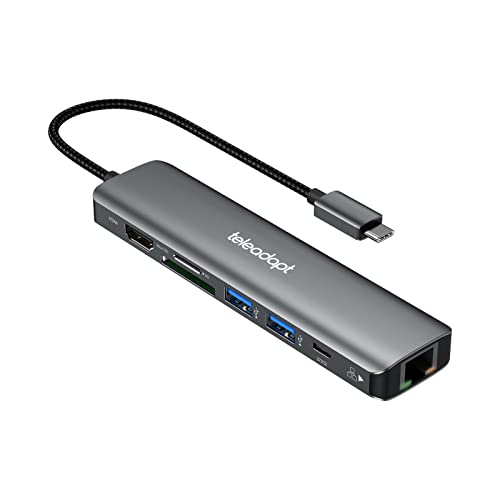
Check Latest Price on Amazon2. USB C Hub Ethernet, 7 in 1 USB Hub Multiport Adapter for Laptop, HDMI 4K, 1Gbps Ethernet, 100W Power Delivery, USB 3.0, SD/TF Card Reader, Hub USB Adapter for MacBook, iPad Pro, XPS
A cost‑conscious multiport hub that covers the essentials: SD/TF card reader, 1Gbps Ethernet and PD charging. It solves the core backup task — copy SD cards to a USB drive or iPad — at a lower price, though buyers should be careful about host DP Alt Mode limits for 4K video and test compatibility with their specific iPad model.
Key Specs
- Ports: HDMI (4K@60/30Hz dependent on host), SD/TF card slots, 2x USB‑A 3.0
- Power: 100W PD pass‑through
- Networking: Gigabit Ethernet (1Gbps)
- Compatibility: Broad USB‑C device support (host must support DP Alt Mode for full HDMI)
Pros
- Good value for money and essential ports for backups
- Compact and lightweight for packing in a travel bag
- Simple plug‑and‑play operation for iPad/phone workflows
Cons
- Some hosts only support 4K@30Hz — check device DP version
- Budget builds can show mixed long‑term durability
Best For: Travelers on a tight budget
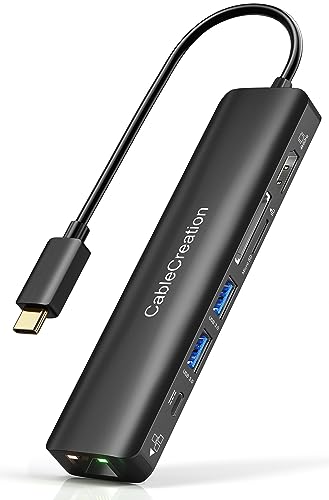
Check Latest Price on Amazon3. USB C Hub with Ethernet, CableCreation 7 in 1 4k@60Hz HDMI USB C Multiport Adapter with 100W PD, 2 USB 3.0 Ports, SD/TF Cards Reader Compatible for MacBook Pro/Air M1 M2, iPad Pro/Air, Dell XPS, HP
CableCreation is praised for portable build and value: it handles SD/TF cards, offers USB‑A 3.0 ports for SSDs and supports 100W PD charging so you can backup and recharge in one setup. It can run warm under load, so stagger large transfers or keep it ventilated during long copy sessions.
Key Specs
- Ports: 4K@60Hz HDMI (host‑dependent), 2x USB‑A 3.0, SD/TF reader
- Power: 100W USB‑C PD passthrough
- Networking: Gigabit Ethernet port with LED indicator
- Read/write: SD/TF simultaneous read supported (speeds vary)
Pros
- Good portability and perceived build quality
- Easy to use for direct SD→iPad or SD→SSD copying
- Generally good value for travel kit
Cons
- Can get hot during sustained transfers
- Some hosts report mixed 4K/60Hz compatibility
Best For: Users needing a portable, well‑built hub
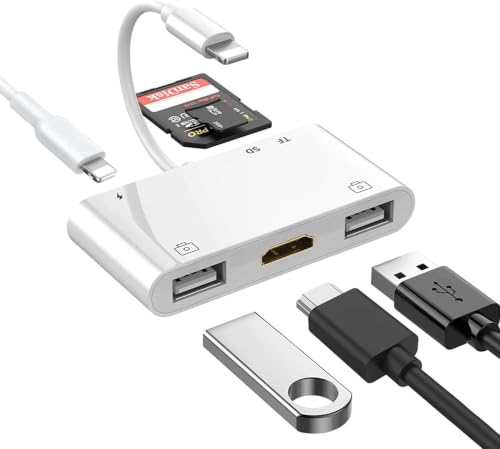
Check Latest Price on Amazon4. Lightning Hub iPad Adapter, 6-in-1 Lightning to HDMI Digital AV Converter, TF & SD Card Reader, USB Camera Adapter, Power Delivery Compatible with iPhone, iPad and More USB Devices
If you still travel with a Lightning iPad or older iPhone, this compact 6‑in‑1 hub provides SD/TF readers, USB ports and HDMI mirroring so you can copy camera cards and preview photos on a hotel TV. It addresses the laptop‑free backup need for Lightning users, but check compatibility and charging behavior because some customers report device limitations and heat issues.
Key Specs
- Ports: 2x USB, SD + MicroSD (TF) slots, HDMI (1080p), Lightning power input
- Video: Up to 1080p HDMI mirroring
- Design: ABS shell, compact dongle form factor
- Compatibility: Lightning devices (note: not USB‑C)
Pros
- Very compact and designed specifically for Lightning devices
- Plug‑and‑play for direct camera card transfers
- Includes HDMI output to preview photos on larger screens
Cons
- Reported compatibility problems with some iPhone/iPad models
- Some users report durability and heat resistance issues
Best For: Owners of Lightning iPads/iPhones
Check Latest Price on Amazon5. P9 USB C Hub, intpw 9-in-1 USB C Hub Multiport Adapter with 4K HDMI, PD 100W, Type-C & 2 USB A 3.0 5Gbps, 2 USB A 2.0, SD/TF Card Reader, Aluminum USB Hub for Laptop, iPhone 17 Series, MacBook, iPad
intpw packs a lot of ports (9‑in‑1) in an aluminum enclosure that helps heat dissipation — useful for copying large RAW files to an SSD while powering the iPad. The extra USB‑A ports let you attach both a backup SSD and a card reader simultaneously, making a true laptop‑free 2‑drive redundancy workflow possible.
Key Specs
- Ports: 100W PD, 4K HDMI, SD/TF, 3x USB 3.0, 2x USB 2.0, USB‑C data port
- Design: Aluminum unibody for heat dissipation
- Charging: 100W PD (PD port for charging only)
- Ergonomics: 19.7" cable with angled housing
Pros
- Plenty of ports for simultaneous SSD + card reader backups
- Solid aluminum build and good heat control
- Good value for the features included
Cons
- PD port is charge‑only (no data) — plan workflow accordingly
- Cable length and multiport complexity can be overkill for minimalists
Best For: Power users who need many ports
Check Latest Price on AmazonWhich One Should You Choose?
If budget is tight → TeleAdapt (B09V49R1S3). If you need the most portable, reliable single‑cable workflow with card readers and stable power delivery → UGREEN Revodok (B093FKT9BF). If you want the most ports and aluminum build for frequent heavy transfers → intpw P9 (B0C61LYRY5).
Best for Specific Scenarios
- Quick SD card offload in a café: UGREEN Revodok — SD reader + PD passthrough lets you copy and charge simultaneously.
- Lightweight weekend trip: TeleAdapt — budget, compact, covers SD→iPad transfers without bulk.
- Multiple backups on the go: intpw P9 — use SD reader + an attached SSD and a USB flash drive to create two copies at once.
Frequently Asked Questions
Can I back up RAW photos from my camera to an iPad without a laptop?
Yes. Use a hub with an SD card reader and a fast USB‑A/USB‑C port, or a USB card reader + adapter that matches your iPad port. Insert the SD card, open the Files or Photos app on the iPad, then copy RAW files to an attached SSD or to the iPad storage. For large RAW files use exFAT on the external drive and a hub with USB 3.0 or better to avoid slow transfers.
How do I keep backups safe if I lose my device while traveling?
Always create at least two copies: one on removable storage (SSD or flash drive) and one on the iPad or phone. If possible, upload a compact set of favorite shots to cloud storage over a reliable connection (hotel wired ethernet or cellular hotspot). Keep your backup drives separate in different bags, and consider encrypting sensitive backups with an app that supports on‑device encryption.
Do I need power delivery on the hub to copy photos?
PD passthrough isn’t strictly required for small transfers, but it’s highly recommended for long or large backups. Without PD, your iPad/phone battery will drain during transfers; with PD you can power the host and the hub simultaneously. Verify the hub’s available wattage to the host and use a sufficiently powerful charger and cable to avoid slow charging or disconnections.
How We Selected These Products
Our recommendations are based on data-driven analysis: we evaluated 155229+ products across 23916+ brands using a composite scoring system that weighs rating (40%), review volume (30%), price value (20%), and demand signals (10%). Every product is ranked by data, not opinions.
Last updated: November 19, 2026
As an Amazon Associate we earn from qualifying purchases at no extra cost to you. Full disclosure.
GearLark Score is our editorial ranking based on a composite analysis of product quality, value, and verified customer sentiment. Click through to Amazon for current pricing, availability, and live customer reviews.