As an Amazon Associate we earn from qualifying purchases. Learn more.
Best USB‑C Hubs for Dorms & Small Desks (2026)
Studying in a dorm or working on a tiny desk means every inch and every port matters. This guide focuses on compact USB‑C hubs that expand ports without taking over your workspace. You’ll find options for single-monitor setups, multi‑display study rigs and strictly data‑focused hubs for drives and dongles. Products were selected for reliability, heat management, and value — and tested against real user feedback on build quality, functionality and long‑term durability.
Quick Answer
For most students the IAVKYU USB C Docking Station (B0BRYH1P56) is the best overall pick — it packs a 14-in-1 port array, 100W PD and triple-display support into a compact body that balances performance and value. If you need the cheapest solid option, the VANGREE 8-in-1 hub (B0D6MNG9TM) offers HDMI, fast data and pass-through charging at a lower price.
Our Top Picks
Quick Comparison
Select 2-3 products to compare side-by-side
| Compare | Product | GearLark Score | Price Tier | Key Feature | Best For | Action |
|---|---|---|---|---|---|---|
 IAVKYU 14-in-1 Dock
|
Mid-Range | Triple-display with 100W PD | Students who want multi-monitor productivity | Check Price | ||
 ABIWAZY 14-in-1 (Black)
|
Premium | 14 ports with dual 4K HDMI | Users who want premium port density and video | Check Price | ||
 ABIWAZY 14-in-1 (Silver)
|
Premium | Triple‑display capable | Power users who attach many peripherals | Check Price | ||
 Anker 8-in-1 Data Hub
|
Mid-Range | High-speed data ports (5Gbps) | Students needing fast data transfer, not video | Check Price | ||
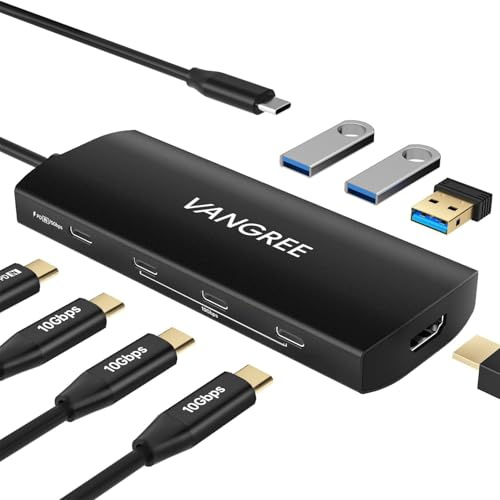 VANGREE 8-in-1 Hub
|
Budget | 10Gbps USB‑C + 4K HDMI | Budget buyers who want HDMI + fast data | Check Price | ||
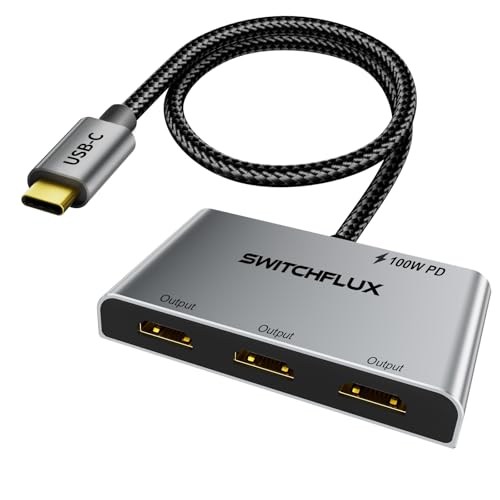 SWITCHFLUX 3× HDMI Adapter
|
Budget | 1→3 HDMI MST at 4K60 | Students who need three HDMI monitors from one USB‑C | Check Price |
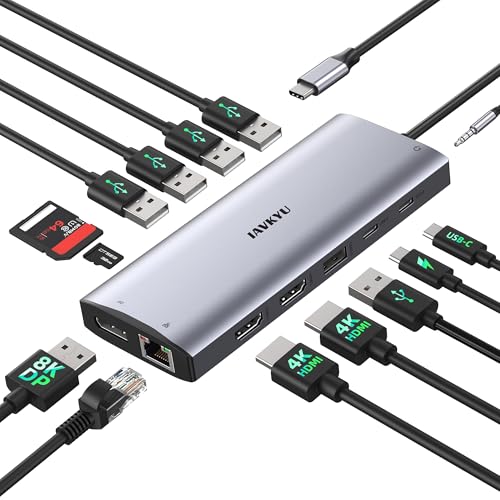
1. USB C Docking Station 3 Monitors 4K@60Hz, 14-in-1 Laptop Docking Station with 2 HDMI 4K@60Hz, DP 8K@30Hz/ 4K@144Hz, 3 USB 3.0, 2 USB 2.0, RJ45, Audio, PD 100W, USB-C HUB for Windows Laptop Accessories
A compact 14‑in‑1 docking station that balances multi‑monitor support, plenty of USB ports and gigabit Ethernet in a portable package. It’s a great fit for dorm desks where you need to drive two or three displays, charge a laptop and connect SD cards and peripherals without extra clutter.
Key Specs
- Dual HDMI 4K@60Hz + DisplayPort up to 8K@30Hz/4K@144Hz
- 100W USB‑C Power Delivery passthrough
- Gigabit RJ45 Ethernet, SD/TF card reader
- Multiple USB: two USB 3.0, one USB‑C 5Gbps, three USB 2.0
Pros
- Very full port array for a compact dock
- Good value compared with larger docks
- Portable size fits small desks
Cons
- Can run warm during heavy multi‑monitor use
- Triple‑display modes require attention to OS/source compatibility
Best For: Students who want multi-monitor productivity
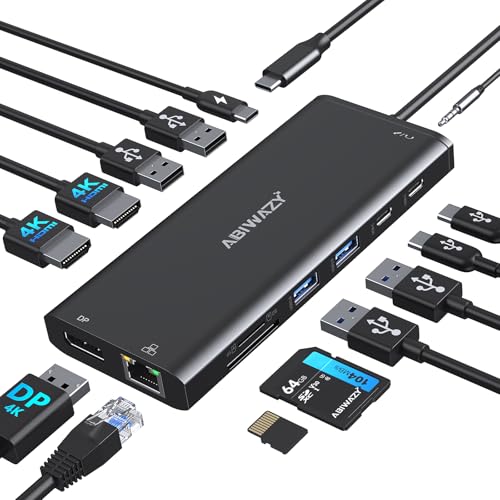
Check Latest Price on Amazon2. USB C Docking Station 3 Monitors USBC Hub Laptop Dual Monitor Multiport Adapter Dock Dongle,USBC to 2 HDMI,4K DisplayPort,PD Charging,Ethernet,7 USB-C/A Ports,SD/TF,Audio for Dell/HP/Lenovo(Black)
A premium-feeling 14‑in‑1 hub that focuses on video outputs and useful laptop ports, including Gigabit Ethernet and SD slots. It’s a strong choice if you plan to run dual 4K displays and need a tidy desktop hub with a lot of connectivity.
Key Specs
- 2× 4K HDMI (one 4K@60Hz), 1× DisplayPort
- Up to 87W USB‑C Power Delivery
- Gigabit Ethernet and SD/MicroSD readers
- 2× USB‑A 3.0 and multiple USB‑C data ports
Pros
- Plenty of ports in a compact footprint
- Solid build and compact size
- Good plug‑and‑play setup for most laptops
Cons
- Some users report mixed power connection behavior on certain systems
- A few long‑term durability concerns reported for HDMI ports
Best For: Users who want premium port density and video
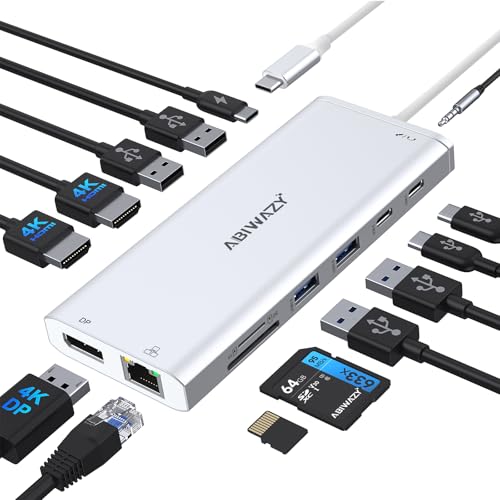
Check Latest Price on Amazon3. USB C Hub USB-C Docking Station Dual Monitor 14 in 1 Triple Display Multiport Adapter with 2 HDMI+DP+7 USB Type C/A Ports+Ethernet+Audio, USBC Dongle for Dell/HP/Lenovo ThinkPad/Surface(Sliver)
Very similar to its black sibling but in a silver finish, this 14‑in‑1 hub is built for users who need many ports and multiple displays. It’s compact and easy to set up, making it useful for dense dorm desk setups where space is limited.
Key Specs
- Supports dual or triple display modes (mix of HDMI/DP)
- Gigabit Ethernet and 87W PD
- SD/TF card readers and audio jack
- Multiple USB‑A and USB‑C data ports
Pros
- High port capacity for small footprint
- Easy setup and compact design
- Good value for multi‑peripheral use
Cons
- Passthrough power can be insufficient on some laptops
- Compatibility quirks with certain systems
Best For: Power users who attach many peripherals
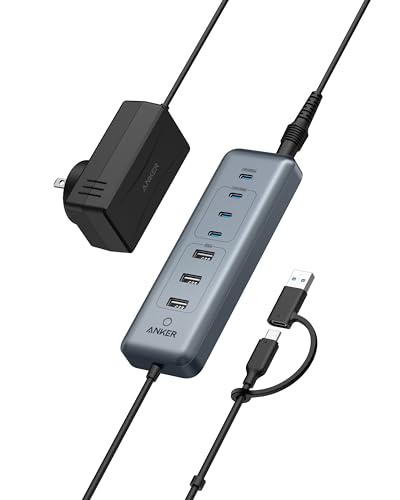
Check Latest Price on Amazon4. Anker USB C Hub, 8-in-1 5Gbps Data Hub, USB Splitter with 3 USBA and 4 USBC Ports, 100W PD-in, 2-in-1 USB-Connector, for Laptop, MacBook, iPad and More (45W Adapter Included)
A data‑focused hub with multiple high‑speed USB‑C and USB‑A ports plus a PD‑IN input and included adapter. It’s ideal if you need to hook up external drives, phones and accessories but don’t need video output.
Key Specs
- 1× 100W PD‑IN port (requires PD charger)
- 4× USB‑C 5Gbps and 3× USB‑A 5Gbps ports
- 2‑in‑1 connector (USB‑C/USB‑A compatible)
- Includes a 45W adapter and 18‑month warranty
Pros
- Well‑built design and fast transfer speeds
- Versatile connector options
- Includes power adapter for PD‑IN
Cons
- No video output (not for external monitors)
- Some users report mixed behavior on certain ports
Best For: Students needing fast data transfer, not video
Check Latest Price on Amazon5. USB C Hub 8 in 1 Multiport Adapter, 3 USB 3.2 Gen 2 Ports with 10Gbps, 3 USB-A 3.0 5Gbps, 4K@60Hz HDMI, 100W PD, USBC Splitter for MacBook Pro, iPad Pro, Mac mini and More(Not Support USB-C Monitor)
A budget-friendly 8‑in‑1 hub that punches above its weight with 10Gbps USB‑C data ports, 4K HDMI and pass‑through charging. It's a solid choice for students who want HDMI output and fast transfers without a big investment.
Key Specs
- 3× USB‑C data ports (up to 10Gbps shared)
- 3× USB‑A 3.0 ports (5Gbps)
- 4K@60Hz HDMI output
- Supports up to ~80W pass‑through charging
Pros
- Strong port mix for the price
- Good build quality for a budget hub
- Easy to use and setup
Cons
- Some reports of early failures or inconsistent reliability
- HDMI/pass‑through power can be limited on certain laptops
Best For: Budget buyers who want HDMI + fast data
Check Latest Price on Amazon6. USB C to 3 HDMI Adapter |4K60Hz HDMI Splitter Extended Display 1 in 3 Out MST Hub with 100W PD for Multiple Monitors Converter Compatible with Laptop,PC,USB-C Graphics Card
A specialized MST adapter that extends a USB‑C/Thunderbolt port to three HDMI displays (4K@60Hz when source and GPU support required bandwidth). It’s compact, aluminum‑cased for heat dissipation and includes 100W PD so you can charge while driving multiple screens.
Key Specs
- 1× USB‑C to 3× HDMI (MST/DP Alt Mode required)
- Supports up to 4K@60Hz per port depending on source
- 100W Power Delivery passthrough
- Aluminum housing and braided cable for heat and durability
Pros
- Enables triple HDMI setup from a single USB‑C on compatible systems
- Plug‑and‑play with supported Thunderbolt/DP Alt Mode ports
- Rugged aluminum design helps dissipate heat
Cons
- Requires full‑featured Thunderbolt/DP Alt Mode port and a high‑bandwidth GPU
- Mixed feedback on build quality from some users
Best For: Students who need three HDMI monitors from one USB‑C
Check Latest Price on AmazonWhich One Should You Choose?
If budget is tight → VANGREE 8-in-1 Hub (B0D6MNG9TM). If you need many high-speed USB ports and no monitors → Anker 8-in-1 Data Hub (B0CQSH3TQL). If you want the best mix of displays, Ethernet and power without overspending → IAVKYU 14-in-1 Dock (B0BRYH1P56). If you need premium multi-monitor support and finish → ABIWAZY 14-in-1 (B0DG588B1S or B0DWMB9BMJ). If you must drive three HDMI monitors from one port and your laptop supports MST/DP Alt Mode → SWITCHFLUX 3× HDMI Adapter (B0DDKJV5MW).
Best for Specific Scenarios
- Tight dorm desk with one external monitor: VANGREE 8-in-1 Hub because it provides 4K HDMI, fast data ports and pass‑through charging at a low price.
- Multi‑monitor productivity for coursework or multitasking: IAVKYU 14-in-1 Dock because it supports dual/triple displays, Ethernet and 100W PD in a compact dock.
- Lots of external drives and phones — no monitor needed: Anker 8-in-1 Data Hub because of its many 5Gbps USB‑C/A ports and included power adapter, ideal for backups and peripherals.
Frequently Asked Questions
Will a USB‑C hub charge my laptop?
Only if the hub supports USB‑C Power Delivery (PD) passthrough and your laptop accepts charging over USB‑C. Check the hub’s PD wattage — thin ultrabooks often need 60–100W for effective charging. Some hubs require you to plug your own charger into the hub’s PD‑in port; others include an adapter.
Do all USB‑C ports support monitors?
No. A USB‑C port must support DisplayPort Alt Mode or be a Thunderbolt 3/4 port to output video. Many hubs advertise video outputs but they rely on your laptop’s USB‑C port capability. Verify your laptop’s specs for 'DP Alt Mode' or Thunderbolt support before buying a video hub.
Will these hubs get hot on a dorm desk?
Hubs with video outputs and many active ports can get warm under sustained use because they handle high data rates and power. Models with aluminum housings and good airflow tend to manage heat better. Avoid blocking vents and keep heavy video workloads in short bursts if heat is a concern.
How We Selected These Products
Our recommendations are based on data-driven analysis: we evaluated 155229+ products across 23916+ brands using a composite scoring system that weighs rating (40%), review volume (30%), price value (20%), and demand signals (10%). Every product is ranked by data, not opinions.
Last updated: August 29, 2026
As an Amazon Associate we earn from qualifying purchases at no extra cost to you. Full disclosure.
GearLark Score is our editorial ranking based on a composite analysis of product quality, value, and verified customer sentiment. Click through to Amazon for current pricing, availability, and live customer reviews.