As an Amazon Associate we earn from qualifying purchases. Learn more.
Best Travel-Friendly USB-C Hubs for Presentations (2026)
Traveling for holidays or conferences means you need a USB-C hub that’s light in your bag but heavyweight in features — stable video, enough ports, and easy setup. In this guide we tested five travel-friendly hubs and docking stations selected for dependable video output, compact builds, and travel-oriented features (lightweight casing, pass-through charging, and plug-and-play setup). You’ll learn which hubs give the most reliable HDMI/DP output for presentations, which are easiest to pack, and which trade-offs (heat, durability, multi-monitor limits) to watch for.
Quick Answer
For the best balance of portability, reliable video output and value choose the Anker 8-in-1 USB-C Hub (ASIN B0D3WS1GC3). If you need a budget multi-display adapter pick the WAVLINK 7-in-1 (ASIN B0D9D4138S). For a premium, full-port docking station consider the LIONWEI 14-in-1 (ASIN B07LFR8VHG).
Our Top Picks
Quick Comparison
Select 2-3 products to compare side-by-side
| Compare | Product | GearLark Score | Price Tier | Key Feature | Best For | Action |
|---|---|---|---|---|---|---|
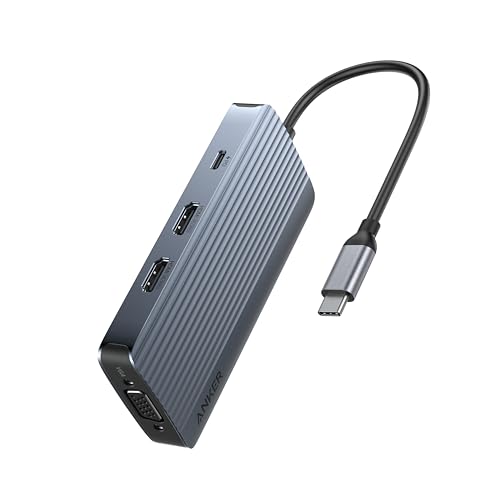 Anker 8-in-1 Hub
|
Mid-Range | Triple-display support with 4K@60Hz HDMI | Travelling presenters who need multiple displays | Check Price | ||
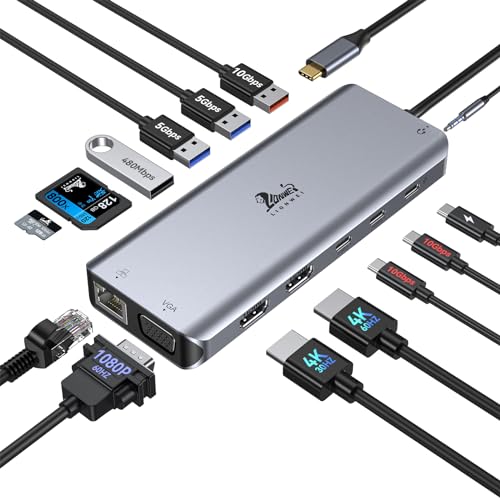 LIONWEI 14-in-1 Dock
|
Premium | 14 ports including dual 4K HDMI and Gigabit Ethernet | Conference multitaskers needing many wired ports | Check Price | ||
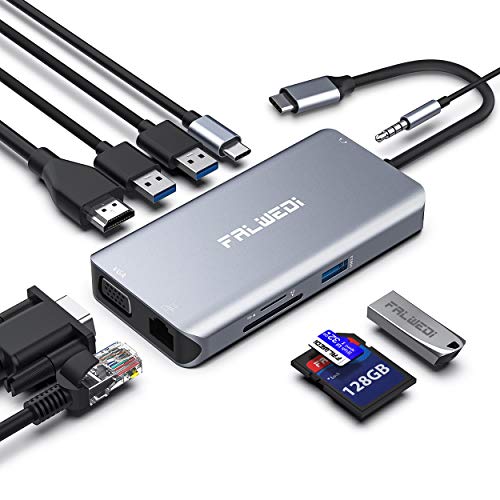 FALWEDI 10-in-1 Hub
|
Mid-Range | 10 ports including Ethernet and HDMI | Portable power users who need card readers and wired LAN | Check Price | ||
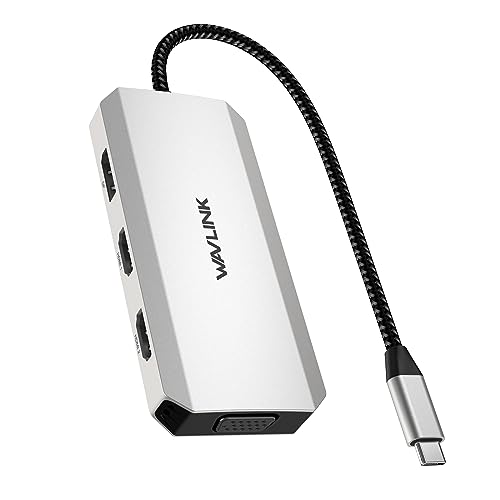 WAVLINK 7-in-1 Adapter
|
Budget | Dual 4K-capable outputs (one 60Hz) | Budget travelers needing dual-monitor output for presentations | Check Price | ||
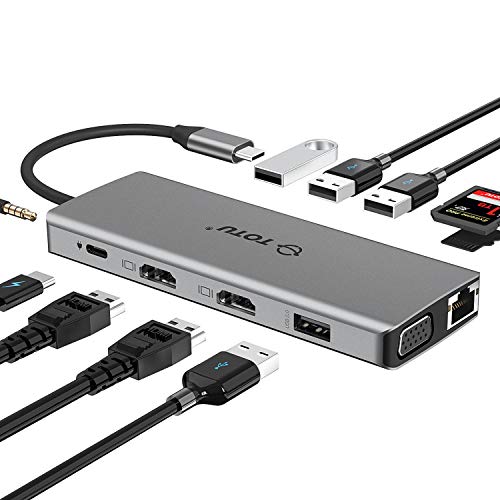 TOTU 13-in-1 Hub
|
Premium | 13 ports including dual HDMI and PD 100W | Frequent business travelers who need many ports in one hub | Check Price |
1. Anker 8-in-1 USB-C Hub, USB C Docking Station Triple Display Multi-Port Dongle with 2 HDMI and VGA, 5Gbps Data Transfers, USB Ports for MacBook Air/Pro, Dell XPS, iPad Pro, and More
Anker’s 8-in-1 hub balances portability with robust video options — two HDMI ports plus VGA and an 85W PD pass-through make it a versatile travel companion. Customers praise its compact size and port capacity, though a few report occasional charging or connectivity quirks.
Key Specs
- 8-in-1 connectivity: 2x HDMI, VGA, USB-A/C ports
- One HDMI supports 4K@60Hz
- 5Gbps USB transfers
- Power Delivery pass-through up to 85W
Pros
- Compact, travel-friendly size
- Strong port mix for presentations (HDMI + VGA)
- Good value for the features offered
Cons
- Some users report intermittent charging or hub stops working
- macOS external display modes limited to mirror in some setups
Best For: Travelling presenters who need multiple displays
Check Latest Price on Amazon2. USB C Docking Station Dual Monitor for Laptop, LIONWEI 14-in-1 USB-C Hub with Triple Display, 2 HDMI + VGA, Ethernet, 6 USB A/C 3.0/2.0, PD, SD/TF, Audio, USBC Dock for Surface/HP/Dell/Lenovo/MacBook
The LIONWEI 14-in-1 docking station is a full-featured option for heavy users who want one compact device to replace multiple adapters. It offers two 4K HDMI outputs, Gigabit Ethernet and high-speed USB options — built quality and materials are often praised. A few customers have noted occasional connectivity inconsistencies.
Key Specs
- 14-in-1: 2x 4K HDMI, VGA, Gigabit Ethernet, SD/TF, audio
- 10Gbps USB 3.1 ports
- 100W PD in (power out limited to ~87W)
- Plug-and-play with Windows and macOS (display limits may apply)
Pros
- Extensive port selection for docking at a hotel or conference desk
- Solid build and premium materials (braided casing noted)
- Good picture quality on 4K video
Cons
- Larger and heavier than slimmer travel dongles
- Some users experience intermittent connections on certain ports
Best For: Conference multitaskers needing many wired ports
Check Latest Price on Amazon3. USB C Hub, Type C Adapter, FALWEDI 10-in-1 Dongle with Ethernet, 4K@30Hz HDMI, VGA, 3 USB3.0, SD/TF Card Reader, Mic/Audio, USB-C PD 3.0, Compatible for MacBook Air Pro and Other Type C Laptops
FALWEDI packs a lot into a compact aluminum body — Ethernet, SD/TF slots, 3x USB 3.0 and HDMI make it a strong all-rounder for travel. Users like the build and portability, though reports of heat and occasional disconnections suggest heavier workloads can stress it.
Key Specs
- 10-in-1: Ethernet, HDMI (4K@30Hz), VGA, 3x USB3.0, SD/TF
- USB-C PD support (100W in; output limited to 87W)
- 3.5mm audio/mic combo
- Aluminum enclosure for durability
Pros
- Stylish, aircraft-grade aluminum shell
- Compact and travel-friendly with many useful ports
- Good value for port capacity
Cons
- Can run hot under heavy use
- Some users report intermittent connectivity/disconnections
Best For: Portable power users who need card readers and wired LAN
Check Latest Price on Amazon4. USB C to Dual HDMI Adapter 4K@60hz, 7-in-1 USB-C Laptop Docking Station with 2xHDMI 1xDisplayport VGA, USB Type C HDMI Splitter Extend 4 Display, 3xUSB 2.0, Multiple Monitor Hub for MacBook/Dell/HP
WAVLINK’s 7-in-1 adapter is an affordable option focused on delivering multiple video outputs in a small package — it supports dual 4K outputs (with source limitations) and VGA for projector compatibility. It’s easy to set up and very portable, but functionality can vary depending on your laptop’s DP Alt Mode and OS.
Key Specs
- 7-in-1: 2x HDMI (1x4K@60Hz + 1x4K@30Hz), DP 4K@60Hz, VGA
- 3x USB 2.0 ports
- Requires host DP1.4 or Thunderbolt for full performance
- Driver-free plug-and-play (OS-dependent display modes)
Pros
- Extremely affordable and compact
- Great for dual-monitor setups when host supports DP1.4
- Simple plug-and-play setup
Cons
- Lower-spec USB (USB 2.0) limits data speeds for peripherals
- Inconsistent functionality on some systems — depends on host support
Best For: Budget travelers needing dual-monitor output for presentations
Check Latest Price on Amazon5. TOTU 13-in-1 USB-C Hub with Ethernet, 4K HDMI, VGA, PD, SD/TF Cards Reader, Mic/Audio Docking Station for MacBook Pro Air XPS and Other USB-C Laptops
TOTU’s 13-in-1 hub is a travel-savvy docking station that keeps a compact footprint while offering dual HDMI, Ethernet and PD charging up to 100W. Customers report reliable dual-monitor operation and strong portability, making it a solid choice for work trips — watch for generic OS limitations on multi-monitor modes.
Key Specs
- 13-in-1: 2x HDMI, VGA, Ethernet, SD/TF, 2x USB3.0, 2x USB2.0
- PD charging support up to 100W
- Dual external monitor support (Windows triple-display options vary)
- Compact and sleek design
Pros
- Extensive connectivity in a compact package
- Works well for dual-monitor travel setups
- Plug-and-play ease and good value for features
Cons
- macOS and Windows have different multi-monitor limits
- Can be bulkier than single-stick dongles for ultra-light packing
Best For: Frequent business travelers who need many ports in one hub
Check Latest Price on AmazonWhich One Should You Choose?
If budget is tight → choose WAVLINK 7-in-1 (ASIN B0D9D4138S). If you need the best portable all-rounder for presentations → choose Anker 8-in-1 (ASIN B0D3WS1GC3). If premium port selection and wired networking matter most → choose LIONWEI 14-in-1 (ASIN B07LFR8VHG).
Best for Specific Scenarios
- Hotel conference room setup: LIONWEI 14-in-1 because its Gigabit Ethernet, multiple HDMI outputs and many USB ports let you connect everything at a desk.
- Air-travel carry-on only: Anker 8-in-1 because it’s compact, covers HDMI/VGA needs and supports strong PD passthrough without adding much weight.
- Budget weekend trip with projector: WAVLINK 7-in-1 because it’s affordable, includes VGA and dual HDMI for presentations and fits in a small pouch.
Frequently Asked Questions
Will a USB-C hub let me run two external monitors?
It depends on the hub and your laptop. Some hubs support multiple displays via MST or DP Alt Mode; Windows machines with DP1.4/Thunderbolt often support extended displays, while many macOS systems mirror external displays or limit independent outputs. Check your laptop’s USB-C/Thunderbolt video capabilities before assuming multi-monitor extend will work.
Do I need a special charger to use power delivery through the hub?
Yes — the hub’s PD passthrough requires an external USB-C PD wall charger plugged into the hub’s power-in port. To reach the maximum pass-through wattage advertised (often 85–100W), use a charger rated at that output or higher and a quality USB-C cable that supports PD.
Will these hubs work with older projectors that only have VGA?
Many of the reviewed hubs include a VGA output specifically for legacy projectors. If a hub lacks VGA, a separate HDMI-to-VGA adapter can work, but results vary. For guaranteed projector compatibility during presentations, choose a hub that explicitly lists VGA in its specs.
How We Selected These Products
Our recommendations are based on data-driven analysis: we evaluated 155229+ products across 23916+ brands using a composite scoring system that weighs rating (40%), review volume (30%), price value (20%), and demand signals (10%). Every product is ranked by data, not opinions.
Last updated: October 02, 2026
As an Amazon Associate we earn from qualifying purchases at no extra cost to you. Full disclosure.
GearLark Score is our editorial ranking based on a composite analysis of product quality, value, and verified customer sentiment. Click through to Amazon for current pricing, availability, and live customer reviews.