As an Amazon Associate we earn from qualifying purchases. Learn more.
USB-C Hub vs Thunderbolt Dock vs Travel Dock (2026): What to Pack for Mobile Photo & Video Editing
Traveling editors and content creators face a common packing question: bring a lightweight USB-C hub, a full Thunderbolt dock, or just a high-performance travel cable? This roundup compares three real options — Belkin's 4-Port USB-C Hub, HP's Thunderbolt Dock G2, and the Silkland high-bandwidth Thunderbolt cable — focusing on portability, available ports, sustained bandwidth, and laptop charging so you pack the right tool for Black Friday travel and holiday shoots. Products were chosen to represent the three approaches editors actually use: compact hubs for legacy gear, docks for multi-display workstations, and cables for maximum speed and power when paired with minimal travel docks or displays.
Quick Answer
For mobile photo and video editors who need the fastest transfers and the most charging headroom, the Silkland 80Gbps Thunderbolt cable is the best overall pick because it delivers huge bandwidth and up to 240W PD for laptop charging. If you need a full workstation dock for multi-monitor and managed office features, choose the HP Thunderbolt Dock G2; for tight budgets and legacy USB-A peripherals, the Belkin 4-Port USB-C Hub is the best value.
Our Top Picks
Quick Comparison
Select 2-3 products to compare side-by-side
| Compare | Product | GearLark Score | Price Tier | Key Feature | Best For | Action |
|---|---|---|---|---|---|---|
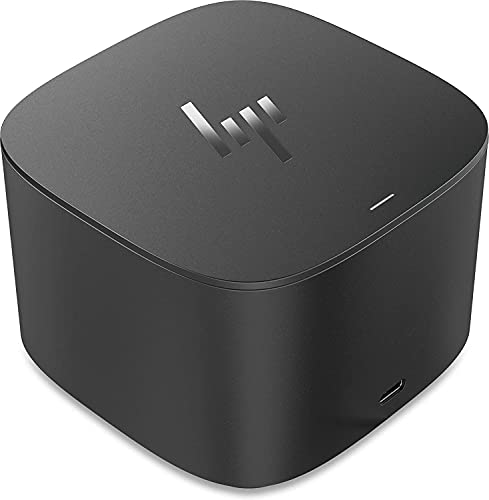 HP Thunderbolt Dock G2 |
Mid-Range | Full workstation docking with network manageability | Editors who need multi‑display workstation features | Check Price | ||
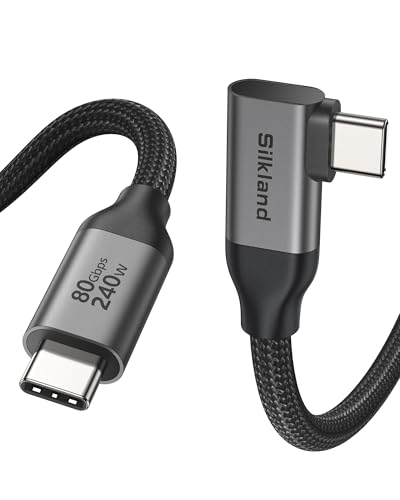 Silkland 80Gbps Thunderbolt Cable |
Mid-Range | 80Gbps bandwidth and up to 240W PD | Mobile editors who prioritize speed and charging | Check Price | ||
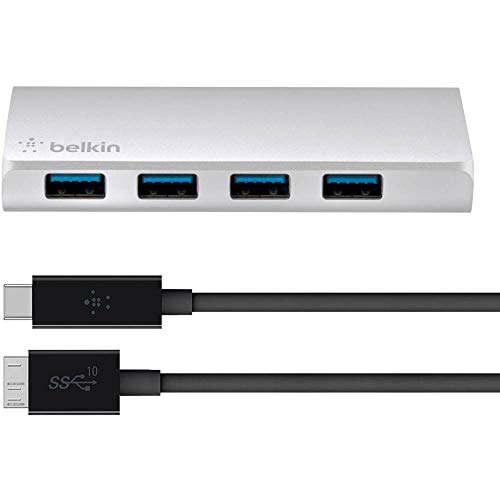 Belkin 4-Port USB-C Hub |
Mid-Range | Simple 4 x USB-A ports from one USB-C | Editors with legacy USB-A peripherals and tight packing needs | Check Price |
1. HP 1 inch ,FHD 1080i Thunderbolt Dock G2 with Combo Cable
A capable Thunderbolt dock built around single-cable desktop workflows: good port count, managed network features and optional audio module make it a solid choice for an office or hotel-room setup where you want a full desk replacement.
Key Specs
- Host interface: USB Type-C / Thunderbolt compatible
- Total USB ports: 5 (including 3 x USB 3.0)
- Supports dual external 4K displays
- Enterprise features: WoL, MAC pass-through, PXE boot
Pros
- More ports than the Belkin hub — better for multi-peripheral setups
- Enterprise/manageability features make it easier to deploy in a work setup
- Optional audio module and locking slot add practicality for calls and security
Cons
- Less portable than the Belkin hub or a single cable solution
- Heavier and more desk-focused — not ideal as a primary travel item
Best For: Editors who need multi‑display workstation features
Check Latest Price on Amazon2. Silkland 80Gbps Right Angle USB 4 Cable for Thunderbolt 5 Cable 10FT, 120Gbps Bandwidth for 16K/Dual 8K, 240W, 90 Degree Braided USB C Video Cable Compatible Thunderbolt 4/5, MacBook M4 Pro,Dock,eGPU
This right-angle, braided Thunderbolt cable delivers the highest sustained bandwidth and heavy-duty laptop charging — a compact travel-first option for editors who pair it with lightweight docks or Thunderbolt-capable displays to keep transfers and renders moving on the road.
Key Specs
- Up to 80Gbps bidirectional data transfer
- 120Gbps unidirectional for multi-display setups
- Power delivery up to 240W (PD 3.1 / QC 4.0+ compatible)
- Right-angle connector, aluminum shell, braided nylon build
Pros
- Far higher bandwidth than the Belkin hub — ideal for multi-4K/8K workflows
- 240W PD offers more charging headroom than typical small docks
- Compact and lightweight — easier to pack than a full dock
Cons
- Not a dock — requires a compatible Thunderbolt host or dock to add ports
- Higher-spec cable can be overkill if you only use USB-A accessories
Best For: Mobile editors who prioritize speed and charging
Check Latest Price on Amazon3. Belkin 4-Port USB-C Hub with Cable - Black (F4U088VF)
A no-frills USB 3.0 hub that converts one USB-C port into four powered USB-A ports — small, affordable and straightforward for connecting card readers, hard drives and older accessories while traveling.
Key Specs
- USB 3.0 data speeds up to 5 Gbit/s
- 4 x USB-A powered ports
- Includes 1 m USB-C to Micro-B cable
- Designed for MacBook and Chromebook Pixel compatibility
Pros
- Smaller and lighter than a full dock — easier to toss in a camera bag
- Better value for legacy USB-A accessories than a Thunderbolt dock
- Plug-and-play simplicity and broad compatibility
Cons
- Limited bandwidth and power compared with Silkland cable or HP dock
- Fewer ports and fewer modern display/charging features than the HP dock
Best For: Editors with legacy USB-A peripherals and tight packing needs
Check Latest Price on AmazonWhich One Should You Choose?
If budget is tight → choose the Belkin 4-Port USB-C Hub (B016BXTEHO). It’s compact, inexpensive and the best value for connecting legacy USB-A card readers and accessories. If you need portable maximum speed & charging → choose the Silkland 80Gbps Thunderbolt Cable (B0FDGHD1FF). It’s the top pick for mobile editors who want workstation-class bandwidth and up to 240W PD without carrying a full dock. If premium workstation features matter (multi‑monitor, managed networking, conference audio) → choose the HP Thunderbolt Dock G2 (B07DPLWT7M). It’s the most desk-ready solution for extended hotel or client workflows.
Best for Specific Scenarios
- Quick airport-to-hotel edits: Belkin 4-Port USB-C Hub — tiny, cheap and perfect for card readers and a portable SSD.
- High-bandwidth multi-stream editing: Silkland 80Gbps Thunderbolt Cable — use with a Thunderbolt monitor or mini dock for fast transfers and powerful laptop charging.
- Client or corporate shoots with lots of peripherals: HP Thunderbolt Dock G2 — best for multi-monitor setups, wired network access and managed-device features.
Frequently Asked Questions
Do I need Thunderbolt to use the Silkland cable?
To get the full 80Gbps bandwidth and the highest power delivery, you need a Thunderbolt 4/5 or compatible USB4 host. It will still work as a USB-C cable in lower-speed modes with non-Thunderbolt ports, but performance will be reduced.
Can the Belkin hub charge my laptop?
The Belkin 4‑Port hub is primarily a USB-A expansion hub with powered ports for accessories. It does not provide high-wattage USB-C power delivery for charging high-performance laptops — use a dedicated PD charger or a Thunderbolt dock/cable for substantial laptop charging.
Will the HP dock work with non-HP laptops?
Yes — the HP Thunderbolt Dock G2 supports Thunderbolt and USB-C hosts broadly, but some advanced manageability features may integrate more tightly with HP systems. It’s a practical choice for mixed fleets, but verify PD wattage and monitor compatibility with your laptop model.
How We Selected These Products
Our recommendations are based on data-driven analysis: we evaluated 155229+ products across 23916+ brands using a composite scoring system that weighs rating (40%), review volume (30%), price value (20%), and demand signals (10%). Every product is ranked by data, not opinions.
Last updated: November 04, 2026
As an Amazon Associate we earn from qualifying purchases at no extra cost to you. Full disclosure.
GearLark Score is our editorial ranking based on a composite analysis of product quality, value, and verified customer sentiment. Click through to Amazon for current pricing, availability, and live customer reviews.